
[Redux] Important things in Redux
Root Smart component can be overloaded, divide 'smart' component wisely & using Provider.
Problem: Something the root component can be overloaded, means it handle too many application logics. For a larger application, it will be hard to maintain.
Solution: We can use Provider from 'react-redux' to inject props into child component.
Install:
npm i -s react-redux
Wrap your <App /> into provider and provide store.
import React from 'react';

import ReactDOM from 'react-dom';

import {Provider} from 'react-redux';

import {Router, Route, browserHistory} from 'react-router';

import {App} from './App';

import {configStore} from './store';

const store = configStore();

ReactDOM.render(

    <Provider store={store}>

        <Router history={browserHistory}>

            <Route path="/(:filter)" component={App}></Route>

        </Router>

    </Provider>,

    document.getElementById('root')

);
So from now on, we can divide logic into different smart component, so the root component doesn't need to handle many logic.
root component:
import React, { Component } from 'react';

import { VisibleTodoList, AddTodo } from './containers';

import {Footer} from './components';

export class TodoApp extends Component {

    render() {

        return (

            <section>

                <AddTodo />

                <VisibleTodoList />

                <Footer />

            </section>

        );

    }

}
As you can see, root component becomes a dump component actually, can change to functional componet syntax if needed. So next let's see how to inject props and dispatch to those smart component.
Inject props and dispatch to smart component by using connect & withRouter.
This is somehow similar to Angular dependecy injection.
If we don't need component lifecycle, we can do:
import React from 'react';

import { connect } from 'react-redux';

import {withRouter} from 'react-router';

import { TodoList } from '../components';const mapStateToProps = (state, {params}) => ({

    todos: TodosSelector.getVisibleTodos(params.filter, state.todos)

});

const mapDispatchToProps = (dispatch) => ({

    onTodoClick: (id) => dispatch(toggleTodoAction(id))

});

/*

* VisibleTodoList: Will be the container component to render TodoList presentational component.

*

* TodoList: The presentational component to render the todos

*

* mapStateToProps: using connect to pass redux state ('todos'), make it available to TodoList component

*

* mapDispatchToProps: using connect to pass callback to make it available to TodoList component

* */

export const VisibleTodoList = withRouter(connect(

    mapStateToProps,

    mapDispatchToProps

)(TodoList));
withRouter allows to inject router params into props.
Now, TodoList dump component will get props and dispatch action in props, so we can use.
import React from 'react';

import {Todo} from './todo.component';

export const TodoList = ({todos, onTodoClick}) => {

    const list = todos.map(

        todo => (

            <Todo

                {...todo}

                key={todo.id}

                onClick={() => onTodoClick(todo.id)}>

            </Todo>

        )

    );

    return (

        <ul>

            {list}

        </ul>

    );

};
If you do need component lifecycle, you can inject props into itself.
import React, { Component } from 'react';

import { connect } from 'react-redux';

import { withRouter } from 'react-router';

import { TodoList } from '../components';

import { fetchingTodosAction } from '../../actions'

import { getVisibleTodos  } from '../../reducers';

export class VisibleTodoList extends Component {

    componentDidMount() {

        this.fetchTodos();

    }

    componentDidUpdate(prevProps) {

        if (this.props.params.filter !== prevProps.params.filter) {

            this.fetchTodos();

        }

    }

    fetchTodos = () => {

        const { params: { filter = 'all' }, fetchingTodos } = this.props;

        fetchingTodos(filter);

    };

    render() {

        return (

            <section>

                <TodoList

                    {...this.props}

                />

            </section>

        );

    }

}

const mapStateToProps = (state, { params }) => ({

        todos: getVisibleTodos(params.filter, state.todos)

    });

VisibleTodoList = withRouter(connect(

    mapStateToProps,

    {

        onTodoClick: toggleTodoAction

    }

)(VisibleTodoList));
So in the VisibleTodoList component, we reassign injected version to itself. In the component, we add two lifecycle methods 'componentDidMount' & 'componentDidUpdate'. componentDidMount is used for fetching data when component loaded, and componentDidUpdate will be triggered when props updated.
Shorthand syntax for mapDispatchToProps.
Notice here we didn't write mapDispatchToProps function instead we just pass an object:
VisibleTodoList = withRouter(connect(

    mapStateToProps,

    {

        onTodoClick: toggleTodoAction

    }

)(VisibleTodoList));
This is a shorthand syntax.
Another example for shorthand syntax.
/*

* We can reassign AddTodo = connect()(AddTodo);

* It will pass the dispatch function to AddTodo's props.

*

* In AddTodo Component, we don't need state, just need dispatch function.

* SO we can write:

* AddTodo = connect(

*   null,

*   dispatch => ({dispatch})

* )(AddTodo)

*

* And by default, connect function will link dispatch function to props,

* so it means we even don't need to pass the dispatch function

* SO we can write:

* AddTodo = connect(null, null)(AddTodo);

*

* In short, we can write:

* AddTodo = connect()(AddTodo);

* */
Introduce to "Selector" to the Reducers to encapsulate state shape.
We still has something to be improved in mapStateToProps function. Because the current mapStateToProps function requires component to know the state shape.
const mapStateToProps = (state, { params }) => ({

        todos: getVisibleTodos(params.filter, state.todos)

    });
This is not good enough because if state shape change later, we have to come back to all the component that related to it and modify those component.
What we want is keep component unchanged no matter how state shape change in the future.
So what we can do is using "selector" to encapsulate state shape inside reudcer. Notice that "selector" is nothing related to new libaray or functions from redux libarary. It is just a concept which we can (should) adopt from best partice.
For exmaple:
import { combineReducers } from 'redux';

/*

* Redux does not enforce that you encapsulate the knowledge about the state

* shape in particular reducer files.

* However, it's a nice pattern,

* because it lets you change the state that is stored by reducers

* without having to change your components or your tests

* if you use selectors together with reducers in your tests.

* */

const createList = (filter) => {

    const ids = (state = [], action) => {

        switch( action.type ) {

            case 'FETCHING_TODOS_SUCCESS':

                if(action.payload.filter !== filter){

                    return state;

                }

                return action.payload.response.result;

            case 'ADD_TODO_SUCCESS':

                return filter !== 'completed' ?

                [...state, action.response.result]:

                state;

            default:

                return state;

        }

    };

    const isFetching = (state = false, action) => {

        if (action.payload && action.payload.filter !== filter) {

            return state;

        }

        switch( action.type ) {

            case 'FETCHING_TODOS_SUCCESS':

                return false;

            case 'FETCHING_TODOS_FAILD':

                return false;

            case 'FETCHING_TODOS':

                return true;

            default:

                return state;

        }

    };

    const errorMessage = (state = null, action) => {

        switch(action.type) {

            case 'FETCHING_TODOS_FAILD':

                return action.payload.message;

            case 'FETCHING_TODOS':

            case 'FETCHING_TODOS_SUCCESS':

                return null;

            default:

                return state;

        }

    };

    return combineReducers({

                               ids,

                               isFetching,

                               errorMessage

                           })

};

/*

 Using default export for Reducer

*/

export default createList;

/*

Using name export for selectors.

Selectors are recommended to keep in the same location as redux

*/

export const getIds = (state) => state.ids;

export const isFetchingTodos = (state) => state.isFetching;

export const getErrorMessage = (state) => state.errorMessage;
Here we have three reducers combine as one single reducer export to outside (mainly for create store).
/*

 Using default export for Reducer

*/

export default createList;
And we also have three selectors corresponding to three single reducers. The selector's job is to take the whole state from outside and return the piece of state which necessary.
export const getIds = (state) => state.ids;

export const isFetchingTodos = (state) => state.isFetching;

export const getErrorMessage = (state) => state.errorMessage;
And if you divide you reducer into multi levels (whic is also good), the high order reducer will NOT interactive which your low level reducer directly. It should go thought selector.
For example:
high order reducer, it call low level reducers' selector function we just see and export its selectors to outside:
import { combineReducers } from 'redux';

import byId, * as fromById from './byId.reducer';

import createList, * as fromList from './createList.reducer';

const listByFilter = combineReducers({

                                        open: createList('open'),

                                        completed: createList('completed'),

                                        all: createList('all')

                                    });

const todosReducer = combineReducers({

                                         byId,

                                         listByFilter

                                     });

export default todosReducer;

/*

* Selectors

* */

export const getVisibleTodos = (filter, state) => {

    const ids = fromList.getIds(state.todos.listByFilter[filter]);

    return ids.map(id => fromById.getTodo(state.todos.byId, id));

};

export const getErrorMessage = (filter, state) => {

    return fromList.getErrorMessage(state.todos.listByFilter[filter]);

};

export const isFetchingTodos = (state, filter) => {

    return fromList.isFetchingTodos(state.todos.listByFilter[filter]);

};
So inside component, we can call selector function:
import { getVisibleTodos, isFetchingTodos, getErrorMessage  } from '../../reducers';

const mapStateToProps = (state, { params }) => ({

        todos: getVisibleTodos(params.filter, state), // we just pass in the whole state, selector will take care

        errorMessage: getErrorMessage(params.filter, state),

        isFetching: isFetchingTodos(state, params.filter)

    });
To summary:
Rule1: Default export is for reducer, named export for selectors.
Rule2: Each reducer is recommended to have a selector (not must, but a good approach)
Rule3: Component will interactive each selector only NOT reudce, and we just need to pass in the whole state, let selector to figure out the right piece of state for the reducer.
Normalize your API response and return data shape.
It is quite normal that we get Array of object from backend. Then in the front end we deal with array.
But there is another way to doing this, which is similar to "Id lookup", so we will get an array of ids. This array is just a lookup table.
Then we will have an big object using the structure {[id]: objItem}. So we can use the id in the lookup table to query the item in the big object.
So the way we conver an array of object to lookup tables and big object pair is using normalizrlibaray.
Define a schema.js:
import {schema} from 'normalizr';

export const todoSchema = new schema.Entity('todos');

export const arrayOfTodosSchema = new schema.Array(todoSchema);
We create a entity call 'todos'. Since we know the response data from API is array, so we can define array of todos by using:
export const arrayOfTodosSchema = new schema.Array(todoSchema);

// OR

export const arrayOfTodosSchema = [todoSchema];
So in action creator, we can do this normalizion:
import { normalize } from 'normalizr';

import * as schema from './schema';

export const fetchingTodoSuccessAction = (response, filter) => ({

    type: 'FETCHING_TODOS_SUCCESS',

    payload: {

        response: normalize(response, schema.arrayOfTodosSchema),

        filter

    }

});
For example:
The data we get from server is:
[

  {

    "id": ,

    "name": "redux",

    "completed": false

  },

  {

    "id": ,

    "name": "react",

    "completed": true

  }

]
After normalized, it should be:
{

  result: [, ],

  entities: {

      "": { "id": "", "name": "redux", "completed": false },

      "": { "id": "", "name": "react", "completed": true }

  }

}
Remove side effect from action creator.
Normally you can use 'redux-thunk' or 'redux-promise' to handle async opreations in action creator. But it becomes hard to test for action creator. What is good is that keep action creator as a pure funciton. Handle effect side in a spreated thread.
There are many libaraies to do so, for exmaple 'redux-saga' & 'redux-observable'. Since I am quite used to RxJS. I choose 'redux-observble' as an example.
First, let's what the articuture can be when using side effect.
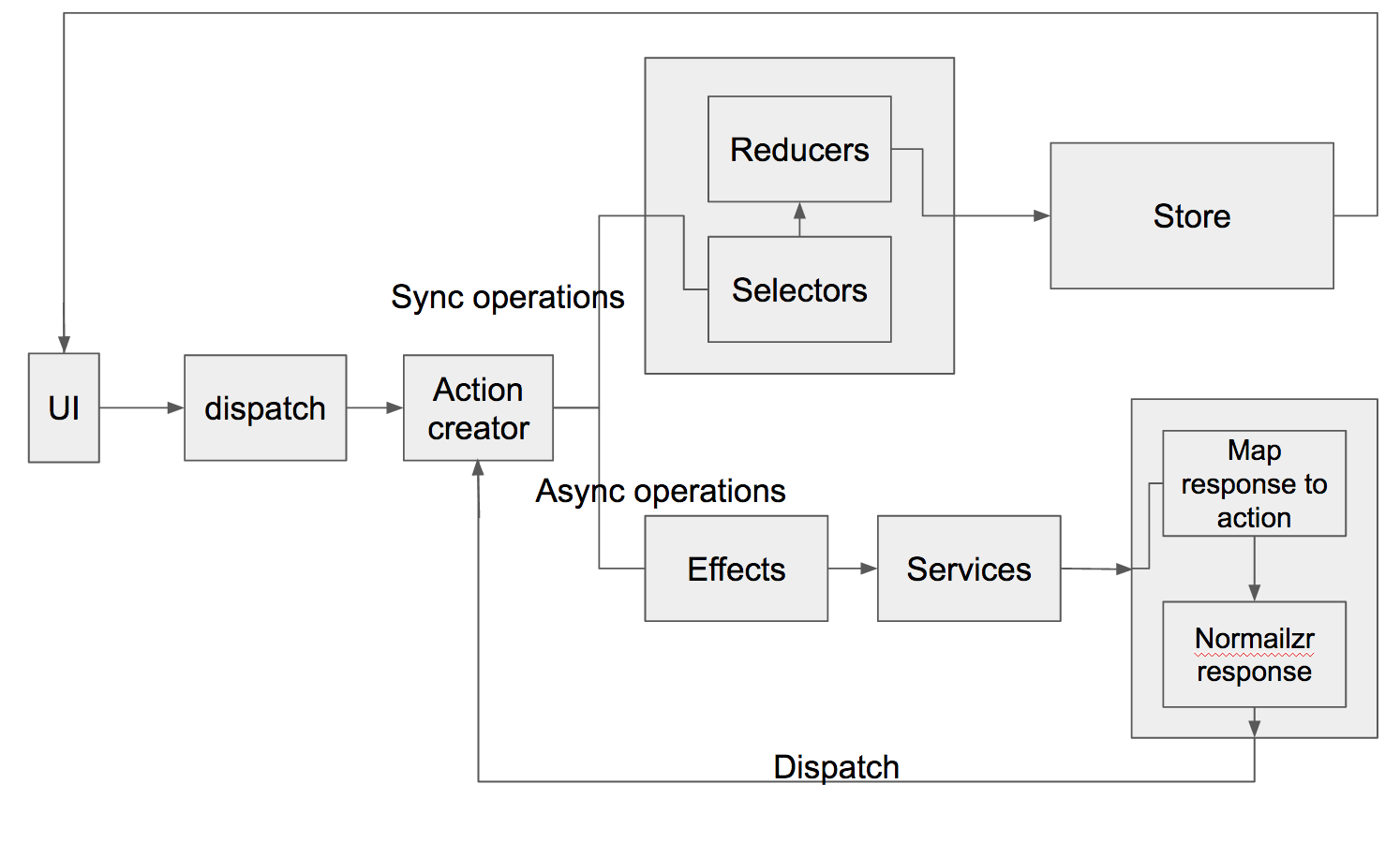
So as you can see, after dispatch an action, there are tow branches to handle the rest opreations. And those opreations are divided into tow parts.
1. All the sync oprations are handled by the Reducer.
2. All the async opreations are handled by Effect.
"Effect" is serving as a listener. Once match an async action, Effect will deal with "Service" which talk to server. After get the response from backend, we will normalizr it first and dispatch a new action. This action can be sync or async, if it is sync action, then after it is dispatched, the reducer will handle it.
For example,
You dispatch an action called 'FECHTING_TODOS'.
It will be only handled by Effect. After get response from server, will either dispatch 'FETCHING_TODOS_SUCCESS' or 'FETCHING_TODOS_ERROR'. And those actions will be handled by Reducer.
Effect:
import * as API from '../api';

import {

    fetchingTodoSuccessAction,

    fetchingTodoFaildAction

} from '../actions';

import { Observable } from 'rxjs';

export const fetchingTodoEpic = action$ =>

    action$.ofType('FETCHING_TODOS')

           .switchMap((action) => {

               return API.getTodosAPI(action.payload.filter)

                         .map((response) =>

                                  fetchingTodoSuccessAction(response, action.payload.filter))

                         .takeUntil(action$.ofType('CANCEL_REQUEST'))

                         .catch((err) => Observable.of(fetchingTodoFaildAction(err, action.payload.filter)));

           });
Service:
export const getTodosAPI = (filter) => {

        return Observable.ajax(`${baseURL}/${filter}`)

                         .retryWhen((err) => err.delay()

                                                .take()

                                                .concat(Observable.throw({

                                                                             xhr: {

                                                                                 response: {

                                                                                     message: 'CANNOT FETCH TODOS'

                                                                                 }

                                                                             }

                                                                         })))

                         .map(data => data.response);

};
The benifits we can get form RxJS is really powerful API we can use, for example, 'switchMap', 'retryWhen'.
Downsides of redux-observable:
1. It is quite hard to test, even in the document, there is no suggested way to do test.
2. Quite a long learning curve to get used to it.
Source code: Github
[Redux] Important things in Redux的更多相关文章
- redux源码解析-redux的架构
redux很小的一个框架,是从flux演变过来的,尽管只有775行,但是它的功能很重要.react要应用于生成环境必须要用flux或者redux,redux是flux的进化产物,优于flux. 而且r ...
- react第十六单元(redux的认识,redux相关api的掌握)
第十六单元(redux的认识,redux相关api的掌握) #课程目标 掌握组件化框架实现组件之间传参的几种方式,并了解两个没有任何关系组件之间通信的通点 了解为了解决上述通点诞生的flux架构 了解 ...
- [Redux + Webpack] Hot reloading Redux Reducers with Webpack
Webpack will hot reload the component, but the reducer we need hard refresh. To sovle the problem, g ...
- Redux学习笔记:Redux简易开发步骤
该文章不介绍Redux基础,也不解释各种乱乱的概念,网上一搜一大堆.只讲使用Redux开发一个功能的步骤,希望可以类我的小白们,拜托它众多概念的毒害,大牛请绕道! 本文实例源代码参考:React-Re ...
- redux sample with slim redux source code
code sample没有package.json文件,也就没有任何外部依赖,直接使用slim redux source code. slim resux只有90多行. nodejs对es6的impo ...
- 1.Redux学习1,Redux
Redux流程图如上: Action就是一条命令 Store顾名思义就是存储数据的, Reducers是一个回调函数用于处理数据,它处理完数据会返回给Store存储起来 基本流程就是:组件中用Stor ...
- 4 react 简书 引入 redux 的 combineReducers 对 redux 数据进行管理
1. src 下的 common 下的 header 创建 store 文件夹 下创建 reducer.js # src/common/header/store/reducer.js const st ...
- React之redux学习日志(redux/react-redux/redux-saga)
redux官方中文文档:https://www.redux.org.cn/docs/introduction/CoreConcepts.html react-redux Dome:https://co ...
- redux学习总结
redux学习总结 *:first-child { margin-top: 0 !important; } body > *:last-child { margin-bottom: 0 !imp ...
随机推荐
- color-在framwork中添加属性变量
1.今天在修改framwork中的代码的时候,需要把自己在代码中写的一个#ffffff,变成在xml中引用的变量.具体操作方法如下 1)在 frameworks/base/core/res/res/v ...
- jQuery offset()函数 和 scrollTop()函数
$(dom).offset() 方法返回或设置匹配元素相对于文档的偏移(位置).{left:100,top:100} $(dom).scrollTop() 方法返回或设置匹配元素的滚动条的垂直位置. ...
- JS/CSS 全屏幕导航 – 从上到下动画
<!DOCTYPE HTML> <html> <head> <meta charset="utf-8"> <title> ...
- [React] Configure a React & Redux Application For Production Deployment and Deploy to Now
In this lesson, we’ll make a few small changes to our scripts and add some environment variables tha ...
- 目标识别(object detection)中的 IoU(Intersection over Union)
首先直观上来看 IoU 的计算公式: 由上述图示可知,IoU 的计算综合考虑了交集和并集,如何使得 IoU 最大,需要满足,更大的重叠区域,更小的不重叠的区域. 两个矩形窗格分别表示: 左上点.右下点 ...
- liunx基本操作常用命令
liunx通常用作服务器,运行服务器软件,服务器要等待,类似超市学关键命令操作 内核,外壳 shell命令跟内核打交道用的是发行版本,不是内核,Radhat公司的CentOS,阿里巴巴也用这个 liu ...
- APP功能点测试
一.移动互联网特点: 1,用户体验至上:精准的用户体验 2,核心竞争力:市场占有率和业务创新能力 3,营销模型:通过口碑传播吸引客户,随之参与互动(如分享等,对接口测试要求高) 二.项目特点: 1,开 ...
- E11 css hack
E11 识别\0 { color:red; color:blue \0; } chrome下颜色是红色.IE11是蓝色
- maven 解决Cannot change version of project facet Dynamic web module to 2.5
我们用Eclipse创建Maven结构的web项目的时候选择了Artifact Id为maven-artchetype-webapp,由于这个catalog比较老,用的servlet还是2.3的,而一 ...
- Android 调用系统邮件,发送邮件到指定邮箱
在项目中,最后有一个联络我们,要求是点击号码还有邮箱地址能够发送邮件,这时候解决的方案其实有两种,一种是调用系统发邮件的软件,可以添加邮箱账号就可以发送邮件:第二种是使用javamail来发送邮件.在 ...