
4.图片左轮播图(swiper)
一、html部分

二、js部分
三、源代码部分
 <body>

     <div id="box">

         <img src="imges/111.jpg" alt="" style="opacity: 1;">

         <img src="imges/222.jpg" alt="" style="opacity: 0; ">

         <img src="imges/333.jpg" alt="" style="opacity: 0; ">

         <img src="imges/444.jpg" alt="" style="opacity: 0; ">

         <img src="imges/555.jpg" alt="" style="opacity: 0; ">

         <ul id="tag">

             <li style="background-color:green;">1</li>

             <li style="background-color:red;">2</li>

             <li style="background-color:red;">3</li>

             <li style="background-color:red;">4</li>

             <li style="background-color:red;">5</li>

         </ul>

         <div id="left">←</div>

         <div id="right">→</div>

     </div>

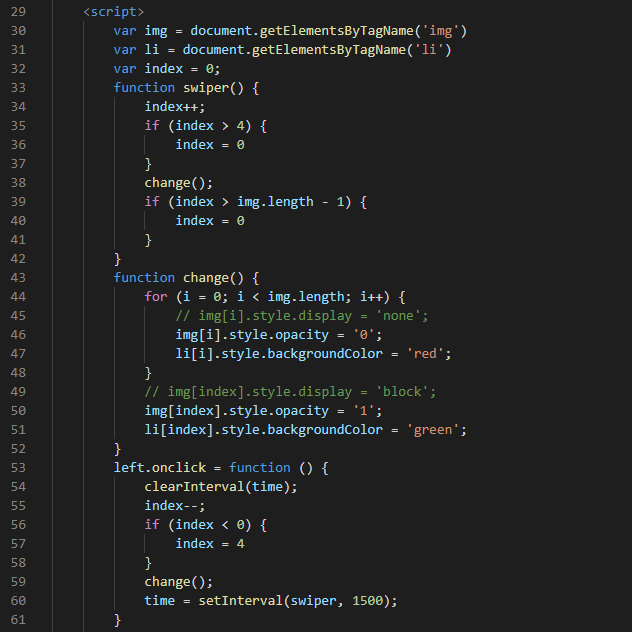
     <script>

         var img = document.getElementsByTagName('img')

         var li = document.getElementsByTagName('li')

         var index = 0;

         function swiper() {

             index++;

             if (index > 4) {

                 index = 0

             }

             change();

             if (index > img.length - 1) {

                 index = 0

             }

         }

         function change() {

             for (i = 0; i < img.length; i++) {

                 // img[i].style.display = 'none';

                 img[i].style.opacity = '0';

                 li[i].style.backgroundColor = 'red';

             }

             // img[index].style.display = 'block';

             img[index].style.opacity = '1';

             li[index].style.backgroundColor = 'green';

         }

         left.onclick = function () {

             clearInterval(time);

             index--;

             if (index < 0) {

                 index = 4

             }

             change();

             time = setInterval(swiper, 1500);

         }

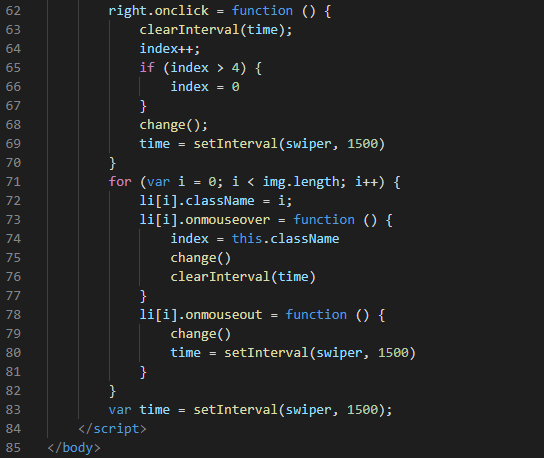
         right.onclick = function () {

             clearInterval(time);

             index++;

             if (index > 4) {

                 index = 0

             }

             change();

             time = setInterval(swiper, 1500)

         }

         for (var i = 0; i < img.length; i++) {

             li[i].className = i;

             li[i].onmouseover = function () {

                 index = this.className

                 change()

                 clearInterval(time)

             }

             li[i].onmouseout = function () {

                 change()

                 time = setInterval(swiper, 1500)

             }

         }

         var time = setInterval(swiper, 1500);

     </script>

 </body>
4.图片左轮播图(swiper)的更多相关文章
- ReactNative新手学习之路04 组件化开发轮播图swiper支持安卓和IOS
react native 新手之路04 组件化开发轮播图swiper支持安卓和IOS npm install react-native-carousel --save git 地址Properties ...
- 图片轮播图插件的使用 unslider!!!
1.百度图片轮播图unslider,第一个就会出现jquery unslider轮播图,点击进去,下载网站提供的文件,解压,内部有我们需要使用的各种js,图片等. 2.在自己的eclipse或者int ...
- iOS 图片轮播图(自动滚动)
iOS 图片轮播图(自动滚动) #import "DDViewController.h" #define DDImageCount 5 @interface DDViewContr ...
- 微信小程序的轮播图swiper问题
微信小程序的轮播图swiper,调用后,怎样覆盖系统的 点,达到自己想要的效果 不多说,先上一图望大家多给意见: 这个是效果图: 微信小程序效果图就成这样子: <view class=" ...
- React Native 之轮播图swiper组件
注释:swiper组件是第三方组件 所以在使用之前应该先在命令行安装,然后将第三方的模块引入(第三方模块地址:https://github.com/leecade/react-native-swipe ...
- 小程序图片轮播特效swiper(纯手打)
前言 一个月前还是用vue做微信H5,后面公司业务发展,入坑小程序,做了几款小程,跑了不少坑, 也会陆续在后面几节跟大家分享. 在这节给大家分享这个 小程序图片轮播实现方案 初步的实现思路 我要实现的 ...
- BannerDemo【图片轮播图控件】
版权声明:本文为HaiyuKing原创文章,转载请注明出处! 前言 这里简单记录下一个开源库youth5201314/banner的运用.具体用法请阅读<youth5201314/banner& ...
- android 使用图片轮播图---banner 使用
转自:https://github.com/youth5201314/banner 使用步骤 Step 1.依赖banner Gradle dependencies{ compile 'com.you ...
- js图片轮播图
/*焦点图*/ var Box='.carousel';//盒子 var Menu=$(Box+' .l_cursor li');//圆点菜单 var Con ...
随机推荐
- 短信的内容提供者Uri和短信表结构
* sms表 * address :手机号码 * date :收发短信的时间 * read :短信的阅读状态 1,已读 0,未读 * type :收发短信的类型 1,收到短信 2,发出短信 * bod ...
- RedHat Enterprise7 修改为CentOS的yum源
报错 解决 1.将自带的yum卸载掉 2.下载centos的yum并安装 wget http://mirrors.163.com/centos/7/os/x86_64/Packages/yum-met ...
- 科大讯飞sdk语音合成工具类
注:主要是dll文件的配置 A:Java SDK 使用了 JNI 形式,在初始化 SDK 时,SDK 将加载共享库(Windows下为msc32.dll或msc64.dll文件,Linux下libms ...
- hive常用的字符串操作函数
- hive中case命令
- 【AMAD】django-social-auth -- 让django使用社交网络oauth鉴权变得极为轻松!
简介 个人评分 简介 django-social-auth1集成的Oauth API包括: Google OpenID Google Oauth Google Oauth2 Yahoo OpenID ...
- 27.IP承载网容量仿真
接入,汇聚,核心 参考资料: 学堂在线,移动通信技术(2019秋)https://next.xuetangx.com/learn/SZIIT61031001367/SZIIT61031001367/1 ...
- vue 基础介绍
0.MVVM 什么是MVVM?就是Model-View-ViewModel. ViewModel是Vue.js的核心,它是一个Vue实例. 1.基础示例 代码: <!DOCTYPE html&g ...
- 检测网站的JS报错
window.onerror = function (errorMessage, scriptURI, lineNumber, columnNumber, errorObj) { var contex ...
- JAVA实验报告及第九周总结
Java第九周作业 实验报告七 实验任务详情: 完成火车站售票程序的模拟. 要求: (1)总票数1000张: (2)10个窗口同时开始卖票: (3)卖票过程延时1秒钟: (4)不能出现一票多卖或卖出负 ...