
Docker镜像搭建ubuntu下samba目录共享
第一种方法:(未使用)
yum install docker

// 下载镜像

docker pull dperson/samba

// 启动镜像,具体看文档,但重要的配置是以下的注释

docker run --name samba \

-it -p 139:139 -p 445:445 \

-v /home/technofiend:/home/technofiend \               #共享目录

-d dperson/samba \

-u "www;thisispasswd" \                                #访问用户

-s "technofiend;/home/technofiend/;yes;no;no;all;none" #共享配置

// 密码跟本机一致,1001为用户id,具体查看你本机的/etc/passwd文件,设置为共享目录所属用户

docker exec -it samba sed -i 's/1000/1001/g' /etc/passwd

// 组跟本机一致,1001为组id,具体查看你本机的/etc/group文件,设置为共享目录所属组

docker exec -it samba sed -i 's/1000/1001/g' /etc/group

// 替换samba的启动用户,与权限有关

docker exec -it samba sed -i 's/force user = smbuser/force user = www/g' /etc/samba/smb.conf

// 替换samba的启动组,与权限有关

docker exec -it samba sed -i 's/force group = users/force group = www/g' /etc/samba/smb.conf

// 重启samba

docker restart samba

用户id那块看清楚了。但docker实例里面新建的第一个用户是1000.这里跟你主机的用户权限需要一直,所以得替换成同样的id,用户和组也得要

就是新进容器建这个用户
第一种方法
第二种方法:(实验成功)
第一步安装docker:
yum install docker-engine
第二步启动服务:
service docker start
第三步:
docker pull dperson/samba
第四步:
docker run -it --name samba -p 139:139 -p 445:445 -v /home:/mount -d dperson/samba -u "www;overkill" -s "www;/mount/;yes;no;no;all;none"
开放了139和445端口。 用服务器访问即可!
要是想把容器的权限与宿主主机的用户权限一致的话,则只需要把用户和组文件映射到容器里面即可:
docker run -it --name samba -p 139:139 -p 445:445 -v /home:/mount -v /etc/passwd:/etc/passwd -v /etc/group:/etc/group -d dperson/samba -s "www;/mount/;yes;no;no;all;none"
请注意 -s 参数后面的第一个;前面的是现已存在的用户名。
官方使用教程:https://github.com/dperson/samba
三、配置方法
系统:ubuntu16.04
配置文件:/etc/samba/smb.conf
Samba的主配置文件叫smb.conf,默认在/etc/samba/目录下
配置文件详解
# This is the main Samba configuration file. You should read the

# smb.conf() manual page in order to understand the options listed

# here. Samba has a huge number of configurable options (perhaps too

# many!) most of which are not shown in this example

#

# Any line which starts with a ; (semi-colon) or a # (hash)

# is a comment and is ignored. In this example we will use a #

# for commentry and a ; for parts of the config file that you

# may wish to enable

#

# NOTE: Whenever you modify this file you should run the command "testparm"

# to check that you have not made any basic syntactic errors.

#

#======================= Global Settings =====================================

[global]

# workgroup = NT-Domain-Name or Workgroup-Name

   workgroup = MYGROUP

#设定 Samba Server 所要加入的工作组或者域

# server string is the equivalent of the NT Description field

   server string = Samba Server
#设定 Samba Server 的注释,可以是任何字符串,也可以不填。宏%v表示显示Samba的版本号

# This option is important for security. It allows you to restrict

# connections to machines which are on your local network. The

# following example restricts access to two C class networks and

# the "loopback" interface. For more examples of the syntax see

# the smb.conf man page

;   hosts allow = 192.168.. 192.168.. .

#表示允许连接到Samba Server的客户端,多个参数以空格隔开。可以用一个IP表示,也可以用一个网段表示。hosts deny 与hosts allow 刚好相反。

# if you want to automatically load your printer list rather

# than setting them up individually then you'll need this

   printcap name = /dev/null

   load printers = no

# It should not be necessary to spell out the print system type unless

# yours is non-standard. Currently supported print systems include:

# bsd, sysv, plp, lprng, aix, hpux, qnx

   printing = bsd

# Uncomment this if you want a guest account, you must add this to /etc/passwd

# otherwise the user "nobody" is used

;  guest account = pcguest

# this tells Samba to use a separate log file for each machine

# that connects

   log file = /dev/stdout

#日志文件的存储位置以及日志文件名称

# Put a capping on the size of the log files (in Kb).

   max log size =

#设置Samba Server日志文件的最大容量,单位为kB,0代表不限制

# Security mode. Most people will want user level security. See

# security_level.txt for details.

   security = user
#用户访问Samba Server的验证方式
;   password server = <NT-Server-Name>

# Password Level allows matching of _n_ characters of the password for

# all combinations of upper and lower case.

;  username level =

# You may wish to use password encryption. Please read

# ENCRYPTION.txt, Win95.txt and WinNT.txt in the Samba documentation.

# Do not enable this option unless you have read those documents

;  encrypt passwords = yes

;  smb passwd file = /etc/samba/smbpasswd

# The following are needed to allow password changing from Windows to

# update the Linux sytsem password also.

# NOTE: Use these with 'encrypt passwords' and 'smb passwd file' above.

# NOTE2: You do NOT need these to allow workstations to change only

#        the encrypted SMB passwords. They allow the Unix password

#        to be kept in sync with the SMB password.

   unix password sync = no

;  passwd program = /usr/bin/passwd %u

;  passwd chat = *New*UNIX*password* %n\n *ReType*new*UNIX*password* %n\n *passwd:*all*authentication*tokens*updated*successfully*

# Unix users can map to different SMB User names

;  username map = /etc/samba/smbusers

# Using the following line enables you to customise your configuration

# on a per machine basis. The %m gets replaced with the netbios name

# of the machine that is connecting

;   include = /etc/samba/smb.conf.%m

# Configure Samba to use multiple interfaces

# If you have multiple network interfaces then you must list them

# here. See the man page for details.

;   interfaces = 192.168.12.2/ 192.168.13.2/

# Configure remote browse list synchronisation here

#  request announcement to, or browse list sync from:

#    a specific host or from / to a whole subnet (see below)

;   remote browse sync = 192.168.3.25 192.168.5.255

# Cause this host to announce itself to local subnets here

;   remote announce = 192.168.1.255 192.168.2.44

# Browser Control Options:

# set local master to no if you don't want Samba to become a master

# browser on your network. Otherwise the normal election rules apply

;   local master = no

# OS Level determines the precedence of this server in master browser

# elections. The default value should be reasonable

;   os level =

# Domain Master specifies Samba to be the Domain Master Browser. This

# allows Samba to collate browse lists between subnets. Don't use this

# if you already have a Windows NT domain controller doing this job

;   domain master = yes

# Preferred Master causes Samba to force a local browser election on startup

# and gives it a slightly higher chance of winning the election

;   preferred master = yes

# Use only if you have an NT server on your network that has been

# configured at install time to be a primary domain controller.

;   domain controller = <NT-Domain-Controller-SMBName>

# Enable this if you want Samba to be a domain logon server for

# Windows95 workstations.

;   domain logons = yes

# if you enable domain logons then you may want a per-machine or

# per user logon script

# run a specific logon batch file per workstation (machine)

;   logon script = %m.bat

# run a specific logon batch file per username

;   logon script = %U.bat

# Where to store roving profiles (only for Win95 and WinNT)

#        %L substitutes for this servers netbios name, %U is username

#        You must uncomment the [Profiles] share below

;   logon path = \\%L\Profiles\%U

# All NetBIOS names must be resolved to IP Addresses

# 'Name Resolve Order' allows the named resolution mechanism to be specified

# the default order is "host lmhosts wins bcast". "host" means use the unix

# system gethostbyname() function call that will use either /etc/hosts OR

# DNS or NIS depending on the settings of /etc/host.config, /etc/nsswitch.conf

# and the /etc/resolv.conf file. "host" therefore is system configuration

# dependant. This parameter is most often of use to prevent DNS lookups

# in order to resolve NetBIOS names to IP Addresses. Use with care!

# The example below excludes use of name resolution for machines that are NOT

# on the local network segment

# - OR - are not deliberately to be known via lmhosts or via WINS.

; name resolve order = wins lmhosts bcast

# Windows Internet Name Serving Support Section:

# WINS Support - Tells the NMBD component of Samba to enable it's WINS Server

;   wins support = yes

# WINS Server - Tells the NMBD components of Samba to be a WINS Client

#    Note: Samba can be either a WINS Server, or a WINS Client, but NOT both

;   wins server = w.x.y.z

# WINS Proxy - Tells Samba to answer name resolution queries on

# behalf of a non WINS capable client, for this to work there must be

# at least one    WINS Server on the network. The default is NO.

;   wins proxy = yes

# DNS Proxy - tells Samba whether or not to try to resolve NetBIOS names

# via DNS nslookups. The built-in default for versions 1.9. is yes,

# this has been changed in version 1.9. to no.

   dns proxy = no

# Case Preservation can be handy - system default is _no_

# NOTE: These can be set on a per share basis

   preserve case = yes

   short preserve case = yes

# Default case is normally upper case for all DOS files

   default case = lower

# Be very careful with case sensitivity - it can break things!

;  case sensitive = no

   pam password change = yes

   map to guest = bad user

   usershare allow guests = yes

   create mask =

   force create mode =

   directory mask =

   force directory mode =

#   force user = www

#   force group = www

   follow symlinks = yes

   load printers = no

   printing = bsd

   printcap name = /dev/null

   disable spoolss = yes

   socket options = TCP_NODELAY

   strict locking = no

   vfs objects = recycle

   recycle:keeptree = yes

   recycle:versions = yes

   min protocol = SMB2

[公共文件]

   path = /home/technofiend/public
   browsable = yes   #用来指定该共享是否可以浏览

   read only = no

   guest ok = no    #将设置客户端以该游客账号来访问共享

   veto files = /._*/.apdisk/.AppleDouble/.DS_Store/.TemporaryItems/.Trashes/desktop.ini/ehthumbs.db/Network Trash Folder/Temporary Items/Thumbs.db/

   delete veto files = yes

   valid users = @public

[网络开发文件]

   comment = group-web  #对该共享的描述,可以是任意字符串

   path = /home/technofiend/group/web  #共享目录路径

   public = yes        #用来指定该共享是否允许guest账户访问

   writable = yes     #用来指定该共享路径是否可写

   printable = no

   valid users = @web  #允许访问该共享的用户,组就用“@+组名”表示

[引擎开发文件]
  comment = ue4
  path = /home/technofiend/group/editor
  public = yes    #用来指定该共享是否允许guest账户访问
  writable = yes  #用来指定该共享路径是否可写
  printable = no
  valid users = @editor
[设计内部文件]
  comment = group public
  path = /home/technofiend/group/public
  public = yes    writable = yes #用来指定该共享路径是否可写

  printable = no
  valid users = @seji #允许访问该共享的用户,组就用“@+组名”表示
service smb restart 重启服务
检查语法是否正确:testparm -v
思路方法:
1)创建组:添加用户组
groupadd public 创建用户组
useradd -s /sbin/nologin -G web,public,group-public webtest1 添加到多个用户组
usermod -g seji cesiyonghu 添加到组
注意:useradd和adduser区别
useradd与adduser都是创建新的用户

在CentOs下useradd与adduser是没有区别的都是在创建用户,在home下自动创建目录,没有设置密码,需要使用passwd命令修改密码。

而在Ubuntu下useradd与adduser有所不同

、useradd在使用该命令创建用户是不会在/home下自动创建与用户名同名的用户目录,而且不会自动选择shell版本,也没有设置密码,那么这个用户是不能登录的,需要使用passwd命令修改密码。

、adduser在使用该命令创建用户是会在/home下自动创建与用户名同名的用户目录,系统shell版本,会在创建时会提示输入密码,更加友好。


userdel 删除用户,

userdel只能删除用户,并不会删除相关的目录文件。userdel -r 可以删除用户及相关目录。
2)变更文件夹的用户和用户组权限
chown -R :web group/web #表示所有web组
3)把用户添加到samba中
smbpasswd -a share #设置密码
4)激活用户
smbpasswd -e share
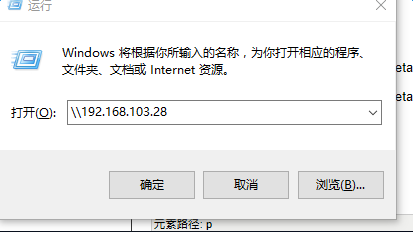
5)window下使用; 运行----输入\\ip地址
文章出处:
http://blog.csdn.net/technofiend/article/details/52346303 主要转载这篇
http://blog.csdn.net/technofiend/article/details/51066262
更多注释详解:http://blog.csdn.net/dhgao38/article/details/43567403
Docker镜像搭建ubuntu下samba目录共享的更多相关文章
- Docker镜像搭建Linux下samba共享目录
Samba 是 SMB/CIFS 网络协议的重新实现, 它作为 NFS 的补充使得在 Linux.OS/2.DOS 和 Windows 系统中进行文件共享.打印机共享更容易实现.SMB协议是客户机/服 ...
- python开发笔记-Python3.7+Django2.2 Docker镜像搭建
目标镜像环境介绍: 操作系统:ubuntu16.04 python版本:python 3.7.4 django版本:2.2 操作步骤: 1. 本地安装docker环境(略)2. 拉取ubunut指定 ...
- 搭建Ubuntu下c/c++编译环境【转】
1. 安装Ubuntu. 2. 安装gcc 方法一: sudo apt-get install build-essential 安装完了可以执行 gcc--version的 ...
- 傲视Kubernetes(二):Docker镜像搭建与本地Kubernetes环境搭建
主要内容: 1.Docker与Kubernetes的关系 2.SpringBoot微服务的Docker镜像创建 3.Kubernetes本地环境搭建 一.Docker与Kubernetes的关系 在说 ...
- PyCharm使用之利用Docker镜像搭建Python开发环境
在我们平时使用PyCharm的过程中,一般都是连接本地的Python环境进行开发,但是如果是离线的环境呢?这样就不好搭建Python开发环境,因为第三方模块的依赖复杂,不好通过离线安装包的方式安装 ...
- Docker+STF在ubuntu下测试环境搭建(详细搭建步骤及踩坑记录)
一.什么是OpenSTF? STF又称OpenSTF,它是一个手机设备管理平台,可以对手机进行远程管理.调试.远程手机桌面监控等操作.这个系统类似于目前很流行的云测服务比如Testin,虽然网页上提供 ...
- Ubuntu杂记——Ubuntu下用虚拟机共享上网
由于最近把自己电脑环境换成了Ubuntu,但学校的网络是电信的闪讯,大学里用过的人都知道这货有多坑,而且没有Linux客户端,上网都是问题,怪不得国内用Linux的人那么少,特别是高校的学生(让我瞎逼 ...
- TensorFlow(1):使用Docker镜像搭建TensorFlow环境
1,关于TensorFlow TensorFlow 随着AlphaGo的胜利也火了起来. google又一次成为大家膜拜的大神了.google大神在引导这机器学习的方向. 同时docker 也是一个非 ...
- Ubuntu12.04下samba服务器共享配置
1 . 前置工作 首先保证你的Ubuntu能上网:虚拟机网络连接方式为NAT:虚拟机雨物理机互ping可通: 2. 安装samba sudo apt-get insall samba sudo apt ...
随机推荐
- ASE19团队项目alpha阶段model组 scrum9 记录
本次会议于11月13日,19时整在微软北京西二号楼sky garden召开,持续7分钟. 与会人员:Jiyan He, Kun Yan, Lei Chai, Linfeng Qi, Xueqing W ...
- vue-element-admin 之设置侧边栏的icon
一.将icon的svg文件放置如下图文件位置 二.在路由设置中设置(icon设置为svg的文件名称即可) 注:若icon选中的颜色不会随着侧边栏文字颜色变动,把svg文件中的fill ...
- Oracle中函数关键字简介
常用的语法:select--from--where--group by--having--order by 1.分组子句group by +con 按什么分组 2.having子句 对上面分组的数据 ...
- XXX_initcall()函数分析
1. 先看这些宏的定义(定义在文件include/linux/init.h中) #define pure_initcall(fn) __define_initcall("0",fn ...
- SPI总线的原理与Verilog实现
转载地址:https://www.cnblogs.com/liujinggang/p/9609739.html 一. 软件平台与硬件平台 软件平台: 1.操作系统:Windows-8.1 2.开发套件 ...
- etcd安装和简单使用
etcd作为一个高可用强一致性的服务发现存储仓库,在Kubernetes等开源项目中用的很多,这里简单记录下安装和常用命令以及api 安装 安装包可以从 https://github.com/etcd ...
- SQL Server 排序规则的影响
目录 SQL Server 排序规则 影响 效果演示 更改数据库排序规则 服务器级排序规则 数据库级排序规则 列级排序规则 查询时指定规则 建议 使用 Unicode 数据类型 使用二进制排序规则 [ ...
- Git修改已经提交的用户名信息
由于工作或者其他原因,有时候我们会修改git的用户名和邮箱账号,没有改过来就提交,就会导致提交人信息不一致的问题.现在记录修正回来的方法 # 第一步,(n)代表提交次数 git rebase -i H ...
- Ubuntu下多个gcc版本之间的切换
Ubuntu下多个gcc版本之间的切换 1.查看当前系统的gcc版本 gcc -v 会输出以下信息: Using built-in specs. COLLECT_GCC=gcc COLLECT_LTO ...
- 工具---《.264视频 转成 MP4视频》
<.264视频 转成 MP4视频> 安装了“爱奇艺万能播放器”可以打开.264视频,但是opencv却不能直接读取.264视频,还是需要想办法“.264视频 转成 MP4/avi视频”. ...