
elasticsearch集群部署以及head插件安装
环境准备
elasticsearch是Java程序写的因此必须装jdk,否则使用不了。
[root@openstack ~]# java -version
openjdk version "1.8.0_131"
OpenJDK Runtime Environment (build 1.8.0_131-b12)
OpenJDK 64-Bit Server VM (build 25.131-b12, mixed mode)
| IP地址 | 主机名 | 系统 | 软件版本 |
| 192.168.209.6 | CFCA | rhel7.4 | elasticsearch-6.0.0/elasticsearch-head |
| 192.168.209.7 | openstack | rhel7.4 | elasticsearch-6.0.0/elasticsearch-head |
[root@openstack ~]# cd /usr/local/
[root@openstack local]# tar zxvf elasticsearch-6.0.0.tar.gz
[root@openstack local]# cd elasticsearch-6.0.0/
[root@openstack elasticsearch-6.0.0]# ll
总用量 224
drwxr-xr-x. 2 elasticsearch elasticsearch 4096 4月 1 21:56 bin #脚本
drwxr-xr-x. 2 elasticsearch elasticsearch 75 4月 2 13:48 config #配置文件
drwxr-xr-x. 2 elasticsearch elasticsearch 4096 11月 11 2017 lib
-rw-r--r--. 1 elasticsearch elasticsearch 11358 11月 11 2017 LICENSE.txt
drwxr-xr-x. 14 elasticsearch elasticsearch 251 11月 11 2017 modules
-rw-r--r--. 1 elasticsearch elasticsearch 193097 11月 11 2017 NOTICE.txt
drwxr-xr-x. 2 elasticsearch elasticsearch 6 11月 11 2017 plugins
-rw-r--r--. 1 elasticsearch elasticsearch 9326 11月 11 2017 README.textile
[root@openstack elasticsearch-6.0.0]# cd config/
[root@openstack config]# grep '^[a-z]' elasticsearch.yml 修改后的配置文件
cluster.name: my-application 集群名称
node.name: node-1 节点名称
path.data: /elk/data 数据存放路径
path.logs: /elk/logs 日志路径
bootstrap.memory_lock: true 内存锁定
network.host: 0.0.0.0
http.port: 9200
discovery.zen.ping.unicast.hosts: ["192.168.209.6", "192.168.209.7"] 若是单节点的话此项配置注释掉
[root@openstack ~]# mkdir -p /elk/data/ /elk/logs/
[root@openstack ~]# useradd elasticsearch
[root@openstack ~]# chown -R elasticsearch:elasticsearch /elk/
[root@openstack ~]# chown -R elasticsearch:elasticsearch /usr/local/elasticsearch-6.0.0
[root@openstack ~]# su - elasticsearch
[elasticsearch@openstack ~]$ cd /usr/local/elasticsearch-6.0.0/
[elasticsearch@openstack bin]$ ./elasticsearch -d 后台启动,此时启动不了,需要修改一下配置
[root@openstack ~]# vim /etc/security/limits.conf 重启参数才能生效
* hard nofile 65536
* soft nofile 65536
* soft memlock unlimited
* hard memlock unlimited
[root@openstack ~]# vim /etc/sysctl.conf
vm.max_map_count=262144
[root@openstack ~]# sysctl -p 参数生效
切换用户之后重新启动,查看进程和监听端口
[root@openstack ~]# ps -ef|grep java 查看进程
elastic+ 6750 1 1 12:29 pts/2 00:02:30 /bin/java -Xms1g -Xmx1g -XX:+UseConcMarkSweepGC -XX:CMSInitiatingOccupancyFraction=75 -XX:+UseCMSInitiatingOccupancyOnly -XX:+AlwaysPreTouch -server -Xss1m -Djava.awt.headless=true -Dfile.encoding=UTF-8 -Djna.nosys=true -XX:-OmitStackTraceInFastThrow -Dio.netty.noUnsafe=true -Dio.netty.noKeySetOptimization=true -Dio.netty.recycler.maxCapacityPerThread=0 -Dlog4j.shutdownHookEnabled=false -Dlog4j2.disable.jmx=true -XX:+HeapDumpOnOutOfMemoryError -Des.path.home=/usr/local/elasticsearch-6.0.0 -Des.path.conf=/usr/local/elasticsearch-6.0.0/config -cp /usr/local/elasticsearch-6.0.0/lib/* org.elasticsearch.bootstrap.Elasticsearch -d
[root@openstack ~]# netstat -tlunp|grep java 查看端口
tcp6 0 0 :::9200 :::* LISTEN 6750/java
tcp6 0 0 :::9300 :::* LISTEN 6750/java
[root@openstack ~]# curl 192.168.209.7:9200 查看信息
{
"name" : "node-1",
"cluster_name" : "my-application",
"cluster_uuid" : "Z3TOUu0jTUiCSHsuFJsv_g",
"version" : {
"number" : "6.0.0",
"build_hash" : "8f0685b",
"build_date" : "2017-11-10T18:41:22.859Z",
"build_snapshot" : false,
"lucene_version" : "7.0.1",
"minimum_wire_compatibility_version" : "5.6.0",
"minimum_index_compatibility_version" : "5.0.0"
},
"tagline" : "You Know, for Search"
}
另外一台机器也一样的配置,只是节点的名称的不一样。
安装head插件:
GitHub地址:https://github.com/mobz/elasticsearch-head
[root@openstack ~]# cd /usr/local/src/
[root@openstack src]# git clone git://github.com/mobz/elasticsearch-head.git
[root@openstack src]# ll
总用量 4
drwxr-xr-x. 7 root root 4096 4月 1 22:58 elasticsearch-head
[root@openstack src]# cd elasticsearch-head/
[root@openstack elasticsearch-head]# yum -y install npm
[root@openstack elasticsearch-head]# npm install grunt -save
[root@openstack elasticsearch-head]# ll -d node_modules/grunt #必须确认生成该文件
drwxr-xr-x. 5 root root 117 4月 1 23:28 node_modules/grunt
[root@openstack elasticsearch-head]# npm install #执行安装
[root@openstack elasticsearch-head]# npm run start & #后台启动
[root@openstack src]# vim /usr/local/elasticsearch-6.0.0/config/elasticsearch.yml 修改如下elasticsearch配置文件,并且重启该服务
http.cors.enabled: true
http.cors.allow-origin: "*"
查看一下进程和端口:
[root@openstack src]# netstat -tlunp|grep grunt
tcp 0 0 0.0.0.0:9100 0.0.0.0:* LISTEN 8911/grunt
[root@openstack src]# ps -ef|grep npm
root 8901 8749 0 15:42 pts/1 00:00:03 npm
可以在页面访问:
输入地址后就可以查看集群的信息了,带星号的是master
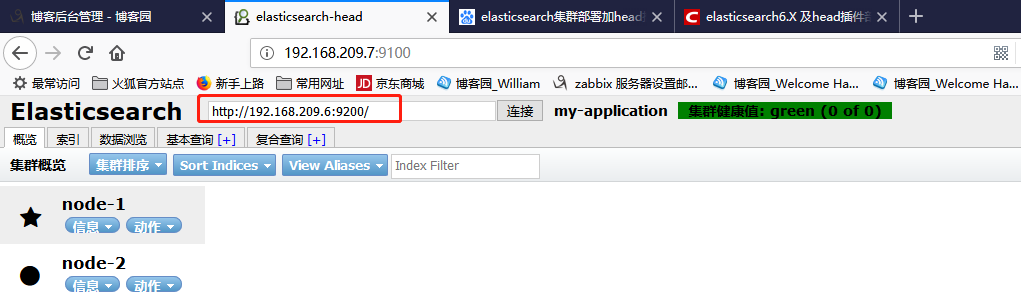
至此集群搭建完成,head插件也安装成功了。
elasticsearch集群部署以及head插件安装的更多相关文章
- Elasticsearch集群管理工具head插件安装
Elasticsearch-head是一个elasticsearch的集群管理工具,它是完全由html5编写的独立网页程序,你可以通过插件把它集成到es.或直接下载源码,在本地打开index.html ...
- Elasticsearch学习总结 (Centos7下Elasticsearch集群部署记录)
一. ElasticSearch简单介绍 ElasticSearch是一个基于Lucene的搜索服务器.它提供了一个分布式多用户能力的全文搜索引擎,基于RESTful web接口.Elasticse ...
- 我的ElasticSearch集群部署总结--大数据搜索引擎你不得不知
摘要:世上有三类书籍:1.介绍知识,2.阐述理论,3.工具书:世间也存在两类知识:1.技术,2.思想.以下是我在部署ElasticSearch集群时的经验总结,它们大体属于第一类知识“techknow ...
- Linux中Elasticsearch集群部署
1.下载安装包elasticsearch-6.3.1 安装包自己下载,网上很多 2.安装位置在cd /usr/local/elasticsearch/目录下 3.因为ES使用root权限运行会报错, ...
- elasticsearch集群部署
启动elk: zjtest7-redis:/usr/local/elasticsearch-2.3.4/bin# ./elasticsearch -d 后台运行 访问: http://192.168. ...
- elasticsearch集群管理工具head插件(转)
elasticsearch-head是一个elasticsearch的集群管理工具,它是完全由html5编写的独立网页程序,你可以通过插件把它集成到es 插件安装方法1: 1.elasticsearc ...
- elasticsearch 集群部署,版本 5.5.0
准备说明: 两台服务器 Ip分别为 192.168.239.78(主),192.168.239.49(从) 主服务器上配置如下:1.上传es5.5.0版本至主服务器2.解压 unzipunzip el ...
- Elasticsearch 集群部署
本文部署环境 $ cat /etc/redhat-release CentOS Linux release (Core) 部署前系统优化 $ /etc/security/limits.conf roo ...
- 谈一谈Elasticsearch的集群部署
Elasticsearch天生就支持分布式部署,通过集群部署可以提高系统的可用性.本文重点谈一谈Elasticsearch的集群节点相关问题,搞清楚这些是进行Elasticsearch集群部署和拓 ...
随机推荐
- JSON运用在文件
#include <iostream>#include <fstream>#define JSON_IS_AMALGAMATION#include "json/jso ...
- VMware永久key
VMware永久KEY:5F29M-48312-8ZDF9-A8A5K-2AM0Z
- C++ STL 之 list
#include <list> #include <iostream> using namespace std; // 打印list元素 void PrintList(list ...
- SSISDB7:当前正在运行的Package及其Executable
PM问:“Vic,现在ETL Job跑到哪一个Package了,正在执行哪个Task?”,第一次遇到这个问题时,一下就懵逼了,只能硬着头皮说:“我看看”. 在做项目开发时,这个问题很常见,但是,被很多 ...
- PHPExcel的简单使用
一.在做PHP开发时,我们会遇到把数据导出变为execl表格的形式,使用PHPExcel就可以,下载地址:https://github.com/PHPOffice/PHPExcel,下载后会显示这么多 ...
- 第六章、Cookies和Session
目录 第六章.Cookies和Session 一.来源 二.cookie工作原理 工作原理: 三.session的工作原理 工作原理: 四.如何操作cookie 服务端常见的cookie操作 五.案例 ...
- 学java编程软件开发,非计算机专业是否能学
近几年互联网的发展越来越好,在国外,java程序员已经成为高薪以及稳定职业的代表,虽然国内的有些程序员很苦逼,但是那只是少数,按照国外的大方向来看,程序员还是一个很吃香的职业.根据编程语言的流行程度, ...
- linux基础5-vi文本处理器
三种模式下各自可以完成的操作: 一般模式:可以完成光标移动.删除单个和整行字.复制和黏贴,通过i.o.a.r这几个命令进入编辑模式 编辑模式:可以输入字符,通过esc返回一般模式 指令模式:读取文件, ...
- C# Winform 禁止一个进程运行多次
禁止一个进程运行多次 using System; using System.Windows.Forms; namespace StartExe { static class Program { /// ...
- Istio技术与实践05:如何用istio实现流量管理
Istio是Google继Kubernetes之后的又一开源力作,主要参与的公司包括Google,IBM,Lyft等,它提供了完整的非侵入式的微服务治理解决方案,解决微服务的管理.网络连接以及安全管理 ...