
Linux高级网络设置——将多个网卡设置成一个网卡
Linux下可以设置网卡模式
模式0:负载均衡
模式1:主备模式,不提高网络带宽
模式3:多网卡同时发送相同的数据
准备实验环境:
Redhat 6.4 企业版64位,最小化安装。
给虚拟机添加网卡


此时我虚拟机有2块网卡,但是真正启用工作的只有一块,使用ifconfig也只能看到一块网卡。ifconfig -a可以看到我们加入的另一块网卡,此时这块网卡还没有启用。
[root@51cto network-scripts]# ifconfig -a

eth0      Link encap:Ethernet  HWaddr :0C:::AA:8B

          inet addr:192.168.80.222  Bcast:192.168.80.255  Mask:255.255.255.0

          inet6 addr: fe80::20c:29ff:fe82:aa8b/ Scope:Link

          UP BROADCAST RUNNING MULTICAST  MTU:  Metric:

          RX packets: errors: dropped: overruns: frame:

          TX packets: errors: dropped: overruns: carrier:

          collisions: txqueuelen:

          RX bytes: (10.8 KiB)  TX bytes: (11.8 KiB)

eth1      Link encap:Ethernet  HWaddr :0C:::AA:

          BROADCAST MULTICAST  MTU:  Metric:

          RX packets: errors: dropped: overruns: frame:

          TX packets: errors: dropped: overruns: carrier:

          collisions: txqueuelen:

          RX bytes: (0.0 b)  TX bytes: (0.0 b)

lo        Link encap:Local Loopback

          inet addr:127.0.0.1  Mask:255.0.0.0

          inet6 addr: ::/ Scope:Host

          UP LOOPBACK RUNNING  MTU:  Metric:

          RX packets: errors: dropped: overruns: frame:

          TX packets: errors: dropped: overruns: carrier:

          collisions: txqueuelen:

          RX bytes: (0.0 b)  TX bytes: (0.0 b)
可见原来的那块网卡IP没变,新加的网卡没有IP。现在将两块网卡绑定成一块网卡,并设置新地址为192.168.80.240。这就要求这两个网卡各自不设置地址,绑定后设置公共地址。
具体流程如下:
①创建绑定网卡的配置文件
[root@51cto network-scripts]# vi /etc/sysconfig/network-scripts/ifcfg-bond0

[root@51cto network-scripts]# cat ifcfg-bond0

DEVICE=bond0

IPADDR=192.168.80.240

PREFIX=

GATEWAY=192.168.80.1

ONBOOT=yes

BOOTPROTO=none

USERCTL=no

BONDING_OPTS="mode=0 miimon=50"
[root@51cto network-scripts]# cat ifcfg-eth0

DEVICE=eth0

ONBOOT=yes

BOOTPROTO=none

MASTER=bond0

SLAVE=yes

USERCTL=no

[root@51cto network-scripts]# cat ifcfg-eth1

DEVICE=eth1

ONBOOT=yes

BOOTPROTO=none

MASTER=bond0

SLAVE=yes

USERCTL=no
③添加驱动支持
[root@51cto modprobe.d]# pwd

/etc/modprobe.d

[root@51cto modprobe.d]# ls

anaconda.conf  blacklist.conf  dist-alsa.conf  dist.conf  dist-oss.conf  openfwwf.conf

[root@51cto modprobe.d]#  vi /etc/modprobe.d/bonding.conf

[root@51cto modprobe.d]# cat bonding.conf

alias bond0 bonding
④重启网络服务

在xshell中测试,192.168.80.222这个绑定前的IP不通了,绑定后的公共IP通
[c:\~]$ ping 192.168.80.222

正在 Ping 192.168.80.222 具有  字节的数据:

请求超时。

192.168.80.222 的 Ping 统计信息:

    数据包: 已发送 = ,已接收 = ,丢失 =  (% 丢失),

^C

[c:\~]$ ping 192.168.80.240

正在 Ping 192.168.80.240 具有  字节的数据:

来自 192.168.80.240 的回复: 字节= 时间<1ms TTL=

来自 192.168.80.240 的回复: 字节= 时间<1ms TTL=

192.168.80.240 的 Ping 统计信息:

    数据包: 已发送 = ,已接收 = ,丢失 =  (% 丢失),

往返行程的估计时间(以毫秒为单位):

    最短 = 0ms,最长 = 0ms,平均 = 0ms
查看绑定的配置,显示网卡工作模式为负载均衡
Ethernet Channel Bonding Driver: v3.6.0 (September 26, 2009)
MII Status: up
MII Polling Interval (ms): 50
Up Delay (ms): 0
Down Delay (ms): 0
MII Status: up
Speed: 1000 Mbps
Duplex: full
Link Failure Count: 0
Permanent HW addr: 00:0c:29:82:aa:8b
Slave queue ID: 0
MII Status: up
Speed: 1000 Mbps
Duplex: full
Link Failure Count: 0
Permanent HW addr: 00:0c:29:82:aa:95
Slave queue ID: 0
验证网卡工作状态是否是负载均衡
物理机上保持ping 192.168.80.240,在虚拟机系统里面每隔几秒钟执行ifconfig查看发送接收数据包变化。
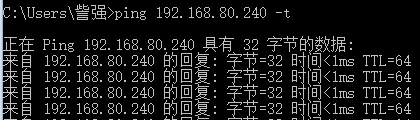
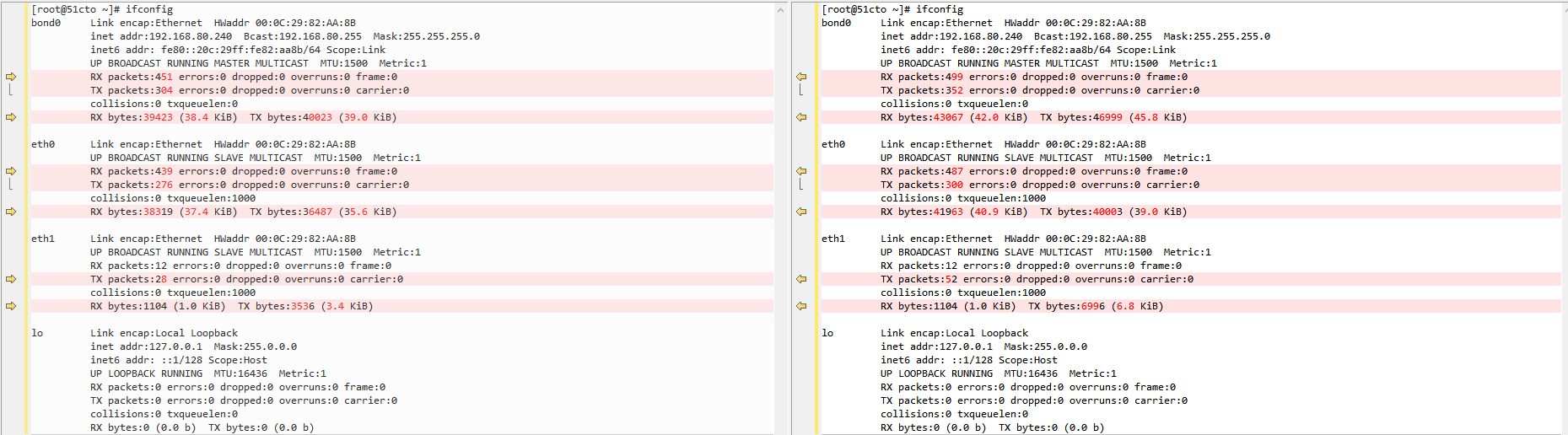
但是这种验证方法太笨
借助watch命令,可以设置间隔多少时间执行一次ifconfig
watch -n ifconfig
上面验证的是负载均衡模式,如果是主备模式至于需要在ifcfg-bond0配置文件里面吧模式改为0即可
如果需要拔掉虚拟机的网卡,如下设置

Linux高级网络设置——将多个网卡设置成一个网卡的更多相关文章
- Linux高级网络设置——给网卡绑定多个IP
假设这样一种场景: 某运营商的Linux服务器上装配了2家互联网公司的Web服务,每个Web服务分配了一个公网IP地址.但是运营商的Linux服务器只有一块网卡.这就需要在一块网卡上绑定多个IP地址. ...
- Linux 高级网络编程
设置套接字函数: #include<sys/socket.h> int setsockopt(int sockfd, int level, int optname, const void* ...
- ubuntu 使用ifupdown 进行高级网络设置
ifupdown ubuntu 本身支持linux的网络底层设置命令:ifconfig,route,ip 等命令,但为了让网络设置更加简单,Debian 提供了一个标准的高级网络设置工具,包含 ifu ...
- Linux CentOS6.x ip设置(网卡设置)
修改IP永久生效按以下方法vi /etc/sysconfig/network-scripts/ifcfg-eth0(eth0,第一块网卡,如果是第二块则为eth1)按如下修改ip: DEVICE=et ...
- CentOS/Linux 网卡设置 IP地址配置
CentOS/Linux下设置IP地址 1:临时修改:1.1:修改IP地址# ifconfig eth0 192.168.100.100 1.2:修改网关地址# route add default g ...
- 【整理】Virtualbox中的网络类型(NAT,桥接等),网卡,IP地址等方面的设置
之前是把相关的内容,放到: [已解决]实现VirtualBox中的(Guest OS)Mac和主机(Host OS)Win7之间的文件和文件夹共享 中的,现在把关于网络配置方面内容,单独提取出来,专门 ...
- Linux下双物理网卡设置成虚拟网卡
为了提供网络的高可用我们须要将多块网卡绑定设置成一块虚拟的网卡对外提供服务,这样能够防止一块网卡损坏或者防止网线连接故障造成的连接中断. 以下我们使用eth0与eth1来虚拟成为bond0为例:--- ...
- linux虚拟机网络设置(本机使用wiff,自己的网)
一.linux虚拟机网络设置(https://jingyan.baidu.com/album/4e5b3e1957979d91901e24f1.html?picindex=16) 选中虚拟机,点击 ...
- LInux:网络连接的设置
主机名的配置 主机名的配置(配置文件/etc/hostname) 1.使用 hostname 命令临时设置主机名 命令格式:hostname [新主机名] 2.永久设置主机名 命令格式:hostnam ...
随机推荐
- QuickText for Notepad++
昨刚投入新欢Notepad++,思路如泉涌,码代码也不累了,一口气用她码了两篇文- 今再接再厉,继续.QuickText严格说来算不上什么神器级插件,也仅只是一个缩写快捷输入的插件而已.可用得好,那效 ...
- Mysql开启审计功能
第一种经验证,有效. 第一种用macfee的mysql审计插件. 下载地址:https://bintray.com/mcafee/mysql-audit-plugin/release/1.1.4-72 ...
- Egret入门学习日记 --- 第十一篇(书中 4.1~4.6节 内容)
第十一篇(书中 4.1~4.6节 内容) 好了,到了这篇开始,前三章都记录完了. 接下来就是到第四章了. 4.1节 的内容总结一下重点: 1.resource目录下default.res.json文件 ...
- 【计算机视觉】OPENCV对于有alpha通道的透明背景图片的读取和图片叠加
这个是我自己做的粗略的螺旋丸的图,导出为png并带有alpha通道. 最后和一只狗合成成这个样子. 效果还是可以的. 为了实现这个效果,首先我们要明白具有透明通道的图片的OpenCV的读取方式.在Op ...
- utf8 gbk 互转
public static function utf8_to_gbk($utfstr) { return iconv("utf-8", "gbk//IGNORE" ...
- Linux 安装环境初始化检查 安装Nginx
一 .阿里云 centos 6.8 32 位裸环境 实现:Linux Nginx mysql php redis 查看当前安装的服务 [root@iZgahlk1l73998Z etc]# servi ...
- java如何获取当前日期和时间
System.currentTimeMillis() 获取标准时间可以通过System.currentTimeMillis()方法获取,此方法不受时区影响,得到的结果是时间戳格式的.例如: 15431 ...
- Reporting Service 2016 匿名访问配置
环境:SQL SERVER 2016 一.修改配置文件 需要修改的配置文件目录C:\Program Files\Microsoft SQL Server\MSRS13.MSSQLSERVER\Repo ...
- Feeding Time 【bfs求最大连通块】
题目链接:https://ac.nowcoder.com/acm/contest/1870/J 题目大意:求最大的连通块是多大 主要是为了防止自己忘记bfs怎么写..... #include<s ...
- 彻底理解JavaScript中的prototype、__proto__
虽然在JavaScript里一切皆对象,但为了理解原型链系统,我们需要将JavaScript的对象分为对象和函数两大类.在此基础上,JavaScript的原型链逻辑遵从以下通用规则: 对象有__pro ...