
(五)lucene之特定项搜索和查询表达式
- 需求:模糊搜索。
- 前提: 本例中使用lucene 5.3.0
package com.shyroke.lucene;

import java.io.File;

import java.io.FileNotFoundException;

import java.io.FileReader;

import java.io.IOException;

import java.nio.file.Paths;

import org.apache.lucene.analysis.Analyzer;

import org.apache.lucene.analysis.standard.StandardAnalyzer;

import org.apache.lucene.document.Document;

import org.apache.lucene.document.Field;

import org.apache.lucene.document.TextField;

import org.apache.lucene.index.IndexWriter;

import org.apache.lucene.index.IndexWriterConfig;

import org.apache.lucene.index.IndexableFieldType;

import org.apache.lucene.queries.function.valuesource.DualFloatFunction;

import org.apache.lucene.store.Directory;

import org.apache.lucene.store.SimpleFSDirectory;

public class Indexer {

    // 写索引

    private IndexWriter indexWriter;

    /**

     * 实例化写索引

     *

     * @param dir

     *            保存索引的目录

     * @throws IOException

     */

    public Indexer(String dir) throws IOException {

        Directory indexDir = new SimpleFSDirectory(Paths.get(dir));

        /**

         * IndexWriterConfig实例化该类的时候如果是空的构造方法,那么默认 public IndexWriterConfig() { this(new

         * StandardAnalyzer()); }

         */

        Analyzer analyzer=new StandardAnalyzer();  //分词器

        IndexWriterConfig conf = new IndexWriterConfig(analyzer);

        indexWriter = new IndexWriter(indexDir, conf);

    }

    /**

     * 索引文件

     */

    public void index(File file) throws Exception {

        System.out.println("被索引的文件为:" + file.getCanonicalPath());

        Document document = getDocument(file);

        indexWriter.addDocument(document);

    }

    /**

     * 从文件中获取文档

     *

     * @param file

     * @return

     * @throws IOException

     */

    private Document getDocument(File file) throws IOException {

        Document document = new Document();

        Field contentField = new TextField("fileContents", new FileReader(file));

        /**

         * Field.Store.YES表示把该Field的值存放到索引文件中,提高效率,一般用于文件的标题和路径等常用且小内容小的。

         */

        Field fileNameField = new TextField("fileName", file.getName(), Field.Store.YES);

        Field filePathField = new TextField("filePath", file.getCanonicalPath(), Field.Store.YES);

        document.add(contentField);

        document.add(fileNameField);

        document.add(filePathField);

        return document;

    }

    /**

     * 创建索引

     *

     * @param dataFile 数据文件所在的目录

     * @return 索引文件的数量

     * @throws Exception

     */

    public int CreateIndex(String dataFile, FileFilter filter) throws Exception {

        File[] files = new File(dataFile).listFiles();

        for (File file : files) {

            /**

             * 被索引文件必须不能是 1.目录 2.隐藏  3. 不可读 4.不是txt文件,

             * 否则不被索引

             */

            if (!file.isDirectory() && !file.isHidden() && file.canRead() && filter.accept(file)) {

                index(file);

            }

        }

        return indexWriter.numDocs();

    }

    /**

     * 关闭写索引

     *

     * @throws IOException

     */

    public void close() throws IOException {

        indexWriter.close();

    }

}
- 这个类用来遍历数据文件夹,生成索引文件。
对特定项搜索
public class SearchTest {

    private IndexWriter writer;

    private IndexSearcher search;

    private IndexReader reader;

    private String indexDir = "E:\\\\lucene4\\\\index";

    private String dataDir = "E:\\\\lucene4\\\\data";

    @Before

    public void setUp() throws Exception {

        Indexer indexer = new Indexer(indexDir);

        indexer.CreateIndex(dataDir, new FileFilter());

        /**

         * 一定要把IndexWriter实例关闭,否则segments_1文件不会生成。

         */

        indexer.close();

        Directory indexDirectory = FSDirectory.open(Paths.get(indexDir));

         reader = DirectoryReader.open(indexDirectory);

        search = new IndexSearcher(reader);

    }

    @After

    public void tearDown() throws Exception {

        reader.close();

    }

    /**

     * 对特定项搜索

     * @throws IOException

     */

    @Test

    public void textTermQuery() throws IOException {

        System.out.println("--------------------");

        String key = "particular";

        Term t = new Term("fileContents", key);

        Query query = new TermQuery(t);

        TopDocs hits = search.search(query, 10);

        System.out.println("匹配 '" + key + "',总共查询到" + hits.totalHits + "个文档");

        for (ScoreDoc scoreDoc : hits.scoreDocs) {

            Document doc = search.doc(scoreDoc.doc);

            System.out.println(doc.get("filePath"));

        }

    }

}
- 注意:上述代码中的橙色标注代码,一定要把IndexWriter实例关闭,否则segments_1文件不会生成。
结果:
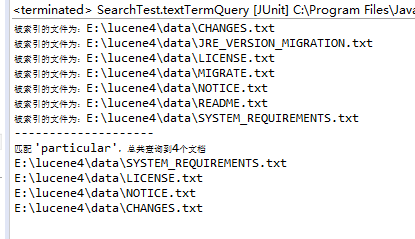
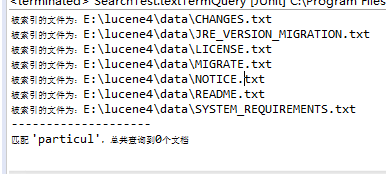
- 解析:对特定项搜索的方法是以搜索关键字作为单位查询,如果把关键字key改为key="particul" ,则结果如下,无法匹配到particular:
解析查询表达式
/**

     * 解析查询表达式,在要搜索的关键字中可以使用AND OR ~ * ?等

     * AND 与      OR 或   ~相近

     * AND和OR只能大写

     * @throws ParseException

     * @throws IOException

     */

    @Test

    public void testQueryParse() throws ParseException, IOException {

        System.out.println("--------------------");

        Analyzer analyzer=new StandardAnalyzer();

        QueryParser parser=new QueryParser("fileContents", analyzer);

        String key="Source* AND Derivati*";

        Query query=parser.parse(key);

        TopDocs hits =search.search(query, 10);

        System.out.println("匹配 '" + key + "',总共查询到" + hits.totalHits + "个文档");

        for (ScoreDoc scoreDoc : hits.scoreDocs) {

            Document doc = search.doc(scoreDoc.doc);

            System.out.println(doc.get("filePath"));

        }

    }
结果:
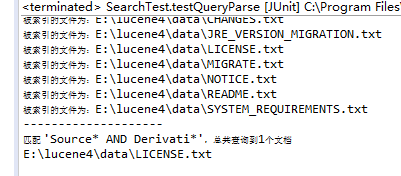
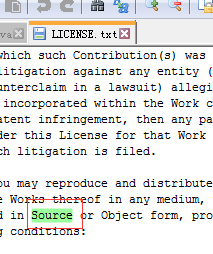
- 查看LICENSE.txt文档,

(五)lucene之特定项搜索和查询表达式的更多相关文章
- 记一次企业级爬虫系统升级改造(五):基于JieBaNet+Lucene.Net实现全文搜索
实现效果: 上一篇文章有附全文搜索结果的设计图,下面截一张开发完成上线后的实图: 基本风格是模仿的百度搜索结果,绿色的分页略显小清新. 目前已采集并创建索引的文章约3W多篇,索引文件不算太大,查询速度 ...
- Lucene.Net 站内搜索
Lucene.Net 站内搜索 一 全文检索: like查询是全表扫描(为性能杀手)Lucene.Net搜索引擎,开源,而sql搜索引擎是收费的Lucene.Net只是一个全文检索开发包(只是帮我们 ...
- C# 动态生成word文档 [C#学习笔记3]关于Main(string[ ] args)中args命令行参数 实现DataTables搜索框查询结果高亮显示 二维码神器QRCoder Asp.net MVC 中 CodeFirst 开发模式实例
C# 动态生成word文档 本文以一个简单的小例子,简述利用C#语言开发word表格相关的知识,仅供学习分享使用,如有不足之处,还请指正. 在工程中引用word的动态库 在项目中,点击项目名称右键-- ...
- 基于JieBaNet+Lucene.Net实现全文搜索
实现效果: 上一篇文章有附全文搜索结果的设计图,下面截一张开发完成上线后的实图: 基本风格是模仿的百度搜索结果,绿色的分页略显小清新. 目前已采集并创建索引的文章约3W多篇,索引文件不算太大,查询速度 ...
- Lucene.net站内搜索—6、站内搜索第二版
目录 Lucene.net站内搜索—1.SEO优化 Lucene.net站内搜索—2.Lucene.Net简介和分词Lucene.net站内搜索—3.最简单搜索引擎代码Lucene.net站内搜索—4 ...
- Lucene.net站内搜索—5、搜索引擎第一版实现
目录 Lucene.net站内搜索—1.SEO优化 Lucene.net站内搜索—2.Lucene.Net简介和分词Lucene.net站内搜索—3.最简单搜索引擎代码Lucene.net站内搜索—4 ...
- Lucene.net站内搜索—4、搜索引擎第一版技术储备(简单介绍Log4Net、生产者消费者模式)
目录 Lucene.net站内搜索—1.SEO优化 Lucene.net站内搜索—2.Lucene.Net简介和分词Lucene.net站内搜索—3.最简单搜索引擎代码Lucene.net站内搜索—4 ...
- Lucene.net站内搜索—3、最简单搜索引擎代码
目录 Lucene.net站内搜索—1.SEO优化 Lucene.net站内搜索—2.Lucene.Net简介和分词Lucene.net站内搜索—3.最简单搜索引擎代码Lucene.net站内搜索—4 ...
- Lucene.net站内搜索—2、Lucene.Net简介和分词
目录 Lucene.net站内搜索—1.SEO优化 Lucene.net站内搜索—2.Lucene.Net简介和分词Lucene.net站内搜索—3.最简单搜索引擎代码Lucene.net站内搜索—4 ...
随机推荐
- arcgis 地理坐标系 699个,投影坐标系是4767
import arcpy # Get the list of spatial references and print it. srs = arcpy.ListSpatialReferences(sp ...
- MAC将根目录文件夹的权限赋给用户
https://my.oschina.net/liujiest/blog/762004 1.sudu -i进入root模式(需输入密码) 2.chown -R 用户名 /文件夹名 sudo -i Pa ...
- STM32 + RT Thread OS 串口通讯
1. 创建项目 a) 禁用Finsh和console b) 默认情况下,项目文件包含了finsh,它使用COM1来通讯,另外,console输出(rt_kprintf)也使用了COM1.因 ...
- Dubbo 2.6.0升级到2.7.3
dubbo依赖,修改groupId和升级version版本号 <dependency> <groupId>com.alibaba</groupId> <art ...
- [Java]在JAVA中使用Oracle的INSERT ALL语法进行批量插入
Oracle也提供了类似MySQL的批量插入语法,只是稍微别扭些,具体代码如下: package com.hy; import java.sql.Connection; import java.sql ...
- ubuntu server 18.04 有线网卡默认关闭,需要手工配置才能使用的方法
1.安装完ubuntu server 18.04 后,笔记本电脑的有线网卡已经识别了,但是没有ip, 并且插上网线后端口灯不亮. 解决方法: 第一步.配置端口链路状态为 up # ip link se ...
- java读取request中的xml
java读取request中的xml 答: // 读取xml InputStream inputStream; StringBuffer sb = new StringBuffer(); inpu ...
- C#泛型学习
什么是泛型 泛型是程序设计语言的一种特性.允许程序员在强类型程序设计语言中编写代码时定义一些可变部分,那些部分在使用前必须作出指明.各种程序设计语言和其编译器.运行环境对泛型的支持均不一样.将类型参数 ...
- spring-core-5.0.6.RELEASE-sources.jar中java源代码不全
笔者最近在调试一段代码,进入spring-core以后,IDEA帮我反编译出源码,其中MethodProxy.java如下 // // Source code recreated from a .cl ...
- php-fpm优化参数介绍
1.php-fpm优化参数介绍他们分别是:pm.pm.max_children.pm.start_servers.pm.min_spare_servers.pm.max_spare_servers. ...