
Mybatis3.1-[tp_34-35]-_映射文件_select_resultMap关联查询_collection定义关联集合封装规则_collection分步查询_延迟加载
笔记要点
出错分析与总结
工程组织
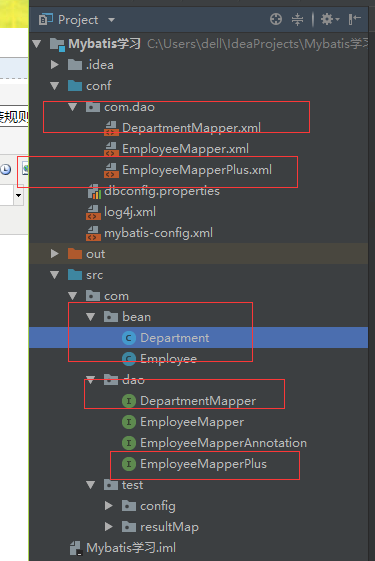
1.定义接口
interface DepartmentMapper
package com.dao;

import com.bean.Department;

public interface DepartmentMapper {

    public Department getDeptByIdStep(Integer id);  //使用Collection,执行分步查询

}
interface EmployeeMapperPlus
package com.dao;

import com.bean.*;

import java.util.List;

public interface EmployeeMapperPlus {

    public List<Employee> getEmpsByDeptId(Integer deptId);  //按照部门的id,返回employee一个列表

}
2.定义XML映射文件
DepartmentMapper.xml
<?xml version="1.0" encoding="UTF-8" ?>

<!DOCTYPE mapper PUBLIC "-//mybatis.org//DTD Mapper 3.0//EN"

        "http://mybatis.org/dtd/mybatis-3-mapper.dtd">

<mapper namespace="com.dao.DepartmentMapper">

    <!--public Department getDeptById(Integer id);-->

    <select id="getDeptById" resultType="com.bean.Department">

        select id,dept_name departmentName from tbl_dept

        where id=#{id}

    </select>

<!--==========================================================================================-->

    <!--

    public class Department {

    private Integer id;

    private String departmentName;

    private List<Employee> emps;

    }

    JavaBean中:   did  dept_name   ||   eid  last_name   email          gender

 -->

    <!--public Department getDeptByIdPlus(Integer id);-->

    <!--进行collection的联合查询/ 分步查询和延迟查询 -->

    <resultMap id="MyDept" type="com.bean.Department">

        <id column="did" property="id"/>

        <result column="dept_name" property="departmentName"/>

        <!--collection 用于定义关联集合类型的属性的封装规则!

            ofType用于指定集合中的类型;-->

        <collection property="emps" ofType="com.bean.Employee">

            <id column="eid" property="id"/>

            <result column="last_name" property="lastName"/>

            <result column="email" property="email"/>

            <result column="gender" property="gender"/>

        </collection>

    </resultMap>

    <select id="getDeptByIdPlus" resultMap="MyDept">

         SELECT d.id did,d.dept_name dept_name,e.id eid,e.last_name last_name,e.email email,gender

        FROM tbl_dept d LEFT JOIN tbl_employee e ON d.id=e.d_id

        WHERE d.id=#{id};

    </select>

    <!--========================================-->

    <!--Department中有属性: private List<Employee> emps;

    public Department getDeptByIdStep(Integer id);  //执行Collection 的分步查询-->

    <resultMap id="MyDeptStep" type="com.bean.Department">

        <id column="id" property="id"/>

        <result column="detp_name" property="departmentName"/>

        <collection property="emps" select="com.dao.EmployeeMapperPlus.getEmpsByDeptId"

            column="id">

        </collection>

    </resultMap>

    <select id="getDeptByIdStep" resultMap="MyDeptStep">

       select id,dept_name departmentName from tbl_dept

        where id=#{id}

    </select>

</mapper>
EmployeeMapperPlus.xml c新增内容
    <select id="getEmpsByDeptId" resultType="com.bean.Employee">

        select * from tbl_employee where d_id = #{DeptId}

    </select>
3.编写测试代码
    @Test

    public void test07() throws Exception{

        SqlSession openSession = getSqlSessionFactory().openSession();

        try{

            DepartmentMapper mapper = openSession.getMapper(DepartmentMapper.class);

//            System.out.println("---tp_34---多表关联查询,使用collection 定义关联集合封装规则-----");

//            Department department = mapper.getDeptByIdPlus(1);

//            List<Employee> emps = department.getEmps();

//            for(Employee e:emps)

//                System.out.println(e);

            System.out.println("---tp_35---多表关联查询,使用collection分步查询&延迟加载--");

            Department dept = mapper.getDeptByIdStep(1);

            System.out.println(dept.getDepartmentName());   //只有一行时,进行按需加载

//          System.out.println(dept);       //当要加载全部的时候,就不会延迟加载了

            openSession.commit();//默认是不自动提交数据的,需要我们自己手动提交

        }finally {

            openSession.close();

        }

    }
测试结果 (全部调用时的结果)
---tp_35---多表关联查询,使用collection分步查询&延迟加载--

DEBUG 12-04 12:01:58,977 ==>  Preparing: select id,dept_name departmentName from tbl_dept where id=?   (BaseJdbcLogger.java:145)

DEBUG 12-04 12:01:58,997 ==> Parameters: 1(Integer)  (BaseJdbcLogger.java:145)

DEBUG 12-04 12:01:59,069 <==      Total: 1  (BaseJdbcLogger.java:145)

开发部

DEBUG 12-04 12:01:59,069 ==>  Preparing: select * from tbl_employee where d_id = ?   (BaseJdbcLogger.java:145)

DEBUG 12-04 12:01:59,070 ==> Parameters: 1(Integer)  (BaseJdbcLogger.java:145)

DEBUG 12-04 12:01:59,072 <==      Total: 2  (BaseJdbcLogger.java:145)

Department{id=1, departmentName='开发部'}
Mybatis3.1-[tp_34-35]-_映射文件_select_resultMap关联查询_collection定义关联集合封装规则_collection分步查询_延迟加载的更多相关文章
- Mybatis3.1-[tp_32-33]-_映射文件_select_resultMap关联查询_association分步查询_延迟加载
笔记要点出错分析与总结 工程组织 1.定义接口 DepartmentMapper package com.dao; import com.bean.Department; public interfa ...
- Mybatis3.1-[tp_36-37]-_映射文件_select_resultMap关联查询__分步查询传递多列值&fetchType_discriminator鉴别器
_分步查询传递多列值&fetchType_discriminator鉴别器 笔记要点出错分析与总结 Department.java bean public class Department { ...
- mybatis3.1-[topic-18-20]-_映射文件_参数处理_单个参数&多个参数&命名参数 _POJO&Map&TO 三种方式及举例
笔记要点出错分析与总结 /**MyBatis_映射文件_参数处理_单个参数&多个参数&命名参数 * _POJO&Map&TO 三种方式及举例 _ * 单个参数 : #{ ...
- mybatis映射文件_select_resultMap
实体类: Employee.java类: package com.hand.mybatis.bean; public class Employee { private Integer e ...
- MyBatis3_[tp-26-27]_映射文件_select_返回List_记录封装Map:返回单个元素的Map或者整体Map集合
笔记要点出错分析与总结工程组织 1.定义接口 public interface EmployeeMapper { //多条记录封装到一个map中: Map<Integer,Employee> ...
- MyBatis 3.0_[tp-24-25]_映射文件_参数处理_#与$取值区别_#{}更丰富的用法
笔记要点出错分析与总结 /**================Mybatis参数值的获取:#和$符号的区别=============== * #{}:可以获得map中的值或者pojo对象属性的值; * ...
- MyBatis映射文件的resultMap如何做表关联
MyBatis的核心是其映射文件,SqlMap文件,里面配置了项目中用到了什么SQL语句,和数据库相关的逻辑都在这个映射文件里.顾名思义,映射文件就是对Java对象和SQL的映射.这里简单介绍一下映射 ...
- mybatis映射文件select_resultMap_关联查询_collection定义关联集合
知识点:查询一个实体类,并查出这个类下面的集合 Employee.java实体类 package com.hand.mybatis.bean;public class Employee { pr ...
- 5.20 mybatis反向生成的映射文件xml(如果需要自己定义其他sql语句时如下)
解决mybatis-generator 生成的mapper.xml覆盖自定义sql的问题 mybatis-generator是个好工具,一建即可生成基本增删改成功能的mapper.xml.但这些是不够 ...
随机推荐
- springboot maven 收发JSON
先在pom.xml添加 json 库 <dependency> <groupId>com.alibaba</groupId> <artifactId>f ...
- JMC(Java Mission Control)在mac下无法启动和显示界面
错误 `org.eclipse.swt.layout.griddata cannot be cast to org.eclipse.swt.layout.filldata` 解决 来源 注意 根据自己 ...
- http响应时长分析
curl -o /dev/null -s -w "time_namelookup:%{time_namelookup}::time_connect:%{time_connect}::time ...
- skywalking 链路式跟踪
wget http://mirror.bit.edu.cn/apache/skywalking/6.4.0/apache-skywalking-apm-6.4.0.tar.gzwget https:/ ...
- eclipse设置格式化tab为4个空格和idea一样
- Eclipse+TestNG搭建接口自动化测试框架
一.环境安装 1.前提 安装好jdk 配置好Java环境变量 安装Eclips 这些网上都有,就不再详细介绍. 资源分享链接:http://pan.baidu.com/s/1v9Fw6 2.安装Tes ...
- [SQL] - Attempted to read or write protected memory. This is often an indication that other memory is corrupt. 问题之解决
场景: 使用 Oracle.DataAccess.dll 访问数据库时,OracleDataAdapter 执行失败. 异常: System.AccessViolationException was ...
- Mkdown常用语法
这篇笔记停了两天,今天开始整理, 写这篇笔记主要是加强下自己的mkdown语法知识, 也当作练手之作. Mkdown 语法简介 标题 [h1 - h6] # ~ ###### 一般# 作为标题, 只有 ...
- Python中nonlocal的用法
class Text: def __init__(self): pass def big(self): n, m = 0, 0 def a(): nonlocal n n += 1 print(n) ...
- TCP,SYN,FIN扫描
1.TCP扫描相对来说是速度比较慢的一种,为什么会慢呢?因为这种方法在扫描的时候会从本地主机的一个端口向目标主机的一个端口发出一个连接请求报文段,而目标主机在收到这个这个请求报文后: 有回复: 若同意 ...