
js实现类似iphone的秒表-添加平均数功能
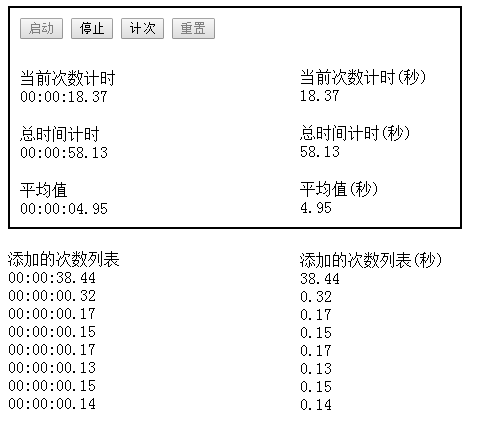
<!DOCTYPE html>

<html>

  <head>

    <meta charset="utf-8">

    <meta name="viewport" content="initial-scale=1, maximum-scale=1, user-scalable=no, width=device-width">

    <title>stop watch</title>

    <!--by 0o晓月メ http://www.cnblogs.com/final-elysion/p/6066358.html -->

    <script type="text/javascript">

        //起始计时时间

        var totalStartTime = null;

        var countStartTime = null;

        //暂停时的时间

        var stopCountTime = 0;

        var stopTotalTime = 0;

        //保存的计次时间列表

        var countList = [];

        //循环指针

        var changeTime = null;

        var addnewValue = false;

        var begin = false;

        //label & 缓存已经使用的时间

        var countTime = null;

        var totalTime = null;

        beginChange = function(){

            //设置标志位进行控制,避免多线程造成的变量问题

            begin = true;

            changeTime = setInterval(changeStopWatch,10);

            document.getElementById('begin').disabled = true;

            document.getElementById('stop').disabled = false;

            document.getElementById('commit').disabled = false;

            document.getElementById('reset').disabled = true;

        }

        /**

         * 计时器核心方法

         */

        changeStopWatch = function(){

            if(begin){

                totalStartTime = new Date();

                countStartTime = totalStartTime;

                begin = false;

            }else if(addnewValue){

                //重设新的起始时间 暂停的时间点

                countStartTime = new Date();

                stopCountTime = 0;

                addnewValue = false;

            }

            var now = new Date();

            var tempTotal = (now.getTime() - totalStartTime.getTime())/1000 + stopTotalTime;

            var tempCount = (now.getTime() - countStartTime.getTime())/1000 + stopCountTime;

            tempTotal = Math.floor(tempTotal * 100) / 100;

            tempCount = Math.floor(tempCount * 100) / 100;

            //多线程问题有时候会出现这情况

            if(tempTotal < 0 || tempCount < 0){

                console.log('bug')

                return ;

            }

            setTotalTime(tempTotal);

            setCountTime(tempCount);

        }

        stopChange = function(){

            clearInterval(changeTime);

            stopCountTime = countTime;

            stopTotalTime = totalTime;

            document.getElementById('begin').disabled = false;

            document.getElementById('stop').disabled = true;

            document.getElementById('commit').disabled = true;

            document.getElementById('reset').disabled = false;

        }

        addNewValue = function (){

            //缓存添加的时间

            var newValue = countTime;

            countList.push(newValue);

            //设置标志位进行控制,避免多线程造成的变量问题

            addnewValue = true;

            //刷新页面

            setNewValue(newValue);

            changeAverage();

        }

        changeAverage = function(){

            var total = 0,

                i = 0;

            for(;i<countList.length; i++){

                total = total +countList[i];

            }

            var result = Math.floor(total/i * 100) / 100;

            document.getElementById('average').innerText = secondToTime(result);

            document.getElementById('average-second').innerText = result;

        }

        resetStopWatch = function(){

            totalStartTime = 0;

            countStartTime = 0;

            stopCountTime = 0;

            stopTotalTime = 0;

            countList = [];

            changeTime = null;

            addnewValue = false;

            begin = false;

            setCountTime(0);

            setTotalTime(0);

            document.getElementById('result').innerHTML = "";

            document.getElementById('average').innerText = "00:00:00.00";

            document.getElementById('result-second').innerHTML = "";

            document.getElementById('average-second').innerText = "0";

        }

        function secondToTime(time) {

            var result = "";

            if (null != time && "" != time && time > 0) {

                //hour

                if (time >= 60 * 60) {

                    result = parseInt(time / 3600);

                    if(result< 10){

                        result = "0" + result + ":";

                    }else{

                        result = result + ":"

                    }

                }else{

                    result = "00:"

                }

                //min

                if (time >= 60) {

                    var tempMin = parseInt((time - parseInt(time / 3600) * 3600 )/ 60) ;

                    if(tempMin < 10){

                        tempMin = "0" + tempMin + ":";

                    }else{

                        tempMin = tempMin + ":"

                    }

                    result = result + tempMin;

                }else{

                    result = result + "00:";

                }

                //second

                var timeStr = time + "";

                var tempSecond = parseInt(time%60);

                if(tempSecond < 10){

                    tempSecond = "0" + tempSecond;

                }

                if(timeStr.indexOf(".") >= 0){

                    tempSecond = tempSecond + timeStr.substring(timeStr.indexOf("."),timeStr.length);

                }

                result = result + tempSecond;

            }else{

                result = "00:00:00.00";

            }

            return result;

        }

        getCountTime = function(){

            return document.getElementById('count-Time');

        }

        setCountTime = function(value){

            countTime = value;

            document.getElementById('count-second-Time').innerText = value;

            document.getElementById('count-Time').innerText = secondToTime(value);

        }

        getTotalTime = function(){

            return document.getElementById('total-Time');

        }

        setTotalTime = function(value){

            totalTime = value;

            document.getElementById('total-Time').innerText = secondToTime(value);

            document.getElementById('total-second-Time').innerText = value;

        }

        setNewValue = function(value){

            var newNode = document.createElement("div");

            newNode.innerHTML = secondToTime(value);

            var oldNode = document.getElementById('result');

            oldNode.appendChild(newNode);

            var newNode2 = document.createElement("div");

            newNode2.innerHTML = value;

            var oldNode2 = document.getElementById('result-second');

            oldNode2.appendChild(newNode2);

        }

    </script>

  </head>

  <body >

    <div style="width: 430px;border-width: 2px;border-style: solid;padding: 10px 10px 10px 10px;">

        <input type="button" id ="begin" value="启动" onclick="beginChange()"/>

        <input type="button" id = "stop" value="停止" disabled="true" onclick="stopChange()"/>

        <input type="button" id = "commit" value="计次"  disabled="true" onclick="addNewValue()"/>

        <input type="button" id = "reset" value="重置"  disabled="true" onclick="resetStopWatch()"/>

        <br />

        <div style="width:200px;margin-top:10px;" >

            <div style="padding-top:20px;">当前次数计时</div>

            <div id="count-Time" >

                00:00:00.00

            </div>

            <div style="padding-top:20px;">总时间计时</div>

            <div id="total-Time" >

                00:00:00.00

            </div>

            <div style="padding-top:20px;">

                <div>平均值</div>

                <div id ="average" >00:00:00.00</div>

            </div>

        </div>

        <div style="width: 200px;position: absolute;left: 300px;top: 50px;" >

            <div style="padding-top:20px;">当前次数计时(秒)</div>

            <div id="count-second-Time">

                0

            </div>

            <div style="padding-top:20px;">总时间计时(秒)</div>

            <div id="total-second-Time">

                0

            </div>

            <div style="padding-top:20px;">

                <div>平均值(秒)</div>

                <div id ="average-second" >0</div>

            </div>

        </div>

    </div>

    <div style="width:200px;margin-top:21px;">

        添加的次数列表

        <div id="result"  >

        </div>

    </div>

    <div style="width: 200px;position: absolute;left: 300px;top:253px;">

        添加的次数列表(秒)

        <div id="result-second"  >

        </div>

    </div>

  </body>

</html>
js实现类似iphone的秒表-添加平均数功能的更多相关文章
- JS为Select下拉框添加输入功能
JavaScript使用parentNode.nextSibling.value实现的本功能,实际上你会发现网页上有两个控件元素,一个是Select,一个是input,使用CSS将input覆盖于se ...
- Expression Blend 的点滴(4)--创建类似iPhone屏幕锁控件(下)
原文:Expression Blend 的点滴(4)--创建类似iPhone屏幕锁控件(下) 接着上篇... 接下去,将一步步演示如果创建当点击checkBox后,其中的按钮由左边滑动到右边,表示处于 ...
- (vue.js)axios interceptors 拦截器中添加headers 属性
(vue.js)axios interceptors 拦截器中添加headers 属性:http://www.codes51.com/itwd/4282111.html 问题: (vue.js)axi ...
- WPF如何实现类似iPhone界面切换的效果(转载)
WPF如何实现类似iPhone界面切换的效果 (version .1) 转自:http://blog.csdn.net/fallincloud/article/details/6968764 在论坛上 ...
- Andoird实现类似iphone AssistiveTouch的控件的demo
类似Iphone Assistive Touch的控件的实现 网上也有些这方面的控件,不过貌似不怎么好用,或者是论坛需要积分下载,恰好自己在项目中有用到这种控件,就打算自己写一个,也成功实现了这种功能 ...
- JS实现为控件添加倒计时功能
一.概述 在有些报表需求中,需要为控件添加倒计时功能,限制到某一个时间点后能进行一项操作或不能进行某项操作,比如查询,导出功能等等,又需要人性化地显示还有多少时间,即倒计时功能,比如下图中我们限制这个 ...
- iPhone 收藏网址[添加到书签] 和 [添加到主屏幕] 显示自定义图标,而不是网页截图
iPhone 收藏网址[添加到书签] 和 [添加到主屏幕] 显示自定义图标,而不是网页截图: <!-- Safari浏览器[添加到书签] --> <link rel="sh ...
- 利用原生JS实现类似浏览器查找高亮功能(转载)
利用原生JS实现类似浏览器查找高亮功能 在完成 Navify 时,增加一个类似浏览器ctrl+f查找并该高亮的功能,在此进行一点总结: 需求 在.content中有许多.box,需要在.box中找出搜 ...
- js实现类似页面广告一段时间自动打开一段时间自动关闭的功能
js实现类似页面广告一段时间自动打开一段时间自动关闭的功能 一.总结 Window 对象的 open()方法:window.open('测试页面.html','news','height=300,wi ...
随机推荐
- java面向对象--类加载器及Class对象
类加载器 jvm 和 类的关系 当调用 java命令运行一个java程序时,会启动一个java虚拟机进程.同一个jvm的所有线程.所有变量都处于同一个进程里,都使用该jvm进程的内存区. jvm进程终 ...
- 使用 CKEditor 上传图片, 粘贴屏幕截图
之前写过wangEditor,那真是好用,文档也清晰,半天就搞定了,无奈没有对应license,只好选择别的. 外语一般,阅读理解都靠蒙.CKEditor官方文档看的我云里雾里,国内的博客比较少,经过 ...
- Java-面向对象总结
下面是学习面向对象的知识点和总结: 面向对象思想: 遇到需求,首先去找是否有现成的类来实现此功能,创建对象来调用,以此来组合成新的类实现自己的需求. 在java中是以类为单位,一个类包括成员变量.成员 ...
- 【2017-05-30】WebForm文件上传
用 FileUpload控件进行上传文件. <asp:FileUpload ID="FileUpload1" runat="server" /> ...
- php 二级级联菜单
找了很多个级联的菜单,都不好用,自己弄个简单点的,共享下,希望有朋友用得着 <?php //建立表country,有三个字段Id,parentId,area. $pro = $_POST['pr ...
- jQuery插件 -- 图片随页面滚动fixed
<!DOCTYPE html> <html lang="en"> <head> <meta charset="UTF-8&quo ...
- Eclipse之文件【默认编码格式设置】,防止乱码等问题
文件默认编码格式设置步骤如下: 这里显示的是workspace的视图 其他格式文件的视图如下:
- cpp(第十七章)
1.baseic_ostream<charT,traits>& write(const char_type *s,streamsize n),cout.write()第一个参数提供 ...
- re 学习随便
. 任意一个字符 \转义字符 * 字符重复0--多次 + 字符重复1-多次 ? 字符重复0-1次 ^行首匹配 或者在一个字符集中表示取反 \$ 匹配字符串末尾 \b 匹配\w 与\w 之间的 \B ...
- Chapter 5:Spectral-Subtractive Algorithms
作者:桂. 时间:2017-05-24 10:06:39 主要是<Speech enhancement: theory and practice>的读书笔记,全部内容可以点击这里. 书中 ...