
web服务之nginx部署
本期内容概要
- 了解web服务
- Nginx和Apache的对比
- 部署Nginx
内容详细
1.什么是web服务
	Web服务是一种服务导向架构的技术,通过标准的Web协议提供服务,目的是保证不同平台的应用服务可以互操作

	根据W3C的定义,Web服务应当是一个软件系统,用以支持网络间不同机器的互动操作。

网络服务通常是许多应用程序接口所组成的,它们透过网络,例如国际互联网的远程服务器端,执行客户所提交服务的请求

	web就是B/S架构
2.web服务器软件
# 网络模型

	01 select

	02 poll

	03 epoll

1.apache

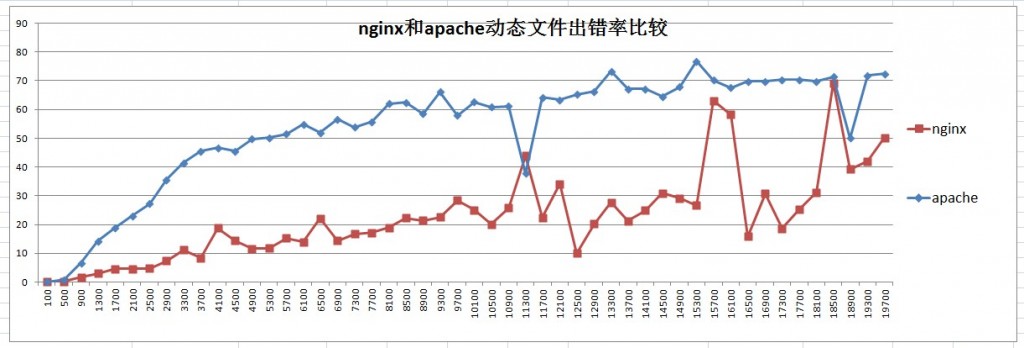
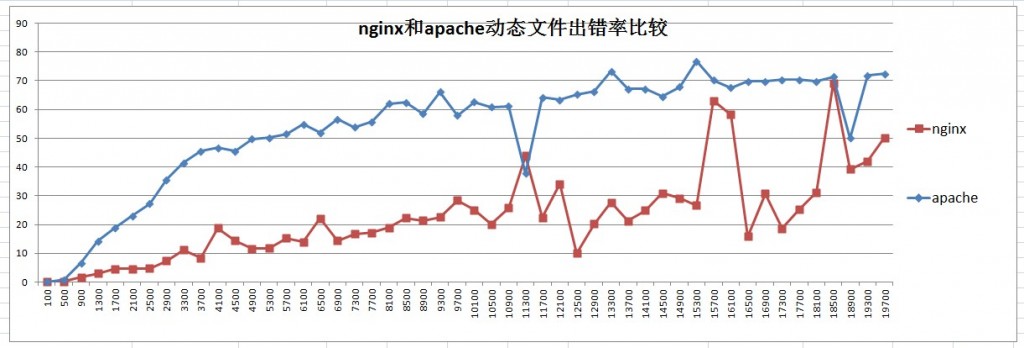
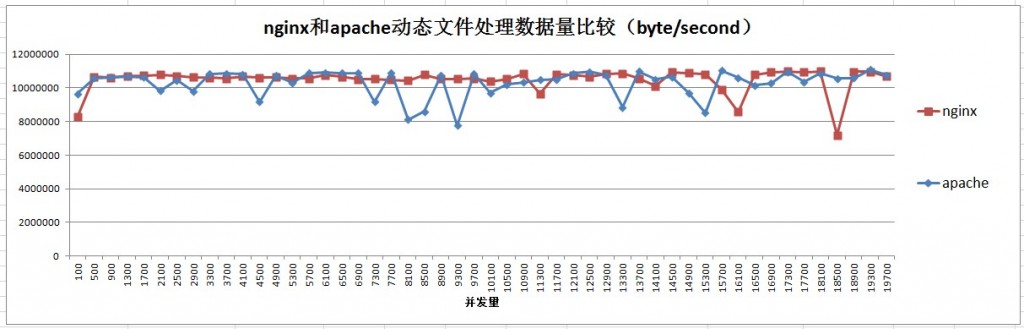
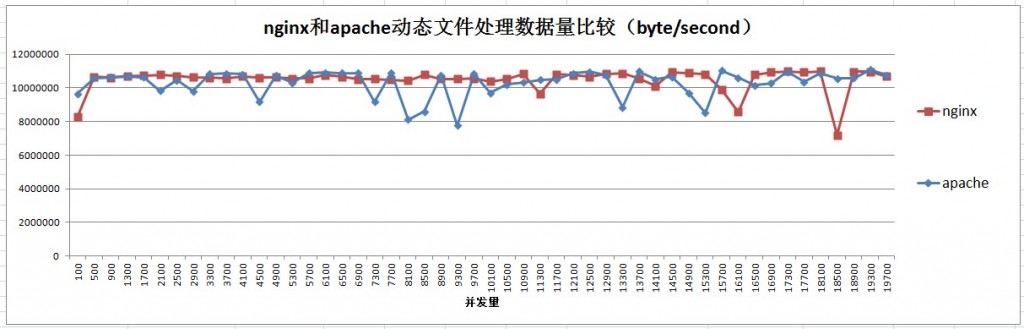
	仅支持 select网络模型

2.Nginx

	部署在Linux中 使用 epoll网络模型

	官网:https://nginx.org/

	软件下载:https://nginx.org/download/
3.部署Nginx
1.安装方式

	01 yum安装(从官网安装 以 web01服务器为例)

	[root@web01 ~]# vim /etc/yum.repos.d/nginx.repo

	写入以下内容:

	[nginx-stable]

	name=nginx stable repo

	baseurl=http://nginx.org/packages/centos/$releasever/$basearch/

	gpgcheck=1

	enabled=1

	gpgkey=https://nginx.org/keys/nginx_signing.key

	module_hotfixes=true

	[nginx-mainline]

	name=nginx mainline repo

	baseurl=http://nginx.org/packages/mainline/centos/$releasever/$basearch/

	gpgcheck=1

	enabled=0

	gpgkey=https://nginx.org/keys/nginx_signing.key

	module_hotfixes=true

	[root@web01 ~]# yum install nginx -y

	[root@web01 ~]# systemctl stop httpd

	[root@web01 ~]# systemctl start nginx

	安装完成过后 直接在浏览器输入客户端IP连接测试

	02 二进制安装

	详见 rpm安装

	https://www.cnblogs.com/jgx0/p/15700136.html

	03 编译安装(以 web02服务器为例)

	先从官网下载 nginx-1.20.2.tar.gz 压缩包

	[root@web02 ~]# wget https://nginx.org/download/nginx-1.20.2.tar.gz

	[root@web02 ~]# tar -xf nginx-1.20.2.tar.gz

	[root@web02 ~]# vim /etc/yum.repos.d/nginx.repo

	写入以下内容:

	[nginx-stable]

	name=nginx stable repo

	baseurl=http://nginx.org/packages/centos/$releasever/$basearch/

	gpgcheck=1

	enabled=1

	gpgkey=https://nginx.org/keys/nginx_signing.key

	module_hotfixes=true

	[nginx-mainline]

	name=nginx mainline repo

	baseurl=http://nginx.org/packages/mainline/centos/$releasever/$basearch/

	gpgcheck=1

	enabled=0

	gpgkey=https://nginx.org/keys/nginx_signing.key

	module_hotfixes=true

	[root@web02 ~]# cd nginx-1.20.2

	[root@web02 nginx-1.20.2]# ./configure

	[root@web02 nginx-1.20.2]# make

	[root@web02 nginx-1.20.2]# make install

	因为没有在环境变量 直接用会提示未安装 所以要用绝对路径执行nginx

	[root@web02 nginx]# /usr/local/nginx/sbin/nginx -v
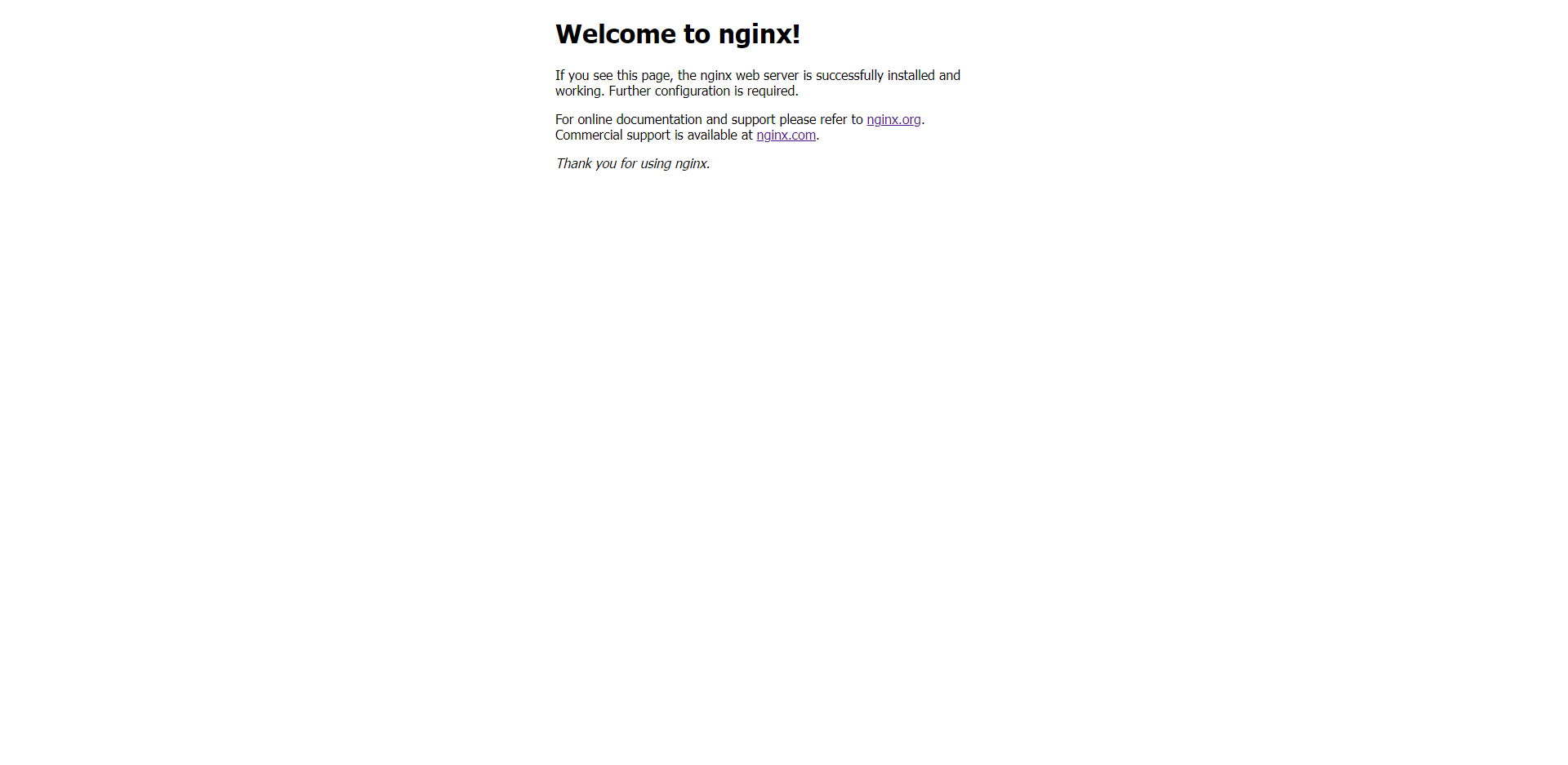
- nginx启动成功
4.平滑增加Nginx模块
'''

增加模块必须重新编译

'''

[root@web02 ~]# rm -rf nginx-1.20.2

[root@web02 ~]# tar -xf nginx-1.20.2.tar.gz

[root@web02 ~]# cd nginx-1.20.2

[root@web02 nginx-1.20.2]# ./configure --with-http_ssl_module

一般会出现报错 安装报错提示解决:

	[root@web02 nginx-1.20.2]# yum install openssl openssl-devel -y

	[root@web02 nginx-1.20.2]# ./configure --with-http_ssl_module

[root@web02 nginx-1.20.2]# make

[root@web02 nginx-1.20.2]# make install

[root@web02 nginx-1.20.2]# /usr/local/nginx/sbin/nginx -V

会显示 --with-http_ssl_module 模块已经加入
5.Nginx的命令
1. -v :	打印版本号

	[root@web01 ~]# nginx -v

	nginx version: nginx/1.20.2

2. -V :	打印版本号和配置项

3. -t :	检查配置文件

4. -T :	测试配置文件并启动

5. -q :	打印错误日志

6. -s :	操作进程

	stop   :	停止

	quit   :	退出

	reopen :	重启(关机之后在启动)

	reload :	重载(重载配置文件)

7. -p  :	指定nginx的工作目录

8. -e  :	指定错误日志路径

9. -c  :	指定配置文件的路径

10. -g :	设置一个全局的Nginx配置项

	[root@web01 ~]# nginx -g 'daemon off;'
6.Nginx配置文件
分为:

	全局配置(全局的) 和 模块配置(大括号里面的)

[root@web01 ~]# cat /etc/nginx/nginx.conf

#####

user  nginx;

worker_processes  auto;

error_log  /var/log/nginx/error.log notice;

pid        /var/run/nginx.pid;

events {

    worker_connections  1024;

}

http {

    include       /etc/nginx/mime.types;

    default_type  application/octet-stream;

    log_format  main  '$remote_addr - $remote_user [$time_local] "$request" '

                      '$status $body_bytes_sent "$http_referer" '

                      '"$http_user_agent" "$http_x_forwarded_for"';

    access_log  /var/log/nginx/access.log  main;

    sendfile        on;

    #tcp_nopush     on;

    keepalive_timeout  65;

    #gzip  on;

    include /etc/nginx/conf.d/*.conf;

}

#####

1.全局配置

	01 user :	指定Nginx的启动用户

	02 worker_processes :	定义Nginx的worker进程数

		auto : CPU数量

	03 error_log :	错误日志路径

	04 pid :	pid的存放文件路径

	05 events :	模块配置

		worker_connections :每一个worker进程最多同时接入多少个请求

		use : 指定Nginx的网络模型

	06 http :	web服务的模块

		include      :	加载外部的配置项

		default_type :	如果找不到文件的类型,则按照指定默认类型处理

		log_format   :	定义日志格式

		例如改为json格式日志:

		log_format json '{"@timestamp":"$time_iso8601",'

			'"host":"$server_addr",'

			'"service":"nginxTest",'

			'"trace":"$upstream_http_ctx_transaction_id",'

			'"log":"log",'

			'"clientip":"$remote_addr",'

			'"remote_user":"$remote_user",'

			'"request":"$request",'

			'"http_user_agent":"$http_user_agent",'

			'"size":$body_bytes_sent,'

			'"responsetime":$request_time,'

			'"upstreamtime":"$upstream_response_time",'

			'"upstreamhost":"$upstream_addr",'

			'"http_host":"$host",'

			'"url":"$uri",'

			'"domain":"$host",'

			'"xff":"$http_x_forwarded_for",'

			'"referer":"$http_referer",'

			'"status":"$status"}';

			access_log /var/log/nginx/access.log json ;

	07 sendfile :	高效读取文件

	08 keepalive_timeout :	长连接保持连接的

		HTTP 1.0 短链接

		HTTP 1.1 长连接

	09 server :	网址模块

		listen      :	监听的端口

		server_name :	定义域名

		location    :	访问路径

			root  :	指定网址路径

			index :	指定网址的索引文件
7.超级玛丽和象棋游戏搭建
1.上传代码

2.编辑配置文件

	创建游戏目录:

	[root@web01 opt]# mkdir /opt/Super_Marie

	[root@web01 opt]# mkdir /opt/Chinese_chess

	[root@web01 opt]# cd /etc/nginx/conf.d

	[root@web01 conf.d]# vim game.conf

	写入以下内容:

	server {

		listen 80;

		server_name game.Marie.com;

		location / {

			root /opt/Super_Marie;

			index index.html;

		}

	}

	[root@web01 conf.d]# vim game1.conf

	写入以下内容:

	server {

		listen 80;

		server_name game.chess.com;

		location / {

			root /opt/Chinese_chess;

			index index.html;

		}

	}

3.测试配置文件是否正常

	[root@web01 conf.d]# nginx -t

	nginx: the configuration file /etc/nginx/nginx.conf syntax is ok

	nginx: configuration file /etc/nginx/nginx.conf test is successful

4.重启Nginx

	[root@web01 conf.d]# systemctl restart nginx

5.Windows域名解析

	目录: C:\Windows\System32\drivers\etc\hosts

	文本内写入并保存(如果没有该文件:hosts 直接创建普通文本即可):

		192.168.15.7 game.Marie.com

		192.168.15.7 game.chess.com

6.测试

	浏览器输入网址:

	game.Marie.com

	game.chess.com

	正常打开游戏就没问题

web服务之nginx部署的更多相关文章
- web服务器之nginx与apache
最近准备架设php的web服务器,以下内容可供参考. 1.nginx相对于apache的优点: 轻量级,同样起web 服务,比apache占用更少的内存及资源 抗并发,nginx 处理请求是异步非阻塞 ...
- web服务器之nginx和apache的区别
① apache属于重量级的服务器,nginx属于轻量级的服务器; 区别在于对一些功能的支持,比如: pathinfo,php模块方面 ② nginx抗高并发能力强. 由于nginx采用的是异步非阻 ...
- Web服务器之Nginx详解(操作部分)
大纲 一.前言 二.Nginx 安装与配置 三.Nginx 配置文件详解 四.Nginx 命令参数 五.配置Nginx提供Web服务 六.配置Nginx的虚拟主机 七.配置Nginx的用户认证 八.配 ...
- Web服务器之Nginx详解(理论部分)
大纲 一.前言 二.Web服务器提供服务的方式 三.多进程.多线程.异步模式的对比 四.Web 服务请求过程 五.Linux I/O 模型 六.Linux I/O 模型具体说明 七.Linux I/O ...
- nginx作为web服务以及nginx.conf详解
Nginx系列文章:http://www.cnblogs.com/f-ck-need-u/p/7576137.html 1.nginx简介 nginx是一个优秀的web服务程序.反向代理程序.它采用非 ...
- 【转】Web服务器之Nginx详解(理论部分)
大纲 一.前言 二.Web服务器提供服务的方式 三.多进程.多线程.异步模式的对比 四.Web 服务请求过程 五.Linux I/O 模型 六.Linux I/O 模型具体说明 七.Linux I/O ...
- Linux系统WEB服务之Nginx基础入门
一.Nginxi简介 Nginx是什么?它是一个开源.高性能的WEB服务器软件和代理服务器软件,由俄罗斯人Igor Sysoev 开发实现.它的功能主要分三类,第一是它作为一个WEB服务软件使用:第二 ...
- WEB 服务应用 Nginx之安装篇
一.Nginx 源码包安装与配置 1.环境准备 操作系统.内核版本: CentOS 6.8 2.6.32-642.el6.x86_64 Nginx 软件版本: nginx-1.10.2 2.创建Ng ...
- linux nginx 部署多套服务(以react包为例)
前言 今天我特地写下笔记,希望可以完全掌握这个东西,也希望可以帮助到任何想对学习这个东西的同学. 本文用nginx部署服务为主要内容,基于CentOs 7.8系统. 文档版本:1.0.1 更新时间:2 ...
随机推荐
- Learning Spark中文版--第四章--使用键值对(2)
Actions Available on Pair RDDs (键值对RDD可用的action) 和transformation(转换)一样,键值对RDD也可以使用基础RDD上的action(开工 ...
- java加密方式
加密,是以某种特殊的算法改变原有的信息数据,使得未授权的用户即使获得了已加密的信息,但因不知解密的方法,仍然无法了解信息的内容.大体上分为双向加密和单向加密,而双向加密又分为对称加密和非对称加密(有些 ...
- 【Linux】【Commands】systemd
1. 系统启动流程:POST --> Boot Sequeue(BIOS) --> Bootloader(MBR) --> Kernel(ramdisk) --> rootfs ...
- java配置文件的使用 —— 设置一个类为单例模式
阅读本文章前建议先阅读:java通过JDBC访问sqlserver数据库 一.使用原因:通过JDBC连接数据库时有时会需要连接不同的数据库,而jar包.连接url.用户名和密码等都是写定在程序中,不便 ...
- 关于python中显存回收的问题
技术背景 笔者在执行一个Jax的任务中,又发现了一个奇怪的问题,就是明明只分配了很小的矩阵空间,但是在多次的任务执行之后,显存突然就爆了.而且此时已经按照Jax的官方说明配置了XLA_PYTHON_C ...
- Nginx模块之limit_conn & limit_req
limit_conn模块 生效阶段:NGX_HTTP_PREACCESS_PHASE阶段 生效范围:全部worker进程(基于共享内存),进入preaccess阶段前不生效,限制的有效性取决于key的 ...
- MySQL获取对应时间
一.查询当前时间包含年月日 SELECT CURDATE(); SELECT CURRENT_DATE(); 二.查询当前时间包含年月日时分秒 SELECT NOW(); SELECT SYSDATE ...
- Kerboros 认证
转:Kerberos介绍(全)
- 初探Windows用户态调试机制
我们在感叹Onlydbg强大与便利的同时,是否考虑过它实现的原理呢? 作为一个技术人员知其然必知其所以然,这才是我们追求的本心. 最近在学习张银奎老师的<软件调试>,获益良多.熟悉Wind ...
- LuoguP4420 [COCI2017-2018#1] Tetris 题解
Content 有一个 \(n\times m\) 的拼图,摆上了几块俄罗斯方块图形.已知这些图形可能包含以下这五种(可以旋转),求出下列类型的俄罗斯方块图形数量. 数据范围:\(1\leqslant ...