想实现效果:
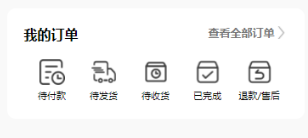
点击后跳转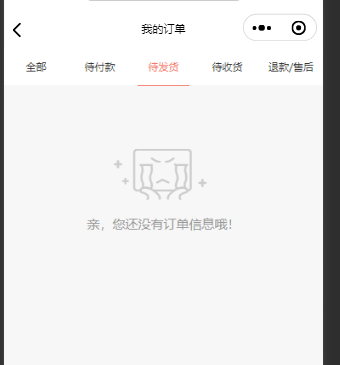
wxml:
<view class="fiveson">
<view class="fiveson-son" bindtap="onepay">
<view class="son-icon">
<image src="../../images/icon/oneimg.png"></image>
</view>
<view class="son-name">待付款</view>
</view>
<view class="fiveson-son" bindtap="twopay">
<view class="son-icon">
<image src="../../images/icon/secondimg.png"></image>
</view>
<view class="son-name">待发货</view>
</view>
<view class="fiveson-son" bindtap="threepay">
<view class="son-icon">
<image src="../../images/icon/thirdimg.png"></image>
</view>
<view class="son-name">待收货</view>
</view>
<view class="fiveson-son" bindtap="fourpay">
<view class="son-icon">
<image src="../../images/icon/fourthimg.png"></image>
</view>
<view class="son-name">已完成</view>
</view>
<view class="fiveson-son" bindtap="fivepay">
<view class="son-icon">
<image src="../../images/icon/fivethimg.png"></image>
</view>
<view class="son-name">退款/售后</view>
</view>
</view>
对应的js:
// 点击待付款跳转
onepay:function(e) {
wx.navigateTo({
url: '/pages/order-lists/index?cid=1',
})
},
// 点击待发货跳转
twopay:function(e) {
wx.navigateTo({
url: '/pages/order-lists/index?cid=2',
})
},
// 点击待收货跳转
threepay:function(e) {
wx.navigateTo({
url: '/pages/order-lists/index?cid=3',
})
},
// 点击已完成跳转
fourpay:function(e) {
wx.navigateTo({
url: '/pages/order-lists/index',
})
},
// 点击退款/售后跳转
fivepay:function(e) {
wx.navigateTo({
url: '/pages/order-lists/index?cid=4',
})
},
跳转后的页面wxml:
<!-- tab栏 -->
<view class="header f-28 col-3">
<view catchtap="bindHeaderTap" class="{{dataType==='all'?'active':''}}" data-type="all">
<text>全部</text>
</view>
<view bindtap="bindHeaderTap" class="{{dataType==='payment'?'active':''}}" data-type="payment">
<text>待付款</text>
</view>
<view bindtap="bindHeaderTap" class="{{dataType==='delivery'?'active':''}}" data-type="delivery">
<text>待发货</text>
</view>
<view bindtap="bindHeaderTap" class="{{dataType==='received'?'active':''}}" data-type="received">
<text>待收货</text>
</view>
<view bindtap="bindHeaderTap" class="{{dataType==='comment'?'active':''}}" data-type="comment">
<text>退款/售后</text>
</view>
</view>
js:
onLoad(options) {
let _this = this;
// 设置scroll-view高度
_this.setListHeight();
//获取索引
let pagecid = options.cid;
console.log(pagecid);
if ( pagecid == 1 ) {
_this.setData({
dataType: options.type || 'payment'
});
} else if ( pagecid == 2 ) {
_this.setData({
dataType: options.type || 'delivery'
});
} else if ( pagecid == 3 ) {
_this.setData({
dataType: options.type || 'received'
});
} else if ( pagecid == 4 ) {
_this.setData({
dataType: options.type || 'comment'
});
} else {
_this.setData({
dataType: options.type || 'all'
});
}
this.setData({
// dataType: e.currentTarget.dataset.type,
list: {},
isLoading: true,
page: 1,
no_more: false,
});
// 获取订单列表
this.getOrderList(options.type);
},
切换的代码(跟这题无关)
/**
* 切换标签
*/
bindHeaderTap(e) {
this.setData({
dataType: e.currentTarget.dataset.type,
list: {},
isLoading: true,
page: 1,
no_more: false,
});
// 获取订单列表
this.getOrderList(e.currentTarget.dataset.type);
},
/**
* 获取订单列表(跟这题无关)
*/
getOrderList(isPage, page) {
let _this = this;
App._get('user.order/lists', {
page: page || 1,
dataType: _this.data.dataType
}, result => {
let resList = result.data.list,
dataList = _this.data.list;
if (isPage == true) {
_this.setData({
'list.data': dataList.data.concat(resList.data),
isLoading: false,
});
} else {
_this.setData({
list: resList,
isLoading: false,
});
}
});
},
参考链接:https://q.cnblogs.com/q/125957/
- 小程序点击跳转外部链接 微信小程序提示:不支持打开非业务域名怎么办 使用web-view 配置业务域名
小程序点击跳转外部页面 1.index.wxml 添加点击事件 标签可以是小程序支持的 <!-- 邀请好友 --> <cover-image src='/img/invitat ...
- 微信小程序之 页面跳转 及 调用本地json的假数据调试
一.微信小程序 跳转页面 小程序页面有2种跳转,可以在wxml页面或者js中: (1)在wxml页面中: <navigator url="../index/index"> ...
- 微信小程序和微信小程序之间的跳转和传参示例代码附讲解
一:微信小程序跳转 使用限制 需要用户触发跳转 从 2.3.0 版本开始,若用户未点击小程序页面任意位置,则开发者将无法调用此接口自动跳转至其他小程序. 需要用户确认跳转 从 2.3.0 版本开始,在 ...
- 微信小程序 - Request | 路由跳转 | 本地存储
Request 官方文档 wx.request相当于发送ajax请求 参数 属性 类型 默认值 必填 说明 url string 是 开发者服务器接口地址 data string/object/A ...
- 微信小程序页面-页面跳转失败WAService.js:3 navigateTo:fail url not in app.json
微信小程序新建页面的要素一是新建的文件名称和其子文件的名称最好一致,不然容易出问题,在小程序页面跳转中如果出现WAService.js:3 navigateTo:fail url not in app ...
- 微信小程序页面无法跳转
推荐网址:https://www.jianshu.com/p/e56b55334585 1.无法跳转原因分析 要跳转的路径在app.js里未注册过或路径写错 要跳转的路径是否位于TabBar中 页 ...
- 微信小程序——navigator无法跳转
今天在做小程序的时候,发现用navigator无法进行跳转.url 路径也是对的. 后面发现是因为我需要跳转的页面定义在了tabBar里面的.如下图: 如果需要跳转到tabBar里面定义的这些页面,需 ...
- 微信小程序:页面跳转时传递数据到另一个页面
一.功能描述 页面跳转时,同时把当前页面的数据传递给跳转的目标页面,并在跳转后的目标页面进行展示 二.功能实现 1. 代码实现 test1页面 // pages/test1/test1.js Page ...
- 关于微信小程序的动态跳转
最近在研究微信小程序.在做一个简单的购物小程序时,遇到一个问题:如何通过扫码实现动态的跳转页面功能, 通过研究终于找到了解决方法: 首先当然要实现扫码解析功能js的代码: click: functio ...
随机推荐
- 【Android】安卓四大组件之内容提供者
[Android]安卓四大组件之内容提供者 1.关于内容提供者 1.1 什么是内容提供者 内容提供者就是contentProvider,作用有如下: 给多个应用提供数据 类似一个接口 可以和多个应用分 ...
- 阿里智能运维实践|阿里巴巴DevOps实践指南
编者按:本文源自阿里云云效团队出品的<阿里巴巴DevOps实践指南>,扫描上方二维码或前往:https://developer.aliyun.com/topic/devops,下载完整版电 ...
- SIFT,SuperPoint在图像特征提取上的对比实验
SIFT,SuperPoint都具有提取图片特征点,并且输出特征描述子的特性,本篇文章从特征点的提取数量,特征点的正确匹配数量来探索一下二者的优劣. 视角变化较大的情况下 原图1 原图2 SuperP ...
- 使用VScode编写Markdown的一些使用技巧
- salesforce零基础学习(一百一十一)custom metadata type数据获取方式更新
本篇参考: https://developer.salesforce.com/docs/atlas.en-us.234.0.apexref.meta/apexref/apex_methods_syst ...
- Collection和Map集合
前言 集合的长度是可变的.集合存储的都是对象.而且对象的类型可以不一致. Collection集合和Map集合是所有集合的父接口. Collection接口定义 体系结构的根接口,代表一组对象,有两个 ...
- 认识Visual C++ 6.0工程结构
- linux_12
一.主从复制及主主复制的实现 主从复制 master配置 # yum -y install mysql-server # systemctl enable --now # vim /etc/my.cn ...
- 帆软报表(finereport)JS实现cpt中详细单元格刷新
1.刷新固定单元格 setInterval(function(){ //获取第二行第 5 列 E2 单元格对象 var _changeCell = $("tr[tridx=1]" ...
- Solution -「CF 840C」On the Bench
\(\mathcal{Description}\) Link. 给定数列 \(\{a_n\}\),求排列 \(\{p_n\}\) 的个数,使得 \((\forall i\in[1,n))(a_ ...
