
JDBC加强
一、使用PreparedStatement预编译语句防止SQL注入
什么是SQL注入?
所谓SQL注入,就是通过把SQL命令插入到Web表单提交或输入域名或页面请求的查询字符串,最终达到欺骗服务器执行恶意的SQL命令。
举个例子:假如我们登录时执行的SQL语句为:select *from user where username='USERNAME' and password='PASSWORD';
但是我们可以把USERNAME填写为"tom';-- ",(注意--后有空格),PASSWORD随便写(假设这里写123),这样SQL语句就成了select *from user where username='tom';-- ' and password='123';
"-- "后的内容就被注释掉,现在就算密码不正确也能查询到相应的结果。利用SQL注入可以实现数据的盗取
在Java中使用PreparedStatement类防止SQL注入
防SQL注入的方法有很多,使用预编译语句是一种简单有效的方式
下面介绍如何使用这种方式来操作数据库
我已经在本地数据库mydb中创建了一个user表,并在表中插入数据
现在我们使用字符串拼接的方式来构造一个SQL语句,并在mysql客户端执行此SQL语句,结果如下:

通过图中我们发现这种方式SQL注入成功
下面使用预编译SQL语句的方式来执行此SQL语句
	 String url = "jdbc:mysql://localhost:3306/mydb";

 	 String user = "root";

	 String password = "root";

 	 String username = "杜若' or 1=1; -- ";  //'-- ' 是sql中的注释符号(注意后面的空格)

	 String pwd = "000";

	Class.forName("com.mysql.jdbc.Driver");

	Connection  connection  = DriverManager.getConnection(url,user,password);

	 //构造sql语句

	String sql = "select *from user where username=? and pwd =?";

	PreparedStatement pstmt = connection.prepareStatement(sql);

	pstmt.setString(1, username);

	pstmt.setString(2, pwd);

	ResultSet rs = pstmt.executeQuery();

	if(rs.next()){

		do{

			String username = rs.getString(2);

			String pwd = rs.getString(3);

			System.out.println(username+":"+pwd);

		}while(rs.next());

	}else{

		System.out.println("未查到相应的结果");

	}

	if(rs!=null){

		rs.close();

	}

	if(pstmt!=null){

		pstmt.close();

	}

	if(connection!=null){

		connection.close();

	}
测试运行之后的结果
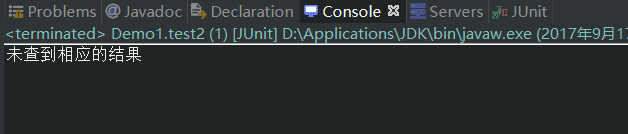
这样已经达到了防SQL注入的目的
那为什么它这样处理就能预防SQL注入提高安全性呢?其实是因为SQL语句在程序运行前已经进行了预编译,在程序运行时第一次操作数据库之前,SQL语句已经被数据库分析,编译和优化,对应的执行计划也会缓存下来并允许数据库已参数化的形式进行查询,当运行时动态地把参数传给PreprareStatement时,即使参数里有敏感字符如 or '1=1'也数据库会作为一个参数一个字段的属性值来处理而不会作为一个SQL指令
二,获取插入自增长值
有时候在插入一条记录的时候,我们需要获取插入这条数据的自增长值,以便在其他地方使用
直接上代码
//获取插入自增长

public class Demo1 {

	private String user="root";

	private String password="root";

	private String url="jdbc:mysql://localhost:3306/mydb";

	@Test

	public void test1() throws Exception{

		Class.forName("com.mysql.jdbc.Driver");

		Connection connection = DriverManager.getConnection(url, user, password);

		String sql = "insert into user(username,pwd) values(?,?)";

		//第二个参数是Statement类中的一个常量,指示是否应该返回自动生成的键的标志

		PreparedStatement pstmt = connection.prepareStatement(sql,Statement.RETURN_GENERATED_KEYS);

		pstmt.setString(1, "mary");

		pstmt.setString(2, "123456");

		pstmt.executeUpdate();

		ResultSet rs = pstmt.getGeneratedKeys();

		if(rs.next()){

			int key = rs.getInt(1);

			System.out.println(key);

		}

		if(rs!=null){

			rs.close();

		}

		if(pstmt!=null){

			pstmt.close();

		}

		if(connection!=null){

			connection.close();

		}

	}

}
三,批处理执行
有时候需要向数据库发送一批SQL语句执行,这时应避免向数据库一条条的发送执行,而应采用JDBC的批处理机制,以提升执行效率。
无论使用Statement对象还是使用PreparedStatement对象都可以实现
这里介绍使用PreparedStatement来实现的方式
- 获取PreparedStatement对象
- 设置每条批处理的参数
- 将一组参数添加到批处理命令中
下面上实例代码
public class Demo1 {

	private String user="root";

	private String password="root";

	private String url="jdbc:mysql://localhost:3306/mydb";

	@Test

	public void test1() throws Exception{

		List<User> list = new ArrayList<User>();

		for(int i = 0;i < 10;i++){

			User user = new User();

			user.setUsername("albee"+i);

			user.setPwd("123456");

			list.add(user);

		}

		sava(list);

	}

	public void sava(List<User> l) throws Exception{

		Class.forName("com.mysql.jdbc.Driver");

		Connection connection = DriverManager.getConnection(url, user, password);

		String sql = "insert into user(username,pwd) values(?,?)";

		PreparedStatement pstmt = connection.prepareStatement(sql);

		for(int i = 0;i<l.size();i++){

			pstmt.setString(1, l.get(i).getUsername());

			pstmt.setString(2, l.get(i).getPwd());

			pstmt.addBatch();

			// 每到五条就执行一次对象集合中的批处理命令,

			if(i%5==0){

				pstmt.executeBatch();

				pstmt.clearBatch();

			}

		}

		// 不足五条也要执行一次

		pstmt.executeBatch();

		pstmt.clearBatch();

		if(pstmt!=null){

			pstmt.close();

		}

		if(connection!=null){

			connection.close();

		}

	}

}
四,事务的操作
有时候我们需要完成一组数据库操作,这其中的操作有一个失败则整个操作就回滚,即组成事务的每一个操作都执行成功整个事务才算成功执行
常见的例子就是银行转帐业务
update account set money=money-1000 where accountName='张三';
update account set money=money+1000 where accountName='李四';
已经在mydb中创建了account表,包含accountName和money字段,并插入了两条记录
实例代码:
// 使用事务

	@Test

	public void test2(){

		String url = "jdbc:mysql://localhost:3306/mydb";

 	 	String user = "root";

	 	String password = "root";

		try {

			Class.forName("com.mysql.jdbc.Driver");

			connection = DriverManager.getConnection(url,user,password);

			connection.setAutoCommit(false);  //设置事务为手动提交

			String sql_zs = "update account set money=money-1000 where accountName='张三'";

			String sql_ls = "update account set money=money+1000 where accountName='李四'";

			pstmt = connection.prepareStatement(sql_ls);

			int count_ls = pstmt.executeUpdate();

			pstmt = connection.prepareStatement(sql_zs);

			int count_zs = pstmt.executeUpdate();

		}catch (Exception e) {

			e.printStackTrace();

			try {

				connection.rollback();

			} catch (Exception e2) {

				e2.printStackTrace();

			}

		} finally {

			try {

				connection.commit();

			} catch (SQLException e1) {

				e1.printStackTrace();

			}

			if(pstmt!=null){

				try {

					pstmt.close();

				} catch (SQLException e) {

					e.printStackTrace();

				}

			}

			if(connection!=null){

				try {

					connection.close();

				} catch (SQLException e) {

					e.printStackTrace();

				}

			}

		}

	}
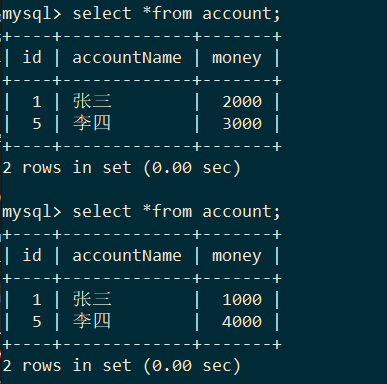
如果事务执行成功
执行前和执行后表的变动
JDBC加强的更多相关文章
- Java数据库连接技术——JDBC
大家好,今天我们学习了Java如何连接数据库.之前学过.net语言的数据库操作,感觉就是一通百通,大同小异. JDBC是Java数据库连接技术的简称,提供连接各种常用数据库的能力. JDBC API ...
- 玩转spring boot——结合AngularJs和JDBC
参考官方例子:http://spring.io/guides/gs/relational-data-access/ 一.项目准备 在建立mysql数据库后新建表“t_order” ; -- ----- ...
- [原创]java使用JDBC向MySQL数据库批次插入10W条数据测试效率
使用JDBC连接MySQL数据库进行数据插入的时候,特别是大批量数据连续插入(100000),如何提高效率呢?在JDBC编程接口中Statement 有两个方法特别值得注意:通过使用addBatch( ...
- JDBC MySQL 多表关联查询查询
public static void main(String[] args) throws Exception{ Class.forName("com.mysql.jdbc.Driver&q ...
- JDBC增加删除修改
一.配置程序--让我们程序能找到数据库的驱动jar包 1.把.jar文件复制到项目中去,整合的时候方便. 2.在eclipse项目右击"构建路径"--"配置构建路径&qu ...
- JDBC简介
jdbc连接数据库的四个对象 DriverManager 驱动类 DriverManager.registerDriver(new com.mysql.jdbc.Driver());不建议使用 ...
- JDBC Tutorials: Commit or Rollback transaction in finally block
http://skeletoncoder.blogspot.com/2006/10/jdbc-tutorials-commit-or-rollback.html JDBC Tutorials: Com ...
- FineReport如何用JDBC连接阿里云ADS数据库
在使用FineReport连接阿里云的ADS(AnalyticDB)数据库,很多时候在测试连接时就失败了.此时,该如何连接ADS数据库呢? 我们只需要手动将连接ads数据库需要使用到的jar放置到%F ...
- JDBC基础
今天看了看JDBC(Java DataBase Connectivity)总结一下 关于JDBC 加载JDBC驱动 建立数据库连接 创建一个Statement或者PreparedStatement 获 ...
- Spring学习记录(十四)---JDBC基本操作
先看一些定义: 在Spring JDBC模块中,所有的类可以被分到四个单独的包:1.core即核心包,它包含了JDBC的核心功能.此包内有很多重要的类,包括:JdbcTemplate类.SimpleJ ...
随机推荐
- VMware_win10能ping通虚拟机ip,虚拟机ping不通win10ip的解决方法
一.虚拟机设置为桥接模式 二.修改虚拟机linux的ip 查看win10的ip和网关 使用ifconfig查看网卡名,并在 /etc/sysconfig/network-scripts/目录修改对应的 ...
- nginxWebUI
nginx网页配置工具 github: https://github.com/cym1102/nginxWebUI 功能说明 本项目可以使用WebUI配置nginx的各项功能, 包括http协议转发, ...
- [ flask ] 解耦models(解决models文件太臃肿的问题)
问题描述 用博客项目来描述,我们在models中定义了用户表(User).文章表(Post).通知表(Notification).等等.随着我们开发的深入,添加的功能越来越多,到后期models文件会 ...
- mysql 连接表 内连接 inner
字段去重 关键字distinct 去除重复记录 可配合分组函数使用 select distinct job,deptno from emp; 未使用 distinct之前 使用后: 笛卡尔积现象:当 ...
- 接口神器之 Json Server 详细指南
简介 json-server 是一款小巧的接口模拟工具,一分钟内就能搭建一套 Restful 风格的 api,尤其适合前端接口测试使用. 只需指定一个 json 文件作为 api 的数据源即可,使用起 ...
- STM32寄存器深入分析
可能很多刚开始学习STM32的小伙伴都有一个疑惑,创建项目时会需要很多头文件,导致学习过程中很难明白那些头文件的作用,虽然知道头文件都是对寄存器的封装,但是怎么封装的就不知道了.这里我以led灯为试验 ...
- Google Java 风格指南(Google Java Style Guide)
官方地址 google.github.io 本文档作为 Google 的 Java 编程语言源代码编码标准的完整定义.当且仅当它遵守此处的规则时,Java 源文件才被描述为 Google 风格. 前言 ...
- nodejs express异常捕获
参考链接: http://blog.coinidea.com/web开发/nodejs-1131.html 由于nodejs是非阻塞单进程单线程的,一旦nodejs抛出异常,整个服务就会停掉.服务将会 ...
- golang反射reflect机制用法
package main import ( "fmt" "reflect" ) type User struct { Id int Name string Ag ...
- shell $用法
$0 这个程式的执行名字$n 这个程式的第n个参数值,n=1..9$* 这个程式的所有参数,此选项参数可超过9个.$# 这个程式的参数个数$$ 这个程式的PID(脚本运行的当前进程ID号)$! 执行上 ...