
串口之完整封装包含发送和接收(windows+ubuntu已通过初步测试)(持续更新)
这里下载源码
更新日志
16-08-2021 V1.0.3

        1.修复接收数据没有将数据传递给应用层的bug

        2.windows版本:设置接收数据相邻字节间间隔为5ms

24-09-2020 V1.0.3

	1. 增加linux获取可用串口代码

	2.example下的main.cc增加Linux显示可用串口代码

23-09-2020 V1.0.3

	1.增加Linux调试输出函数

	2.增加Linux创建接收线程,并调用接收函数

	3.cmake配置文件去掉 构建Windows项目时的used_in_mfc_flag

22-09-2020 V1.0.3

	1. ubuntu测试完毕,初步测试结果:发送正常

	2. 移除fmt库的引用及ext/fmt下的文件

	3. 解除interface.h中的serial_port_info类,改到接口类中

	4. example/shared/main.cc示例代码优化

	5. 解决seral_port_win_base.h中使用spdlog引起的bug(log函数少写了1个"}"

	6. CMAKE配置文件增加代码优化、增加Linux库生成

20-09-2020 V1.0.2

	1. 增加ubuntn测试代码

20-09-2020 V1.0.2

	1.将cmake的配置文件改为modern cmake

	2.引入fmt和spdlog库,并使用spdlog记录日志,增加宏_lib_sp_use_spdlog_和_lib_sp_use_fmt_

	3.增加cmake文件,使用fetchcontent管理其他模块(组件,库)

	4.接口文件中serial_port_prop_结构体增加变量_is_to_log

	5.接口的初步测试已经通过

	@todo

	1.静态库测试

	2.增加对MFC的支持

	3.64位动态库测试

19-09-2020 V1.0.1

	1.增加模板config.h.in 和 version.rc.in

18-09-2020 V1.0.1

	1.屏蔽自定义函数返回类型,改为int

	2.完善函数注释

	3.改为modern cmake语法

17-09-2020  V1.0.0

	1.增加cxx11线程接收数据,初步测试通过

	2.增加read_data函数调用on_recv_data函数(落下了)

	3.完善代码注释

	4.增加utils类,包括基础数据类型之间的相互转换,剥离出项目

	5.增加获取Windows可以用串口的接口

	6.将部分宏定义分离到universe_def.h中

	todo:

	1.增加fmt库的引用

	2.增加spdlog库的引用

	3.增加记录日志的功能

16-09-2020 V1.0.0

	1.封装初步完成,测试收发正常

	2.增加测试用例,且测试接口结果:正常
1.About
- lib_serial_port is an library to operate serial port, which is written by c++11. .It is convenient to read and write data to the serial port after openning. And also, it supports to query the information of available serial port.
- to receive data, this library creates a thread to do that.
- If an error occured, it will output the error information to the log file using spdlog library
- Now, it only works on windows.
2. Directory & File
the following is the description of this library
.

│   CMakeLists.txt		# cmake file

│   del.bat				# to delete middle objects of Visual Studio produced

│   readme.md			# readme written by markdown

│   update-log.txt		# the log of this project

│

├───build

│       del.bat			# to delete middle objects of Visual Studio produced

├───config

│       config.h.in		# definite some macro

│

├───example

│   └───shared			# shared demo

│           main.cc 	# source file

│

├───ext					# other project, like spdlog, fmt

├───include				# header files' directory

│   │   universe_def.h	# definite some macro

│   │   utils.h			# a helper to switch basic type, like int -> std::string

│   │

│   └───serial_port		# the serial port's header files

│           serial_port_interface.h		# the serial port's interface

│           serial_port_win_base.h		# definite some class to oprator serial port on windows platform

│           serial_port_win_info.h		# include some interfaces to get serial port's information on windows platform

├───other_tools

│   │   VSPDP_9349.zip			# Virtual Serial Port Driver Pro

│   │

│   └───AccessPort_23021		# Access port

│

└───src		# the source files of serial port library

        serial_port_interface.cpp	# the source file of interface file

        serial_port_win_base.cpp	# the source file of serial_port_win_base.h

        serial_port_win_info.cpp	# the implemention of serial_port_win_base class

        utils.cpp					# the implemention of helper class
3. Configure & Generate
- You need CMake, whose version is greater than 3.14.
- Cmd
$ cd xx/serial_port/build

$ cmake ..
then, you will get the serial port's project files. And also, you could use the following cmd to compile your program:
cmake --build .. --config Release
4. Usage
If you wanna receive data, you should definite anther class to inherit irecv_data class and implement the on_recv_data function. Thus, you could get the data from serial port in the on_recv_data function.
4,1 include file:
#include "serial_port/serial_port_interface.h"
4.2 use namespace lib_sp:
using namespace lib_sp;
4.2 initialize
serial_port_prop spp;

spp._name = std::string("COM" + to_string(sp_id));

int ret_val = sp->init(spp);
4.3 open
int ret_val = sp->open();
4.4 send data
const char arr_send[] = {"123ABC-=+"};

int ret_val = sp->send(arr_send, sizof(arr_send));
4.5 to check if opened
bool is_open = sp->is_opened();
4.6 close serial port
int ret_val = sp->close();
4.7 to get information of library
std::string str_ver = sp->get_version();

cout << "version = " << str_ver.c_str() << "\n\n"; // 1.0.0.18-09-2020
4.8 to receive data
Definite another class inherited irecv_data class to receive data, Like this:
class serial_port : public irecv_data

{

// ...

}
then ,set the second parameter of init to this :
// if you wanna recv data, set the second param this, otherwise, set it nullptr

_psp->init(spp, this);
4.9 to create an library object
You could call sp_create_win(in the serial_port_interface.h) function to create an object
iserial_port *_psp = sp_create_win();
4.10 to release an object
You must call sp_release to release the object created by sp_create_win function.
sp_release(_psp);
5. Example
You could get further information to use it from xx/serial_port/example/shared/main.cc
6. Other tools
Note These tools only works on Windows
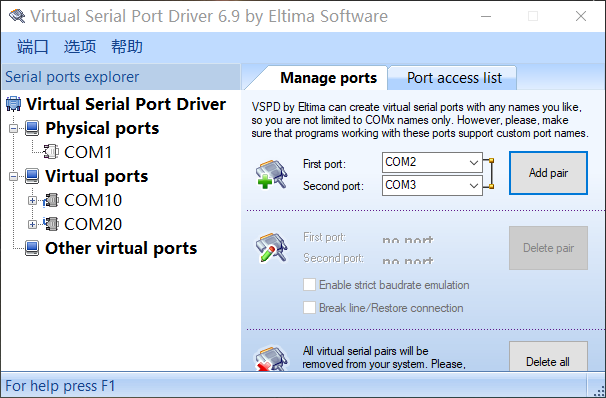
If you dont have any physical serial port, Configure Virtual Serial Port Driver could create more available virtual serial port pairs. Note, virtual serial port must be used in pairs. Like 10 and 20, 11 and 21
6.1 configure serial port
use Configure Virtual Serial Port Driver to add and delete serial port pairs
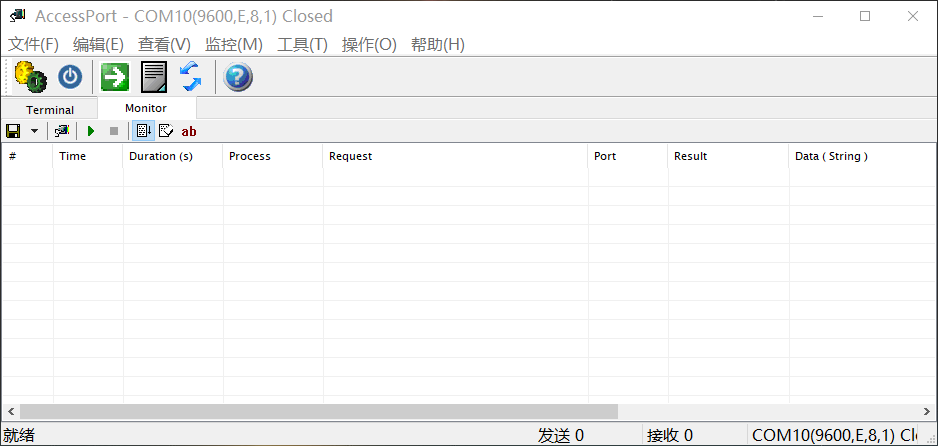
6.2 Access port
This tool could monitor and communicate with serial port.
7 License
串口之完整封装包含发送和接收(windows+ubuntu已通过初步测试)(持续更新)的更多相关文章
- 单片机C51串口发送、接收寄存器
所以,发送和接收寄存器可使用同一地址,编写验证程序(发送和接收是独立空间):读取一个数(1)->发送一个数(2)->再读取得1则是独立空间 不知道STM32串口寄存器和C51串口寄存器是否 ...
- Java实现RS485串口通信,发送和接收数据进行解析
最近项目有一个空气检测仪,需要得到空气检测仪的实时数据,保存到数据库当中.根据了解得到,硬件是通过rs485进行串口通讯的,需要发送16进制命令给仪器,然后通过轮询来得到数据. 需要先要下载RXTX的 ...
- 手把手教你Android手机与BLE终端通信--连接,发送和接收数据
假设你还没有看上一篇 手把手教你Android手机与BLE终端通信--搜索,你就先看看吧,由于这一篇要接着讲搜索到蓝牙后的连接.和连接后的发送和接收数据. 评论里有非常多人问假设一条信息特别长,怎么不 ...
- DICOM医学图像处理:DIMSE消息发送与接收“大同小异”之DCMTK fo-dicom mDCM
背景: 从DICOM网络传输一文开始,相继介绍了C-ECHO.C-FIND.C-STORE.C-MOVE等DIMSE-C服务的简单实现,博文中的代码给出的实例都是基于fo-dicom库来实现的,原因只 ...
- boost asio 学习(八) 网络基础 二进制写发送和接收
http://www.gamedev.net/blog/950/entry-2249317-a-guide-to-getting- started-with-boostasio?pg=9 8. Net ...
- JavaMail发送和接收邮件API(详解)
一.JavaMail概述: JavaMail是由Sun定义的一套收发电子邮件的API,不同的厂商可以提供自己的实现类.但它并没有包含在JDK中,而是作为JavaEE的一部分. 厂商所提供的JavaMa ...
- 第一百六十一节,封装库--JavaScript,完整封装库文件
封装库--JavaScript,完整封装库文件 /** *feng_zhuang_ku_1.0版本,js封装库,2016/12/29日:林贵秀 **/ /** 前台调用 * 每次调用$()创建库对象, ...
- JavaMail发送和接收邮件
一.JavaMail概述: JavaMail是由Sun定义的一套收发电子邮件的API,不同的厂商可以提供自己的实现类.但它并没有包含在JDK中,而是作为JavaEE的一部分. 厂商所提供 ...
- SIM900A—发送、接收中英文短信
文章目录 一.SMS简介 二.短信的控制模式与编码 1.Text Mode 2.PDU Mode 3.GSM编码 4.UCS2编码 三.收发英文短信 1.AT+CPMS查询短信数量 2.AT+CNMI ...
随机推荐
- MYSQL权限全解
• All/All Privileges权限代表全局或者全数据库对象级别的所有权限 • Alter权限代表允许修改表结构的权限,但必须要求有create和insert权限配合.如果是rename表名, ...
- 你不知道的iostat
1. 作用 iostat是I/O statistics(输入/输出统计)的缩写,iostat工具将对系统的磁盘操作活动进行监视.它的特点是汇报磁盘活动统计情况,同时也会汇报出CPU使用情况 ...
- word2010在左侧显示目录结构
- 一个简单但能考察C语言基础的题目
请看题: #include<stdio.h> int a=1; int main(void) { int a=a; printf("a=d%\n",a); return ...
- 在Kubernetes上安装MySQL-PXC集群
官方部署文档地址:https://www.percona.com/doc/kubernetes-operator-for-pxc/kubernetes.html 一.部署方式 示例在k8s集群(至少3 ...
- 容器之分类与各种测试(四)——multiset
multiset是可重复关键字的关联式容器,其与序列式容器相比最大的优势在于其查找效率相当高.(牺牲空间换取时间段) 例程 #include<stdexcept> #include< ...
- 【Elasticsearch-Java】Java客户端搭建
Elasticsearch Java高级客户端 1. 概述 Java REST Client 有两种风格: Java Low Level REST Client :用于Elasticsearch ...
- 【HarmonyOS】【xml】初学XML布局作业
首先要明确,有两种布局方式 线性布局:DirectionalLayout 依赖布局:DependentLayout 好,接下来看一看下面的例子 页面案例1 代码如下: <?xml version ...
- 如何为Dash/Zeal生成c++ 文档: 以abseil文档为例
目录 1. 软件安装 2 Sample源文件下载: 3. 生成步骤 3.1 使用doxygen生成html文件 3.2 使用docsetutil 生成 dash/Zeal 格式 1. 软件安装: 1. ...
- Jenkins代码检查
目录 一.静态代码分析 二.规范检查 PMD进行检查 分析器区别 三.持续代码质量检测 Maven与SonarQube集成 Jenkins与SonarQube集成 代码扫描 SonarQube集成p3 ...