
Apache Hama安装部署
安装Hama之前,应该首先确保系统中已经安装了hadoop,本集群使用的版本为hadoop-2.3.0
一、下载及解压Hama文件
下载地址:http://www.apache.org/dyn/closer.cgi/hama,选用的是目前最新版本:hama0.6.4。解压之后的存放位置自己设定。
二、修改配置文件
- 在hama-env.sh文件中加入JAVA_HOME变量(分布式情况下,设为机器的值)
- 配置hama-site.xml(分布式情况下,所有机器的配置相同)
bsp.master.address为bsp master地址。fs.default.name参数设置成hadoop里namenode的地址。hama.zookeeper.quorum和 hama.zookeeper.property.clientPort两个参数和zookeeper有关,设置成为zookeeper的quorum server即可,单机伪分布式就是本机地址。
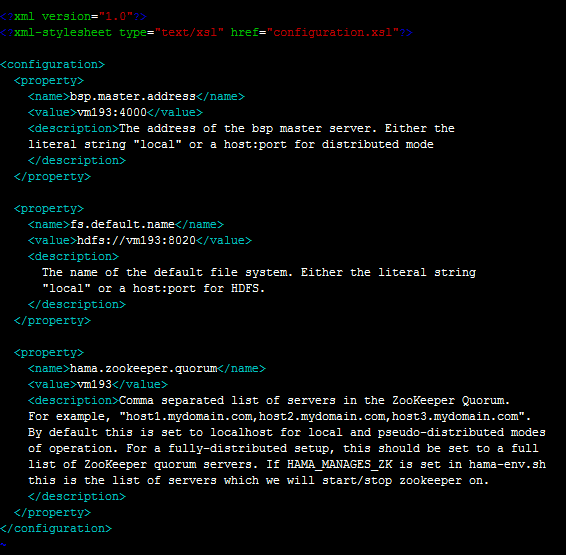
4. 配置groomservers文件。hama与hadoop具有相似的主从结构,该文件存放从节点的IP地址,每个IP占一行。(分布式情况下只需要配置BSPMaster所在的机器即可)
5. hama0.6.4自带的hadoop核心包为1.2.0,与集群hadoop2.3.0不一致,需要进行替换,具体是在hadoop的lib文件夹下找到hadoop-core-2.3.0*.jar和hadoop-test-2.3.0*.jar,拷贝到hama的lib目录下,并删除hadoop-core-1.2.0.jar和hadoop-test-1.2.0.jar两个文件。
6. 此时可能会报找不到类的错, 需加入缺失的jar包。(把hadoop开头的jar包和protobuf-java-2.5.0.jar导入到hama/lib下)
三、编写Hama job
在eclipse下新建Java Project,将hama安装时需要的jar包全部导入工程。
官网中计算PI的例子:
 package pi;

 import java.io.IOException;

 import org.apache.commons.logging.Log;

 import org.apache.commons.logging.LogFactory;

 import org.apache.hadoop.fs.FSDataInputStream;

 import org.apache.hadoop.fs.FileStatus;

 import org.apache.hadoop.fs.FileSystem;

 import org.apache.hadoop.fs.Path;

 import org.apache.hadoop.io.DoubleWritable;

 import org.apache.hadoop.io.IOUtils;

 import org.apache.hadoop.io.NullWritable;

 import org.apache.hadoop.io.Text;

 import org.apache.hama.HamaConfiguration;

 import org.apache.hama.bsp.BSP;

 import org.apache.hama.bsp.BSPJob;

 import org.apache.hama.bsp.BSPJobClient;

 import org.apache.hama.bsp.BSPPeer;

 import org.apache.hama.bsp.ClusterStatus;

 import org.apache.hama.bsp.FileOutputFormat;

 import org.apache.hama.bsp.NullInputFormat;

 import org.apache.hama.bsp.TextOutputFormat;

 import org.apache.hama.bsp.sync.SyncException;

 public class PiEstimator {

     private static Path TMP_OUTPUT = new Path("/tmp/pi-"

             + System.currentTimeMillis());

     public static class MyEstimator

             extends

             BSP<NullWritable, NullWritable, Text, DoubleWritable, DoubleWritable> {

         public static final Log LOG = LogFactory.getLog(MyEstimator.class);

         private String masterTask;

         private static final int iterations = 100000;

         @Override

         public void bsp(

                 BSPPeer<NullWritable, NullWritable, Text, DoubleWritable, DoubleWritable> peer)

                 throws IOException, SyncException, InterruptedException {

             int in = 0;

             for (int i = 0; i < iterations; i++) {

                 double x = 2.0 * Math.random() - 1.0, y = 2.0 * Math.random() - 1.0;

                 if ((Math.sqrt(x * x + y * y) < 1.0)) {

                     in++;

                 }

             }

             double data = 4.0 * in / iterations;

             peer.send(masterTask, new DoubleWritable(data));

             peer.sync();

             if (peer.getPeerName().equals(masterTask)) {

                 double pi = 0.0;

                 int numPeers = peer.getNumCurrentMessages();

                 DoubleWritable received;

                 while ((received = peer.getCurrentMessage()) != null) {

                     pi += received.get();

                 }

                 pi = pi / numPeers;

                 peer.write(new Text("Estimated value1 of PI is"),

                         new DoubleWritable(pi));

             }

             peer.sync();

             int in2 = 0;

             for (int i = 0; i < iterations; i++) {

                 double x = 2.0 * Math.random() - 1.0, y = 2.0 * Math.random() - 1.0;

                 if ((Math.sqrt(x * x + y * y) < 1.0)) {

                     in2++;

                 }

             }

             double data2 = 4.0 * in2 / iterations;

             peer.send(masterTask, new DoubleWritable(data2));

             peer.sync();

             if (peer.getPeerName().equals(masterTask)) {

                 double pi2 = 0.0;

                 int numPeers = peer.getNumCurrentMessages();

                 DoubleWritable received;

                 while ((received = peer.getCurrentMessage()) != null) {

                     pi2 += received.get();

                 }

                 pi2 = pi2 / numPeers;

                 peer.write(new Text("Estimated value2 of PI is"),

                         new DoubleWritable(pi2));

             }

             peer.sync();

         }

         @Override

         public void setup(

                 BSPPeer<NullWritable, NullWritable, Text, DoubleWritable, DoubleWritable> peer)

                 throws IOException {

             // Choose one as a master

             this.masterTask = peer.getPeerName(peer.getNumPeers() / 2);

         }

         @Override

         public void cleanup(

                 BSPPeer<NullWritable, NullWritable, Text, DoubleWritable, DoubleWritable> peer)

                 throws IOException {

             // if (peer.getPeerName().equals(masterTask)) {

             // double pi = 0.0;

             // int numPeers = peer.getNumCurrentMessages();

             // DoubleWritable received;

             // while ((received = peer.getCurrentMessage()) != null) {

             // pi += received.get();

             // }

             //

             // pi = pi / numPeers;

             // peer.write(new Text("Estimated value of PI is"),

             // new DoubleWritable(pi));

             // }

         }

     }

     static void printOutput(HamaConfiguration conf) throws IOException {

         FileSystem fs = FileSystem.get(conf);

         FileStatus[] files = fs.listStatus(TMP_OUTPUT);

         for (int i = 0; i < files.length; i++) {

             if (files[i].getLen() > 0) {

                 FSDataInputStream in = fs.open(files[i].getPath());

                 IOUtils.copyBytes(in, System.out, conf, false);

                 in.close();

                 break;

             }

         }

         fs.delete(TMP_OUTPUT, true);

     }

     public static void main(String[] args) throws InterruptedException,

             IOException, ClassNotFoundException {

         // BSP job configuration

         HamaConfiguration conf = new HamaConfiguration();

         BSPJob bsp = new BSPJob(conf, PiEstimator.class);

         // Set the job name

         bsp.setJobName("Pi Estimation Example");

         bsp.setBspClass(MyEstimator.class);

         bsp.setInputFormat(NullInputFormat.class);

         bsp.setOutputKeyClass(Text.class);

         bsp.setOutputValueClass(DoubleWritable.class);

         bsp.setOutputFormat(TextOutputFormat.class);

         FileOutputFormat.setOutputPath(bsp, TMP_OUTPUT);

         BSPJobClient jobClient = new BSPJobClient(conf);

         ClusterStatus cluster = jobClient.getClusterStatus(true);

         if (args.length > 0) {

             bsp.setNumBspTask(Integer.parseInt(args[0]));

         } else {

             // Set to maximum

             bsp.setNumBspTask(cluster.getMaxTasks());

         }

         long startTime = System.currentTimeMillis();

         if (bsp.waitForCompletion(true)) {

             printOutput(conf);

             System.out.println("Job Finished in "

                     + (System.currentTimeMillis() - startTime) / 1000.0

                     + " seconds");

         }

     }

 }
View PiEstimator
将工程Export成Jar文件,发到集群上运行。运行命令:
$HAMA_HOME/bin/hama jar jarName.jar
输出:
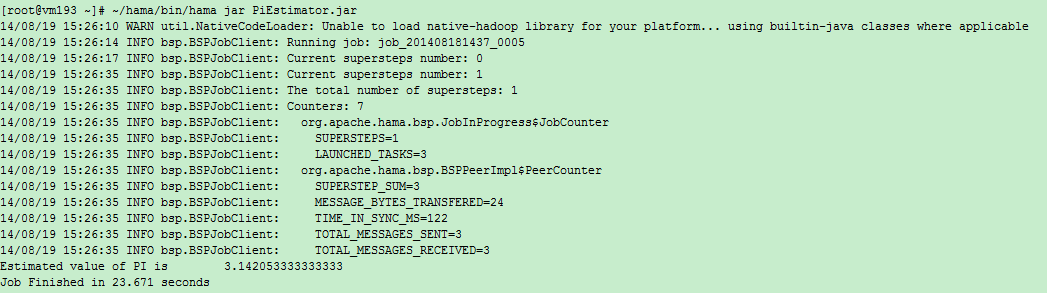
Current supersteps number: 0()
Current supersteps number: 4()
The total number of supersteps: 4(总超级步数目)
Counters: 8(一共8个计数器,如下8个。所有计数器列表待完善)
org.apache.hama.bsp.JobInProgress$JobCounter
SUPERSTEPS=4(BSPMaster超级步数目)
LAUNCHED_TASKS=3(共多少个task)
org.apache.hama.bsp.BSPPeerImpl$PeerCounter
SUPERSTEP_SUM=12(总共的超级步数目,task数目*BSPMaster超级步数目)
MESSAGE_BYTES_TRANSFERED=48(传输信息字节数)
TIME_IN_SYNC_MS=657(同步消耗时间)
TOTAL_MESSAGES_SENT=6(发送信息条数)
TOTAL_MESSAGES_RECEIVED=6(接收信息条数)
TASK_OUTPUT_RECORDS=2(任务输出记录数)
PageRank例子:
 package pi;

 import java.io.IOException;

 import org.apache.hadoop.conf.Configuration;

 import org.apache.hadoop.fs.Path;

 import org.apache.hadoop.io.DoubleWritable;

 import org.apache.hadoop.io.LongWritable;

 import org.apache.hadoop.io.NullWritable;

 import org.apache.hadoop.io.Text;

 import org.apache.hama.HamaConfiguration;

 import org.apache.hama.bsp.HashPartitioner;

 import org.apache.hama.bsp.TextOutputFormat;

 import org.apache.hama.graph.AverageAggregator;

 import org.apache.hama.graph.Edge;

 import org.apache.hama.graph.GraphJob;

 import org.apache.hama.graph.Vertex;

 import org.apache.hama.graph.VertexInputReader;

 /**

  * Real pagerank with dangling node contribution.

  */

 public class PageRank {

     public static class PageRankVertex extends

             Vertex<Text, NullWritable, DoubleWritable> {

         static double DAMPING_FACTOR = 0.85;

         static double MAXIMUM_CONVERGENCE_ERROR = 0.001;

         @Override

         public void setup(HamaConfiguration conf) {

             String val = conf.get("hama.pagerank.alpha");

             if (val != null) {

                 DAMPING_FACTOR = Double.parseDouble(val);

             }

             val = conf.get("hama.graph.max.convergence.error");

             if (val != null) {

                 MAXIMUM_CONVERGENCE_ERROR = Double.parseDouble(val);

             }

         }

         @Override

         public void compute(Iterable<DoubleWritable> messages)

                 throws IOException {

             // initialize this vertex to 1 / count of global vertices in this

             // graph

             if (this.getSuperstepCount() == 0) {

                 this.setValue(new DoubleWritable(1.0 / this.getNumVertices()));

             } else if (this.getSuperstepCount() >= 1) {

                 double sum = 0;

                 for (DoubleWritable msg : messages) {

                     sum += msg.get();

                 }

                 double alpha = (1.0d - DAMPING_FACTOR) / this.getNumVertices();

                 this.setValue(new DoubleWritable(alpha + (sum * DAMPING_FACTOR)));

             }

             // if we have not reached our global error yet, then proceed.

             DoubleWritable globalError = this.getAggregatedValue(0);

             if (globalError != null && this.getSuperstepCount() > 2

                     && MAXIMUM_CONVERGENCE_ERROR > globalError.get()) {

                 voteToHalt();

                 return;

             }

             // in each superstep we are going to send a new rank to our

             // neighbours

             sendMessageToNeighbors(new DoubleWritable(this.getValue().get()

                     / this.getEdges().size()));

         }

     }

     public static GraphJob createJob(String[] args, HamaConfiguration conf)

             throws IOException {

         GraphJob pageJob = new GraphJob(conf, PageRank.class);

         pageJob.setJobName("Pagerank");

         pageJob.setVertexClass(PageRankVertex.class);

         pageJob.setInputPath(new Path(args[0]));

         pageJob.setOutputPath(new Path(args[1]));

         // set the defaults

         pageJob.setMaxIteration(30);

         pageJob.set("hama.pagerank.alpha", "0.85");

         // reference vertices to itself, because we don't have a dangling node

         // contribution here

         pageJob.set("hama.graph.self.ref", "true");

         pageJob.set("hama.graph.max.convergence.error", "1");

         if (args.length == 3) {

             pageJob.setNumBspTask(Integer.parseInt(args[2]));

         }

         // error

         pageJob.setAggregatorClass(AverageAggregator.class);

         // Vertex reader

         pageJob.setVertexInputReaderClass(PagerankTextReader.class);

         pageJob.setVertexIDClass(Text.class);

         pageJob.setVertexValueClass(DoubleWritable.class);

         pageJob.setEdgeValueClass(NullWritable.class);

         pageJob.setPartitioner(HashPartitioner.class);

         pageJob.setOutputFormat(TextOutputFormat.class);

         pageJob.setOutputKeyClass(Text.class);

         pageJob.setOutputValueClass(DoubleWritable.class);

         return pageJob;

     }

     private static void printUsage() {

         System.out.println("Usage: <input> <output> [tasks]");

         System.exit(-1);

     }

     public static class PagerankTextReader

             extends

             VertexInputReader<LongWritable, Text, Text, NullWritable, DoubleWritable> {

         @Override

         public boolean parseVertex(LongWritable key, Text value,

                 Vertex<Text, NullWritable, DoubleWritable> vertex)

                 throws Exception {

             String[] split = value.toString().split("\t");

             for (int i = 0; i < split.length; i++) {

                 if (i == 0) {

                     vertex.setVertexID(new Text(split[i]));

                 } else {

                     vertex.addEdge(new Edge<Text, NullWritable>(new Text(

                             split[i]), null));

                 }

             }

             return true;

         }

     }

     public static void main(String[] args) throws IOException,

             InterruptedException, ClassNotFoundException {

         if (args.length < 2)

             printUsage();

         HamaConfiguration conf = new HamaConfiguration(new Configuration());

         GraphJob pageJob = createJob(args, conf);

         long startTime = System.currentTimeMillis();

         if (pageJob.waitForCompletion(true)) {

             System.out.println("Job Finished in "

                     + (System.currentTimeMillis() - startTime) / 1000.0

                     + " seconds");

         }

     }

 }
View PageRank
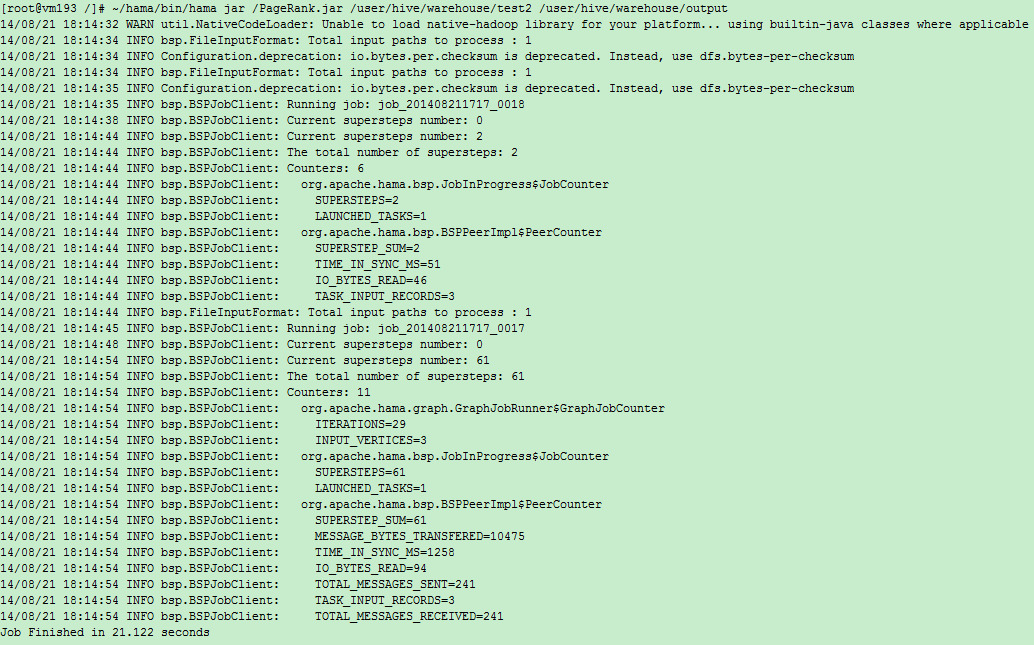
输出:
Apache Hama安装部署的更多相关文章
- Apache Kylin安装部署
0x01 Kylin安装环境 Kylin依赖于hadoop大数据平台,安装部署之前确认,大数据平台已经安装Hadoop, HBase, Hive. 1.1 了解kylin的两种二进制包 预打包的二进制 ...
- Apache Ranger安装部署
1.概述 Apache Ranger提供了一个集中式的安全管理框架,用户可以通过操作Ranger Admin页面来配置各种策略,从而实现对Hadoop生成组件,比如HDFS.YARN.Hive.HBa ...
- Apache的安装部署 2(加密认证 ,网页重写 ,搭建论坛)
一.http和https的基本理论知识1. 关于https: HTTPS(全称:Hypertext Transfer Protocol Secure,超文本传输安全协议),是以安全为目标的HTTP通道 ...
- Apache Solr 初级教程(介绍、安装部署、Java接口、中文分词)
Python爬虫视频教程零基础小白到scrapy爬虫高手-轻松入门 https://item.taobao.com/item.htm?spm=a1z38n.10677092.0.0.482434a6E ...
- 安装部署Apache Hadoop (本地模式和伪分布式)
本节内容: Hadoop版本 安装部署Hadoop 一.Hadoop版本 1. Hadoop版本种类 目前Hadoop发行版非常多,有华为发行版.Intel发行版.Cloudera发行版(CDH)等, ...
- Apache入门篇(一)之安装部署apache
一.HTTPD特性 (1)高度模块化:core(核心) + modules(模块) = apache(2)动态模块加载DSO机制: Dynamic Shared Object(动态共享对象)(3)MP ...
- Apache Hadoop集群离线安装部署(三)——Hbase安装
Apache Hadoop集群离线安装部署(一)——Hadoop(HDFS.YARN.MR)安装:http://www.cnblogs.com/pojishou/p/6366542.html Apac ...
- Apache Hadoop集群离线安装部署(二)——Spark-2.1.0 on Yarn安装
Apache Hadoop集群离线安装部署(一)——Hadoop(HDFS.YARN.MR)安装:http://www.cnblogs.com/pojishou/p/6366542.html Apac ...
- Apache Hadoop集群离线安装部署(一)——Hadoop(HDFS、YARN、MR)安装
虽然我已经装了个Cloudera的CDH集群(教程详见:http://www.cnblogs.com/pojishou/p/6267616.html),但实在太吃内存了,而且给定的组件版本是不可选的, ...
随机推荐
- php 使用htmlspecialchars() 和strip_tags函数过滤HTML标签的区别
原文地址:http://www.manongjc.com/article/1103.html 先来看一下htmlspecialchars函数和strip_tags函数的使用实例: <?php $ ...
- C程序范例(1)——学生管理系统”数组“实现
1.在写程序之前,我想告诉大家,这个程序初学者很可能可能看不懂,但是这很正常,因为这是我在学习完C语言之后写的.所以大家好好学习吧! 由于这是在我大一刚学到数组时编写的程序,有许多冗余的部分,但当时做 ...
- Atitit.atiagent agent分销系统 代理系统 设计文档
Atitit.atiagent agent分销系统 代理系统 设计文档 1. 启动项目1 2. 首也2 3. 登录功能2 4. 用户中心2 5. 充值查询3 6. 授权下级代理4 7. 我的提成5 ...
- Javaweb学习笔记——EL表达式
一.前言 EL表达式是什么? 简而言之,可以这样理解,EL表达式全名为:Exprexxsion Language,原先是JSTL 1.0为了方便存取数据而定义的语言,到了JSTL 2.0便正式成为标准 ...
- 基本排序算法——快速排序java实现
简单的快速排序算法,我竟然花费了如此多的时间来写作,好好学习. /** * */ package basic.sort; import java.util.Arrays; import java.ut ...
- linux文件目录详解
文件系统的是用来组织和排列文件存取的,所以她是可见的,在Linux中,我们可以通过ls等工具来查看其结构,在Linux系统中,我们见到 的都是树形结构:比如操作系统安装在一个文件系统中,他表现为由/起 ...
- iOS 根据银行卡号判断银行名称
如何根据银行卡号判断银行名称? + (NSString *)getBankName:(NSString*) cardId{ //"发卡行.卡种名称", NSArray* bankN ...
- AFN3.0封装
总结了一下AFN3.0封装,也借鉴了其他人总结的,整理如下,希望多交流,互相进步 // // XJYSessionManager.h// // Created by XJY on 16/10/17. ...
- Android中Listview点击item不变颜色以及设置listselector 无效
Android中Listview点击item不变颜色以及设置listselector 无效 这是同一个问题,Listview中点击item是会变颜色的,因为listview设置了默认的listsele ...
- 转载:WinForm中播放声音的三种方法
转载:WinForm中播放声音的三种方法 金刚 winForm 播放声音 本文是转载的文章.原文出处:http://blog.csdn.net/jijunwu/article/details/4753 ...