
prometheus从零开始
本次的想法是做服务监控 并告警 主要线路如下图所示

1、运行prometheus docker方式
docker run -itd \

-p 9090:9090 \

-v /opt/prometheus/prometheus.yml:/etc/prometheus/prometheus.yml \

prom/prometheus
2、prometheus.yml 初始配置文件如下:
global:

  scrape_interval:     15s # By default, scrape targets every 15 seconds.   全局默认值 15秒抓取一次数据

  # Attach these labels to any time series or alerts when communicating with

  # external systems (federation, remote storage, Alertmanager).

  external_labels:

    monitor: 'codelab-monitor'

# A scrape configuration containing exactly one endpoint to scrape:

# Here it's Prometheus itself.

scrape_configs:

  # The job name is added as a label `job=<job_name>` to any timeseries scraped from this config.

  - job_name: 'prometheus'

    # Override the global default and scrape targets from this job every 5 seconds.

    scrape_interval: 5s

    static_configs:

      - targets: ['localhost:9090']
3、默认 prometheus 会有自己的指标接口http://192.168.246.2:9090/metrics 内容部分截取如下
# HELP go_gc_duration_seconds A summary of the pause duration of garbage collection cycles.

# TYPE go_gc_duration_seconds summary

go_gc_duration_seconds{quantile="0"} 2.6636e-05

go_gc_duration_seconds{quantile="0.25"} 0.000123346

go_gc_duration_seconds{quantile="0.5"} 0.000159706

go_gc_duration_seconds{quantile="0.75"} 0.000190857

go_gc_duration_seconds{quantile="1"} 0.001369042
4、可以登录9090端口去看看prometheus主界面 可以执行PromQL (Prometheus Query Language) 来excute得到结果
比如这个 prometheus_target_interval_length_seconds{quantile="0.99"}
具体PromQL语法示例请参考官网https://prometheus.io/docs/prometheus/latest/querying/basics/

5、上面的数据是prometheus自己的 ,下面我们自己生产数据给它 有很多公共的exporter 可以用 比如 node_exporter 他可以暴露机器一些基本的通用指标。
也可以执行python自定义编程 取指标 让自己成为一个exporter
安装node_exporter 官网例子 但是不要使用127.0.0.1 因为我的prometheus是docker起的 和宿主机的127.0.0.1是不通的 它抓取不到数据的,请改成实际的主机地址
ps:其他exporter 可参考地址 https://prometheus.io/docs/instrumenting/exporters/
tar -xzvf node_exporter-*.*.tar.gz

cd node_exporter-*.*

# Start 3 example targets in separate terminals:

./node_exporter --web.listen-address 127.0.0.1:8080

./node_exporter --web.listen-address 127.0.0.1:8081

./node_exporter --web.listen-address 127.0.0.1:8082
6、需要修改prometheus.yml增加job 抓取exproter 修改后的如下 增加了 一个job 里面有三个exporter 标签是随便配的
global:

  scrape_interval:     15s # By default, scrape targets every 15 seconds.

  # Attach these labels to any time series or alerts when communicating with

  # external systems (federation, remote storage, Alertmanager).

  external_labels:

    monitor: 'codelab-monitor'

# A scrape configuration containing exactly one endpoint to scrape:

# Here it's Prometheus itself.

scrape_configs:

  # The job name is added as a label `job=<job_name>` to any timeseries scraped from this config.

  - job_name: 'prometheus'

    # Override the global default and scrape targets from this job every 5 seconds.

    scrape_interval: 5s

    static_configs:

      - targets: ['localhost:9090']

  - job_name: 'node'

    # Override the global default and scrape targets from this job every 5 seconds.

    scrape_interval: 5s

    static_configs:

      - targets: ['192.168.246.2:8080', '192.168.246.2:8081']

        labels:

          group: 'production'

      - targets: ['192.168.246.2:8082']

        labels:

          group: 'canary'
6、查看页面 是否ok了

7、可以看看node_exporter 暴露的指标例子 比如有如下的
node_cpu_seconds_total{cpu="0",mode="idle"} 2963.27

node_cpu_seconds_total{cpu="0",mode="iowait"} 0.38

node_cpu_seconds_total{cpu="0",mode="irq"} 0

node_cpu_seconds_total{cpu="0",mode="nice"} 0

node_cpu_seconds_total{cpu="0",mode="softirq"} 0.35

node_cpu_seconds_total{cpu="0",mode="steal"} 0

node_cpu_seconds_total{cpu="0",mode="system"} 19.19

node_cpu_seconds_total{cpu="0",mode="user"} 16.96

node_cpu_seconds_total{cpu="1",mode="idle"} 2965.47

node_cpu_seconds_total{cpu="1",mode="iowait"} 0.37

node_cpu_seconds_total{cpu="1",mode="irq"} 0

node_cpu_seconds_total{cpu="1",mode="nice"} 0.03

node_cpu_seconds_total{cpu="1",mode="softirq"} 0.28

node_cpu_seconds_total{cpu="1",mode="steal"} 0

node_cpu_seconds_total{cpu="1",mode="system"} 18.42

node_cpu_seconds_total{cpu="1",mode="user"} 17.95
8、如果我们想看 近5分钟内 每个实例的所有cpus的平均每秒CPU时间速率 可以这样写
avg by (job, instance, mode) (rate(node_cpu_seconds_total[5m]))
图例结果

9、下面设置一个rules规则,写一个文件 prometheus.rules.yml
groups:

- name: cpu-node

  rules:

  - record: job_instance_mode:node_cpu_seconds:avg_rate5m

    expr: avg by (job, instance, mode) (rate(node_cpu_seconds_total[5m]))
10、现在发现配置文件太多了 我们重新用另一种方式启动docker 优化一下 把本地配置文件都放在 /opt/prometheus/,原来的docker可删除了。
--web.enable-lifecycle 参数支持热更新 接口是curl -X POST http://192.168.246.2:9090/-/reload
docker run -itd -p 9090:9090 -v /opt/prometheus/:/etc/prometheus/ prom/prometheus --config.file=/etc/prometheus/prometheus.yml --web.enable-lifecycle
11、查看rules

12、上面只是规则,并没有告警,我们假设 avg by (job, instance, mode) (rate(node_cpu_seconds_total[5m])) > 0.5 就触发 cpu警告 这是假设的测试
我们需要rules文件如下:
groups:

- name: example

  rules:

  - alert: HighCpuLatency

    expr: avg by (job, instance, mode) (rate(node_cpu_seconds_total[5m])) > 0.5

    for: 10s

    labels:

      severity: page

    annotations:

      summary: High request latency
写到prometheus.rules.yml文件中 ,注意groups不能复制进去 key不能重复 可以使用命令检查rules文件是否正确
[root@test prometheus]# ./prometheus-2.26.0.linux-amd64/promtool check rules prometheus.rules.yml

Checking prometheus.rules.yml

  FAILED:

prometheus.rules.yml: yaml: unmarshal errors:

  line 6: mapping key "groups" already defined at line 1

prometheus.rules.yml: yaml: unmarshal errors:

  line 6: mapping key "groups" already defined at line 1

[root@test prometheus]# ./prometheus-2.26.0.linux-amd64/promtool check rules prometheus.rules.yml

Checking prometheus.rules.yml

  SUCCESS: 2 rules found

[root@test prometheus]#
13、热更新一下
curl -X POST http://192.168.246.2:9090/-/reload
这次不用重启docker了
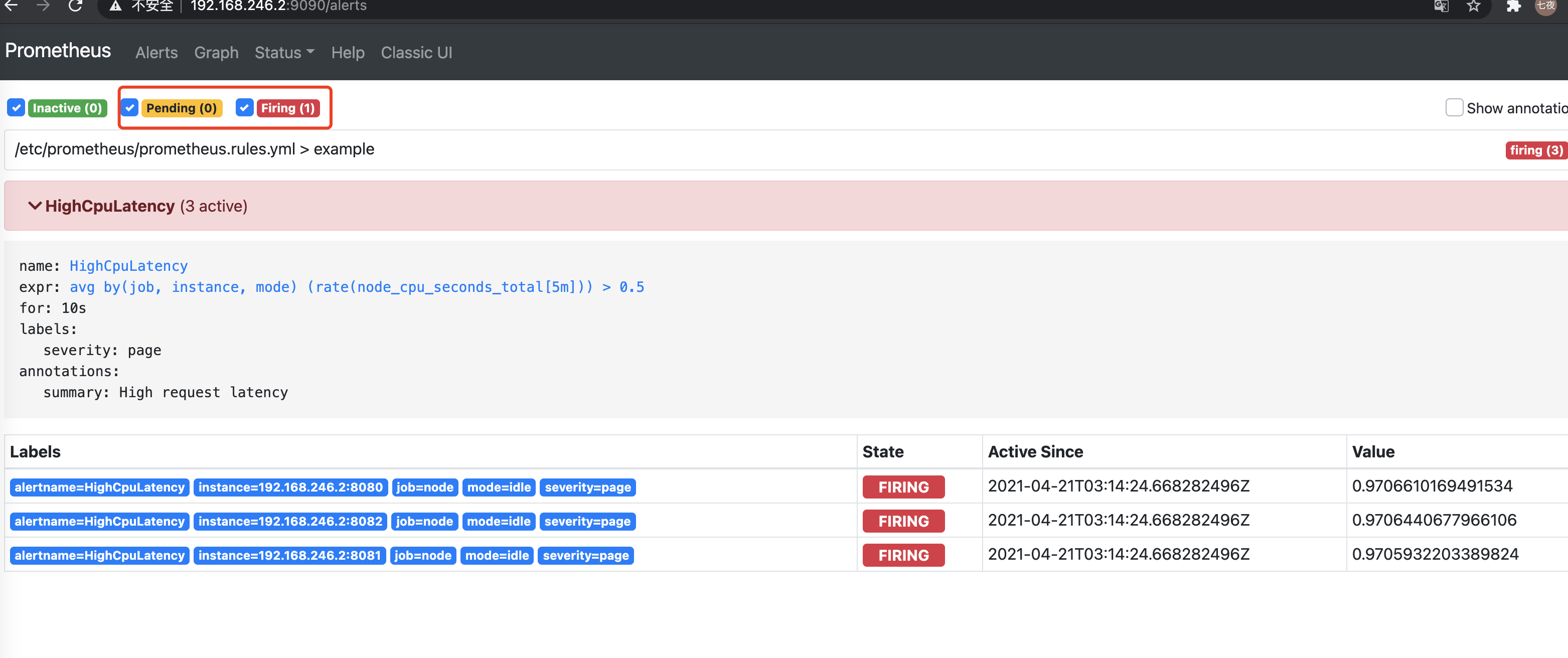
查看页面 rules会增加一个 且alert会先有pending状态,等符合条件后就触发告警
14、下面启动alertmanager
启动之前要做两个配置,首先把 alertmanager 的IP和端口配置到prometheus.yml中
最会面增加了 alerting的配置 这样 prometheus 就连上 alertmanager
global:

  scrape_interval:     15s # By default, scrape targets every 15 seconds.

  # Attach these labels to any time series or alerts when communicating with

  # external systems (federation, remote storage, Alertmanager).

  external_labels:

    monitor: 'codelab-monitor'

rule_files:

  - 'prometheus.rules.yml'

# A scrape configuration containing exactly one endpoint to scrape:

# Here it's Prometheus itself.

scrape_configs:

  # The job name is added as a label `job=<job_name>` to any timeseries scraped from this config.

  - job_name: 'prometheus'

    # Override the global default and scrape targets from this job every 5 seconds.

    scrape_interval: 5s

    static_configs:

      - targets: ['localhost:9090']

  - job_name: 'node'

    # Override the global default and scrape targets from this job every 5 seconds.

    scrape_interval: 5s

    static_configs:

      - targets: ['192.168.246.2:8080', '192.168.246.2:8081']

        labels:

          group: 'production'

      - targets: ['192.168.246.2:8082']

        labels:

          group: 'canary'

alerting:

  alertmanagers:

    - static_configs:

        - targets: ["192.168.246.2:9093"]
第二个配置 我们先测试邮件告警,写的 alertmanager 配置如下
注意修改的部分 qq如何申请授权码请百度一下
  smtp_smarthost: 'smtp.qq.com:465'

  smtp_from: '6171391@qq.com'

  smtp_auth_username: '6171391@qq.com'

  smtp_auth_password: 'qq授权码'

  smtp_require_tls: false
默认不做任何过滤选择的接收人
- to: 'dfwl@163.com'
global:

  # The smarthost and SMTP sender used for mail notifications.

  smtp_smarthost: 'smtp.qq.com:465'

  smtp_from: '6171391@qq.com'

  smtp_auth_username: '6171391@qq.com'

  smtp_auth_password: 'qq授权码'

  smtp_require_tls: false

# The directory from which notification templates are read.

templates:

- '/etc/alertmanager/template/*.tmpl'

# The root route on which each incoming alert enters.

route:

  group_by: ['alertname', 'cluster', 'service']

  group_wait: 30s

  # When the first notification was sent, wait 'group_interval' to send a batch

  # of new alerts that started firing for that group.

  group_interval: 1m

  # If an alert has successfully been sent, wait 'repeat_interval' to

  # resend them.

  repeat_interval: 7h

  # A default receiver

  receiver: team-X-mails

  # The child route trees.

  routes:

  # This routes performs a regular expression match on alert labels to

  # catch alerts that are related to a list of services.

  - match_re:

      service: ^(foo1|foo2|baz)$

    receiver: team-X-mails

    # The service has a sub-route for critical alerts, any alerts

    # that do not match, i.e. severity != critical, fall-back to the

    # parent node and are sent to 'team-X-mails'

    routes:

    - match:

        severity: critical

      receiver: team-X-pager

  - match:

      service: files

    receiver: team-Y-mails

    routes:

    - match:

        severity: critical

      receiver: team-Y-pager

  # This route handles all alerts coming from a database service. If there's

  # no team to handle it, it defaults to the DB team.

  - match:

      service: database

    receiver: team-DB-pager

    # Also group alerts by affected database.

    group_by: [alertname, cluster, database]

    routes:

    - match:

        owner: team-X

      receiver: team-X-pager

      continue: true

    - match:

        owner: team-Y

      receiver: team-Y-pager

# Inhibition rules allow to mute a set of alerts given that another alert is

# firing.

# We use this to mute any warning-level notifications if the same alert is

# already critical.

inhibit_rules:

- source_match:

    severity: 'critical'

  target_match:

    severity: 'warning'

  # Apply inhibition if the alertname is the same.

  # CAUTION:

  #   If all label names listed in `equal` are missing

  #   from both the source and target alerts,

  #   the inhibition rule will apply!

  equal: ['alertname', 'cluster', 'service']

receivers:

- name: 'team-X-mails'

  email_configs:

  - to: 'dfwl@163.com'

- name: 'team-X-pager'

  email_configs:

  - to: 'team-X+alerts-critical@example.org'

  pagerduty_configs:

  - service_key: <team-X-key>

- name: 'team-Y-mails'

  email_configs:

  - to: 'team-Y+alerts@example.org'

- name: 'team-Y-pager'

  pagerduty_configs:

  - service_key: <team-Y-key>

- name: 'team-DB-pager'

  pagerduty_configs:

  - service_key: <team-DB-key>
15、手动启动测试一下 生产环境可以docker或k8s等方式启动
./alertmanager --config.file=alertmanager.yml
16、alertmanager页面能同步到告警
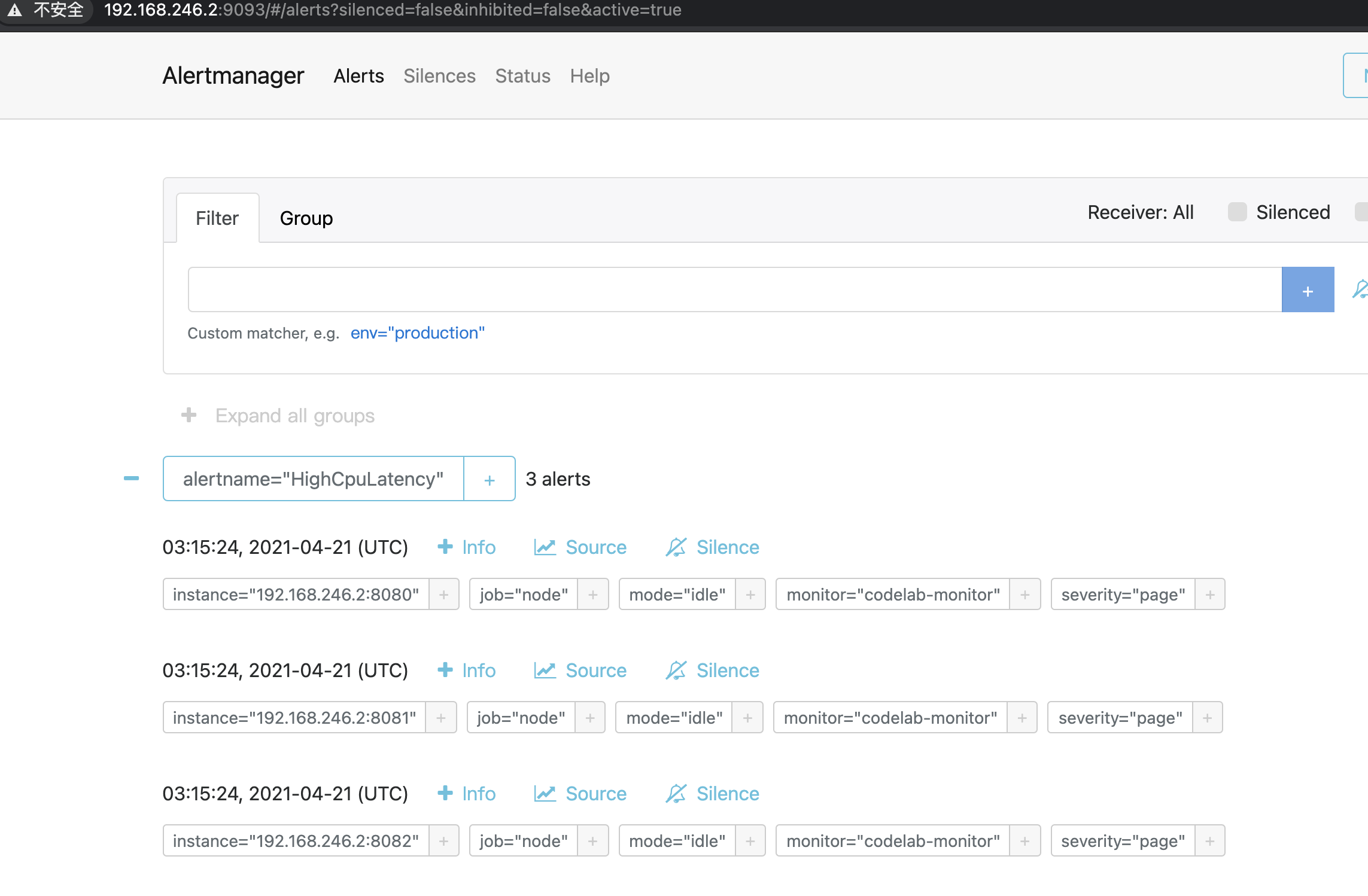
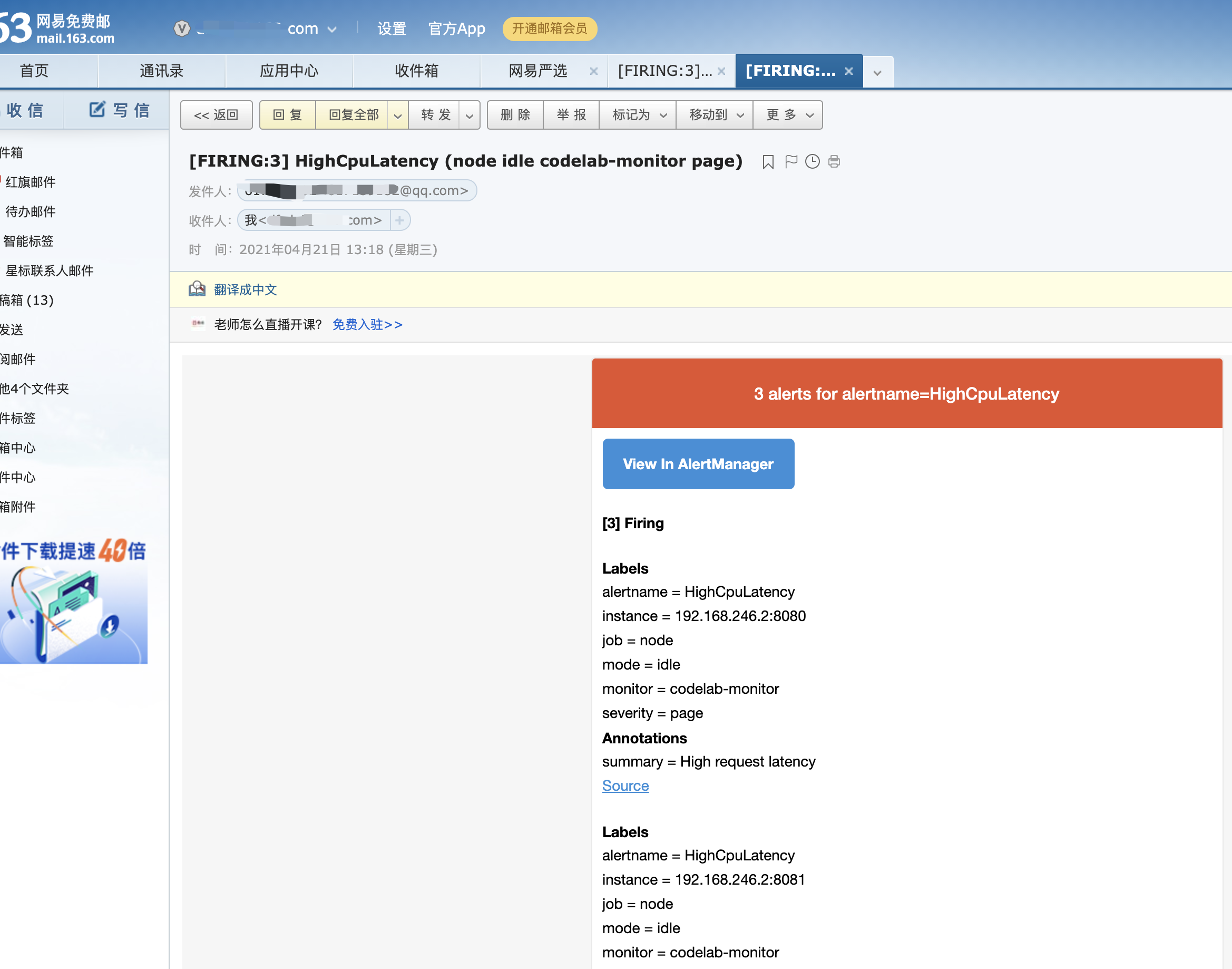
过一会就会发邮件了
group_interval: 1m 意思 从第一次接受告警1m后还在就发
prometheus从零开始的更多相关文章
- 从零开始搭建Prometheus自动监控报警系统
从零搭建Prometheus监控报警系统 什么是Prometheus? Prometheus是由SoundCloud开发的开源监控报警系统和时序列数据库(TSDB).Prometheus使用Go语言开 ...
- 从零开始学习Prometheus监控报警系统
Prometheus简介 Prometheus是一个开源的监控报警系统,它最初由SoundCloud开发. 2016年,Prometheus被纳入了由谷歌发起的Linux基金会旗下的云原生基金会( C ...
- Prometheus监控学习记录
官方文档 Prometheus基础文档 从零开始:Prometheus 进阶之路:Prometheus —— 技巧篇 进阶之路:Prometheus —— 理解篇 prometheus的数据类型介绍 ...
- 基于prometheus监控k8s集群
本文建立在你已经会安装prometheus服务的基础之上,如果你还不会安装,请参考:prometheus多维度监控容器 如果你还没有安装库k8s集群,情参考: 从零开始搭建基于calico的kuben ...
- kubernetes 1.15.1 高可用部署 -- 从零开始
这是一本书!!! 一本写我在容器生态圈的所学!!! 重点先知: 1. centos 7.6安装优化 2. k8s 1.15.1 高可用部署 3. 网络插件calico 4. dashboard 插件 ...
- 你必须知道的容器监控 (3) Prometheus
本篇已加入<.NET Core on K8S学习实践系列文章索引>,可以点击查看更多容器化技术相关系列文章.上一篇介绍了Google开发的容器监控工具cAdvisor,但是其提供的操作界面 ...
- 从零搭建Prometheus监控报警系统
什么是Prometheus? Prometheus是由SoundCloud开发的开源监控报警系统和时序列数据库(TSDB).Prometheus使用Go语言开发,是Google BorgMon监控系统 ...
- 3W字干货深入分析基于Micrometer和Prometheus实现度量和监控的方案
前提 最近线上的项目使用了spring-actuator做度量统计收集,使用Prometheus进行数据收集,Grafana进行数据展示,用于监控生成环境机器的性能指标和业务数据指标.一般,我们叫这样 ...
- Prometheus入门教程(二):Prometheus + Grafana实现可视化、告警
文章首发于[陈树义]公众号,点击跳转到原文:https://mp.weixin.qq.com/s/56S290p4j9KROB5uGRcGkQ Prometheus UI 提供了快速验证 PromQL ...
随机推荐
- OpenStack虚拟网络与物理网络的衔接(flat方式)
by 无若 这边以CentOS7+Liberty版本为例. 过去一段时间(Juno版本之前版本),OpenStack内的虚拟网络与真正的物理网络衔接主要使用openvswitch,其主要问题是在配置网 ...
- OceanBase三节点部署&&扩容
OceanBase三节点部署&&扩容 环境信息搭建三节点(1-1-1)创建资源池和租户查看数据分布 环境信息 IP OB目录 端口 192.168.43.89 /data/observ ...
- javaScript学习关于节点
节点的常用属性和方法: 个人理解,对于节点来说,他就是html里面的标签对象. 通过具体的元素节点调用: getElementsByTagName()方法,获取当前节点的指定标签名孩子节点 appen ...
- Linux命令(七)之上传/共享/挂载文件至Linux系统中
.personSunflowerP { background: rgba(51, 153, 0, 0.66); border-bottom: 1px solid rgba(0, 102, 0, 1); ...
- [开源]入坑Qt,我的第一个小程序:MD5计算器
版权声明 --------- 本文仅在知乎与博客园发布.开发者为szx0427 MFC和Win32搞了好几年了,也算是懂了个皮毛,但是一直觉得用这两者开发软件都很麻烦,需要将大量的代码花费在UI等地方 ...
- HCNA Routing&Switching之访问控制列表ACL
前文我们了解了DHCP服务相关话题,回顾请参考https://www.cnblogs.com/qiuhom-1874/p/15147870.html:今天我们来聊一聊访问控制列表ACL: ACL(ac ...
- .Net Core with 微服务 - 分布式事务 - TCC
上一次我们讲解了分布式事务的 2PC.3PC .那么这次我们来理一下 TCC 事务.本次还是讲解 TCC 的原理跟 .NET 其实没有关系. TCC Try 准备阶段,尝试执行业务 Confirm 完 ...
- mysql 常用见的错误处理
一, 创建用户: 命令:CREATE USER 'username'@'host' IDENTIFIED BY 'password'; 说明:username - 你将创建的用户名, host - 指 ...
- leaflet 动态线渲染
可以采用leaflet插件 leaflet-ant-path ... <script src="js/leaflet-ant-path.js" type="text ...
- LeetCoded第739题题解--每日温度
每日温度 请根据每日 气温 列表,重新生成一个列表.对应位置的输出为:要想观测到更高的气温,至少需要等待的天数.如果气温在这之后都不会升高,请在该位置用 0 来代替. 例如,给定一个列表 temper ...