
easyUI中datagrid展示对象下属性以及显示多个子属性(Day_37)
easyUI中datagrid展示对象下属性以及显示多个子属性
显示对象单个属性值
添加formatter属性
<th field="decidedzone" width="100" align="center" formatter="formatName">所属定区</th>

<script>

          // value:显示的值  row:行  index: 当前下标

           function formatDistrict(value,row,index){

               //region:对象名   district:要显示的字段名

               return row.region.district;

           }

</script>
显示对象多个子属性值
先来看看,若像上面显示单个属性值一样

结果显示如下图:

很显然,省市区显示有误,所以,当需要显示对象多个子属性时。我们需要从row这个参数上下手,将代码修改为如下:
<th field="province" width="110" align="center" formatter="formatProvince">省</th>

<th field="city" width="90" align="center" formatter="formatCity">市</th>

<th field="district" width="90" align="center" formatter="formatDistrict">区(县)</th>
field的值改为对象的属性值。
最终代码:
<tr>

            <th   field="idd"checkbox="true"></th>

            <th field="id" width="90" align="center">分区编号</th>

            <th field="province" width="110" align="center" formatter="formatProvince">省</th>

            <th field="city" width="90" align="center" formatter="formatCity">市</th>

            <th field="district" width="90" align="center" formatter="formatDistrict">区(县)</th>

            <th field="addresskey" width="120" align="center">位置关键字</th>

            <th field="startnum" width="60" align="center">起始号</th>

            <th field="endnum" width="60" align="center">结束号</th>

            <th field="single" width="60" align="center">单双号</th>

            <th field="position" width="200" align="center">具体位置信息</th>

            <th field="decidedzone" width="100" align="center" formatter="formatName">所属定区</th>

</tr>

        <script>

            function formatName(value,row,index) {

                return row.decidedzone.name;

            }

            function formatProvince(value,row,index) {

                return row.region.province;

            }

            function formatCity(value,row,index) {

                return row.region.city;

            }

           function formatDistrict(value,row,index){

               return row.region.district;

           }

        </script>
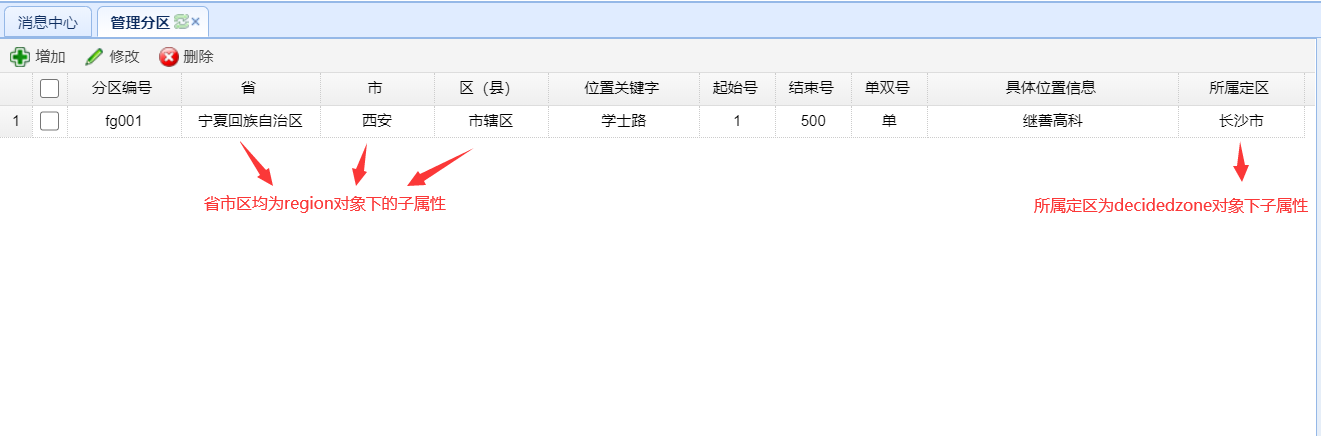
最终显示:

easyUI中datagrid展示对象下属性以及显示多个子属性(Day_37)的更多相关文章
- EasyUI 中 DataGrid 控件 列 如何绑定对象中的属性
EasyUI 中 DataGrid 控件 是我们经常用到的控件之一, 但是 DataGrid 控件 在绑定显示列时却不支持对象属性绑定. 模型如下: public class Manager impl ...
- EasyUI中datagrid的基本用法
EasyUI中datagrid是最常用的一个控件了,现在整理一下datagrid的基本语法,先展示下页面效果吧,如下图
- EasyUI中datagrid双击事件
EasyUI中datagrid双击事件 在jsp文件底部增加代码: <script type="text/javascript"> //数据表双击事件 $('#tabl ...
- easyui中datagrid标题居中内容居左实现方式
easyui中的datagrid使用起来,确实还是挺轻巧方便,但是其中也有不少的问题,尤其遇到客户的一些特殊的需求时往往实现得不是很好.这个时候就需要我们自己动手来修改easyui的源码了.easyu ...
- easyUI中datagrid的使用
easyUI中的datagrid数据表格经常被用到,结合项目中的使用情况,总结一下datagrid使用中需要注意的一些问题.使用datagrid展示数据,需要在html.css.js中都要编写代码,h ...
- EasyUI中datagrid控件的使用 设置多行表头(两行或多行)
EasyUI中的datagrid控件十分强大,能生成各种复杂的报表,现在因为项目需要,需要生成一个表头两行的表,找了一些说明文档,以下用一个实例来说明一下: 第一种方法: $('#divData'). ...
- 利用Aspose.Cells完成easyUI中DataGrid数据的Excel导出功能
我准备在项目中实现该功能之前,google发现大部分代码都是利用一般处理程序HttpHandler实现的服务器端数据的Excel导出,但是这样存在的问题是ashx读取的数据一般都是数据库中视图的数据, ...
- 修改easyui中datagrid表头和数据不能分开对齐的BUG。
easyui的datagrid中表头和列只能同时全部向左对齐,全部向右对齐或者居中对齐. 有时候有需求,数据向左或向右,表头居中对齐. 在不修改源码的情况下.下面的代码可以实现该功能. 把下面代码放在 ...
- JQuery EasyUI中datagrid的使用
在学习过程中,可以参照JQuery EasyUI的官方网站学习.地址:http://www.jeasyui.com/demo/main/index.php 在学习JQuery EasyUI中的Data ...
随机推荐
- java 用枚举替换多if-else
1.定义抽象类 package com.polaris.design; /** * @author :shi * @date :Created in 2020/8/18 20:15 * @descri ...
- Spring-@PostConstruct注解
@PostConstruct注解 @PostConstruct注解好多人以为是Spring提供的.其实是Java自己的注解. Java中该注解的说明:@PostConstruct该注解被用来修饰一个非 ...
- Day05_24_继承
继承 什么是继承? 继承本质上是对某一批类的抽象,从而实现对现实世界更好的建模.继承是类和类之间的一种关系,除此之外类和类之间的关系还有依赖.组合.聚合等. 继承就是子类(派生类)继承父类(基类)的特 ...
- 2.7w字!Java基础面试题/知识点总结!(2021 最新版)
这篇<Java 基础知识总结>是 JavaGuide 上阅读量最高的一篇文章,由于我对其进行了重构完善并且修复了很多小问题,所以,在博客园再同步一下! 文章内容比较多,目录如下: 基础概念 ...
- E - Minimal Subarray Length(连续区间和)
题目链接 题意:给出n个数,求加和大于x的最短区间的区间长度. 如果前i个数字和为y,那么如果前j数字的和小于等于y-x,那么i-j就是一种可能的情况,我们对于所有的i找出前面最大的j就可以了,因为数 ...
- vue 回顾
①.组件的注册 全局注册: // 注册 Vue.component('my-component', { template: '<div>A custom component!</di ...
- dedecms arclist分页
https://blog.csdn.net/qq_41104911/article/details/81510589
- hdu3987 最小割边数
题意: 是让你求最小割之后问最小割的最少边数是多少,因为最小割不是唯一的,所以存在最小边数的问法.思路: 两个方法,一个是先一遍最大流,然后把割边全都改成流量1,其他的全都改成流量 ...
- thymeleaf中[[${}]]与[(${})]的区别
[[-]]会被转义,[(-)]不会. 假设在后台传入msg的值为 <b>AAA</b> 在前台这样使用 [[${msg}]]___[(${msg})] 展示效果 官方参考文档
- tp 创建文件并写入数据
代码:1.$url = Env::get('root_path').'application/admin/test.txt'; //定义创建路径 $file = fopen($url,"w& ...