
Spring Boot自动配置原理与实践(二)
前言
在之前的博文(Spring Boot自动配置原理与实践(一))中,已经介绍了Spring boot的自动配置的相关原理与概念,本篇主要是对自动配置的实践,即自定义Starter,对原理与概念加深理解。
本篇是我在实际工作中配置的用于弱口令检查的Starter,能方便嵌入到用户模块中的相关密码接口或方法,对弱口令进行检查并反馈,当然由于是公司内部代码,部分代码省略。
一、Starter实践
1、配置Maven依赖
Spring Boot自动化配置主要依赖如下两个包:
- spring-boot-starter:打包starter主要依赖
- configuration-processor:自动化配置主要依赖
<dependency>

   <groupId>org.springframework.boot</groupId>

   <artifactId>spring-boot-starter</artifactId>

</dependency>

<dependency>

  <groupId>org.springframework.boot</groupId>

   <artifactId>spring-boot-configuration-processor</artifactId>

   <optional>true</optional>

</dependency>
2、创建实体类映射配置信息
众所周知,SpringBoot Starter最厉害的就是可以通过最简单的properties/yaml文件配置,达到最终目的。配置文件需要通过解析生成对应的实体类
@ConfigurationProperties(prefix = "weak.password")

public class CheckWeakPasswordProperties {

    private Boolean enabled = true;

    /**

     * 需要检查的URI数组

     */

    private String[] checkUri;

    /**

     * 拦截检查的方式 1-interceptor 2-filter 3-aop

     */

    private Integer checkType = 1;

    private String ip = "127.0.0.1";

    private String port = "8501";

    /**

     * 客户端名称

     */

    private String clientName = "cloud-user";

    /**

     * 校验失败信息提示

     */

    private String failureMessage = "密码等级不够";

   ...// 省略getter/setter方法
其中prefix = "weak.password",标明配置文件以“weak.password”开头的字段(对应实体类中的字段)都是需要解析的。在配置文件中输入前缀后,会进行提示说明

3、定义配置类
这一步非常关键,是自动装配的核心,通过配置文件配置灵活的参数产生相关的Bean,完成一系列初始化操作,关键的几个注解在这里就不解释了,具体可以看Spring Boot自动配置原理与实践(一)。
@Configuration

@EnableConfigurationProperties(CheckWeakPasswordProperties.class)

@ConditionalOnProperty(prefix = "weak.password", name = "enabled", havingValue = "true")

public class CheckWeakPasswordAutoConfiguration {

    public CheckWeakPasswordAutoConfiguration() {

    }

    @Bean

    @ConditionalOnProperty(prefix = "weak.password", name = "checkType", havingValue = "2")

    public CheckPasswordInterceptor checkPasswordInterceptor(){

        return new CheckPasswordInterceptor();

    }

    @Bean

    @ConditionalOnProperty(prefix = "weak.password", name = "checkType", havingValue = "2")

    public CheckPasswordFilter checkPasswordFilter(){

        return new CheckPasswordFilter();

    }

    @Bean

    @ConditionalOnProperty(name = "weak.password.check-type", havingValue = "2")

    public CheckPasswordFilterConfig checkPasswordFilterConfig() {

        return new CheckPasswordFilterConfig();

    }

    @Bean

    @ConditionalOnProperty(prefix = "weak.password", name = "checkType", havingValue = "1")

    public CheckPasswordInterceptorConfig checkPasswordInterceptorConfig(){

        return new CheckPasswordInterceptorConfig();

    }

}
4、创建spring.factories文件
之前三步所有的操作都已经完成,那么将Starter当引入工程中是如何发现并自动装配的,这就需要spring.factory文件中标明,在resource/META-INF在新建spring.factory文件
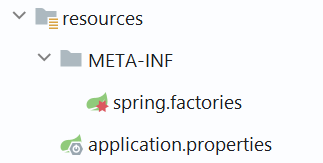
在该文件中指明AutoConfiguration的全Class路径

这样打包的时候就能将spring.factory文件打包,项目启动的时候就会扫描并装配
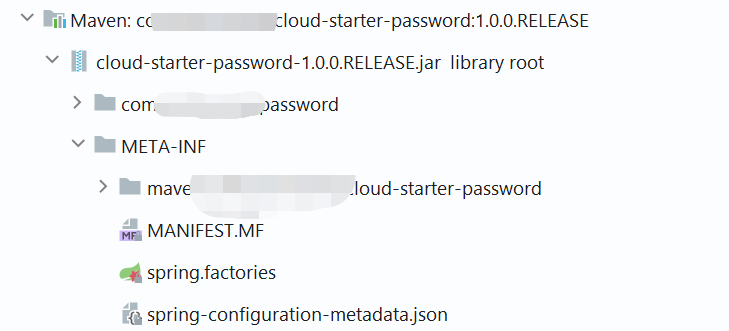
同时生成spring-configuration-metadata.json文件,其内容就是提供配置文件智能化提示的
{

  "groups": [

    {

      "name": "weak.password",

      "type": "com.yunchuang.password.properties.CheckWeakPasswordProperties",

      "sourceType": "com.yunchuang.password.properties.CheckWeakPasswordProperties"

    }

  ],

  "properties": [

    {

      "name": "weak.password.check-type",

      "type": "java.lang.Integer",

      "description": "拦截检查的方式 1-interceptor 2-filter 3-aop",

      "sourceType": "com.yunchuang.password.properties.CheckWeakPasswordProperties",

      "defaultValue": 1

    },

    {

      "name": "weak.password.check-uri",

      "type": "java.lang.String[]",

      "description": "需要检查的URI数组",

      "sourceType": "com.yunchuang.password.properties.CheckWeakPasswordProperties"

    },

    {

      "name": "weak.password.client-name",

      "type": "java.lang.String",

      "description": "客户端名称",

      "sourceType": "com.yunchuang.password.properties.CheckWeakPasswordProperties",

      "defaultValue": "cloud-user"

    },

    {

      "name": "weak.password.enabled",

      "type": "java.lang.Boolean",

      "sourceType": "com.yunchuang.password.properties.CheckWeakPasswordProperties",

      "defaultValue": true

    },

    {

      "name": "weak.password.failure-message",

      "type": "java.lang.String",

      "description": "校验失败信息提示",

      "sourceType": "com.yunchuang.password.properties.CheckWeakPasswordProperties",

      "defaultValue": "密码等级不够"

    },

    {

      "name": "weak.password.ip",

      "type": "java.lang.String",

      "sourceType": "com.yunchuang.password.properties.CheckWeakPasswordProperties",

      "defaultValue": "127.0.0.1"

    },

    {

      "name": "weak.password.port",

      "type": "java.lang.String",

      "sourceType": "com.yunchuang.password.properties.CheckWeakPasswordProperties",

      "defaultValue": "8501"

    }

  ],

  "hints": []

}
二、自定义Starter使用
首先引入自定义的Starter包依赖到相关应用中
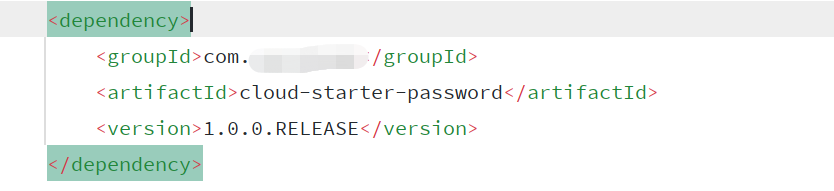
然后在配置文件中打开开关,或者某些条件才能开启自动配置,以我的代码示例举例的话,就是需要指定enabled为true
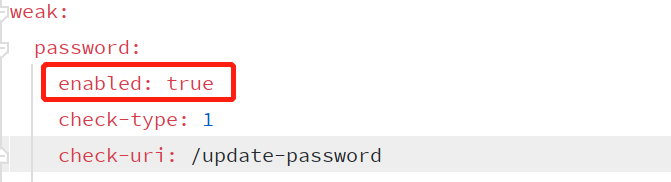
其次可以观察启动的时候相关的Bean是否被自动装配,可以打开debug模式查看日志,或者在idea中查看Endpoints-->Beans-->application,可以看到相关的自动配置启动时加载了,并且相应的Bean也注入了。

最后就是验证是否符合业务逻辑
Spring Boot自动配置原理与实践(二)的更多相关文章
- Spring Boot自动配置原理与实践(一)
前言 Spring Boot众所周知是为了简化Spring的配置,省去XML的复杂化配置(虽然Spring官方推荐也使用Java配置)采用Java+Annotation方式配置.如下几个问题是我刚开始 ...
- Spring Boot自动配置原理(转)
第3章 Spring Boot自动配置原理 3.1 SpringBoot的核心组件模块 首先,我们来简单统计一下SpringBoot核心工程的源码java文件数量: 我们cd到spring-boot- ...
- Spring Boot自动配置原理、实战
Spring Boot自动配置原理 Spring Boot的自动配置注解是@EnableAutoConfiguration, 从上面的@Import的类可以找到下面自动加载自动配置的映射. org.s ...
- Springboot 系列(三)Spring Boot 自动配置原理
注意:本 Spring Boot 系列文章基于 Spring Boot 版本 v2.1.1.RELEASE 进行学习分析,版本不同可能会有细微差别. 前言 关于配置文件可以配置的内容,在 Spring ...
- Spring Boot 自动配置原理(精髓)
一.自动配置原理(掌握) SpringBoot启动项目会加载主配置类@SpringBootApplication,开启@EnableAutoConfiguration自动配置功能 @EnableAut ...
- spring boot 自动配置原理
1).spring boot启动的时候加载主配置类,开启了自动配置功能@EnableAutoConfiguration,先看一下启动类的main方法 public ConfigurableApplic ...
- Spring Boot自动配置原理
使用Spring Boot之后,一个整合了SpringMVC的WEB工程开发,变的无比简单,那些繁杂的配置都消失不见了,这 是如何做到的? 一切魔力的开始,都是从我们的main函数来的,所以我们再次来 ...
- 【串线篇】spring boot自动配置原理
配置文件到底能写什么?怎么写?自动配置原理: 配置文件能配置的属性参照 一.自动配置原理: 1.1.SpringBoot启动的时候加载主配置类,开启了自动配置功能 @EnableAutoConfigur ...
- Spring Boot 自动配置原理是什么?
注解 @EnableAutoConfiguration, @Configuration, @ConditionalOnClass 就是自动配置的核心,首先它得是一个配置文件,其次根据类路径下是否有这个 ...
随机推荐
- centos Sonarqube ldap(AD域) 配置
1. 测试ad 连接 命令: ldapsearch -h 192.168.1.4 -D LXWJadmin@wjj.local -w 用户密码 -b "OU=蓝翔技校,OU=挖掘机事业群,O ...
- RabbitMQ 常用知识点总结
基础 为什么使用 MQ? 1.削峰:在某个模块接收到超过最大承受的并发量时,可以通过 MQ 排队来使这些削减同一时刻处理的消息量.减小并发量. 2.解耦:在发送 MQ 处理业务时,可以使业务代码与当前 ...
- mqtt 集成
-- 在pom.xml导入依赖 <!-- mqtt --> <dependency> <groupId>org.springframework.boot</g ...
- XP共享打印机
1.开启GUEST:右击"我的电脑"管理--用户--GUEST开启 2.运行--GPEDIT.MSC--计算机管理-WINDOWS设置--安全设置--本地策略--用户权利指派--允 ...
- vs2013:asp.net网站发布
1."生成"菜单"生成网站" 2."发布网站" 3.配置文件--自定义,名称 4.发布方法:文件系统,确定目标位置(另外的) 5.配置选择r ...
- java03类与对象相关问题
1.使用类的静态字段和构造函数,可以跟踪某个类所创建对象的个数.请写一个类,在任何时候都可以向他查询"你已经创建了几个对象" 1 package 第四五周; 2 3 public ...
- facade层,service 层,domain层,dao 层设计
转自http://fei-6666.iteye.com/blog/446247,记录下来 一,Service->DAO,只能在Service中注入DAO. 二,DAO只能操作但表数据,跨表操作放 ...
- 【剑指offer】05. 替换空格
剑指 Offer 05. 替换空格 知识点:: 题目描述 请实现一个函数,把字符串 s 中的每个空格替换成"%20". 示例 输入:s = "We are happy.& ...
- Scala学习——操作外部数据
scala操作外部数据 一.scala读取文件及网络数据 package top.ruandb.scala.Course08 import scala.io.Source object FileApp ...
- C# BS方向 该如何规划学习?【学习路线指南】
C#学习路线指南 花费了几天时间整理了C#学习路线图,可以说是纯野生C#程序员成长路线规划,在这里分享下,希望可以帮助到想从事C#开发的同学们.本人阅历尚浅,有些知识点可能分享不正确,希望广大网友评论 ...