
WebAPI HelpPage帮助页
WebAPI HelpPage是个插件,根据代码的注释生成API说明页,一目了然。
下面开始安装和配置
1.添加引用
先选择管理NuGet程序包,搜索 Microsoft.AspNet.WebApi.HelpPage 然后当然是安装啦~~~
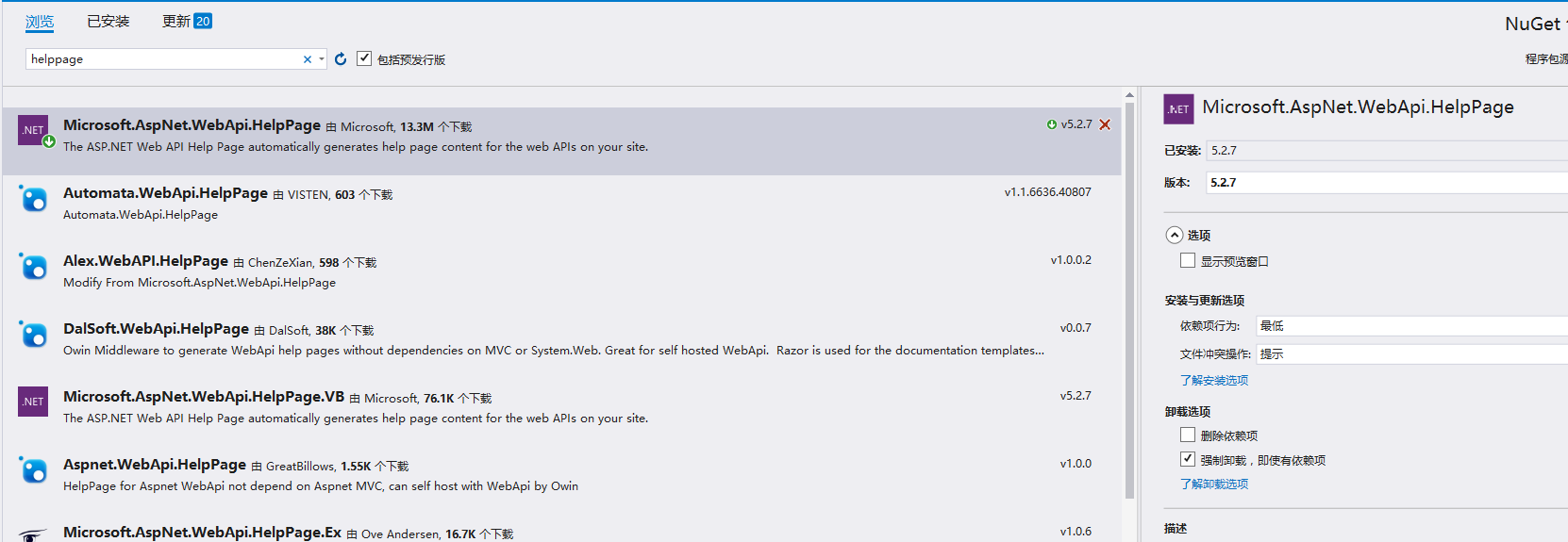
安装完成后我们看项目下是不是多出了一个文件夹Areas ,就是它

2.添加扩展
到了这步,我们先了解下App_Start 下的 HelpPageConfig.cs ,打开后一堆注释,一个Register方法,它用来注册HelpPage页面需要展示的API的文档的。
默认支持单文档导入,我们建立一个支持多文件注册类
using APIDemo.Areas.HelpPage.ModelDescriptions;

using System;

using System.Collections.Generic;

using System.Linq;

using System.Reflection;

using System.Web;

using System.Web.Http.Controllers;

using System.Web.Http.Description;

namespace APIDemo.Areas.HelpPage.App_Start

{

    public class MultiXmlDocumentationProvider : IDocumentationProvider, IModelDocumentationProvider

    {

        private readonly XmlDocumentationProvider[] Providers;

        public MultiXmlDocumentationProvider(params string[] paths)

        {

            this.Providers = paths.Select(p => new XmlDocumentationProvider(p)).ToArray();

        }

        public string GetDocumentation(MemberInfo subject)

        {

            return this.GetFirstMatch(p => p.GetDocumentation(subject));

        }

        public string GetDocumentation(Type subject)

        {

            return this.GetFirstMatch(p => p.GetDocumentation(subject));

        }

        public string GetDocumentation(HttpControllerDescriptor subject)

        {

            return this.GetFirstMatch(p => p.GetDocumentation(subject));

        }

        public string GetDocumentation(HttpActionDescriptor subject)

        {

            return this.GetFirstMatch(p => p.GetDocumentation(subject));

        }

        public string GetDocumentation(HttpParameterDescriptor subject)

        {

            return this.GetFirstMatch(p => p.GetDocumentation(subject));

        }

        public string GetResponseDocumentation(HttpActionDescriptor subject)

        {

            return this.GetFirstMatch(p => p.GetDocumentation(subject));

        }

        private string GetFirstMatch(Func<XmlDocumentationProvider, string> expr)

        {

            return this.Providers

                .Select(expr)

                .FirstOrDefault(p => !String.IsNullOrWhiteSpace(p));

        }

    }

}
然后修改HelpPageConfig.cs文件中的代码,注意XML地址:
 namespace APIDemo.Areas.HelpPage

{

  public static class HelpPageConfig

    {

        [SuppressMessage("Microsoft.Globalization", "CA1303:Do not pass literals as localized parameters",

            MessageId = "APIDemo.Areas.HelpPage.TextSample.#ctor(System.String)",

            Justification = "End users may choose to merge this string with existing localized resources.")]

        [SuppressMessage("Microsoft.Naming", "CA2204:Literals should be spelled correctly",

            MessageId = "bsonspec",

            Justification = "Part of a URI.")]

        public static void Register(HttpConfiguration config)

        {

     //config.SetSampleForMediaType(

            //    new TextSample("Binary JSON content. See http://bsonspec.org for details."),

            //    new MediaTypeHeaderValue("application/bson"));

            config.SetDocumentationProvider(new MultiXmlDocumentationProvider(

        HttpContext.Current.Server.MapPath("~/bin/APIDemo.xml")));

    }

  }

}
3.XML文档文件设置
"~/bin/APIDemo.xml"这个文件需要我们在属性下设置的,让其生成相关xml文件
右击项目=》属性=》生成=》勾选XML文档文件,填写地址,把上面的地址填进去。
4.注册
进入到Global.asax的Application_Start方法看看有没有注册上Area
 protected void Application_Start()

        {

            AreaRegistration.RegisterAllAreas();

            GlobalConfiguration.Configure(WebApiConfig.Register);

            FilterConfig.RegisterGlobalFilters(GlobalFilters.Filters);

            RouteConfig.RegisterRoutes(RouteTable.Routes);

            BundleConfig.RegisterBundles(BundleTable.Bundles);

        }
然后就可以建立控制器测试下好了没,下面是我的控制器
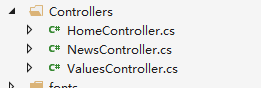
 public class NewsController : ApiController

    {

        /// <summary>

        /// 说明写这里

        /// </summary>

        /// <returns></returns>

       public IEnumerable<News> GetAllNews()

        {

            var news = NewsRepository.GetAllNews();

            return news;

        }

    }
运行:
其实看Areas文件夹下的控制器文件夹,有一个HelpController的控制器,生成了几个 Action
 public ActionResult Index()

        {

            ViewBag.DocumentationProvider = Configuration.Services.GetDocumentationProvider();

            return View(Configuration.Services.GetApiExplorer().ApiDescriptions);

        }

        public ActionResult Api(string apiId)

        {

            if (!String.IsNullOrEmpty(apiId))

            {

                HelpPageApiModel apiModel = Configuration.GetHelpPageApiModel(apiId);

                if (apiModel != null)

                {

                    return View(apiModel);

                }

            }

            return View(ErrorViewName);

        }

        public ActionResult ResourceModel(string modelName)

        {

            if (!String.IsNullOrEmpty(modelName))

            {

                ModelDescriptionGenerator modelDescriptionGenerator = Configuration.GetModelDescriptionGenerator();

                ModelDescription modelDescription;

                if (modelDescriptionGenerator.GeneratedModels.TryGetValue(modelName, out modelDescription))

                {

                    return View(modelDescription);

                }

            }

            return View(ErrorViewName);

        }
我们可以看到Index, 访问它就可以呈现下面的页面了。
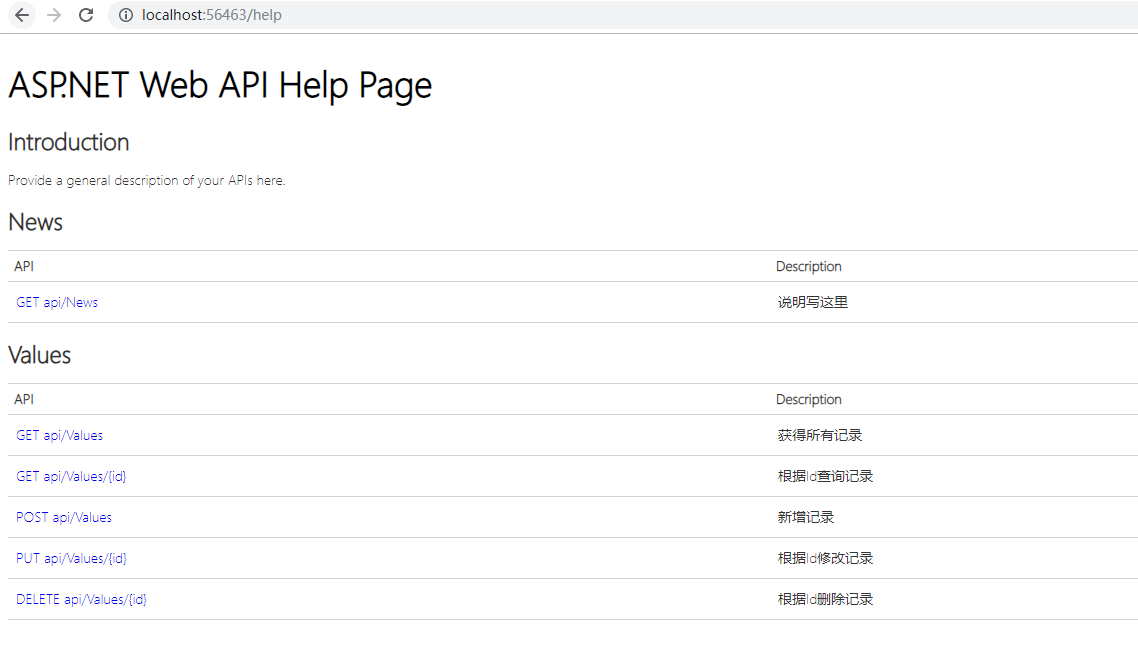
到这里就成功了,API列下有访问的地址,Description列下面是说明。

WebAPI HelpPage帮助页的更多相关文章
- WebApi 之HelpPage帮助页
1.创建解决方案 2.选择类型-Web API 3.设置项目生成XML路径 同时修改HelpPageConfig,代码调用XML文件位置 3.编写WebApi接口代码 4.启动项目 查看接口 5.测试 ...
- WebApi中帮助页Description的中文显示
转自:http://edi.wang/post/2013/10/28/auto-generate-help-document-aspnet-webapi 我选择Web API的一个重要原因就是因为可以 ...
- WebAPI HelpPage支持Area
WebAPI原生的HelpPage文档并不支持Area的生成,需进行如下改造: WebApiConfig: public static class WebApiConfig { public stat ...
- .Net Core WebAPI开启静态页,设置主页
1.使用场景 默认创建的.Net Core WebAPI应用在运行时是没有页面显示的,效果如下: 那么,如果想要给API设置一个主页,应该怎么做呢?这就需要用到本文提供的方法. 2.设置方法 (1)首 ...
- ASP.NET Web API 2系列(三):查看WebAPI接口的详细说明及测试接口
引言 前边两篇博客介绍了Web API的基本框架以及路由配置,这篇博客主要解决在前后端分离项目中,为前端人员提供详细接口说明的问题,主要是通过修改WebApi HelpPage相关代码和添加WebAp ...
- ASP.Net WebAPI中添加helppage帮助页面
一.自动创建带帮助的WebAPI 1.首先创建项目的时候选择WebAPI,如下图所示,生成的项目会自动生成帮助文档. 2.设置调用XML文档的代码 3.设置项目注释XML文档生成目录,项目——属性—— ...
- 1.3为WebApi创建帮助文档
当你创建一个网络 API 时,它很有用来创建一个帮助页,以便其他开发人员将知道如何调用您的 API.您可以创建的所有文档手动,但它是自动生成尽可能多地更好. 为了简化这一任务,ASP.NET Web ...
- Web API使用记录系列(二)HelpPage优化与WebApiTestClient
继续使用记录的第二节,HelpPage的优化与测试工具WebApiTestClient的使用. 之前没怎么整理博客,都是记录一下笔记,真正好好整理发现没想像的那么简单.不管怎么说还是培养下写博客的习惯 ...
- Asp.net WebApi添加帮助文档
一.创建一个空的WebApi站点 二.新增一个名为Test的API控制器,实现部分方法(方法和类要添加文档说明注释) 1. 添加一个用户数据模型UserInfo.cs,代码如下: /// <su ...
随机推荐
- flink KMeans算法实现
更正:之前发的有两个错误. 1.K均值聚类算法 百度解释:k均值聚类算法(k-means clustering algorithm)是一种迭代求解的聚类分析算法,其步骤是随机选取K个对象作为初始的聚类 ...
- [b0009] 玩Hadoop中碰到的各种错误
1. Error: java.lang.RuntimeException: java.lang.ClassNotFoundException: Class mp.filetest.WordCount2 ...
- python中lambda
lambda_expr ::= "lambda" [parameter_list]: expression python中lambda可以理解为一个匿名函数,它的要求是函数的运算部 ...
- nginx反向代理和负载均衡的基本配置
一.反向代理的基本配置 在原本默认的nginx上修改server配置 server { listen 2222;#监听请求端口 server_name 192.168.100.3;#监听请求地址,ng ...
- docker仓库资源的地址修改
docker仓库资源的地址修改 1.新增或者修改/etc/docker目录下的daemon.json文件 样例文件如下 { "registry-mirrors": ["h ...
- Python从零开始——迭代器与生成器
一:迭代器 二:生成器
- linux 通过wol远程开机【转】
转自:http://yangbajing.blog.chinaunix.net/uid-10480699-id-5179860.html 今天发现个可以对linux服务器进行远程开机的软件-wakeo ...
- conan使用(三)--打包只有头文件的库
参考:https://docs.conan.io/en/latest/howtos/header_only.html?highlight=header%20only 对于只含头文件的库打包非常简单,以 ...
- 201871010134-周英杰《面向对象程序设计(java)》第六到七周学习总结
201871010134-周英杰<面向对象程序设计(java)>第六到七周学习总结 项目 内容 这个作业属于哪个课程 https://www.cnblogs.com/nwnu-daizh/ ...
- redis 在 windows 中的安装
redis 在 windows 中的安装 redis 官方并没有提供 redis 的 windows 版本.但是微软提供了 redis 的 windows 版本.有2.8和3.0版本.3.0版本支持集 ...