
Spring boot + mybatis + orcale
接着上次的实现, 添加 mybatis 查询 orcale 数据库
第一步: 新建几个必须的包, 结果如下

第二步: 在service包下新建personService.java 根据名字查person方法接口
package com.example.first.service;

import com.example.first.entity.Person;

public interface personService {

    Person queryPersonByName(String name);

}
第三步: 在serviceImpl包下新建personServiceImpl.java 实现personService.java接口
package com.example.first.serviceImpl;

import com.example.first.personDao.personMapperDao;

import com.example.first.entity.Person;

import com.example.first.service.personService;

import org.springframework.beans.factory.annotation.Autowired;

import org.springframework.stereotype.Service;

import org.springframework.transaction.annotation.Transactional;

@Service

@Transactional

public class personServiceImpl implements personService {

    @Autowired

    personMapperDao personMapperDao;

    @Override

    public Person queryPersonByName(String name) {

        Person person = personMapperDao.findByName(name);

        return person;

    }

}
第四步: personDao下新建personMapperDao.java 有一个查询person的方法
package com.example.first.personDao;

import com.example.first.entity.Person;

import org.apache.ibatis.annotations.Mapper;

@Mapper

public interface personMapperDao {

    Person findByName(String name);

}
第五步: 在resource下新建personMapper.xml
<?xml version="1.0" encoding="UTF-8" ?>

<!DOCTYPE mapper PUBLIC "-//mybatis.org//DTD Mapper 3.0//EN" "http://mybatis.org/dtd/mybatis-3-mapper.dtd" >

<mapper namespace="com.example.first.personDao.personMapperDao">

    <resultMap id="findPerson" type="com.example.first.entity.Person">

        <result property="name" column="name"/>

        <result property="age" column="age"/>

    </resultMap>

    <select id="findByName" resultMap="findPerson">

        select name,age from person where name = #{name}

    </select>

</mapper>
第六步: 在application.properties 中添加数据源 , mapper文件路径 和实体路径
spring.jpa.database=oracle

spring.datasource.driver-class-name=oracle.jdbc.driver.OracleDriver

spring.datasource.url=jdbc:oracle:thin:@//192.168.3.177:1521/orcl

spring.datasource.username=liguang_dev

spring.datasource.password=123456

spring.jpa.hibernate.ddl-auto=update

mybatis.mapperLocations=classpath:/mapper/*.xml

mybatis.typeAliasesPackag= com.example.first.entity

spring.thymeleaf.prefix=classpath:/templates/

spring.thymeleaf.suffix=.html

spring.thymeleaf.mode = HTML5
第七步: 在pom文件中添加依赖
<?xml version="1.0" encoding="UTF-8"?>

<project xmlns="http://maven.apache.org/POM/4.0.0" xmlns:xsi="http://www.w3.org/2001/XMLSchema-instance"

    xsi:schemaLocation="http://maven.apache.org/POM/4.0.0 http://maven.apache.org/xsd/maven-4.0.0.xsd">

    <modelVersion>4.0.0</modelVersion>

    <groupId>com.example.first</groupId>

    <artifactId>springboot</artifactId>

    <version>0.0.1-SNAPSHOT</version>

    <packaging>jar</packaging>

    <name>springboot</name>

    <description>Demo project for Spring Boot</description>

    <parent>

        <groupId>org.springframework.boot</groupId>

        <artifactId>spring-boot-starter-parent</artifactId>

        <version>1.5.6.RELEASE</version>

        <relativePath/> <!-- lookup parent from repository -->

    </parent>

    <properties>

        <project.build.sourceEncoding>UTF-8</project.build.sourceEncoding>

        <project.reporting.outputEncoding>UTF-8</project.reporting.outputEncoding>

        <java.version>1.8</java.version>

    </properties>

    <dependencies>

        <dependency>

            <groupId>org.springframework.boot</groupId>

            <artifactId>spring-boot-starter-web</artifactId>

        </dependency>

        <dependency>

            <groupId>org.springframework.boot</groupId>

            <artifactId>spring-boot-starter-test</artifactId>

            <scope>test</scope>

        </dependency>

        <dependency>

            <groupId>org.springframework.boot</groupId>

            <artifactId>spring-boot-starter-thymeleaf</artifactId>

        </dependency>

        <!--orcale数据库依赖-->

        <dependency>

            <groupId>oracle</groupId>

            <artifactId>ojdbc7</artifactId>

            <version>1.0.0.1</version>

        </dependency>

        <!--mybatis依赖-->

        <dependency>

            <groupId>org.mybatis.spring.boot</groupId>

            <artifactId>mybatis-spring-boot-starter</artifactId>

            <version>1.1.1</version>

        </dependency>

        <dependency>

            <groupId>org.springframework.boot</groupId>

            <artifactId>spring-boot-starter-jdbc</artifactId>

        </dependency>

    </dependencies>

    <build>

        <plugins>

            <plugin>

                <groupId>org.springframework.boot</groupId>

                <artifactId>spring-boot-maven-plugin</artifactId>

            </plugin>

        </plugins>

    </build>

</project>
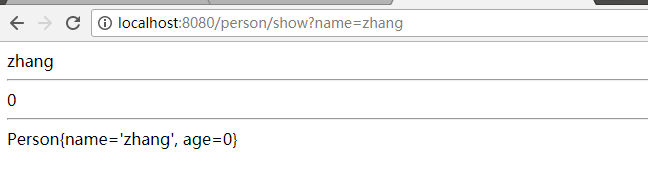
第八步:浏览器输入http://localhost:8080/person/show?name=zhang
Spring boot + mybatis + orcale的更多相关文章
- Spring boot + mybatis + orcale实战(干货)
废话少说,直接上步骤: 第一步:安装好IDEA(此处省略) 第二步:在IDEA新建springboot工程 第三步:在springboot工程的pom.xml添加oracle和mybait依赖 < ...
- spring boot + mybatis + druid
因为在用到spring boot + mybatis的项目时候,经常发生访问接口卡,服务器项目用了几天就很卡的甚至不能访问的情况,而我们的项目和数据库都是好了,考虑到可能时数据库连接的问题,所以我打算 ...
- Spring Boot入门教程2-1、使用Spring Boot+MyBatis访问数据库(CURD)注解版
一.前言 什么是MyBatis?MyBatis是目前Java平台最为流行的ORM框架https://baike.baidu.com/item/MyBatis/2824918 本篇开发环境1.操作系统: ...
- spring boot + mybatis + druid配置实践
最近开始搭建spring boot工程,将自身实践分享出来,本文将讲述spring boot + mybatis + druid的配置方案. pom.xml需要引入mybatis 启动依赖: < ...
- spring boot+mybatis+quartz项目的搭建完整版
1. 利用spring boot提供的工具(http://start.spring.io/)自动生成一个标准的spring boot项目架构 2. 因为这里我们是搭建spring boot+mybat ...
- 快速搭建一个Spring Boot + MyBatis的开发框架
前言:Spring Boot的自动化配置确实非常强大,为了方便大家把项目迁移到Spring Boot,特意总结了一下如何快速搭建一个Spring Boot + MyBatis的简易文档,下面是简单的步 ...
- spring boot mybatis 打成可执行jar包后启动UnsatisfiedDependencyException异常
我的spring boot + mybatis项目在idea里面执行正常,但发布测试环境打成可执行jar包后就启动失败,提示错误如下: [ ERROR] [2018-08-30 17:23:48] o ...
- Spring Boot + Mybatis + Redis二级缓存开发指南
Spring Boot + Mybatis + Redis二级缓存开发指南 背景 Spring-Boot因其提供了各种开箱即用的插件,使得它成为了当今最为主流的Java Web开发框架之一.Mybat ...
- Spring Boot + Mybatis 实现动态数据源
动态数据源 在很多具体应用场景的时候,我们需要用到动态数据源的情况,比如多租户的场景,系统登录时需要根据用户信息切换到用户对应的数据库.又比如业务A要访问A数据库,业务B要访问B数据库等,都可以使用动 ...
随机推荐
- jq通过对象获取其ID值
$(this).click(function(){ var this_id=$(this).attr("id");// attr(属性名) 获取属性的值 alert(this_id ...
- UML介绍--用例图
用例图定义:由参与者(Actor).用例(Use Case)以及它们之间的关系构成的用于描述系统功能的静态视图称为用例图. 用例图(User Case)是被称为参与者的外部用户所能观察到的系统功能的模 ...
- nmcli工具详解
目录 1. nmcli 安装 2. nmcli 基本选项 3. general 常规选项 3.1 status 3.2 hostname 3.3 permissions 3.4 loggin 4. n ...
- 个人觉得非常好用的mysql客户端工具的HeidiSQL
感觉比Navicat好用,能显示注释,而且还有绿色版,轻量级 下载地址:http://www.heidisql.com/download.php
- JavaWeb学习 (二十四)————Filter(过滤器)常见应用
一.统一全站字符编码 通过配置参数charset指明使用何种字符编码,以处理Html Form请求参数的中文问题 1 package me.gacl.web.filter; 2 3 import ja ...
- MySQL之库、表操作
一.库操作 创建库 create database 库名(charset utf8 对库的编码进行设置,不写就用默认值) 库名可以由字母.数字.下划线.特殊字符,要区分大小写,唯一性,不能使用关键字, ...
- VSCode git Warning LF will be replaced by CRLF
本文参考自:http://www.yulongjun.com/linux/20170518-08-lf-cr/ 我们打开Visual Studio Code编辑器,可以看到右下角有这个LF,这是VS ...
- 无法打开锁文件 /var/lib/dpkg/lock - open (13: 权限不够)
比如输入apt-get install eclipse,或者apt-get update 会提示 无法打开锁文件 /var/lib/dpkg/lock - open (13: 权限不够) 无法对状态 ...
- C#基础知识回顾-- 反射(2)
使用反射调用方法: 一旦知道一个类型所支持的方法,就可以对方法进行调用.调用时,需使用包含在 MethodInfo中的Invoke()方法.调用形式: object Invoke(object ...
- Flask在Pycharm开启调试模式
一.Flask在Pycharm2018前的版本只需设置(两种方法之一): 1. 直接设置app的debug为true: app.debug=true 2. 把debug=true作为参数,传入到 ...