
Android学习:自定义组件,DrawView
布局文件:
<LinearLayout xmlns:android="http://schemas.android.com/apk/res/android"

    xmlns:tools="http://schemas.android.com/tools"

    android:layout_width="match_parent"

    android:layout_height="match_parent"

    tools:context=".CustomViewActivity"

    android:id="@+id/root"

    android:orientation="vertical">

</LinearLayout>
自定义类:
这个类必须写在一个独立的java文件中
public class DrawView extends View

{

    public float currentX = 40;

    public float currentY = 50;

    // 定义、并创建画笔

    Paint p = new Paint();

    public DrawView(Context context)

    {

        super(context);

    }

    public DrawView(Context context , AttributeSet set)

    {

        super(context,set);

    }

    @Override

    public void onDraw(Canvas canvas)

    {

        super.onDraw(canvas);

        // 设置画笔的颜色

        p.setColor(Color.RED);

        // 绘制一个小圆(作为小球)

        canvas.drawCircle(currentX, currentY, 15, p);

    }

    // 为该组件的触碰事件重写事件处理方法

    @Override

    public boolean onTouchEvent(MotionEvent event)

    {

        // 修改currentX、currentY两个属性

        currentX = event.getX();

        currentY = event.getY();

        // 通知当前组件重绘自己

        invalidate();

        // 返回true表明该处理方法已经处理该事件

        return true;

    }

}
将组件添加到容器中去
public class MainActivity extends AppCompatActivity {

    @Override

    protected void onCreate(Bundle savedInstanceState) {

        super.onCreate(savedInstanceState);

        setContentView(R.layout.activity_main);

        LinearLayout root=(LinearLayout) findViewById(R.id.root);

        final myDrawView draw=new myDrawView(this);

        draw.setMinimumWidth(300);

        draw.setMinimumHeight(500);

        root.addView(draw);

    }

}
也可以在布局文件里加载自定义的组件。把布局文件修改如下:
Android studio在写布局文件的时候,代码补全可以侦测到自定义组件的名字,确实很智能。
<?xml version="1.0" encoding="utf-8"?>

<LinearLayout xmlns:android="http://schemas.android.com/apk/res/android"

    xmlns:tools="http://schemas.android.com/tools"

    android:layout_width="match_parent"

    android:layout_height="match_parent"

    tools:context="myDrawView"

    android:id="@+id/root"

    android:orientation="vertical">

    <allegro.mydrawview.myDrawView

        android:layout_width="match_parent"

        android:layout_height="match_parent" />

</LinearLayout>
这样在java代码中不必要额外写代码加载自定义的组件了。下面的代码已经注释了加载组件的代码。
public class MainActivity extends AppCompatActivity {

    @Override

    protected void onCreate(Bundle savedInstanceState) {

        super.onCreate(savedInstanceState);

        setContentView(R.layout.activity_main);

        /*LinearLayout root=(LinearLayout) findViewById(R.id.root);

        final myDrawView draw=new myDrawView(this);

        draw.setMinimumWidth(300);

        draw.setMinimumHeight(500);

        root.addView(draw);*/

    }

}
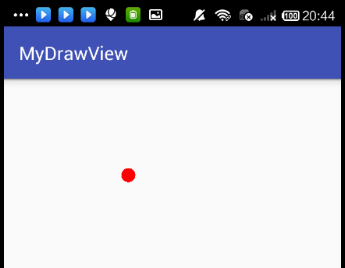
这个程序的效果是,随手指移动的小球。
Android学习:自定义组件,DrawView的更多相关文章
- Android学习----自定义Adapter实现ListView
前言: 对于ListView而言,自定义的Adapter对于显示复杂的界面有很大的灵活性 .使用自定义的Adapter需要继承BaseAdapter,然后重写getCount(),getView(), ...
- Android学习自定义Dialog
Dialog是Android提供的各种对话框的基类,和上篇的DialogFragment类似.为什么还要介绍Dialog呢,因为DialogFragment只能运行在Android3.0以上的系统中. ...
- Android学习笔记 Toast屏幕提示组件的使用方法
activity_main.xml <LinearLayout xmlns:android="http://schemas.android.com/apk/res/android&qu ...
- 【转】Android学习基础自定义Checkbox组件
原文网址:http://forum.maiziedu.com/thread-515-1-1.html heckbox组件是一种可同时选中多项的基础控件,即复选框,在android学习中,Checkbo ...
- android学习日记20--连接组件之Intent和IntentFilter
上次刚了解完Android的四大组件,现在学习组件间通信的Intent和IntentFilter 一.Intent 1.简述 Intent(意图)在应用程序运行时连接两个不同组件,是一种运行时的绑定机 ...
- Android之自定义View学习(一)
Android之自定义View学习(一) Canvas常用方法: 图片来源 /** * Created by SiberiaDante on 2017/6/3. */ public class Bas ...
- Android学习系列(3)--App自动更新之自定义进度视图和内部存储
友好的视觉感知和稳定的不出错表现,来自于我们追求美感和考虑的全面性,博客园从技术的角度,一直我都很欣赏.这篇文章是android开发人员的必备知识,是我特别为大家整理和总结的,不求完美,但是有用. 这 ...
- 【转】 Pro Android学习笔记(六五):安全和权限(2):权限和自定义权限
目录(?)[-] 进程边界 声明和使用权限 AndroidManifestxml的许可设置 自定义权限 运行安全通过两个层面进行保护.进程层面:不同应用运行在不同的进程,每个应用有独自的user ID ...
- Android自定义组件系列【5】——进阶实践(2)
上一篇<Android自定义组件系列[5]--进阶实践(1)>中对任老师的<可下拉的PinnedHeaderExpandableListView的实现>前一部分进行了实现,这一 ...
随机推荐
- selenium3 文件系列之------ opencsv读取csv文件
最近在学习selenium有关文件的读取测试,今天先总结一下如何读取csv文件.CSV的定义是与逗号分隔的值(Comma-Separated Values),在Java中需要用到第三方lib去处理读取 ...
- hnctf安恒--蜘蛛侠呀
这题不会做,赛场被吊打,事后才明白 首先解压看到是流量包,放在wireshark,过滤http很明显看到no_flag.zip,当时想这是个关键点,然后把时间都浪费在这上了,赛后发现并没有传输数据的包 ...
- java 遍历Map的4种方法
在Java中如何遍历Map对象 How to Iterate Over a Map in Java 在java中遍历Map有不少的方法.我们看一下最常用的方法及其优缺点. 既然java中的所有map都 ...
- ubuntu redis 自启动配置文件(关机有密码)
#!/bin/bash # chkconfig : ### BEGIN INIT INFO # Provides: redis-server # Required-Start: $syslog $re ...
- C++ 中的不定参数与格式化字符串 # ## vsprintf
日志打印或者格式字符串时,可能会用到不定参数的使用,这里记录一下. 格式化字符串有很多方法: snprintf std::stringstream # ##的使用 ##是一个连接符号,用于把参数连在一 ...
- 虚拟主机连接FTP发送"AUTH TLS"命令后提示“无法连接到服务器”
https://help.aliyun.com/knowledge_detail/36417.html?spm=5176.11065259.1996646101.searchclickresult.7 ...
- Deep Learning.ai学习笔记_第四门课_卷积神经网络
目录 第一周 卷积神经网络基础 第二周 深度卷积网络:实例探究 第三周 目标检测 第四周 特殊应用:人脸识别和神经风格转换 第一周 卷积神经网络基础 垂直边缘检测器,通过卷积计算,可以把多维矩阵进行降 ...
- CAS 单点登录【1】入门
1. CAS 的引入的前提和好处 很早期的公司,一家公司可能只有一个应用,慢慢的应用开始变多,如员工报销系统.审核系统.学习系统...... 每个应用都要进行注册登录,退出的时候又要一个个退出,用户操 ...
- window下zookeeper的下载启动和报错等问题
在使用dubbo等需要用到zookeeper,之前window下本地部署,启动一直有问题,后面折腾了下才部署成功,此次记录下来. 将zookeeper下载之后,解压到指定目录即可,无需安装.例如:解压 ...
- CentOS 7.5 安装KVM虚拟机(Linux)
1.认识理解KVM虚拟机 Kernel-based Virtual Machine的简称,是一个开源的系统虚拟化模块,自Linux 2.6.20之后集成在Linux的各个主要发行版本中.它使用Linu ...