
【Mybatis】MyBatis对表执行CRUD操作(三)
本例在【Mybatis】MyBatis配置文件的使用(二)基础上继续学习对表执行CRUD操作
使用MyBatis对表执行CRUD操作
1、定义sql映射xml文件(EmployeeMapper.xml)
 <?xml version="1.0" encoding="UTF-8" ?>

 <!DOCTYPE mapper PUBLIC "-//mybatis.org//DTD Mapper 3.0//EN" "http://mybatis.org/dtd/mybatis-3-mapper.dtd">

 <!--

 namespace:名称空间

 id:唯一标识

 resultType:返回值类型

 #{id}:从传过来的参数中取出id值

  -->

 <mapper namespace="com.hd.test.mapper.EmployeeMapper">

     <select id="getEmployeeById"

         resultType="com.hd.test.pojo.Employee">

         select id, last_name lastName, gender, email from employee where id =

         #{id}

     </select>

     <!-- public Long insertEmployee(Employee employee); -->

     <!-- parameterType 可写可不写 -->

     <insert id="insertEmployee" parameterType="com.hd.test.pojo.Employee" >

         insert into employee(last_name, email, gender) values(#{lastName}, #{email}, #{gender})

     </insert>

     <!-- public boolean updateEmployee(Employee employee); -->

     <update id="updateEmployee">

         update employee

             set last_name = #{lastName}, email = #{email}, gender = #{gender}

         where

             id = #{id}

     </update>

     <!-- public Integer deleteEmployeeById(Integer id); -->

     <delete id="deleteEmployeeById">

         delete from employee where id = #{id}

     </delete>

 </mapper>
2、在mybatis-config.xml文件中注册这个映射文件EmployeeMapper.xml
<?xml version="1.0" encoding="UTF-8" ?>

<!DOCTYPE configuration

  PUBLIC "-//mybatis.org//DTD Config 3.0//EN"

  "http://mybatis.org/dtd/mybatis-3-config.dtd">

<configuration>

    <environments default="development">

        <environment id="development">

            <transactionManager type="JDBC" />

            <!-- 配置数据库连接信息 -->

            <dataSource type="POOLED">

                <property name="driver" value="com.mysql.jdbc.Driver" />

                <property name="url" value="jdbc:mysql://localhost:3306/test_mybatis?allowPublicKeyRetrieval=true" />

                <property name="username" value="admin" />

                <property name="password" value="123456" />

            </dataSource>

        </environment>

    </environments>

    <mappers>

        <!-- 添加sql射文件到Mybatis的全局配置文件中 -->

        <mapper resource="mapper/EmployeeMapper.xml" />

    </mappers>

</configuration>
3、编写一个EmployeeMapper接口
 package com.hd.test.mapper;

 import com.hd.test.pojo.Employee;

 public interface EmployeeMapper {

     public Employee getEmployeeById(Integer id);

     // 新增

     public Long insertEmployee(Employee employee);

     // 修改

     public boolean updateEmployee(Employee employee);

     // 删除

     public Integer deleteEmployeeById(Integer id);

 }
4、编写mybatis单元测试类(TestMybatis.java)
 package com.hd.test.mybatis;

 import java.io.IOException;

 import java.io.InputStream;

 import javax.sound.midi.Soundbank;

 import org.apache.ibatis.io.Resources;

 import org.apache.ibatis.session.SqlSession;

 import org.apache.ibatis.session.SqlSessionFactory;

 import org.apache.ibatis.session.SqlSessionFactoryBuilder;

 import org.junit.Test;

 import com.hd.test.mapper.EmployeeMapper;

 import com.hd.test.pojo.Employee;

 import sun.print.resources.serviceui;

 /**

  * 1、SqlSession代表和数据库的一次会话,用完必须关闭

     2、SqlSession和connection一样都是非线程安装的,每次使用都应该去获取新对象

     3、mapper接口没有实现累,但是mybatis会为这个接口生成一个代理对象

     (将接口和xml进行绑定)

     EmployeeMapper empMapper = sqlSession.getMapper(EmployeeMapper.class)

     4、连个重要的配置文件:

     mybatis的全局配置文件:包含数据库连接信息,事物管理等系统环境信息

     sql映射文件:保存了每一个sql语句的映射信息:

         将sql抽取出来。

  *

  */

 public class TestMybatis {

     /**

      * 测试增删改

      * 1、mybatis允许增删改直接定义一下类型返回值

      *         Ingteger、Long、Boolean

      * 2、需要手动提交数据

      *         SqlSession session = sqlSessionFactory.openSession(); ==> 手动提交

      *         SqlSession session = sqlSessionFactory.openSession(true); ==> 自动提交

      * @throws IOException

      */

     // 插入

     @Test

     public void test1() throws IOException {

         // 获取SqlSessionFactory

         InputStream inputStream = Resources.getResourceAsStream("mybatis-config.xml");

         SqlSessionFactory sqlSessionFactory = new SqlSessionFactoryBuilder().build(inputStream);

         // 获取的sqlsession不会自动提交数据

         SqlSession session = sqlSessionFactory.openSession();

         try {

             EmployeeMapper mapper = session.getMapper(EmployeeMapper.class);

             // 1、插入数据

             Employee employee = new Employee("小红", "1", "xiaohong@163.com");

             Long returnValue = mapper.insertEmployee(employee);

             System.out.println("插入返回值:" + returnValue);

             // 手动提交数据

             session.commit();

         } finally {

             session.close();

         }

     }

     // 修改

     @Test

     public void test2() throws IOException {

         // 获取SqlSessionFactory

         InputStream inputStream = Resources.getResourceAsStream("mybatis-config.xml");

         SqlSessionFactory sqlSessionFactory = new SqlSessionFactoryBuilder().build(inputStream);

         // 获取的sqlsession 自动提交数据

         SqlSession session = sqlSessionFactory.openSession(true);

         try {

             EmployeeMapper mapper = session.getMapper(EmployeeMapper.class);

             // 2、更新数据

             Employee employee = new Employee(1, "小红", "0", "xiaohong@163.com");

             boolean returnValue = mapper.updateEmployee(employee);

             System.out.println("更新返回值:" + returnValue);

         } finally {

             session.close();

         }

     }

     // 删除

     @Test

     public void test3() throws IOException {

         // 获取SqlSessionFactory

         InputStream inputStream = Resources.getResourceAsStream("mybatis-config.xml");

         SqlSessionFactory sqlSessionFactory = new SqlSessionFactoryBuilder().build(inputStream);

         // 获取的sqlsession 自动提交数据

         SqlSession session = sqlSessionFactory.openSession(true);

         try {

             EmployeeMapper mapper = session.getMapper(EmployeeMapper.class);

             // 3、删除数据

             Integer returnValue = mapper.deleteEmployeeById(8);

             System.out.println("删除返回值:" + returnValue);

         } finally {

             session.close();

         }

     }

     /**

      * 查询

      * @throws IOException

      */

     @Test

     public void test() throws IOException {

         // 1、根据mybatis全局配置文件,获取SqlSessionFactory

         String resource = "mybatis-config.xml";

         // 使用MyBatis提供的Resources类加载mybatis的配置文件,获取输入流

         InputStream inputStream = Resources.getResourceAsStream(resource);

         // 构建sqlSession的工厂

         SqlSessionFactory sqlSessionFactory = new SqlSessionFactoryBuilder().build(inputStream);

         // 2、从SqlSession工厂中,获取sqlsession,用来执行sql

         SqlSession session = sqlSessionFactory.openSession();

         try {

             // 查询selectOne

             // @param statement Unique identifier matching the statement to use.      一个唯一标识

             // @param parameter A parameter object to pass to the statement.        参数

             EmployeeMapper mapper = session.getMapper(EmployeeMapper.class);

             Employee employee = mapper.getEmployeeById(1);

             // 输出信息

             System.out.println("查询返回值:" + employee);

         } finally {

             // 关闭session

             session.close();

         }

     }

 }
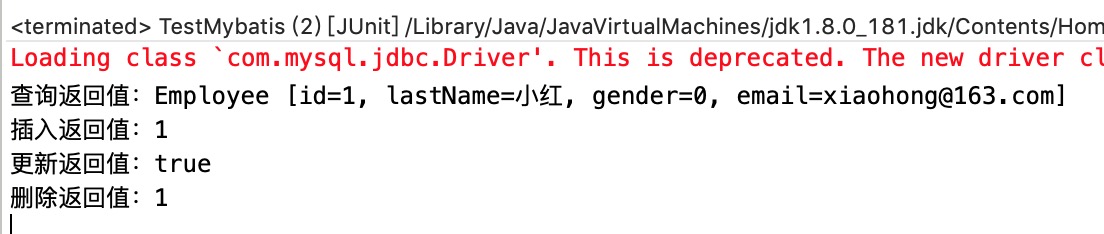
5、运行单元测试类,结果如下:
【Mybatis】MyBatis对表执行CRUD操作(三)的更多相关文章
- 使用MyBatis对表执行CRUD操作
一.使用MyBatis对表执行CRUD操作——基于XML的实现 1.定义sql映射xml文件 userMapper.xml文件的内容如下: <?xml version="1.0&quo ...
- MyBatis学习总结(二)——使用MyBatis对表执行CRUD操作(转载)
本文转载自:http://www.cnblogs.com/jpf-java/p/6013540.html 上一篇博文MyBatis学习总结(一)--MyBatis快速入门中我们讲了如何使用Mybati ...
- MyBatis入门学习教程-使用MyBatis对表执行CRUD操作
上一篇MyBatis学习总结(一)--MyBatis快速入门中我们讲了如何使用Mybatis查询users表中的数据,算是对MyBatis有一个初步的入门了,今天讲解一下如何使用MyBatis对use ...
- MyBatis学习总结(二)——使用MyBatis对表执行CRUD操作
一.使用MyBatis对表执行CRUD操作--基于XML的实现 1.定义sql映射xml文件 userMapper.xml文件的内容如下: 1 <?xml version="1.0&q ...
- MyBatis学习总结(二)——使用MyBatis对表执行CRUD操作
上一篇博文MyBatis学习总结(一)——MyBatis快速入门中我们讲了如何使用Mybatis查询users表中的数据,算是对MyBatis有一个初步的入门了,今天讲解一下如何使用MyBatis对u ...
- MyBatis学习总结_02_使用MyBatis对表执行CRUD操作
一.使用MyBatis对表执行CRUD操作——基于XML的实现 1.定义sql映射xml文件 userMapper.xml文件的内容如下: 1 <?xml version="1.0&q ...
- 【转】MyBatis学习总结(二)——使用MyBatis对表执行CRUD操作
[转]MyBatis学习总结(二)——使用MyBatis对表执行CRUD操作 上一篇博文MyBatis学习总结(一)——MyBatis快速入门中我们讲了如何使用Mybatis查询users表中的数据, ...
- MyBatis学习笔记(二)——使用MyBatis对表执行CRUD操作
转自孤傲苍狼的博客:http://www.cnblogs.com/xdp-gacl/p/4262895.html 上一篇博文MyBatis学习总结(一)——MyBatis快速入门中我们讲了如何使用My ...
- 二:MyBatis学习总结(二)——使用MyBatis对表执行CRUD操作
上一篇博文MyBatis学习总结(一)——MyBatis快速入门中我们讲了如何使用Mybatis查询users表中的数据,算是对MyBatis有一个初步的入门了,今天讲解一下如何使用MyBatis对u ...
随机推荐
- keil5 MDK warning:registered ARM compiler version not found in path
重装 打开keil5弹出窗口: warning:registered ARM compiler version not found in path... 解决: 增加系统环境变量 ARMCC5LIB ...
- [UE4]Input Key Selector
一.Input Key Selector:按键设置 二.On Key Selected:按键收集完毕后触发该事件. 三.点击On Key Selected控件后,会显示“...”,表示可以接受键盘输入 ...
- 受限玻尔兹曼机(Restricted Boltzmann Machine, RBM) 简介
受限玻尔兹曼机(Restricted Boltzmann Machine,简称RBM)是由Hinton和Sejnowski于1986年提出的一种生成式随机神经网络(generative stochas ...
- HTML/CSS基础知识(二)
Q:HTML5是什么?为什么要用HTML5?有什么新特性?移除了哪些元素? HTML5是HTML的最新版本,2014年10月由万维网联盟(W3C)完成标准制定.目标是替换1999年制定的HTML4.0 ...
- Java八大排序算法
Java八大排序算法: package sort; import java.util.ArrayList; import java.util.Arrays; import java.util.List ...
- Java笔试面试题整理第五波
转载至:http://blog.csdn.net/shakespeare001/article/details/51321498 作者:山代王(开心阳) 本系列整理Java相关的笔试面试知识点,其他几 ...
- postgresql数据库3种程序(rule,trigger ,FUNCTION )
1. CREATE [ OR REPLACE ] RULE name AS ON event TO table_name [ WHERE condition ] DO [ ALSO | INSTEAD ...
- [C#]WinForm 中 comboBox控件之数据绑定
[C#]WinForm 中 comboBox控件之数据绑定 一.IList 现在我们直接创建一个List集合,然后绑定 IList<string> list = new List<s ...
- Android Studio设置连续按两次退出APP
主要是在onKeyDown方法中进行操作,直接上代码. private long mTime; @Override public boolean onKeyDown(int keyCode, KeyE ...
- 爬取WX小程序的数据
方法一: 使用TBS工具,调试跟踪获取URL https://x5.tencent.com/tbs/guide/debug/download.html https://x5.tencent.com/t ...