
在Java Web中使用Spark MLlib训练的模型
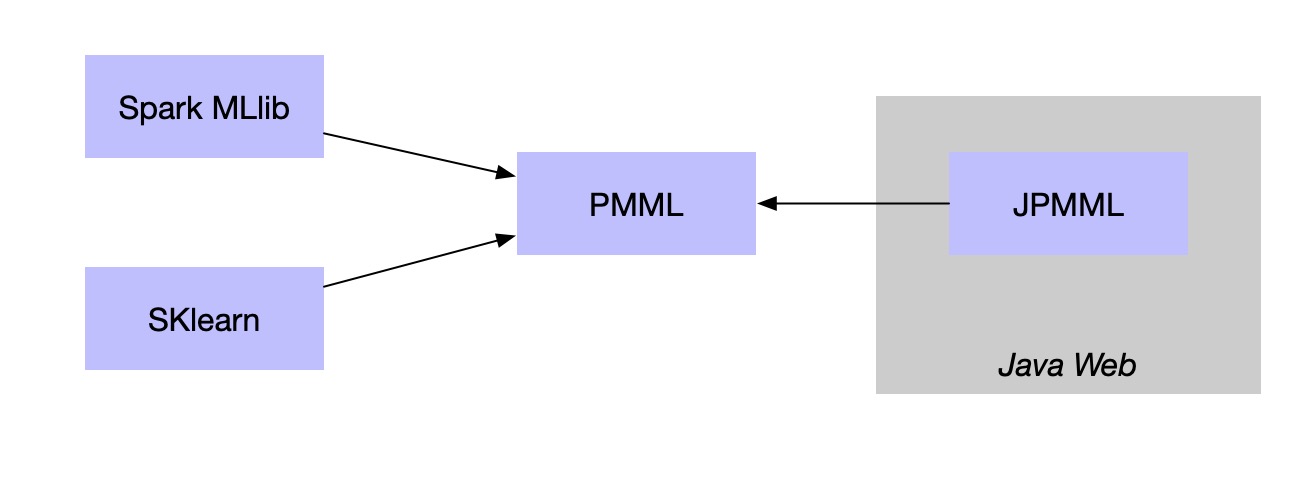
PMML是一种通用的配置文件,只要遵循标准的配置文件,就可以在Spark中训练机器学习模型,然后再web接口端去使用。目前应用最广的就是基于Jpmml来加载模型在javaweb中应用,这样就可以实现跨平台的机器学习应用了。
训练模型
首先在spark MLlib中使用mllib包下的逻辑回归训练模型:
import org.apache.spark.mllib.classification.{LogisticRegressionModel, LogisticRegressionWithLBFGS}

import org.apache.spark.mllib.evaluation.MulticlassMetrics

import org.apache.spark.mllib.regression.LabeledPoint

import org.apache.spark.mllib.util.MLUtils

val training = spark.sparkContext

  .parallelize(Seq("0,1 2 3 1", "1,2 4 1 5", "0,7 8 3 6", "1,2 5 6 9").map( line => LabeledPoint.parse(line)))

// Run training algorithm to build the model

val model = new LogisticRegressionWithLBFGS()

  .setNumClasses(2)

  .run(training)

val test = spark.sparkContext

  .parallelize(Seq("0,1 2 3 1").map( line => LabeledPoint.parse(line)))

// Compute raw scores on the test set.

val predictionAndLabels = test.map { case LabeledPoint(label, features) =>

  val prediction = model.predict(features)

  (prediction, label)

}

// Get evaluation metrics.

val metrics = new MulticlassMetrics(predictionAndLabels)

val accuracy = metrics.accuracy

println(s"Accuracy = $accuracy")

// Save and load model

//    model.save(spark.sparkContext, "target/tmp/scalaLogisticRegressionWithLBFGSModel")

//    val sameModel = LogisticRegressionModel.load(spark.sparkContext,"target/tmp/scalaLogisticRegressionWithLBFGSModel")

model.toPMML(spark.sparkContext, "/tmp/xhl/data/test2")
训练得到的模型保存到hdfs。
PMML模型文件
模型下载到本地,重新命名为xml。
可以看到默认四个特征分别叫做feild_0,field_1...目标为target
<?xml version="1.0" encoding="UTF-8" standalone="yes"?>

<PMML version="4.2" xmlns="http://www.dmg.org/PMML-4_2">

    <Header description="logistic regression">

        <Application name="Apache Spark MLlib" version="2.2.0"/>

        <Timestamp>2018-11-15T10:22:25</Timestamp>

    </Header>

    <DataDictionary numberOfFields="5">

        <DataField name="field_0" optype="continuous" dataType="double"/>

        <DataField name="field_1" optype="continuous" dataType="double"/>

        <DataField name="field_2" optype="continuous" dataType="double"/>

        <DataField name="field_3" optype="continuous" dataType="double"/>

        <DataField name="target" optype="categorical" dataType="string"/>

    </DataDictionary>

    <RegressionModel modelName="logistic regression" functionName="classification" normalizationMethod="logit">

        <MiningSchema>

            <MiningField name="field_0" usageType="active"/>

            <MiningField name="field_1" usageType="active"/>

            <MiningField name="field_2" usageType="active"/>

            <MiningField name="field_3" usageType="active"/>

            <MiningField name="target" usageType="target"/>

        </MiningSchema>

        <RegressionTable intercept="0.0" targetCategory="1">

            <NumericPredictor name="field_0" coefficient="-5.552297758753701"/>

            <NumericPredictor name="field_1" coefficient="-1.4863480719075117"/>

            <NumericPredictor name="field_2" coefficient="-5.7232298850417855"/>

            <NumericPredictor name="field_3" coefficient="8.134075057437393"/>

        </RegressionTable>

        <RegressionTable intercept="-0.0" targetCategory="0"/>

    </RegressionModel>

</PMML>
接口使用
在接口的web工程中引入maven jar:
<!-- https://mvnrepository.com/artifact/org.jpmml/pmml-evaluator -->

<dependency>

    <groupId>org.jpmml</groupId>

    <artifactId>pmml-evaluator</artifactId>

    <version>1.4.3</version>

</dependency>

<!-- https://mvnrepository.com/artifact/org.jpmml/pmml-evaluator-extension -->

<dependency>

    <groupId>org.jpmml</groupId>

    <artifactId>pmml-evaluator-extension</artifactId>

    <version>1.4.3</version>

</dependency>
接口代码中直接读取pmml,使用模型进行预测:
package soundsystem;

import org.dmg.pmml.FieldName;

import org.dmg.pmml.PMML;

import org.jpmml.evaluator.*;

import java.io.FileInputStream;

import java.io.InputStream;

import java.util.HashMap;

import java.util.LinkedHashMap;

import java.util.List;

import java.util.Map;

public class PMMLDemo2 {

    private Evaluator loadPmml(){

        PMML pmml = new PMML();

        try(InputStream inputStream = new FileInputStream("/Users/xingoo/Desktop/test2.xml")){

            pmml = org.jpmml.model.PMMLUtil.unmarshal(inputStream);

        } catch (Exception e) {

            e.printStackTrace();

        }

        ModelEvaluatorFactory modelEvaluatorFactory = ModelEvaluatorFactory.newInstance();

        return modelEvaluatorFactory.newModelEvaluator(pmml);

    }

    private Object predict(Evaluator evaluator,int a, int b, int c, int d) {

        Map<String, Integer> data = new HashMap<String, Integer>();

        data.put("field_0", a);

        data.put("field_1", b);

        data.put("field_2", c);

        data.put("field_3", d);

        List<InputField> inputFields = evaluator.getInputFields();

        //过模型的原始特征,从画像中获取数据,作为模型输入

        Map<FieldName, FieldValue> arguments = new LinkedHashMap<FieldName, FieldValue>();

        for (InputField inputField : inputFields) {

            FieldName inputFieldName = inputField.getName();

            Object rawValue = data.get(inputFieldName.getValue());

            FieldValue inputFieldValue = inputField.prepare(rawValue);

            arguments.put(inputFieldName, inputFieldValue);

        }

        Map<FieldName, ?> results = evaluator.evaluate(arguments);

        List<TargetField> targetFields = evaluator.getTargetFields();

        TargetField targetField = targetFields.get(0);

        FieldName targetFieldName = targetField.getName();

        ProbabilityDistribution target = (ProbabilityDistribution) results.get(targetFieldName);

        System.out.println(a + " " + b + " " + c + " " + d + ":" + target);

        return target;

    }

    public static void main(String args[]){

        PMMLDemo2 demo = new PMMLDemo2();

        Evaluator model = demo.loadPmml();

        demo.predict(model,2,5,6,8);

        demo.predict(model,7,9,3,6);

        demo.predict(model,1,2,3,1);

        demo.predict(model,2,4,1,5);

    }

}
得到输出内容:
2 5 6 8:ProbabilityDistribution{result=1, probability_entries=[1=0.9999949538769296, 0=5.046123070395758E-6]}

7 9 3 6:ProbabilityDistribution{result=0, probability_entries=[1=1.1216598160542013E-9, 0=0.9999999988783402]}

1 2 3 1:ProbabilityDistribution{result=0, probability_entries=[1=2.363331367481431E-8, 0=0.9999999763666864]}

2 4 1 5:ProbabilityDistribution{result=1, probability_entries=[1=0.9999999831203591, 0=1.6879640907241367E-8]}
其中result为LR最终的结果,概率为二分类的概率。
参考资料
- 官方文档:https://openscoring.io/
- JPMML官方文档:https://github.com/jpmml/jpmml-evaluator
- jpmml-sklearn:https://github.com/jpmml/jpmml-sklearn
- jpmml-sparkml:https://github.com/jpmml/jpmml-sparkml/tree/master
- 用PMML实现机器学习模型的跨平台上线:http://www.cnblogs.com/pinard/p/9220199.html
- PMML模型文件在机器学习的实践经验:https://blog.csdn.net/hopeztm/article/details/78321700
在Java Web中使用Spark MLlib训练的模型的更多相关文章
- Java Web 中 过滤器与拦截器的区别
过滤器,是在java web中,你传入的request,response提前过滤掉一些信息,或者提前设置一些参数,然后再传入servlet或者struts的 action进行业务逻辑,比如过滤掉非法u ...
- JAVA WEB 中的编码分析
JAVA WEB 中的编码分析 */--> pre.src {background-color: #292b2e; color: #b2b2b2;} pre.src {background-co ...
- Java web中常见编码乱码问题(一)
最近在看Java web中中文编码问题,特此记录下. 本文将会介绍常见编码方式和Java web中遇到中文乱码问题的常见解决方法: 一.常见编码方式: 1.ASCII 码 众所周知,这是最简单的编码. ...
- Java web中常见编码乱码问题(二)
根据上篇记录Java web中常见编码乱码问题(一), 接着记录乱码案例: 案例分析: 2.输出流写入内容或者输入流读取内容时乱码(内容中有中文) 原因分析: a. 如果是按字节写入或读取时乱码, ...
- 深入分析Java Web中的编码问题
编码问题一直困扰着我,每次遇到乱码或者编码问题,网上一查,问题解决了,但是实际的原理并没有搞懂,每次遇到,都是什么头疼. 决定彻彻底底的一次性解决编码问题. 1.为什么要编码 计算机的基本单元是字节, ...
- 解决java web中safari浏览器下载后文件中文乱码问题
解决java web中safari浏览器下载后文件中文乱码问题 String fileName = "测试文件.doc"; String userAgent = request.g ...
- Java Web 中使用ffmpeg实现视频转码、视频截图
Java Web 中使用ffmpeg实现视频转码.视频截图 转载自:[ http://www.cnblogs.com/dennisit/archive/2013/02/16/2913287.html ...
- java web中servlet、jsp、html 互相访问的路径问题
java web中servlet.jsp.html 互相访问的路径问题 在java web种经常出现 404找不到网页的错误,究其原因,一般是访问的路径不对. java web中的路径使用按我的分法可 ...
- java web 中 读取windows图标并显示
java web中读取windows对应文件名的 系统图标 ....显示 1.获取系统图标工具类 package utils; import java.awt.Graphics; import j ...
随机推荐
- Android TextView 跑马灯效果 - 2018年6月19日
第一步在布局中添加加粗部分代码: <TextView android:id="@+id/tv_company" android:layout_width="0dp& ...
- java学习笔记(一):开始第一个java项目
这里使用IntelliJ IDEA 来新建第一个java项目 在新建项目向导,你可以选择你的项目支持的技术,你正在做一个普通的Java项目,只需单击下一步. 下一步,新建一个test的项目. 新建一个 ...
- win7 win10下80端口被System进程占用的解决方法
用如下方法可以解决System进程占用80端口的问题:打开RegEdit:开始-运行-输入regedit-调出注册表找到HKEY_LOCAL_MACHINE\SYSTEM\CurrentControl ...
- as3.0画直线
import flash.display.Shape; import flash.events.MouseEvent; import flash.geom.Point; var line:Shape; ...
- Oracle修改表结构字段名和字段长度
添加字段的语法:alter table tablename add (column datatype [default value][null/not null],….); 修改字段的语法:alter ...
- Django的rest_framework的视图之基于ModelViewSet视图源码解析
前言 今天一直在整理Django的rest_framework的序列化组件,前面一共写了2篇博客,前面的博客给的方案都是一个中间的状态的博客,其中有很多的冗余的代码,如果有朋友不清楚,可以先看下我前面 ...
- python中type、class、object之间的关系
先看一段代码 # -*- coding:UTF-8 -*- __autor__ = 'zhouli' __date__ = '2018/11/13 18:40' a = 1 b = 'abc' pri ...
- [leetcode]152. Maximum Product Subarray最大乘积子数组
Given an integer array nums, find the contiguous subarray within an array (containing at least one n ...
- eclipse使用lomnok无效
把下载好的jar包去掉版本号放到与eclipse.exe同级目录 修改sts.ini或者eclipse.ini 在最后面加上: -javaagent:lombok.jar-Xbootclasspath ...
- Spyder设置代码自动补全
1.spyder 代码自动补齐设置方式在tools->preferences->IPython console->advanced Settings 下面,把User the gre ...