
springMvc---跨服务器文件上传(实测总结)
序言:
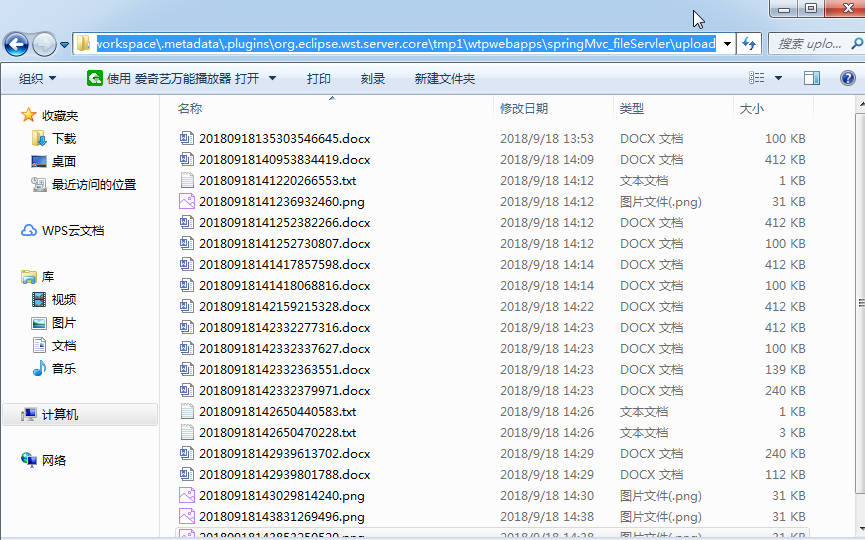
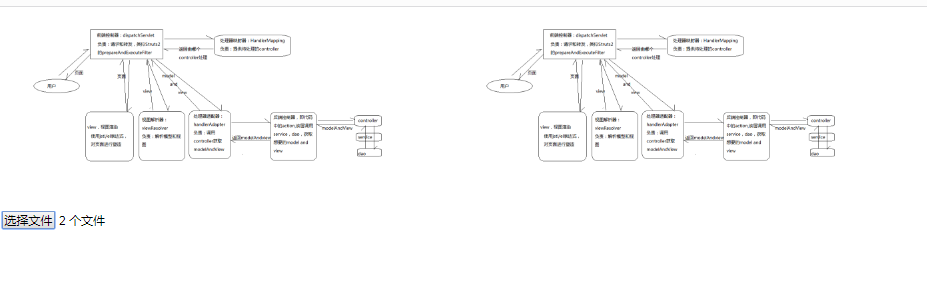
该案例是采用springMvc实现跨服务器图片上传功能,其中用到的主要类和工具有:CommonsMultipartResolver、jquery.form.js。如果要实现多个文件上传,只需要在input元素中加入multiple="multiple",即可选择多个文件进行上传。另外本文的上传的文件路径不是在tomcat下对应的文件夹中,而是在workspace对应的文件夹中存在。该案例使用ajax上传页面不刷新,多个图片可立即回显,并将其相对路径可以随着表单一起保存到数据库中,而文件则存放在文件服务器中。还有,点击选择,选择了文件之后,文件是依附于form表单,因此在使用jquery.form.js的$("#formId").ajaxSubmit(options)提交的表单,提交之后,文件是以流的形式通过HttpServeltRequest传递到Controller当中,之后再通过向下强转成HttpServeltRequest的实现接口MultipartHttpServletRequest进一步获取到文件集合。
代码:
springMvc-servlet.xml文件中需要配置:
<!-- 文件上传解析器 -->

    <bean id="multipartResolver" class="org.springframework.web.multipart.commons.CommonsMultipartResolver">

        <property name="maxUploadSize" value="20180000"></property>

    </bean>
jsp页面:
<%@ page language="java" contentType="text/html; charset=UTF-8"

    pageEncoding="UTF-8"%>

<%@ taglib uri="http://java.sun.com/jsp/jstl/core" prefix="c" %>

<!DOCTYPE html PUBLIC "-//W3C//DTD HTML 4.01 Transitional//EN" "http://www.w3.org/TR/html4/loose.dtd">

<html>

<head>

<meta http-equiv="Content-Type" content="text/html; charset=UTF-8">

<title>Insert title here</title>

<script type="text/javascript" src="${pageContext.request.contextPath }/js/jquery.js"></script>

<script type="text/javascript" src="${pageContext.request.contextPath }/js/jquery.form.js"></script>

<script type="text/javascript">

function fileOnchage(){

    var option = {

            type:"post",

            data:{myUploadFile:'uploadFile'},

            dataType:"string",

            url:"${pageContext.request.contextPath }/uploadController/upload.do",

            success:function(data){

                //String格式json,转json对象

                var json = $.parseJSON(data);

                //将对象转String格式的json(例如数组)

                //JSON.stringify('obj');

                for(var i in json){

                    $("#picImg").append('<img id="myImg" src="'+json[i].fullPath+'"/>');

                }

            }

        }

    $("#fileForm").ajaxSubmit(option);

}

</script>

</head>

<body>

<form id="fileForm" method="post">

    <div id="picImg"></div>

    <input type="file" name="uploadFile" value="请选择" multiple="multiple" onchange="fileOnchage()"/>

    <input type="hidden" id="relativePath" value="">

</form>

</body>

</html>
controller:
package com.cissst.it;

import java.io.IOException;

import java.io.InputStream;

import java.text.SimpleDateFormat;

import java.util.ArrayList;

import java.util.Date;

import java.util.List;

import java.util.Random;

import javax.servlet.ServletException;

import javax.servlet.http.HttpServletRequest;

import net.sf.json.JSONArray;

import org.springframework.stereotype.Controller;

import org.springframework.web.bind.ServletRequestDataBinder;

import org.springframework.web.bind.annotation.InitBinder;

import org.springframework.web.bind.annotation.RequestMapping;

import org.springframework.web.bind.annotation.ResponseBody;

import org.springframework.web.multipart.MultipartFile;

import org.springframework.web.multipart.MultipartHttpServletRequest;

import org.springframework.web.multipart.commons.CommonsMultipartFile;

import org.springframework.web.multipart.support.ByteArrayMultipartFileEditor;

import com.sun.jersey.api.client.Client;

import com.sun.jersey.api.client.WebResource;

@Controller

@RequestMapping("/uploadController")

public class UploadController {

    @InitBinder

    protected void initBinder(HttpServletRequest request,

            ServletRequestDataBinder binder) throws ServletException {

        binder.registerCustomEditor(CommonsMultipartFile.class,

                new ByteArrayMultipartFileEditor());

    }

    @RequestMapping("upload")

    @ResponseBody

    public String upload(String myUploadFile,HttpServletRequest request){

        //多部件请求对象

        MultipartHttpServletRequest mh = (MultipartHttpServletRequest) request;

        //获取文件list集合

        List<MultipartFile> files = mh.getFiles(myUploadFile);

        //创建jersey服务器,进行跨服务器上传

        Client client = Client.create();

        //json格式的图片路径

        List<String> listJsonPath = new ArrayList<String>();

        for (MultipartFile file : files) {

            String newFileName="";

            SimpleDateFormat sdf = new SimpleDateFormat("yyyyMMddHHmmssSSS");

            newFileName = sdf.format(new Date());

            Random r = new Random();

            //{'':''}

            String jsonPath="";

            for(int i =0 ;i<3;i++){

                newFileName=newFileName+r.nextInt(10);

            }

            //原始的文件名

            String originalFilename = file.getOriginalFilename();

            //截取文件扩展名

            String suffix = originalFilename.substring(originalFilename.lastIndexOf("."));

            //绝对路径(另一台服务器文件路径)

            String fullPath="http://127.0.0.1:8083/springMvc_fileServler/upload/"+newFileName+suffix;

            //相对路径(数据库中存放的文件名)

            String relativePath=newFileName+suffix;

            //各自的流

            InputStream inputStream = null;

            try {

                inputStream = file.getInputStream();

            } catch (IOException e1) {

                e1.printStackTrace();

            }

            //将文件传入文件服务器

            WebResource resource = client.resource(fullPath);

            resource.put(String.class, inputStream);

            jsonPath = "{\"fullPath\":\""+fullPath+"\",\"relativePath\":\""+relativePath+"\"}";

            listJsonPath.add(jsonPath);

        }

        JSONArray jsonArray = JSONArray.fromObject(listJsonPath);

        return jsonArray.toString();

    }

}
服务器信息:
master server's and point :
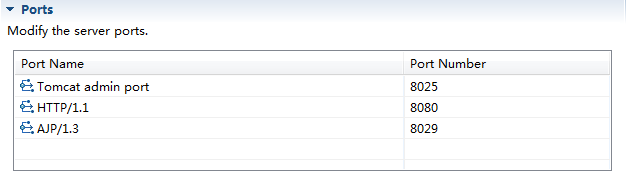
file server's and point:
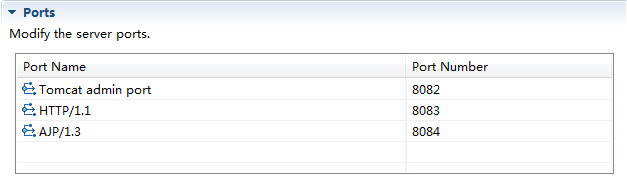
you must confrim two server's point diffrence
上传后的文件:
页面回显:
springMvc---跨服务器文件上传(实测总结)的更多相关文章
- 前后端分离跨服务器文件上传-Java SpringMVC版
近来工作上不上特别忙,加上对后台java了解一点,所以就抽时间,写了一个java版本的前后端分离的跨服务器文件上传功能,包括前后端代码. 一.Tomcat服务器部分 1.Tomcat服务器 单独复制一 ...
- django 12天(跨域,文件上传,下载,cookie,session)
django 12天(跨域,文件上传,下载) 跨域 什么是跨域 1.协议不同 2.端口不同 3.主机不同 如何解决跨域 1.安装django-cors-headers模块 2.在settings.py ...
- (转)SpringMVC学习(九)——SpringMVC中实现文件上传
http://blog.csdn.net/yerenyuan_pku/article/details/72511975 这一篇博文主要来总结下SpringMVC中实现文件上传的步骤.但这里我只讲单个文 ...
- 使用SpringMVC框架实现文件上传和下载功能
使用SpringMVC框架实现文件上传和下载功能 (一)单个文件上传 ①配置文件上传解释器 <!—配置文件上传解释器 --> <mvc:annotation-driven>&l ...
- ASP.NET、JAVA跨服务器远程上传文件(图片)的相关解决方案整合
一.图片提交例: A端--提交图片 protected void Page_Load(object sender, EventArgs e) { if (!IsPostBack) { string u ...
- (H5)FormData+AJAX+SpringMVC跨域异步上传文件
最近都没时间整理资料了,一入职就要弄懂业务,整天被业务弄得血崩. 总结下今天弄了一个早上的跨域异步上传文件.主要用到技术有HTML5的FormData,AJAX,Spring MVC. 首先看下上传页 ...
- SpringMvc入门五----文件上传
知识点: SpringMvc单文件上传 SpringMvc多文件上传 这里我直接演示多文件上传,单文件的上传就不说了,不过代码都是现成的. 效果预览: DEMO图: 添加文件上传j ...
- SpringMVC国际化与文件上传
点击阅读上一章 其实SpringMVC中的页面国际化与上一章的验证国际化基本一致. 1.对页面进行国际化 1)首先我们对Spring配置文件中添加国际化bean配置 <!-- 注册国际化信息,必 ...
- SpringMVC框架06——文件上传与下载
1.文件上传 Spring MVC框架的文件上传是基于commons-fileupload组件的文件上传,只不过Spring MVC框架在原有文件上传组件上做了进一步封装,简化了文件上传的代码实现. ...
随机推荐
- (转载)Unity UGUI鼠标点击UI不受影响方法IsPointerOverGameObject
这几天在做捕鱼达人游戏时发现,当鼠标点击UI时,炮台的子弹也会发射子弹,这样会影响用户体验. 然后网上百度了一波,发现在UGUI系统上,EventSystem提供了一些方法.那就是EventSyste ...
- frame和bounds有什么不同?
frame指的是该view在父view坐标系统中的位置和大小.(参照物是他的父坐标系统). bounds指的是该view在他本身的坐标系统中的位置和大小.(参照点是本身的坐标系统).
- ssm 整合(方案二 maven)
通过maven来整合ssm方便很多,至少不用去找jar包 具体架构如下: 1.配置pom.xml <project xmlns="http://maven.apache.org/POM ...
- hdu 5564 Clarke and digits 矩阵快速幂优化数位dp
Clarke and digits Time Limit: 5000/3000 MS (Java/Others) Memory Limit: 65536/65536 K (Java/Others ...
- 【Core Swagger】.NET Core中使用swagger
一.入门 https://www.nuget.org/packages/Swashbuckle.AspNetCore.SwaggerGen/ 1.添加核心NUGET包 Swashbuckle.AspN ...
- C#退出程序方法分类
1.this.Close(); 只是关闭当前窗口,若不是主窗体的话,是无法退出程序的,另外若有托管线程(非主线程),也无法干净地退出:
- python学习:数据类型
python有两种索引方式.一种从左至右,下标从0开始:一种从右至左,下标从-1开始. python有六种数据类型: 不可变数据(四个):Number(数字).String(字符串).Tuple(元组 ...
- 【Mybatis】【1】generate批量生成实体类,数据库接口类和mapper
前言: 1,实体类之类如果自己写的话,比较繁琐,还容易出错,所以用generate自动生成 2,int类型可能会生成为short类型,建议不要手动改回int类.因为下次生成又是short类型了,可能会 ...
- Android流媒体开发之路一:Camera2采集摄像头原始数据并手动预览
Android Camera2采集摄像头原始数据并手动预览 最近研究了一下android摄像头开发相关的技术,也看了Google提供的Camera2Basic调用示例,以及网上一部分代码,但都是在Te ...
- python变量传递
python变量传递 数值 代码 num_1 = 123 num_2 = num_1 # 改变num_2值前 print 'num_1 = {0}, num_2 = {1}'.format(num_1 ...