
android 自定义进度条颜色
先看图
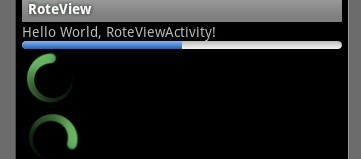
基于产品经理各种自定义需求,经过查阅了解,下面是自己对Android自定义进度条的学习过程!
这个没法了只能看源码了,还好下载了源码, sources\base\core\res\res\ 下应有尽有,修改进度条颜色只能找progress ,因为是改变样式,首先找styles.xml
找到xml后,进去找到
- <span style="font-size: 18px;"> <style name="Widget.ProgressBar">
- <item name="android:indeterminateOnly">true</item>
- <item name="android:indeterminateDrawable">@android:drawable/progress_medium_white</item>
- <item name="android:indeterminateBehavior">repeat</item>
- <item name="android:indeterminateDuration">3500</item>
- <item name="android:minWidth">48dip</item>
- <item name="android:maxWidth">48dip</item>
- <item name="android:minHeight">48dip</item>
- <item name="android:maxHeight">48dip</item>
- </style></span>
这是默认转圈的效果style,但今天我们修改的是水平进度条颜色!
所以找到
- <span style="font-size: 18px;"> <style name="Widget.ProgressBar.Horizontal">
- <item name="android:indeterminateOnly">false</item>
- <item name="android:progressDrawable">@android:drawable/progress_horizontal</item>
- <item name="android:indeterminateDrawable">@android:drawable/progress_indeterminate_horizontal</item>
- <item name="android:minHeight">20dip</item>
- <item name="android:maxHeight">20dip</item>
- </style></span>
你看系统一步一步关联的,扩展性很性,低耦合,所以我们现在只要改变进度条是怎么样画出来的就行了 ,但是负责画进度条的是
<item name="android:progressDrawable"> 所以我们可以找到"drawable下的 progress_horizontal 文件,改变他就可以改变进度条颜色
- <span style="font-size: 18px;"><?xml version="1.0" encoding="utf-8"?>
- <!-- Copyright (C) 2008 The Android Open Source Project
- Licensed under the Apache License, Version 2.0 (the "License");
- you may not use this file except in compliance with the License.
- You may obtain a copy of the License at
- http://www.apache.org/licenses/LICENSE-2.0
- Unless required by applicable law or agreed to in writing, software
- distributed under the License is distributed on an "AS IS" BASIS,
- WITHOUT WARRANTIES OR CONDITIONS OF ANY KIND, either express or implied.
- See the License for the specific language governing permissions and
- limitations under the License.
- -->
- <layer-list xmlns:android="http://schemas.android.com/apk/res/android">
- <item android:id="@android:id/background">
- <shape>
- <corners android:radius="5dip" />
- <gradient
- android:startColor="#ff9d9e9d"
- android:centerColor="#ff5a5d5a"
- android:centerY="0.75"
- android:endColor="#ff747674"
- android:angle="270"
- />
- </shape>
- </item>
- <item android:id="@android:id/secondaryProgress">
- <clip>
- <shape>
- <corners android:radius="5dip" />
- <gradient
- android:startColor="#80ffd300"
- android:centerColor="#80ffb600"
- android:centerY="0.75"
- android:endColor="#a0ffcb00"
- android:angle="270"
- />
- </shape>
- </clip>
- </item>
- <item android:id="@android:id/progress">
- <clip>
- <shape>
- <corners android:radius="5dip" />
- <gradient
- android:startColor="#ffffd300"
- android:centerColor="#ffffb600"
- android:centerY="0.75"
- android:endColor="#ffffcb00"
- android:angle="270"
- />
- </shape>
- </clip>
- </item>
- </layer-list>
- </span>
看到没有,这是系统的进度条画出的布局条件
android:startColor="#80ffd300"
android:centerColor="#80ffb600"
android:endColor="#ff747674"
我们只要改变这个色值就能改变他的颜色,主要改变的是<item android:id="@android:id/progress">下的色值就行了
说了这么多,到底怎么做呢, 很简单
1 。 在我们的项目下新建一个 style.xml 文件
创建一个style 标签,集成系统默认样式,然后自定义一个新的progressDrawable 文件,随后面在layout 中的progress 中引用这个文件就行
<style name="ProgressBar_Mini" parent="@android:style/Widget.ProgressBar.Horizontal">
<item name="android:maxHeight">50dip</item>
<item name="android:minHeight">8dip</item>
<item name="android:indeterminateOnly">false</item>
<item name="android:indeterminateDrawable">@android:drawable/progress_indeterminate_horizontal</item>
<item name="android:progressDrawable">@drawable/progressbar_mini</item>
</style>
下面是我的 progressbar_mini 文件,改变了下android:endColor="#F5F5F5" android:startColor="#BEBEBE" 的色值
- <span style="font-size: 18px;"><layer-list xmlns:android="http://schemas.android.com/apk/res/android" >
- <item android:id="@android:id/background">
- <shape >
- <corners android:radius="5dip" />
- <gradient
- android:angle="270"
- android:centerY="0.75"
- android:endColor="#F5F5F5"
- android:startColor="#BEBEBE" />
- </shape>
- </item>
- <item android:id="@android:id/secondaryProgress">
- <clip >
- <shape >
- <corners android:radius="0dip" />
- <gradient
- android:angle="270"
- android:centerY="0.75"
- android:endColor="#165CBC"
- android:startColor="#85B0E9" />
- </shape>
- </clip>
- </item>
- <item android:id="@android:id/progress">
- <clip >
- <shape >
- <corners android:radius="5dip" />
- <gradient
- android:angle="270"
- android:centerY="0.75"
- android:endColor="#165CBC"
- android:startColor="#85B0E9" />
- </shape>
- </clip>
- </item>
- </layer-list></span>
最后在中引用就可以了
<ProgressBar
android:id="@+id/progress"
style="@style/ProgressBar_Mini"
android:layout_width="fill_parent"
android:layout_height="wrap_content"
android:progress="50" />
转载申明初入:http://blog.csdn.net/liao3841054/article/details/7556551
- 顶
- 0
- 踩
- 0
android 自定义进度条颜色的更多相关文章
- Android自定义进度条颜色
这个没法了只能看源码了,还好下载了源码, sources\base\core\res\res\ 下应有尽有,修改进度条颜色只能找progress ,因为是改变样式,首先找styles.xml ? 1 ...
- 最简单的android自定义进度条样式
一.自定义圆形进度条样式 1.在安卓项目drawable目录下新建一个xml文件如下:<?xml version="1.0" encoding="utf-8&quo ...
- Android自定义进度条
Android原生控件只有横向进度条一种,而且没法变换样式,比如原生rom的样子很丑是吧,当伟大的产品设计要求更换前背景,甚至纵向,甚至圆弧状的,咋办,比如ok,我们开始吧: 一)变换前背景 先来看看 ...
- Android自定义进度条-带文本(文字进度)的水平进度条(ProgressBar)
水平进度条,显示进度的文本随着进度而移动. 效果如下,截的静态图. 代码如下 TextProgressBar.java public class TextProgressBar extends Pro ...
- android圆形进度条ProgressBar颜色设置
花样android Progressbar http://www.eoeandroid.com/thread-1081-1-1.html http://www.cnblogs.com/xirihanl ...
- BitBlt()函数实现带数字百分比进度条控件、静态文本(STATIC)控件实现的位图进度条、自定义进度条控件实现七彩虹颜色带数字百分比
Windows API BitBlt()函数实现带数字百分比进度条控件. 有两个例子:一用定时器实现,二用多线程实现. 带有详细注解. 此例是本人原创,绝对是网上稀缺资源(本源码用Windows AP ...
- Android 设置进度条背景
Android 设置进度条背景 直接上代码 <ProgressBar android:id="@+id/progressBar" android:layout_width=& ...
- android113 自定义进度条
MainActivity: package com.itheima.monitor; import android.os.Bundle; import android.app.Activity; im ...
- 自定义进度条PictureProgressBar——从开发到开源发布全过程
自定义进度条PictureProgressBar——从开发到开源发布全过程 出处: 炎之铠邮箱:yanzhikai_yjk@qq.com 本文原创,转载请注明本出处! 本项目JCenter地址:htt ...
随机推荐
- javaWEB小练习:在数据库中查找相同的username和password
/*练习题: * 在Mysql数据库中创建一个person数据表,添加三个字段,id,user,password,并录入几条记录 * *练习题:定义一个login.html,里面定义了两个请求字段:u ...
- Unity5 Standard自发光材质无效解决方法
受光物和发光物都要勾选Static才会有效. 如果不够选静态就是用HDR光照,需要相机勾选HDR 所以如果是动态的物体真实发光,Unity依旧无法支持
- grails的layouts模板页面使用
使用方式1: layouts文件夹下新建文件,名称和Controller名称相同,例如UserController,layouts下面创建user.gsp,此时,user站点下所有的页面都将套用 us ...
- gd-jpeg: JPEG library reports unrecoverable error 解决办法
Warning: imagecreatefromjpeg() [function.imagecreatefromjpeg]: gd-jpeg: JPEG library reports unrecov ...
- CODEVS 3145 汉诺塔游戏 递归
题目描述 Description 汉诺塔问题(又称为河内塔问题),是一个大家熟知的问题.在A,B,C三根柱子上,有n个不同大小的圆盘(假设半径分别为1-n吧),一开始他们都叠在我A上(如图所示),你的 ...
- SqlSever基础 select cast 将一个int类型数据转换为char
镇场诗:---大梦谁觉,水月中建博客.百千磨难,才知世事无常.---今持佛语,技术无量愿学.愿尽所学,铸一良心博客.------------------------------------------ ...
- N年后给自己一些忠诚的建议
给自己S年后的一封信: 也许,现在的自己已经经历了种种历练,或成为干将,许是拔杆而起的创业者,再者仍然是一名奋斗中的工薪族.无论现在如何,请记得: M年前,自己坐在小房子里写下的信件. 那时候,自己是 ...
- SQL十进制和十六进制相互转换
CREATE FUNCTION ufn_ConvertInt2Hex ( @Num BIGINT ) ) AS BEGIN /************************************* ...
- 让PHP 5.3支持MSSQL连接
最近在Windows Server 2008配置了PHP环境,想要连接SQL Server 2008,但是悲催的发现,从5.3开始,PHP自带的dll不再支持2000以后的MS SQL Server了 ...
- printf()函数
printf()函数是格式化输出函数, 一般用于向标准输出设备按规定格式输出信息. printf()函数的调用格式为: printf("<格式化字符串>", <参 ...