
JAVA I/O之文件复制
有没有大佬告诉我这个不要了的代码插入区(就现在这句话的区域)怎么删掉。。。。。。。
        //一个字节一个字节的复制

        public static  void  fun() throws IOException {

            FileInputStream fis = new FileInputStream("F:/abc.txt");

            FileOutputStream fos = new FileOutputStream("F:/字节流复制(一个字节一个字节).txt");

            int by = 0;

            while ((by=fis.read()) != -1) {

                fos.write(by);

            }

            fis.close();

            fos.close();

        }

        //1024字节数组复制(加入数组缓冲区)

        public  static void  fun1() throws IOException {

            FileInputStream fis = new FileInputStream("F:/abc.txt");

            FileOutputStream fos = new FileOutputStream("F:/字节流复制(1024字节数组).txt");

            int len = 0;

            byte[] bytes =new byte[1024];

            while ((len=fis.read(bytes)) != -1) {

                fos.write(bytes,0,len);

            }

            fis.close();

            fos.close();

        }

        // 一个字节一个字节复制并用了缓冲流

        public static   void  fun2() throws IOException {

            BufferedInputStream bis = new BufferedInputStream(new FileInputStream("F:/abc.txt"));

            BufferedOutputStream bos = new BufferedOutputStream(new FileOutputStream("F:/字节缓冲流复制(一个字节一个字节).txt"));

            int by = 0;

            while ((by=bis.read()) != -1) {

                bos.write(by);

            }

            bos.close();

            bis.close();

        }

        // 1024字节数组复制并用了缓冲流 (加入数组缓冲区)

        public  static void  fun3() throws IOException {

            BufferedInputStream bis = new BufferedInputStream(new FileInputStream("F:/abc.txt"));

            BufferedOutputStream bos = new BufferedOutputStream(new FileOutputStream("F:/字节缓冲流复制(1024字节数组).txt"));

            int len = 0;

            byte[] bytes =new byte[1024];

            while ((len=bis.read(bytes)) != -1) {

                bos.write(bytes,0,len);

            }

            bos.close();

            bis.close();

        }

        //字符缓冲流复制文(一行一行可保留格式)

        public  static void  fun4() throws IOException {

            FileInputStream fileInputStream = new FileInputStream("F:/abc.txt");

       //出现乱码问题的原因:文件的编码,系统的编码,java的默认编码有冲突。

        //假如我们用FileReader这些类来读取系统文件,它调用的字符编码是java默认的UTF-8,但是一般WINDOW的TXT默认是ANSI,而自己本机的中文编码是GBK

            InputStreamReader inputStreamReader = new InputStreamReader(fileInputStream,"GBK");

            BufferedReader bufferedReader = new BufferedReader(inputStreamReader);

            FileOutputStream fileOutputStream = new FileOutputStream("F:/字符缓冲流复制文件.txt");

            OutputStreamWriter outputStreamWriter = new OutputStreamWriter(fileOutputStream,"GBK");

            BufferedWriter bufferedWriter = new BufferedWriter(outputStreamWriter);

              String line = null;

            while (null != (line = bufferedReader.readLine())) {

                bufferedWriter.write(line);

                bufferedWriter.newLine();

            }

            if (bufferedWriter != null || outputStreamWriter != null || fileOutputStream != null) {

                bufferedWriter.close();

                outputStreamWriter.close();

                fileOutputStream.close();

            }

            if (bufferedReader != null || inputStreamReader != null || fileInputStream != null) {

                bufferedReader.close();

                inputStreamReader.close();

                fileInputStream.close();

            }

        }

        //字节流(ByteArrayInputStream)当你资源不足够用时,选择BufferedOutputStream是最佳的选择, 当你选择快速完成一个作业时,可以选择ByteArrayOutputStream之类的输出流https://www.cnblogs.com/yixiu868/p/8144670.html

        public  static void  fun5() throws IOException {

              FileInputStream fileInputStream = new FileInputStream("F:/abc.txt");

            byte[] buffer = new byte[1024];

            int len = 0;

            ByteArrayOutputStream bos = new ByteArrayOutputStream();

            while ((len = fileInputStream.read(buffer)) != -1) {

                bos.write(buffer, 0, len);

            }

            bos.close();

            byte[] bytes = bos.toByteArray();

            FileOutputStream fileOutputStream = new FileOutputStream("F:/字节流(ByteArrayInputStream).txt");

            fileOutputStream.write(bytes);

            if (fileOutputStream != null) {

                fileOutputStream.close();

            }

            if (fileInputStream != null) {

                fileInputStream.close();

            }

        }

          public static void main(String[] arg) throws IOException{

            long start,end;

            start = System.currentTimeMillis();

            fun();

            end = System.currentTimeMillis();

            System.out.println("一个字节一个字节的复制(字节流)花费时间:" + (end - start) + "ms");

            start = System.currentTimeMillis();

            fun1();

            end = System.currentTimeMillis();

            System.out.println("1024字节数组复制(字节流)花费时间:" + (end - start) + "ms");

            start = System.currentTimeMillis();

            fun2();

            end = System.currentTimeMillis();

            System.out.println("一个字节一个字节的复制(缓冲流)花费时间:" + (end - start) + "ms");

            start = System.currentTimeMillis();

            fun3();

            end = System.currentTimeMillis();

            System.out.println("1024字节数组复制(缓冲流)花费时间:" + (end - start) + "ms");

            start = System.currentTimeMillis();

            fun4();

            end = System.currentTimeMillis();

            System.out.println("字符缓冲流复制文件花费时间:" + (end - start) + "ms");

            start = System.currentTimeMillis();

            fun5();

            end = System.currentTimeMillis();

            System.out.println("字节流(ByteArrayInputStream)花费时间:" + (end - start) + "ms");

          }
执行结果:

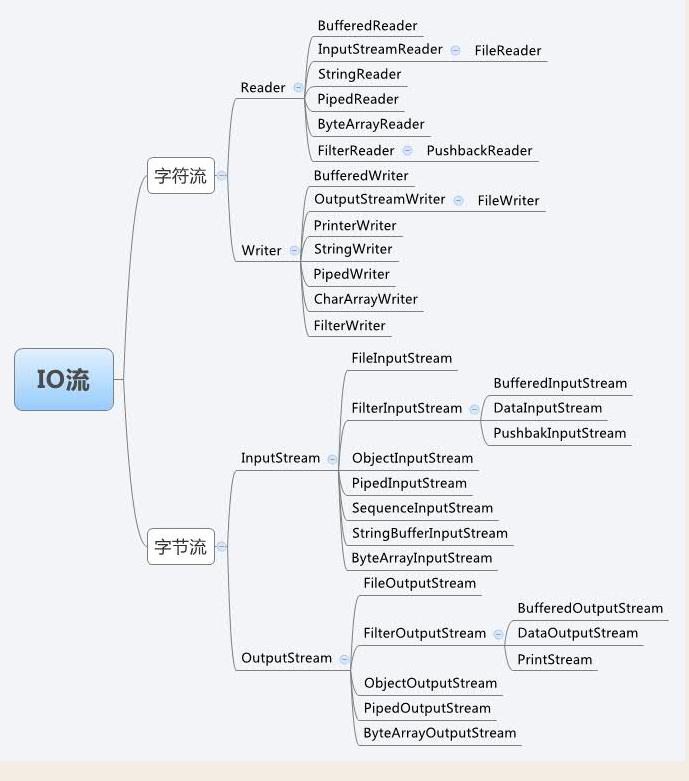
下图为IO中的字节流和字符流,每一种又分为相应的输入流和输出流。需了解的基础概念:字符流(Reader,Writer),字节流,缓冲流(Buffered);使用时按照各自需求去搜寻对应相关资料即可。
JAVA I/O之文件复制的更多相关文章
- JAVA File方法各类文件复制操作
import java.io.*; public class AllFile { public static void main(String[] args) throws Exception {// ...
- Java实现简单的文件复制
public class FileCopy { public static void main(String[] args) { String path = "d:\\1.txt" ...
- Java中创建操作文件和文件夹的工具类
Java中创建操作文件和文件夹的工具类 FileUtils.java import java.io.BufferedInputStream; import java.io.BufferedOutput ...
- Java实现文件复制的四种方式
背景:有很多的Java初学者对于文件复制的操作总是搞不懂,下面我将用4中方式实现指定文件的复制. 实现方式一:使用FileInputStream/FileOutputStream字节流进行文件的复制操 ...
- Java基础之读文件——使用通道复制文件(FileBackup)
控制台程序,除了使用Files类中使用copy()方法将文件复制外,还可以使用FileChannel对象复制文件,连接到输入文件的FileChannel对象能直接将数据传输到连接到输出文件的FileC ...
- java中的IO流之文件复制
O(∩_∩)O哈哈~ 1.综述 一门成熟的语言肯定具备的几个模块:IO,通信,线程,UI...... Java作为一门成熟的程序语言,其IO流是比较复杂的.上个图大家感受下: 简单分析一下,IO分为两 ...
- 黑马程序员——java基础之文件复制
---------------------- ASP.Net+Unity开发..Net培训.期待与您交流!---------------------- <a href="http:// ...
- java IO之字节流和字符流-Reader和Writer以及实现文件复制拷贝
接上一篇的字节流,以下主要介绍字符流.字符流和字节流的差别以及文件复制拷贝.在程序中一个字符等于两个字节.而一个汉字占俩个字节(一般有限面试会问:一个char是否能存下一个汉字,答案当然是能了,一个c ...
- java学习之实现文件的复制
package com.io; import java.io.*; import java.text.SimpleDateFormat; import java.util.Date; /** * 文件 ...
随机推荐
- hdu, KMP algorithm, linear string search algorithm, a nice reference provided
reference: Rabin-Karp and Knuth-Morris-Pratt Algorithms By TheLlama– TopCoder Member https://www.top ...
- Msql入门实战之下
前面一章主要解说了mysql的select的使用方法.将select的大部分使用方法进行分别解说.本章主要解说Msql约束表的建立,以及存储过程的实现,附带其它介绍.临时就算入门了,Mysql索引之后 ...
- YTU 2552: 好好学习天天向上
2552: 好好学习天天向上 时间限制: 1 Sec 内存限制: 128 MB 提交: 55 解决: 42 题目描述 在刚过去不久的母亲节中,小红答应妈妈要好好学习天天向上.小红对数学特别不擅长, ...
- jquery uploadify在谷歌浏和火狐下无法上传的解决方案(.Net版)
在项目紧张的进行过程中,jquery uploadify上传不兼容的问题一直没有试着去解决,只幻想着用ie的人越来越多,怎么奈何firefox4刚推出,就有4000万的下载.......仰天长叹,记生 ...
- JQuery 日期选择框
一 jeDate日期控件,关于官方的文档请查看: http://www.jayui.com/jedate/ 1 引入js文件 <script type="text/javascr ...
- dubbo和SpringCould
作为常用的微服务框架,这两者经常会被对比,但实际上两者有不少差异. dubbo好比组装电脑,很多东西可以自己选配,自由度高但对于小白难入门,很可能因为某个组件没选好,导致完全用不起来. SpringC ...
- C# 简单实现直线方程,抛物线方程(转载)
http://www.cnblogs.com/hsiang/archive/2017/01/17/6294864.html 本例子是简单的在WinForm程序中实现在坐标系中绘制直线方程,抛物线方程, ...
- 洛谷 P1865 A % B Problem(求区间质数个数)
题目背景 题目名称是吸引你点进来的 实际上该题还是很水的 题目描述 区间质数个数 输入输出格式 输入格式: 一行两个整数 询问次数n,范围m 接下来n行,每行两个整数 l,r 表示区间 输出格式: 对 ...
- 汇编程序49:实验14 访问CMOS RAM(显示系统时间)
assume cs:code ;安装程序,使用指令out和in指令 code segment start: mov ax,cs mov ds,ax mov si,offset sub1 mov ax, ...
- 贪心+优先队列 HDOJ 5360 Hiking
题目传送门 /* 题意:求邀请顺序使得去爬山的人最多,每个人有去的条件 贪心+优先队列:首先按照l和r从小到大排序,每一次将当前人数相同的被邀请者入队,那么只要能当前人数比最多人数条件小,该人能 被邀 ...