
微服务熔断限流Hystrix之Dashboard
简介
Hystrix Dashboard是一款针对Hystrix进行实时监控的工具,通过Hystrix Dashboard可以直观地看到各Hystrix Command的请求响应时间,请求成功率等数据。
快速上手
工程说明
| 工程名 | 端口 | 作用 |
|---|---|---|
| eureka-server | 8761 | 注册中心 |
| service-hi | 8762 | 服务提供者 |
| service-consumer | 8763 | 服务消费者 |
核心代码
eureka-server 工程
pom.xml
<dependency>

    <groupId>org.springframework.boot</groupId>

    <artifactId>spring-boot-starter-web</artifactId>

</dependency>

<dependency>

    <groupId>org.springframework.cloud</groupId>

    <artifactId>spring-cloud-starter-netflix-eureka-server</artifactId>

</dependency>
application.yml
server:

  port: 8761

eureka:

  instance:

    hostname: localhost

  client:

    register-with-eureka: false

    fetch-registry: false

    service-url:

      defaultZone: http://${eureka.instance.hostname}:/${server.port}/eureka/

spring:

  application:

    name: eureka-server
启动类
@SpringBootApplication

@EnableEurekaServer

public class EurekaServerApplication {

    public static void main(String[] args) {

        SpringApplication.run( EurekaServerApplication.class, args );

    }

}
service-hi 工程
pom.xml
<dependency>

    <groupId>org.springframework.boot</groupId>

    <artifactId>spring-boot-starter-web</artifactId>

</dependency>

<dependency>

    <groupId>org.springframework.cloud</groupId>

    <artifactId>spring-cloud-starter-netflix-eureka-client</artifactId>

</dependency>
application.yml
server:

  port: 8762

spring:

  application:

    name: service-hi

eureka:

  client:

    service-url:

      defaultZone: http://localhost:8761/eureka/
HelloController
@RestController

public class HelloController {

    @GetMapping("/hi")

    public String hi() {

        return "hello ~";

    }

    @GetMapping("/hey")

    public String hey() {

        return "hey ~";

    }

    @GetMapping("/oh")

    public String oh() {

        return "ah ~";

    }

    @GetMapping("/ah")

    public String ah() {

        //模拟接口1/3的概率超时

        Random rand = new Random();

        int randomNum = rand.nextInt(3) + 1;

        if (3 == randomNum) {

            try {

                Thread.sleep( 3000 );

            } catch (InterruptedException e) {

                e.printStackTrace();

            }

        }

        return "来了老弟~";

    }

}
启动类
@SpringBootApplication

@EnableEurekaClient

public class ServiceHiApplication {

    public static void main(String[] args) {

        SpringApplication.run( ServiceHiApplication.class, args );

    }

}
service-consumer 工程
pom.xml
<dependency>

    <groupId>org.springframework.boot</groupId>

    <artifactId>spring-boot-starter-web</artifactId>

</dependency>

<dependency>

    <groupId>org.springframework.cloud</groupId>

    <artifactId>spring-cloud-starter-netflix-eureka-client</artifactId>

</dependency>

<dependency>

    <groupId>org.springframework.cloud</groupId>

    <artifactId>spring-cloud-starter-netflix-ribbon</artifactId>

</dependency>

<dependency>

    <groupId>org.springframework.boot</groupId>

    <artifactId>spring-boot-starter-actuator</artifactId>

</dependency>

<dependency>

    <groupId>org.springframework.cloud</groupId>

    <artifactId>spring-cloud-starter-netflix-hystrix</artifactId>

</dependency>

<dependency>

    <groupId>org.springframework.cloud</groupId>

    <artifactId>spring-cloud-starter-netflix-hystrix-dashboard</artifactId>

</dependency>
application.yml
server:

  port: 8763

  tomcat:

    uri-encoding: UTF-8

    max-threads: 1000

    max-connections: 20000

spring:

  application:

    name: service-consumer

eureka:

  client:

    service-url:

      defaultZone: http://localhost:8761/eureka/

management:

  endpoints:

    web:

      exposure:

        include: "*"

      cors:

        allowed-origins: "*"

        allowed-methods: "*"
HelloService
@Service

public class HelloService {

    @Autowired

    private RestTemplate restTemplate;

    /**

     * 简单用法

     */

    @HystrixCommand

    public String hiService() {

        return restTemplate.getForObject("http://SERVICE-HI/hi" , String.class);

    }

    /**

     * 定制超时

     */

    @HystrixCommand(commandProperties = {

            @HystrixProperty(name = "execution.isolation.thread.timeoutInMilliseconds", value = "30000") })

    public String heyService() {

        return restTemplate.getForObject("http://SERVICE-HI/hey" , String.class);

    }

    /**

     * 定制降级方法

     */

    @HystrixCommand(fallbackMethod = "getFallback")

    public String ahService() {

        return restTemplate.getForObject("http://SERVICE-HI/ah" , String.class);

    }

    /**

     * 定制线程池隔离策略

     */

    @HystrixCommand(fallbackMethod = "getFallback",

            threadPoolKey = "studentServiceThreadPool",

            threadPoolProperties = {

                    @HystrixProperty(name="coreSize", value="30"),

                    @HystrixProperty(name="maxQueueSize", value="50")

            }

    )

    public String ohService() {

        return restTemplate.getForObject("http://SERVICE-HI/oh" , String.class);

    }

    public String getFallback() {

        return "Oh , sorry , error !";

    }

}
HelloController
@RestController

public class HelloController {

    @Autowired

    private HelloService helloService;

    @GetMapping("/hi")

    public String hi() {

        return helloService.hiService();

    }

    @GetMapping("/hey")

    public String hey() {

        return helloService.heyService();

    }

    @GetMapping("/oh")

    public String oh() {

        return helloService.ohService();

    }

    @GetMapping("/ah")

    public String ah() {

        return helloService.ahService();

    }

}
启动类
@SpringBootApplication

@EnableEurekaClient

@EnableHystrixDashboard

@EnableHystrix

@EnableCircuitBreaker

public class ServiceConsumerApplication {

    public static void main(String[] args) {

        SpringApplication.run( ServiceConsumerApplication.class, args );

    }

    @LoadBalanced

    @Bean

    public RestTemplate restTemplate() {

        return new RestTemplate();

    }

}
Hystrix Dashboard 的使用
JSON格式监控信息
先访问http://localhost:8762/hi
再打开http://localhost:8763/actuator/hystrix.stream,可以看到一些具体的数据:
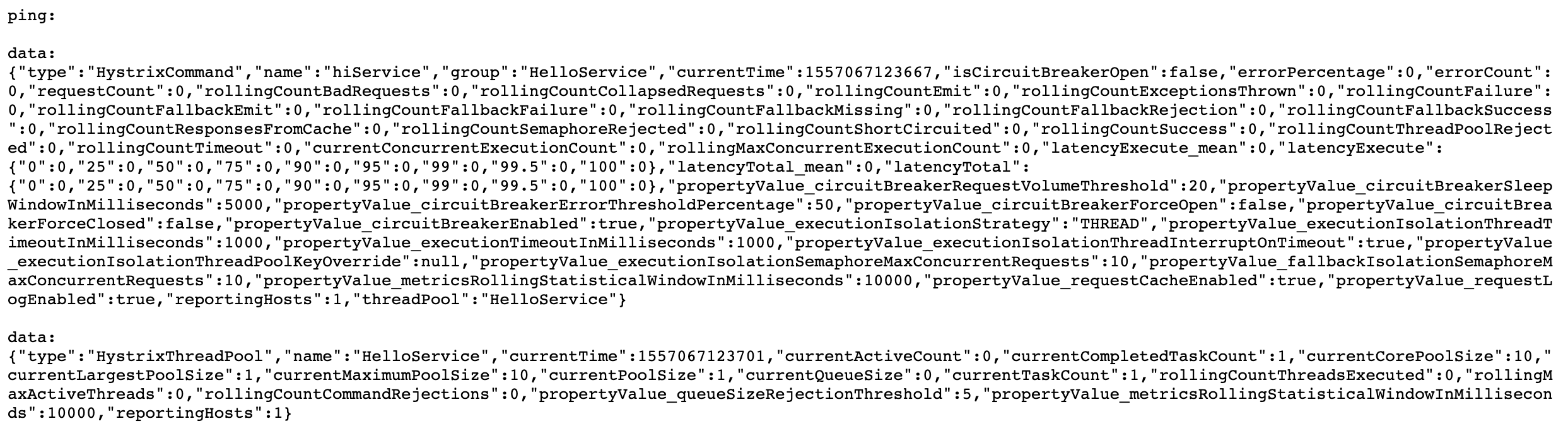
Hystrix仪表盘监控信息
单纯的查看json数据,很难分析出结果,所以,要在Hystrix仪表盘中来查看这一段json,在hystrix仪表盘中输入监控地址进行监控:
打开仪表盘地址:http://localhost:8762/hystrix
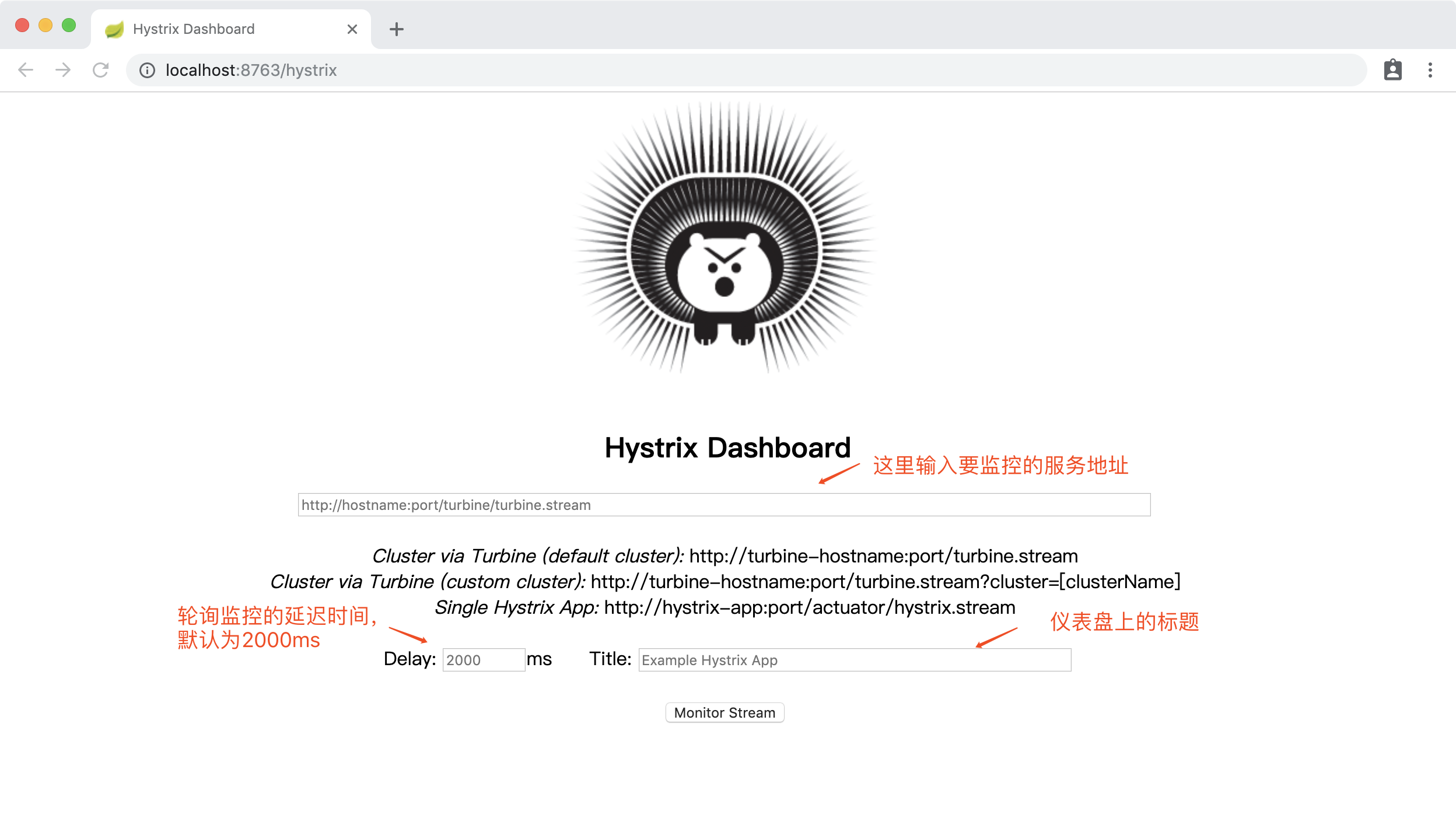
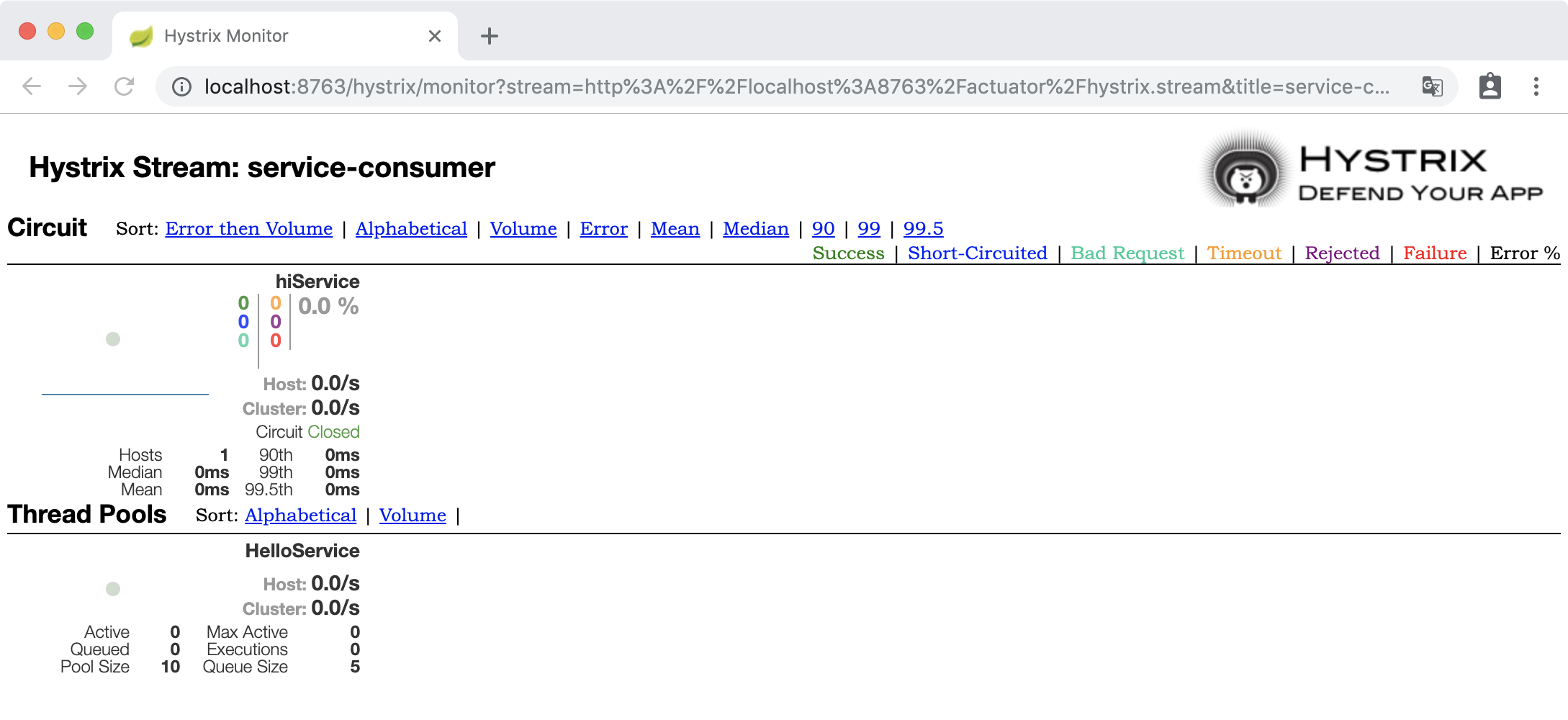
在界面依次输入:http://localhost:8763/actuator/hystrix.stream 、2000 、service-consumer;点确定。
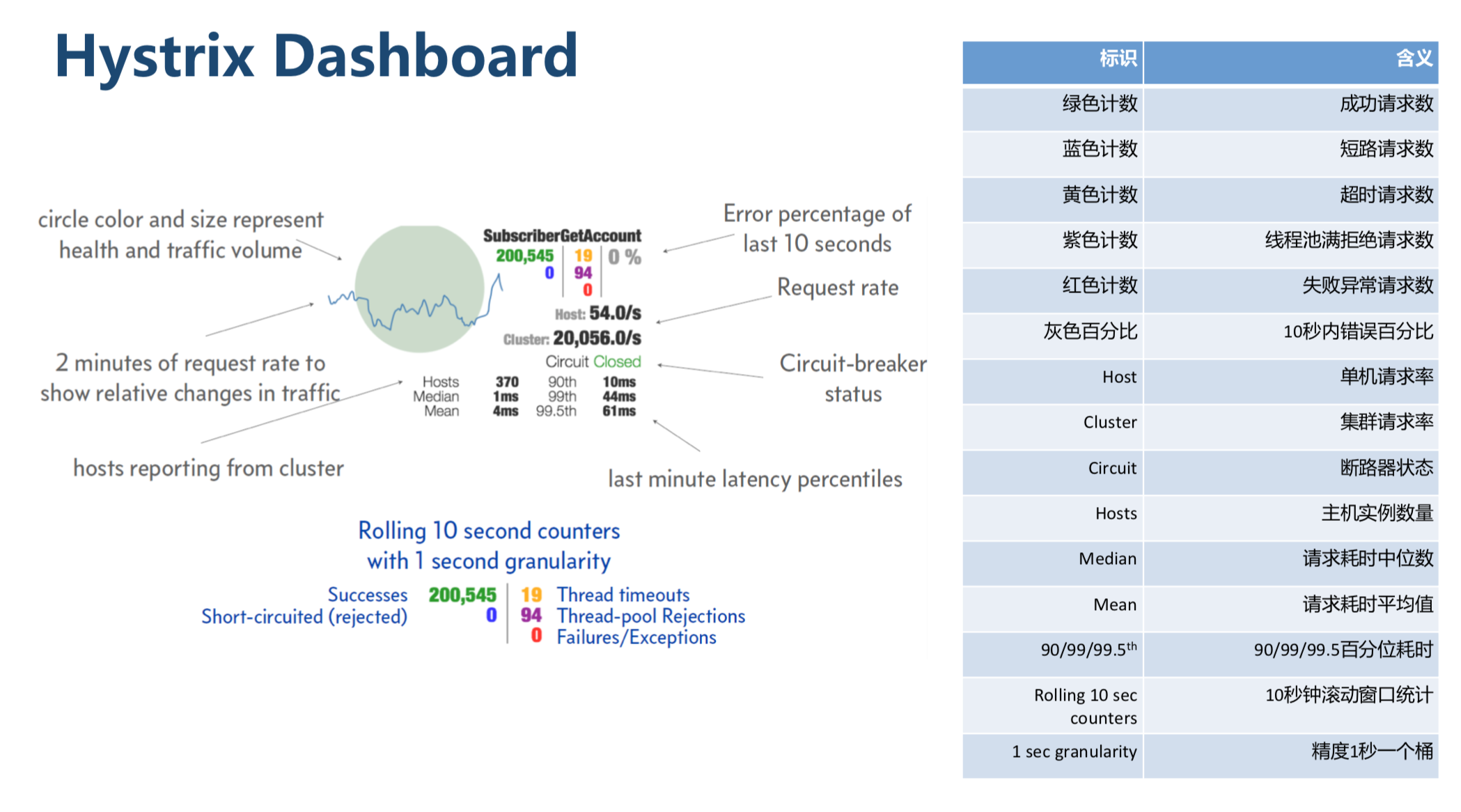
Hystrix仪表盘指标含义
测试
编一个测试脚本curl.sh
while true;

do

curl "http://localhost:8763/hi";

curl "http://localhost:8763/hey";

curl "http://localhost:8763/oh";

curl "http://localhost:8763/ah";

done
执行测试脚本,查看Hystrix仪表盘:
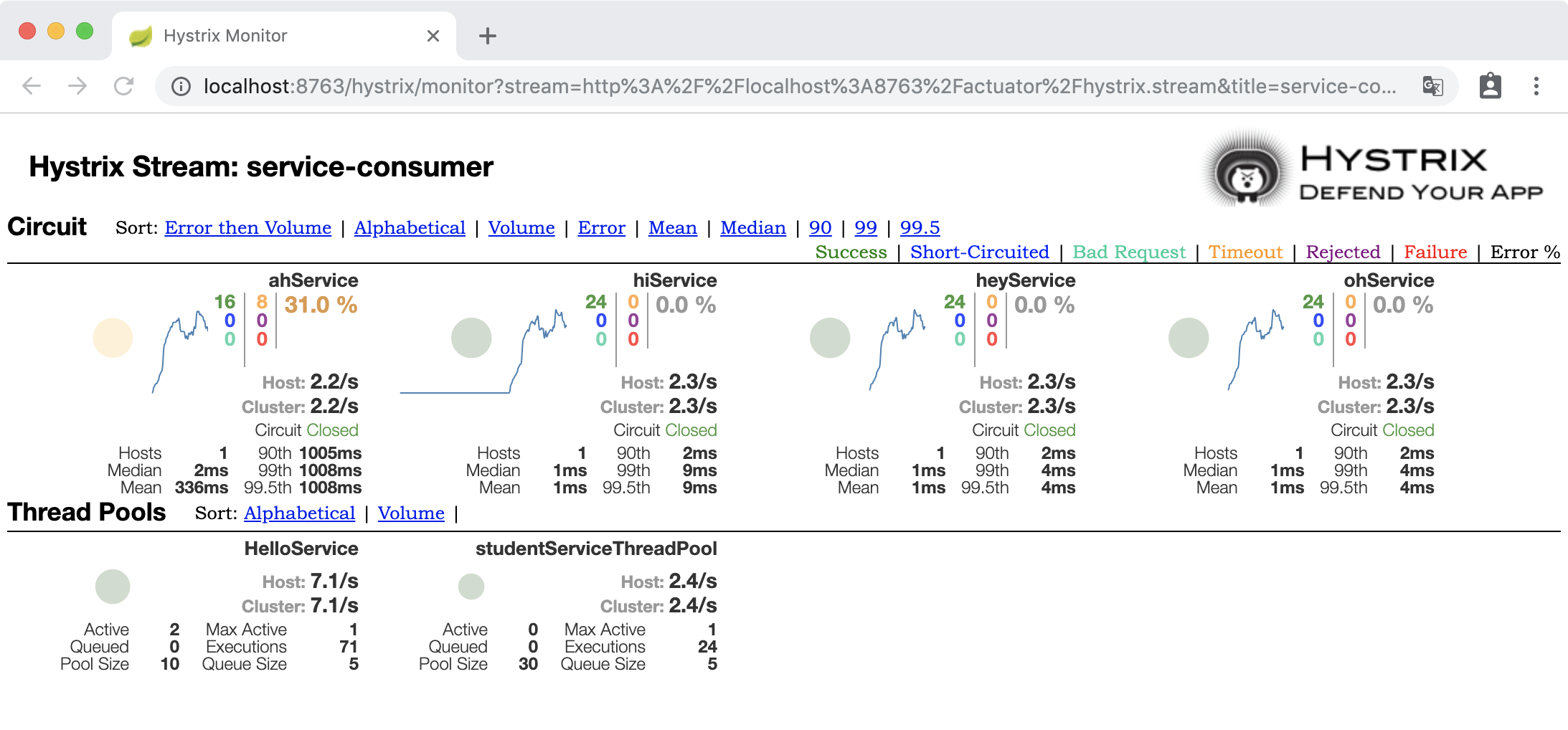
可以看出 ahService 因为模拟了1/3的概率超时,所以监控中呈现了30%左右的错误百分比。
源码
https://github.com/gf-huanchupk/SpringCloudLearning/tree/master/chapter17
欢迎扫码或微信搜索公众号《程序员果果》关注我,关注有惊喜~

微服务熔断限流Hystrix之Dashboard的更多相关文章
- 微服务熔断限流Hystrix之流聚合
简介 上一篇介绍了 Hystrix Dashboard 监控单体应用的例子,在生产环境中,监控的应用往往是一个集群,我们需要将每个实例的监控信息聚合起来分析,这就用到了 Turbine 工具.Turb ...
- 微服务容错限流Hystrix入门
为什么需要容错限流 复杂分布式系统通常有很多依赖,如果一个应用不能对来自依赖 故障进行隔离,那么应用本身就处在被拖垮的风险中.在一个高流量的网站中,某个单一后端一旦发生延迟,将会在数秒内导致 所有应用 ...
- 微服务组件--限流框架Spring Cloud Hystrix分析
Hystrix的介绍 [1]Hystrix是springCloud的组件之一,Hystrix 可以让我们在分布式系统中对服务间的调用进行控制加入一些调用延迟或者依赖故障的容错机制. [2]Hystri ...
- 聊聊微服务熔断降级Hystrix
在现在的微服务使用的过程中,经常会遇到依赖的服务不可用,那么如果依赖的服务不可用的话,会导致把自己的服务也会拖死,那么就产生了熔断,熔断顾名思义就是当服务处于不可用的时候采取半开关的状态,达到一定数量 ...
- 阿里熔断限流Sentinel研究
1. 阿里熔断限流Sentinel研究 1.1. 功能特点 丰富的应用场景:例如秒杀(即突发流量控制在系统容量可以承受的范围).消息削峰填谷.集群流量控制.实时熔断下游不可用应用等 完备的实时监控:S ...
- Spring-cloud微服务实战【七】:服务熔断与降级hystrix
在之前的文章中,我们先后介绍了eureka,ribbon,feign,使用eureka集群的方式来保证注册中心的高可用,在eureka中使用ribbon进行负载均衡,使用feign接口替换手动编码 ...
- springcloud3(六) 服务降级限流熔断组件Resilience4j
代码地址:https://github.com/showkawa/springBoot_2017/tree/master/spb-demo/spb-gateway/src/test/java/com/ ...
- Envoy熔断限流实践(二)Rainbond基于RLS服务全局限流
Envoy 可以作为 Sevice Mesh 微服务框架中的代理实现方案,Rainbond 内置的微服务框架同样基于 Envoy 实现.本文所描述的全局限速实践也是基于 Envoy 已有的方案所实现. ...
- 微服务(二)hystrix
特性 1.延迟和失败容忍 防止级联错误,错误回退,优雅降级.快速失败和恢复 线程和信号量隔离 2.实时监控和配置更改 3.并发 并行执行,请求缓存,自动批处理失败请求 总运行流程 当你发出请求后,hy ...
随机推荐
- oracle随机数
1.从表中随机取记录 select * from (select * from staff order by dbms_random.random) where rownum < 4 表示从ST ...
- 安装PyQt5和Eric6
安装官方的指引,安装起来本来是非常简单的,但是我前后折腾了两天,甚至连Eric得源码都去调试都没成功.过程如下: 在PyQt5的官网链接中下载轮子 PyQt5-5.7.1-5.7.1-cp34.cp3 ...
- Hibernate4之session核心方法
在学习session的核心方法之前,我们先了解下hibernate中几种对象的状态: 暂时状态:这样的状态就好像咱们公司请的暂时员工一样,他在公司里没有相关的资料和id. 特点:在使用代理主键的情况下 ...
- MySQL 温故而知新--Innodb存储引擎中的锁
近期碰到非常多锁问题.所以攻克了后,细致再去阅读了关于锁的书籍,整理例如以下:1,锁的种类 Innodb存储引擎实现了例如以下2种标准的行级锁: ? 共享锁(S lock),同意事务读取一行数据. ? ...
- 在云服务器 ECS Linux CentOS 7 下重启服务不再通过 service 操作,而是通过 systemctl 操作
在云服务器 ECS Linux CentOS 7 下重启服务不再通过 service 操作,而是通过 systemctl 操作. 操作说明如下: 1. 查看 sshd 服务是否启动: 看到上述信息就 ...
- 微信企业号调用js-sdk注意事项
企业号应用必须添加可信域名,域名必须通过备案,可以是子域名,如果网站带端口,一定也要加上端口号...踩坑记
- Django的缓存,序列化,ORM操作的性能
1,缓存:把数据先保存在某个地方,下次再读取的时候不用再去原位置读取
- CentOS 7.2更改网卡名称
背景 没啥背景,就是VMWare装的CentOS虚拟机的自带网卡名有点乱,想重新定义一下. 环境 1.VMWare虚拟机 6张网卡 2.系统 [root@localhost ~]# cat /etc/ ...
- aapt的常用命令
1. 列出apk包的内容 aapt l[ist] [-v] [-a] file.{zip,jar,apk} -v 以table形式列出来 -a 详细列出内容 例如:aapt l <你的apk文件 ...
- bzoj1046 [HAOI2007]上升序列——LIS
题目:https://www.lydsy.com/JudgeOnline/problem.php?id=1046 倒序求最长下降子序列,则得到了每个点开始的最长上升子序列: 然后贪心输出即可. 代码如 ...