
标准WPS框架下的空间信息处理服务部署方法
笔者第一篇博客里面曾介绍过将专题图制作功能发布为WPS,但随着后面的研究,才发现那时候发布的不是真正WPS框架下的服务,而只是通过Servlet将其发布为可调用的网络服务,所以今天再具体介绍一下真正的WPS服务到底如何发布。
WPS(Web Processing Service)是OGC组织制定的空间信息处理服务的标准规范,旨在以标准化的方式在网络上共享空间信息处理功能。WPS主要用来处理空间数据,实现通过网络向客户端提供地理数据的处理服务,使客户无需安装桌面软件就能实现相关的处理功能。它定义一个标准的接口来帮助实现地理进程发布和绑定进程与客户端,“进程”包括任何能够操作空间数据的算法、计算或模型,“发布”意思是提供机器可读的绑定信息和人们可读的元数据信息以便服务的发现和使用。一个WPS可以被配置提供任何功能的GIS空间数据处理功能,将WPS进程链接在一起能够生成可以复用的工作流。
在WPS中,客户端和服务器采用基于XML的通信方式,在WPS接口中定义了三个主要操作,用于向客户端提供服务详细信息、查询部署在服务器上的进程描述和执行进程,这三个主要操作分别是:GetCapabilities、DescribeProcess和Execute。GetCapabilities操作允许客户端从服务器中检索元数据,使客户端通过请求获得描述具体信息的元数据文档,该文档包括所有可执行的进程简要的元数据信息描述。DescribeProcess操作使客户通过请求获得进程的详细信息,包括输入、输出参数和格式等。Execute操作允许WPS客户端提供输入参数值,然后在服务器端运行指定的进程,并返回输出结果。
下面介绍将算子模型部署到WPS框架的具体步骤:
一、获取WPS工程
我使用的工程来自师门提供,不能外传,可以从网上找到开源的相关代码,其目录结构如下所示:
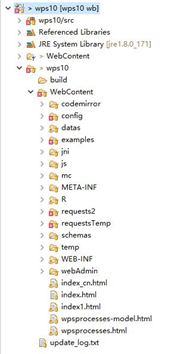
二、部署需要调用的Java类
将算法调用java文件放到cn.edu.whu.lmars.reflect.services路径下,将文件名和类名更改统一,比如此处改为DzLdksmnProcess.java,添加对接口IReflectService的实现,如下语句所示:
public class DzLdksmnProcess extends Model implements IReflectService
添加接口方法的实现函数:
public Object execute(HashMap<Object, Object> layers, HashMap<Object, Object> paramters)
建议先完成四、五两个步骤之后再实现这个接口,最终实现后的函数内容如下:
 @Override

 public Object execute(HashMap<Object, Object> layers, HashMap<Object, Object> paramters) {

     // TODO Auto-generated method stub

     String firstInput = "QuHuaShp";

     String secondInput = "LieDuShp";

     String input1_href = layers.get(firstInput + IReflectService.DATAHREF).toString();

     String input2_href = layers.get(secondInput + IReflectService.DATAHREF).toString();

     String output = layers.get(IReflectService.OUTPUTNAME).toString();

     File file = new File(output);

     if(file.exists()){

             file.delete();

     }

     try {

         DzLdksmnProcess.mainprocess(input1_href, input2_href, output);

     } catch (Exception e) {

         e.printStackTrace();

     }

     return true;

 }
三、在jni目录下添加编译文件
如果有需要调用的其他文件,比如.exe、.dll、.py、.so等文件,要将其放到wps10/WebContent/jni目录下,并添加相应的引用。
此例子中需要将arcobjects.jar添加到Referenced Libraries,jar包文件放于wps10/WebContent/WEB-INF/lib目录下,并将其添加到Build Path。
四、添加ProcessDescription的xml文档
创建DzLdksmnProcess类的ProcessDescription XML文档,注意其中的Identifier属性要和类名一样,内容编辑完成后将其放到wps10/ WebContent/config/processes路径下。
DzLdksmnProcess.xml内容如下:
 <?xml version="1.0" encoding="UTF-8"?>

 <wps:ProcessDescriptions xmlns:wps="http://www.opengis.net/wps/1.0.0"

     xmlns:xsi="http://www.w3.org/2001/XMLSchema-instance"

     xmlns:ows="http://www.opengis.net/ows/1.1"

     xsi:schemaLocation="http://www.opengis.net/wps/1.0.0 http://schemas.opengis.net/wps/1.0.0/wpsDescribeProcess_response.xsd"

     xml:lang="en-US" service="WPS" version="1.0.0">

 <ProcessDescription statusSupported="true" storeSupported="true" wps:processVersion="1.1.0">

     <ows:Identifier>DzLdksmnProcess</ows:Identifier>

     <ows:Title>地震烈度模型</ows:Title>

     <ows:Abstract>利用地震震级、震中地理坐标和震源机制解等相关参数绘制地震烈度图</ows:Abstract>

     <DataInputs>

     <Input minOccurs="1" maxOccurs="1">

         <ows:Identifier>QuHuaShp</ows:Identifier>

         <ows:Title>行政区划图</ows:Title>

         <ComplexData>

             <Default>

                 <Format>

                 <MimeType>application/x-zipped-shp</MimeType>

                 </Format>

             </Default>

             <Supported>

                 <Format>

                     <MimeType>application/x-zipped-shp</MimeType>

                 </Format>

                 <Format>

                     <MimeType>text/xml; subtype=gml</MimeType>

                 </Format>

                 <Format>

                     <MimeType>text/xml; subtype=gml/2.0.0</MimeType>

                 </Format>

                 <Format>

                     <MimeType>text/xml; subtype=gml/2.1.1</MimeType>

                 </Format>

                 <Format>

                     <MimeType>text/xml; subtype=gml/2.1.2</MimeType>

                 </Format>

                 <Format>

                     <MimeType>text/xml; subtype=gml/2.1.2.1</MimeType>

                 </Format>

                 <Format>

                     <MimeType>text/xml; subtype=gml/3.0.0</MimeType>

                 </Format>

                 <Format>

                     <MimeType>text/xml; subtype=gml/3.0.1</MimeType>

                 </Format>

                 <Format>

                     <MimeType>text/xml; subtype=gml/3.1.0</MimeType>

                 </Format>

                 <Format>

                     <MimeType>text/xml; subtype=gml/3.1.1</MimeType>

                 </Format>

                 <Format>

                     <MimeType>text/xml; subtype=gml/3.2.1</MimeType>

                 </Format>

             </Supported>

         </ComplexData>

     </Input>

     <Input minOccurs="1" maxOccurs="1">

         <ows:Identifier>LieDuShp</ows:Identifier>

         <ows:Title>断裂带分布图</ows:Title>

         <ComplexData>

             <Default>

                 <Format>

                 <MimeType>application/x-zipped-shp</MimeType>

                 </Format>

             </Default>

             <Supported>

                 <Format>

                     <MimeType>application/x-zipped-shp</MimeType>

                 </Format>

                 <Format>

                     <MimeType>text/xml; subtype=gml</MimeType>

                 </Format>

                 <Format>

                     <MimeType>text/xml; subtype=gml/2.0.0</MimeType>

                 </Format>

                 <Format>

                     <MimeType>text/xml; subtype=gml/2.1.1</MimeType>

                 </Format>

                 <Format>

                     <MimeType>text/xml; subtype=gml/2.1.2</MimeType>

                 </Format>

                 <Format>

                     <MimeType>text/xml; subtype=gml/2.1.2.1</MimeType>

                 </Format>

                 <Format>

                     <MimeType>text/xml; subtype=gml/3.0.0</MimeType>

                 </Format>

                 <Format>

                     <MimeType>text/xml; subtype=gml/3.0.1</MimeType>

                 </Format>

                 <Format>

                     <MimeType>text/xml; subtype=gml/3.1.0</MimeType>

                 </Format>

                 <Format>

                     <MimeType>text/xml; subtype=gml/3.1.1</MimeType>

                 </Format>

                 <Format>

                     <MimeType>text/xml; subtype=gml/3.2.1</MimeType>

                 </Format>

             </Supported>

         </ComplexData>

     </Input>

     </DataInputs>

     <ProcessOutputs>

     <Output>

         <ows:Identifier>OutputData</ows:Identifier>

         <ows:Title>地震烈度图</ows:Title>

         <ComplexOutput>

             <Default>

                 <Format>

                 <MimeType>application/x-zipped-shp</MimeType>

                 </Format>

             </Default>

             <Supported>

                 <Format>

                     <MimeType>application/x-zipped-shp</MimeType>

                 </Format>

                 <Format>

                     <MimeType>text/xml; subtype=gml</MimeType>

                 </Format>

                 <Format>

                     <MimeType>text/xml; subtype=gml/2.0.0</MimeType>

                 </Format>

                 <Format>

                     <MimeType>text/xml; subtype=gml/2.1.1</MimeType>

                 </Format>

                 <Format>

                     <MimeType>text/xml; subtype=gml/2.1.2</MimeType>

                 </Format>

                 <Format>

                     <MimeType>text/xml; subtype=gml/2.1.2.1</MimeType>

                 </Format>

                 <Format>

                     <MimeType>text/xml; subtype=gml/3.0.0</MimeType>

                 </Format>

                 <Format>

                     <MimeType>text/xml; subtype=gml/3.0.1</MimeType>

                 </Format>

                 <Format>

                     <MimeType>text/xml; subtype=gml/3.1.0</MimeType>

                 </Format>

                 <Format>

                     <MimeType>text/xml; subtype=gml/3.1.1</MimeType>

                 </Format>

                 <Format>

                     <MimeType>text/xml; subtype=gml/3.2.1</MimeType>

                 </Format>

             </Supported>

         </ComplexOutput>

     </Output>

     </ProcessOutputs>

 </ProcessDescription>

 </wps:ProcessDescriptions>
五、添加Execute的xml文档
创建DzLdksmnProcess类的Execute XML文档,注意其中的Identifier属性要和类名一样,内容编辑完成后将其放到wps10/WebContent/requests2路径下。
DzLdksmnProcess.xml内容如下:
 <?xml version="1.0" encoding="UTF-8" standalone="yes"?>

 <wps:Execute service="WPS" version="1.0.0" xmlns:wps="http://www.opengis.net/wps/1.0.0"

     xmlns:ows="http://www.opengis.net/ows/1.1"

     xmlns:ogc="http://www.opengis.net/ogc"

     xmlns:xlink="http://www.w3.org/1999/xlink"

     xmlns:xsi="http://www.w3.org/2001/XMLSchema-instance"

     xsi:schemaLocation="http://www.opengis.net/wps/1.0.0 http://schemas.opengis.net/wps/1.0.0/wpsExecute_request.xsd">

     <ows:Identifier>DzLdksmnProcess</ows:Identifier>

     <ows:Title>地震烈度模型</ows:Title>

     <ows:Abstract>利用地震震级、震中地理坐标和震源机制解等相关参数绘制地震烈度图</ows:Abstract>

     <wps:DataInputs>

     <wps:Input>

         <ows:Identifier>QuHuaShp</ows:Identifier>

         <ows:Title>行政区划图</ows:Title>

         <wps:Reference mimeType="application/x-zipped-shp"

             xlink:href="http://localhost:8080/wps10/datas/shapefile/china.zip" method="GET"/>

     </wps:Input>

     <wps:Input>

         <ows:Identifier>LieDuShp</ows:Identifier>

         <ows:Title>断裂带分布图</ows:Title>

         <wps:Reference mimeType="application/x-zipped-shp"

             xlink:href="http://localhost:8080/wps10/datas/shapefile/Duanceng.zip" method="GET"/>

     </wps:Input>

     </wps:DataInputs>

     <wps:ResponseForm>

     <wps:ResponseDocument storeExecuteResponse="false" lineage="false" status="false">

       <wps:Output asReference="true" mimeType="application/x-zipped-shp" encoding="UTF-8">

         <ows:Identifier>OutputData</ows:Identifier>

         <ows:Title>地震烈度图</ows:Title>

       </wps:Output>

     </wps:ResponseDocument>

     </wps:ResponseForm>

 </wps:Execute>
六、在common_algorithms.properties下添加键值对
打开wps10/WebContent/config路径下的
common_algorithms.properties文件,在最后一行下面添加:
DzLdksmnProcess=cn.edu.whu.lmars.reflect.ReflectAlgorithm
(注意key要和类名一样)
七、在index.html添加执行页面
打开wps10/WebContent路径下的index.html文件,找到
var requests = new Array();并在下面添加新的指定值:
requests[159] = datafolder + "DzLdksmnProcess.xml";
(注意这里是添加第五步的Execute xml文档)
八、测试
至此,所有部署工作已经完成,将整个工程用tomcat发布,本地的访问页面如下所示:

可以成功访问即可。
标准WPS框架下的空间信息处理服务部署方法的更多相关文章
- linux下syslog-ng日志集中管理服务部署记录
syslog是Linux系统默认的日志守护进程,默认的syslog配置文件是/etc/syslog.conf文件.syslog守护进程是可配置的,它允许人们为每一种类型的系统信息精确地指定一个存放地点 ...
- Win7系统下彻底删除无用服务的方法
win7系统下中有非常多的服务项,用户来满足不同行业用户间的所有需求,系统服务也是执行指定系统功能的程序,许多情况下我们想要运行软件或执行外接设备都无法离开系统服务,但并非所有系统服务都是我们用到的, ...
- 基于CXF框架下的SOAP Webservice服务端接口开发
最近对webservice 进行入门学习,网上也是找了很多的学习资料.总得感觉就是这了解点,那了解点.感觉不够系统,不够容易入门.差不多断断续续看了一个星期了,今天小有成果,把客户端,服务端都搞定了. ...
- LINUX 下.NET Core 微服务部署实战
前言 最近一直在开发部署.也没有总结一下.从5月份开始出差到现在基本没有发过博客,哎,惭愧. 一直在弄微服务,后续会慢慢更新下面这个系列.欢迎各位大佬交流指点. 分布式理论专题 1..net core ...
- [转载] 新兵训练营系列课程——平台服务部署及Web框架
原文: http://weibo.com/p/1001643875679132642345 大纲 微博平台主要负责微博基础功能.接下来将会介绍 平台的作用,以及服务提供的形式 平台Web服务的部署 平 ...
- Python框架下django 的并发和多线程
django 的并发能力真的是令人担忧,django本身框架下只有一个线程在处理请求,任何一个请求阻塞,就会影响另一个情感求的响应,尤其是涉及到IO操作时,基于框架下开发的视图的响应并没有对应的开启多 ...
- Keras框架下的保存模型和加载模型
在Keras框架下训练深度学习模型时,一般思路是在训练环境下训练出模型,然后拿训练好的模型(即保存模型相应信息的文件)到生产环境下去部署.在训练过程中我们可能会遇到以下情况: 需要运行很长时间的程序在 ...
- Chris Richardson微服务翻译:微服务部署
Chris Richardson 微服务系列翻译全7篇链接: 微服务介绍 构建微服务之使用API网关 构建微服务之微服务架构的进程通讯 微服务架构中的服务发现 微服务之事件驱动的数据管理 微服务部署( ...
- yii框架的部署方法
yii框架(yii framework)的部署方法 刚開始学习的人来说,部署yii框架还是有一定难度的,Yii是一个基于组件.用于开发大型 Web 应用的高性能 PHP 框架.Yii提供了今日Web ...
随机推荐
- 带您了解Oracle层次查询
http://database.51cto.com/art/201010/231539.htm Oracle层次查询(connect by )是结构化查询中用到的,下面就为您介绍Oracle层次查询的 ...
- JAVA_MyEclipse常见配置NETGEAR路由器如何设置
1 把宽带网线接到路由器的Internet口,然后用一个网线连接PC和路由器的任意端口(1,2,3,4一般四个),如下图所示 2 在浏览器地址栏中输入下面的网址,中途会弹出对话框询问账号密码,默认的账 ...
- angular 的 GET 请求 和 POST 请求的 区别 及 实现
1.GET 请求 .factory('AlarmService', ['$rootScope','ENV','$resource','$http','ionicToast',function($roo ...
- Ikki's Story IV - Panda's Trick (poj 3207 2-SAT)
Language: Default Ikki's Story IV - Panda's Trick Time Limit: 1000MS Memory Limit: 131072K Total S ...
- BZOJ 3363 POJ 1985 Cow Marathon 树的直径
题目大意:给出一棵树.求两点间的最长距离. 思路:裸地树的直径.两次BFS,第一次随便找一个点宽搜.然后用上次宽搜时最远的点在宽搜.得到的最长距离就是树的直径. CODE: #include < ...
- 淘宝数据库OceanBase SQL编译器部分 源码阅读--生成逻辑计划
body, td { font-family: tahoma; font-size: 10pt; } 淘宝数据库OceanBase SQL编译器部分 源码阅读--生成逻辑计划 SQL编译解析三部曲分为 ...
- ln: 正在创建指向“asm-arm”的符号链接“asm”: 不支持的操作
原因是不能在windows共享目录编译,将待编译的uboot源码copy到home目录
- yum报错File "/usr/bin/yum", line 30 except KeyboardInterrupt, e:
原因:学python的时候,把centos7自带的python2.7改成了python3.6.2.而yum使用的是python2,所以会出现yum报错. 解决方法: 在文件/usr/bin/yum./ ...
- BZOJ3260: 跳
BZOJ3260: 跳 Description 邪教喜欢在各种各样空间内跳.现在,邪教来到了一个二维平面. 在这个平面内,如果邪教当前跳到了(x,y),那么他下一步可以选择跳到以下4个点: (x-1, ...
- code[VS] 1297 硬币
题目描写叙述 Description 我们知道即使是同一种面值的硬币,它们的重量也有可能不一样,由于它受到很多因素的影响,包含制造工艺和流程上的.可是不论什么一种面值的硬币的重量总是处于某个特定范围之 ...