
SmtpClient发邮件时为什么用MailMessage.From而不用MailMessage.Sender
今天在看C#高级编程(第9版)的时候,在768页看到这样的一段代码
SmtpClient sc = new SmtpClient();

sc.Host = "邮箱服务器地址";

MailMessage mm = new MailMessage();

mm.Sender = new MailAddress("公司邮箱", "发件人");

mm.To.Add(new MailAddress("我的163邮箱", "接收人"));

mm.CC.Add(new MailAddress("抄送的邮箱", "抄送人"));

mm.Subject = "测试程序发送邮件";

mm.Body = "<b>我发送了邮件---我是程序发出的</b>";

mm.IsBodyHtml = true;

mm.Priority = MailPriority.High;

sc.Send(mm);
以前没有做过Email项目,所以,直接就敲到了VS下,编译,但是出问题,报了个错
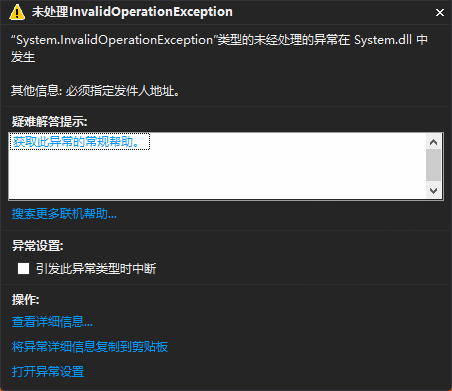
我心思是没有指定发件人的用户名和密码,因此又增加了一行代码
sc.Credentials = new System.Net.NetworkCredential("发件邮箱", "密码");
但是依然报这个错误,继续找办法吧,看了看网上其他人发邮件的代码,发现他们用的是From,因此,又增加了一行代码
mm.From = new MailAddress("公司邮箱", "发件人");
发现顿时就好使了,而且两个可以同时存在,或单独From存在,都好使。
这……我就郁闷了,因为F12定位到定义,From和Sender的注解里面只差了一个字

一个是发信人,一个是发件人,而且From是发信人,Sender是发件人,一字之差不应该Sender不好使,From好使啊,疑惑增加ing……
那就用ILSpy反编译看一下吧

我擦,更加疑惑,不可能只是因为From比Sender多了一个判断是否为null就用From吧。
那就继续看反编译的代码吧。在SmtpClient里找到Send方法,代码如下
public void Send(MailMessage message)

        {

            if (Logging.On)

            {

                Logging.Enter(Logging.Web, this, "Send", message);

            }

            if (this.disposed)

            {

                throw new ObjectDisposedException(base.GetType().FullName);

            }

            try

            {

                if (Logging.On)

                {

                    Logging.PrintInfo(Logging.Web, this, "Send", "DeliveryMethod=" + this.DeliveryMethod.ToString());

                }

                if (Logging.On)

                {

                    Logging.Associate(Logging.Web, this, message);

                }

                SmtpFailedRecipientException ex = null;

                if (this.InCall)

                {

                    throw new InvalidOperationException(SR.GetString("net_inasync"));

                }

                if (message == null)

                {

                    throw new ArgumentNullException("message");

                }

                if (this.DeliveryMethod == SmtpDeliveryMethod.Network)

                {

                    this.CheckHostAndPort();

                }

                MailAddressCollection mailAddressCollection = new MailAddressCollection();

                if (message.From == null)

                {

                    throw new InvalidOperationException(SR.GetString("SmtpFromRequired"));

                }

                if (message.To != null)

                {

                    foreach (MailAddress current in message.To)

                    {

                        mailAddressCollection.Add(current);

                    }

                }

                if (message.Bcc != null)

                {

                    foreach (MailAddress current2 in message.Bcc)

                    {

                        mailAddressCollection.Add(current2);

                    }

                }

                if (message.CC != null)

                {

                    foreach (MailAddress current3 in message.CC)

                    {

                        mailAddressCollection.Add(current3);

                    }

                }

                if (mailAddressCollection.Count == )

                {

                    throw new InvalidOperationException(SR.GetString("SmtpRecipientRequired"));

                }

                this.transport.IdentityRequired = false;

                try

                {

                    this.InCall = true;

                    this.timedOut = false;

                    this.timer = new Timer(new TimerCallback(this.TimeOutCallback), null, this.Timeout, this.Timeout);

                    string pickupDirectory = this.PickupDirectoryLocation;

                    switch (this.DeliveryMethod)

                    {

                    case SmtpDeliveryMethod.Network:

                        goto IL_235;

                    case SmtpDeliveryMethod.SpecifiedPickupDirectory:

                        break;

                    case SmtpDeliveryMethod.PickupDirectoryFromIis:

                        pickupDirectory = IisPickupDirectory.GetPickupDirectory();

                        break;

                    default:

                        goto IL_235;

                    }

                    if (this.EnableSsl)

                    {

                        throw new SmtpException(SR.GetString("SmtpPickupDirectoryDoesnotSupportSsl"));

                    }

                    bool allowUnicode = this.IsUnicodeSupported();

                    this.ValidateUnicodeRequirement(message, mailAddressCollection, allowUnicode);

                    MailWriter mailWriter = this.GetFileMailWriter(pickupDirectory);

                    goto IL_275;

                    IL_235:

                    this.GetConnection();

                    allowUnicode = this.IsUnicodeSupported();

                    this.ValidateUnicodeRequirement(message, mailAddressCollection, allowUnicode);

                    mailWriter = this.transport.SendMail(message.Sender ?? message.From, mailAddressCollection, message.BuildDeliveryStatusNotificationString(), allowUnicode, out ex);

                    IL_275:

                    this.message = message;

                    message.Send(mailWriter, this.DeliveryMethod > SmtpDeliveryMethod.Network, allowUnicode);

                    mailWriter.Close();

                    this.transport.ReleaseConnection();

                    if (this.DeliveryMethod == SmtpDeliveryMethod.Network && ex != null)

                    {

                        throw ex;

                    }

                }

                catch (Exception ex2)

                {

                    if (Logging.On)

                    {

                        Logging.Exception(Logging.Web, this, "Send", ex2);

                    }

                    if (ex2 is SmtpFailedRecipientException && !((SmtpFailedRecipientException)ex2).fatal)

                    {

                        throw;

                    }

                    this.Abort();

                    if (this.timedOut)

                    {

                        throw new SmtpException(SR.GetString("net_timeout"));

                    }

                    if (ex2 is SecurityException || ex2 is AuthenticationException || ex2 is SmtpException)

                    {

                        throw;

                    }

                    throw new SmtpException(SR.GetString("SmtpSendMailFailure"), ex2);

                }

                finally

                {

                    this.InCall = false;

                    if (this.timer != null)

                    {

                        this.timer.Dispose();

                    }

                }

            }

            finally

            {

                if (Logging.On)

                {

                    Logging.Exit(Logging.Web, this, "Send", null);

                }

            }

        }
看代码里我注红色的部分,可以发现,Send方法,必须要求From存在,如果From不存在的话,就会抛出异常,但是并没有强制要求Sender存在,Sender可以存在,如果Sender存在就用Sender,不存在就用From,但是必须保证From存在。
SmtpClient发邮件时为什么用MailMessage.From而不用MailMessage.Sender的更多相关文章
- MimeMessageHelper代码发邮件时,通过客服端登陆到邮箱,在已发送邮件里没有已经通过代码发送的邮件
MimeMessageHelper代码发邮件时,通过客服端登陆到邮箱,在已发送邮件里没有已经通过代码发送的邮件, 这个问题很奇怪,这样的话不能看到通过代码发送的邮件历史记录,所以只好借助秘密抄送了,抄 ...
- 解决升级PHP7.1后,发邮件时提示“fsockopen(): Peer certificate CN=`xxx.xx.com' did not match expected CN=`113.x.xx.98”
把项目环境升级到PHP7.1后,发现在不使用SSL时可以使用IP发邮件,可设置成SSL时就只能使用hostname发送,PHP提示的错误信息大致意思是说,IP与hostname无法通过SSL验证,修改 ...
- C# .net 使用 SmtpClient 发邮件 ,发送邮箱的配置
1.需打开POP3/SMTP/IMAP 2.打开时要求授权码,输入自定义的密码如:1234cb 3.自定义的密码就是 SmtpClient 的密码,而非邮箱密码
- C# SmtpClient 发邮件
using System; using System.Collections.Generic; using System.Linq; using System.Text; using System.T ...
- Dynamics CRM 2011 通过工作流发邮件时的权限问题
场景: 在CRM中配置工作流,完成某个步骤后,发送邮件通知其他用户.发件人统一配置为管理员,收件人则根据业务需要设定动态值. 相关权限配置 首先启动流程的用户, 需要允许其他用户代表发送电子邮件 另外 ...
- python使用SMTP发邮件时使用Cc(抄送)和Bcc(密送)
SMTP发送邮件的时候,并没有特殊的通信语句告诉邮件服务器 谁是主送,谁是抄送/密送,这三个角色都是以同样的方式告诉邮件服务器的,然后重点在邮件内容里. 邮件内容分为头和体两部分(就像http),头部 ...
- linux(centos8):阿里云ecs配置smtps发邮件(解决不能通过25端口发邮件问题)
一,2016年9月后购买的阿里云ecs不再支持通过25端口发送邮件 官方的建议是使用465端口 465端口(SMTPS): 465端口是为SMTPS(SMTP-over-SSL)协议服务开放的 它是S ...
- C# System.Net.Mail.MailMessage 发邮件
C# System.Net.Mail.MailMessage 发邮件 上篇文化在哪个可以看到使用 System.Web.Mail.MailMessage 发邮件时会提示 ,提供用于构造电子邮件的属性和 ...
- 如何使cron任务出错时发邮件
如果设置了 MAILTO,cron就会将任务的标准输出和标准错误输出重定向到邮箱(即发送邮件).但如果只想接到错误报警邮件 -- 即任务正常执行时不发送,只在出错时发送 -- 应该怎么实现呢? 方法很 ...
随机推荐
- JAVA集合类型详解
一.前言 作为java面试的常客[集合类型]是永恒的话题:在开发中,主要了解具体的使用,没有太多的去关注具体的理论说明,掌握那几种常用的集合类型貌似也就够使用了:导致这一些集合类型的理论有可能经常的忘 ...
- 在Andoid开发中使用MVP模式来解耦,增加可测试性
by Jeff Angelini posted on 7/20/2011 2:35:00 PM 将应用程序UI的表现从Ui的逻辑中分离是一个好的想法.这种分离减少了代码耦合,代码更加干净, 甚至可以有 ...
- Activemq mqtt 点对点聊天实现(转载)
我这想到一个点对点聊天的方法,不用没割人都建立一个topic了,思路还是自定义一个分发策略,具体如下: 1. 建立一个topic,所有人都用匹配订阅的方式订阅以该topic为头的topic,例如:所 ...
- Myeclipse 不能保存汉字
window-->首选项-->content type-->Text-->Default encoding改为UTF-8,点击update
- heml设置浏览器版本
<meta http-equiv="X-UA-Compatible" content="IE=edge,chrome=1"> action类获取se ...
- shell命令获取最新文件的名称
最近有一个需求,在部署游戏战场服时,从程序包到部署需要做一些本地化的操作,手工操作费时费力,故写一个shell脚本,一键部署. 遇到的问题是每次要部署最新的程序包,因此需要shell命令获取最新的文件 ...
- 第三方框架之ThinkAndroid 学习总结(一)
ThinkAndroid是一个免费的开源的.简易的.遵循Apache2开源协议发布的Android开发框架,其开发宗旨是简单.快速的进行Android应用程序的开发,包含Android mvc.简易s ...
- MySQL数据表range分区例子
某些行业数据量的增长速度极快,随着数据库中数据量的急速膨胀,数据库的插入和查询效率越来越低.此时,除了程序代码和查询语句外,还得在数据库的结构上做点更改:在一个主读辅写的数据库中,当数据表数据超过10 ...
- 第一章-第十五题(谈谈你对压力的看法,以及怎么和别人合作, 帮助别人,把压力转化为动力,在互相帮助的环境中成长。)--By林培文
压力是一把双刃剑,有害也有利,重点是如何看待压力,从而做到趋利避害,化压力为动力.对于当前的我来说,压力利大于弊.形成这一想法,我经历了好几个阶段.第一个阶段是小学时代,那会整天就知道玩,也没什么压力 ...
- java异常处理
try{}catch(){}中的代码与外部代码之间有一定的逻辑关系,需要考虑到如果抛出异常的情况下,外部代码是否可以执行. 在需要捕获异常前尽量不要代入非异常代码,捕获后相关的代码放在一起.