
[Unity]背包效果-使用NGUI实现物品的拖拽效果Drag
背包效果-使用NGUI实现物品的拖拽效果Drag
效果实现如图
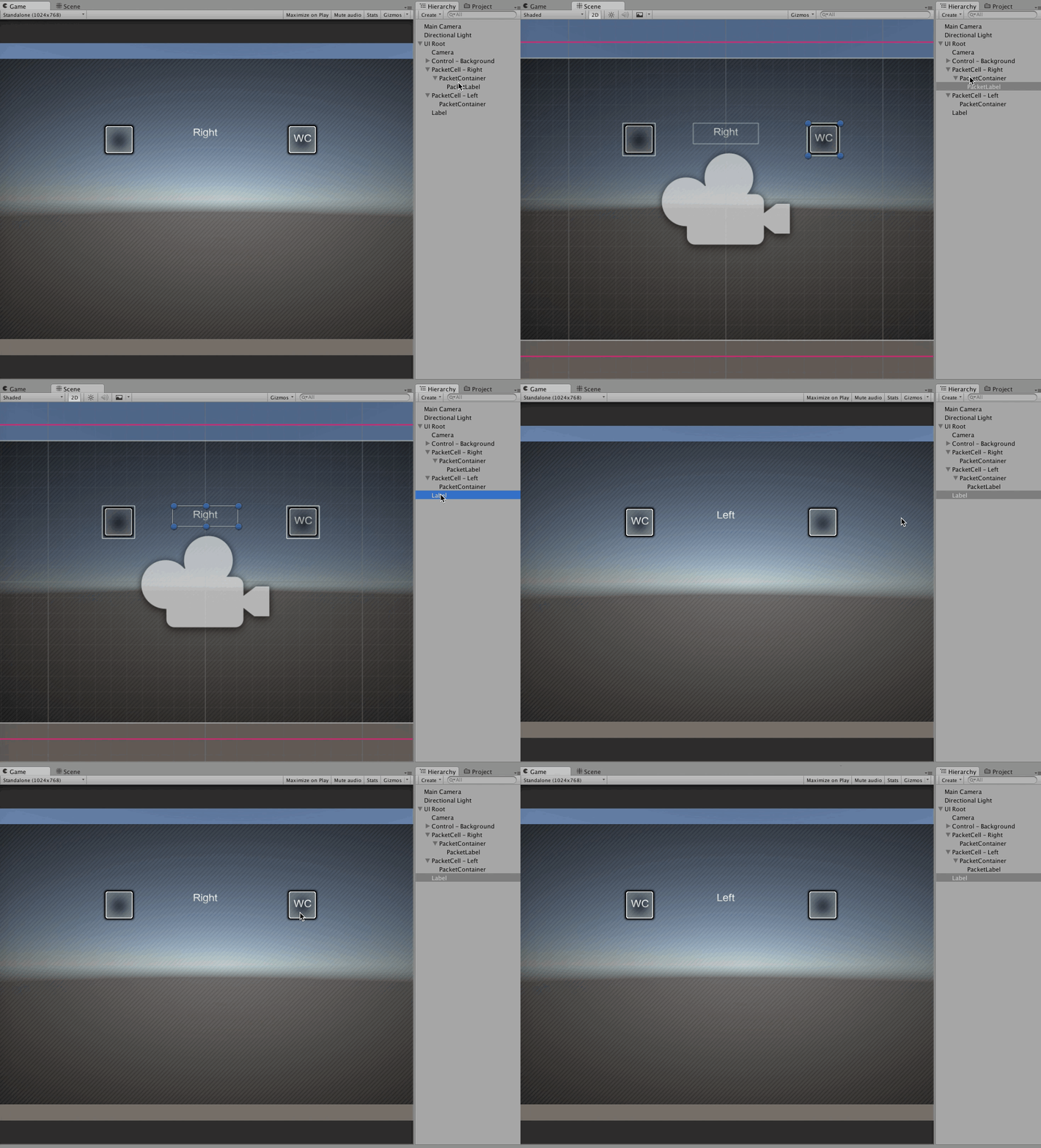
对象层级关系图

PacketCell - Right- 对象作为单元格背景
PacketContainer- 对象作为单元格容器
PacketLabel- 对象作为单元格物体
PacketCell - Left- 对象作为单元格背景
PacketContainer- 对象作为单元格容器
PacketLabel- 对象作为单元格物体
'Label - Middle'
- 用来显示当前文字处于哪个位置
物体能够被拖拽的几个条件
- 碰撞器
BoxCollider - 拖拽功能
UIDragDropItem
创建第一个拖拽功能的空子类
using System;

using UnityEngine;

/// <summary>

/// 第一个自己创建的拖拽功能

/// </summary>

public class MyFirstDragDropItem:UIDragDropItem

{

}
容器可以监测正在被拖拽物体是否到自己对象位置的几个条件
- 碰撞器
BoxCollider - 容器功能
UIDragDropContainer
GMUser.cs
using System;

/// <summary>

/// 用户管理器

/// </summary>

public class GMUserManager

{

	//存储当前正在玩游戏的玩家信息

	private static GMUser user = null;

	//公开访问器

	public static GMUser User{

		get {

			if (GMUserManager.user == null) {

				GMUserManager.user = new GMUser ();

			}

			return GMUserManager.user;

		}

	}

}

public class GMUser

{

	//游戏用户的姓名

	public string Name{set;get;}

	public GMUser ()

	{

		//设置每个用户的默认姓名是Right

		this.Name = "Right";

	}

}
MyFirstDragDropItem.cs
using System;

using UnityEngine;

/// <summary>

/// 第一个自己创建的拖拽功能

/// </summary>

public class MyFirstDragDropItem:UIDragDropItem

{

	private GameObject sourceParent;

	/// <summary>

	/// 重写父类的拖拽开始函数

	/// </summary>

	protected override void OnDragDropStart ()

	{

		//当拖拽开始时存储原始的父对象

		this.sourceParent = this.transform.parent.gameObject;

		base.OnDragDropStart ();

	}

	/// <summary>

	/// 重写父类的拖拽释放函数

	/// </summary>

	protected override void OnDragDropRelease (GameObject surface)

	{

		//如果不是拖拽到场景表面的话

		if (!surface.name.Equals ("UI Root")) {

			//寻找surface对象的父对象

			GameObject cell = surface.transform.parent.gameObject;

			//判断当前单元格的对象姓名

			if (cell.name.Equals ("PacketCell - Left")) {

				GMUserManager.User.Name = "Left";

			}

			if (cell.name.Equals ("PacketCell - Right")) {

				GMUserManager.User.Name = "Right";

			}

		} else {

			//其他的错误位置时,重置父子关系

			this.transform.parent = this.sourceParent.transform;

		}

		//最终调用父类的功能

		base.OnDragDropRelease(surface);

		//调整位置

		this.transform.localPosition = new Vector3(0,0,0);

	}

}
Test.script
挂载在MainCamera对象上的脚本
using UnityEngine;

using System.Collections;

public class TestScript : MonoBehaviour {

	//指向游戏中间的那个label控件

	public UILabel	label;

	// Use this for initialization

	void Start () {

	}

	// Update is called once per frame

	void Update ()

	{

		this.label.text = GMUserManager.User.Name;

	}

}
[Unity]背包效果-使用NGUI实现物品的拖拽效果Drag的更多相关文章
- Unity实现放大缩小以及相机位置平移实现拖拽效果
放大缩小功能是游戏开发中用到的功能,今天就来讲一下Unity中放大缩小怎么实现. 1.IDragHandler, IBeginDragHandler, IEndDragHandler这三个接口是Uni ...
- jQuery的DOM操作实例(2)——拖拽效果&&拓展插件
一.原生JavaScript编写拖拽效果 二.jQuery编写的拖拽效果 三.在jQuery中拓展一个拖拽插件
- React.js实现原生js拖拽效果及思考
一.起因&思路 不知不觉,已经好几天没写博客了...近来除了研究React,还做了公司官网... 一直想写一个原生js拖拽效果,又加上近来学react学得比较嗨.所以就用react来实现这个拖 ...
- js拖拽效果
<!DOCTYPE html> <html lang="en"> <head> <meta charset="UTF-8&quo ...
- WinForm支持拖拽效果
有一个MSDN客户提问在WinForm中如何实现拖拽效果——比如在WinForm中有一个Button,我要实现的效果是拖拽这个Button到目标位置后生成一个该控件的副本. 其实这个操作主要分成三步走 ...
- js div浮动层拖拽效果代码
<!DOCTYPE html PUBLIC "-//W3C//DTD XHTML 1.0 Transitional//EN" "http://www.w3.org/ ...
- JS实现漂亮的窗口拖拽效果(可改变大小、最大化、最小化、关闭)
转自<JS实现漂亮的窗口拖拽效果(可改变大小.最大化.最小化.关闭)>:http://www.jb51.net/article/73157.htm 这篇文章主要介绍了JS实现漂亮的窗口 ...
- JQ实现3D拖拽效果
<!DOCTYPE HTML> <html onselectstart='return false'> <head> <meta http-equiv=&qu ...
- 用JS实现版面拖拽效果
类似于这样的一个版面,点击标题栏,实现拖拽效果. 添加onmousedown事件 通过获取鼠标的坐标(clientX,clientY)来改变面板的位置 注意:面板使用绝对定位方式,是以左上角为参考点, ...
随机推荐
- IoC容器Autofac正篇之依赖注入(七)
依赖注入,这个专业词我们可以分为两个部分来理解: 依赖,也就是UML中描述事物之间关系的依赖关系,依赖关系描述了事物A在某些情况下会使用到事物B,事物B的变化会影响到事物A: 注入,医生通过针头将药物 ...
- H5调用本地摄像头
<!DOCTYPE html><html><head lang="en"><meta charset="UTF-8"& ...
- Underscore.js 的模板功能介绍与应用
Underscore是一个非常实用的JavaScript库,提供许多编程时需要的功能的支持,他在不扩展任何JavaScript的原生对象的情况下提供很多实用的功能,需要了解的朋友可以详细参考下 U ...
- 在windows命令行窗口下执行:查看所有的端口占用情况
开始--运行--cmd 进入命令提示符 输入netstat -ano 即可看到所有连接的PID 之后在任务管理器中找到这个PID所对应的程序如果任务管理器中没有PID这一项,可以在任务管理器中选&qu ...
- c#高级编程
1..net才程序编译经过2步.首先把源代码编译成IL,这个是在visual studio中编译,然后是IL编译成机器语言,这个是在程序执行的时候进行的.
- 把aspx页面输出成xml的方法注意事项
先贴代码 Response.Charset = "gb2312"; Response.ContentType = "text/xml"; Response.Co ...
- nodejs 命令篇
1.npm init // 生成package.json 2.npm install --save-dev gulp-jslint // 安装gulp-jslint模块,并把模块名和版本保存到pack ...
- java web服务器tomcat介绍【转载】
机器矩阵2016-08-10 22:14 java程序员亲切地称他为tom猫,看到这只猫可以说明1 服务器部署成功了 ,2 网络是联通的. 到底这只猫是什么来头呢? tomcat是Apache基金会下 ...
- english 释词
english 释词 [amount of & number of]the amount of /the number of指……的数量an amount of/a number of 指“大 ...
- Inno Setup入门(七)——提供安装语言选项
Inno Setup安装目录下有一个Languages的文件夹,该文件夹提供了可供使用的语言,通过在脚本中加入[languages]段,可以实现该项功能,实现代码如下: [setup] ;全局设置,本 ...