
git在idea中使用
(1)创建README.md文件
fengli@DESKTOP-FEQ1N4I MINGW32 /f/workspace/imallproject (master)
$ touch README.md
(2)创建.gitignore文件(用于忽略上传的文件)
|
1
2
3
4
5
6
7
8
9
10
11
12
13
14
15
16
17
18
19
20
21
22
23
24
25
26
27
|
#提交到码云上面忽略的东西配置*.class#package file*.war*.ear*.origtarget/.settings/.project.classpath.idea//idea/*.ipr*.iml*.iws*.log*.cache*.diff*.patch*.tmp.DS_StoreThumbs.db |
fengli@DESKTOP-FEQ1N4I MINGW32 /f/workspace/imallproject (master)
$ touch .gitignore
(3)初始化git
fengli@DESKTOP-FEQ1N4I MINGW32 /f/workspace/imallproject (master)
$ git init
Initialized empty Git repository in F:/workspace/imallproject/.git/
fengli@DESKTOP-FEQ1N4I MINGW32 /f/workspace/imallproject (master)
查看git状态:现在是在master上(一般分支开发主干合并)
$ git status
On branch master
(4)commit提示错误,先git add一下
Initial commit
Untracked files:
(use "git add <file>..." to include in what will be committed)
.gitignore
README.md
pom.xml
src/
nothing added to commit but untracked files present (use "git add" to track)
fengli@DESKTOP-FEQ1N4I MINGW32 /f/workspace/imallproject (master)
$ git add .
fengli@DESKTOP-FEQ1N4I MINGW32 /f/workspace/imallproject (master)
$ git status
On branch master
Initial commit
Changes to be committed:
(use "git rm --cached <file>..." to unstage)
new file: .gitignore
new file: README.md
new file: pom.xml
new file: src/main/webapp/WEB-INF/web.xml
new file: src/main/webapp/index.jsp
fengli@DESKTOP-FEQ1N4I MINGW32 /f/workspace/imallproject (master)
$ git commit -am 'first commit '
[master (root-commit) 5ef0663] first commit
5 files changed, 65 insertions(+)
create mode 100644 .gitignore
create mode 100644 README.md
create mode 100644 pom.xml
create mode 100644 src/main/webapp/WEB-INF/web.xml
create mode 100644 src/main/webapp/index.jsp
git连接到码云仓库:
fengli@DESKTOP-FEQ1N4I MINGW32 /f/workspace/imallproject (master)
$ git remote add origin git@git.oschina.net:marrymayun/imalllearning.git
fengli@DESKTOP-FEQ1N4I MINGW32 /f/workspace/imallproject (master)
$ git branch
* master
(5)推送
fengli@DESKTOP-FEQ1N4I MINGW32 /f/workspace/imallproject (master)
$ git push -u origin master
The authenticity of host 'git.oschina.net (120.55.226.24)' can't be established.
ECDSA key fingerprint is SHA256:FQGC9Kn/eye1W8icdBgrQp+KkGYoFgbVr17bmjey0Wc.
Are you sure you want to continue connecting (yes/no)? no
Host key verification failed.
fatal: Could not read from remote repository.
Please make sure you have the correct access rights
and the repository exists.
fengli@DESKTOP-FEQ1N4I MINGW32 /f/workspace/imallproject (master)
$ git pull
The authenticity of host 'git.oschina.net (120.55.226.24)' can't be established.
ECDSA key fingerprint is SHA256:FQGC9Kn/eye1W8icdBgrQp+KkGYoFgbVr17bmjey0Wc.
Are you sure you want to continue connecting (yes/no)? yes
Warning: Permanently added 'git.oschina.net,120.55.226.24' (ECDSA) to the list of known hosts.
warning: no common commits
remote: Counting objects: 4, done.
remote: Compressing objects: 100% (3/3), done.
remote: Total 4 (delta 0), reused 0 (delta 0)
Unpacking objects: 100% (4/4), done.
From git.oschina.net:marrymayun/imalllearning
* [new branch] master -> origin/master
There is no tracking information for the current branch.
Please specify which branch you want to merge with.
See git-pull(1) for details.
git pull <remote> <branch>
If you wish to set tracking information for this branch you can do so with:
git branch --set-upstream-to=origin/<branch> master
fengli@DESKTOP-FEQ1N4I MINGW32 /f/workspace/imallproject (master)
$ git push -u -f origin master
Counting objects: 11, done.
Delta compression using up to 4 threads.
Compressing objects: 100% (7/7), done.
Writing objects: 100% (11/11), 1.29 KiB | 0 bytes/s, done.
Total 11 (delta 0), reused 0 (delta 0)
To git@git.oschina.net:marrymayun/imalllearning.git
+ a5a27d2...5ef0663 master -> master (forced update)
Branch master set up to track remote branch master from origin.
fengli@DESKTOP-FEQ1N4I MINGW32 /f/workspace/imallproject (master)
$ git branch
* master
fengli@DESKTOP-FEQ1N4I MINGW32 /f/workspace/imallproject (master)
$ git branch -r
origin/master
在master下创建分支v1.0
fengli@DESKTOP-FEQ1N4I MINGW32 /f/workspace/imallproject (master)
$ git checkout -b v1.0 origin/master
Branch v1.0 set up to track remote branch master from origin.
Switched to a new branch 'v1.0'
fengli@DESKTOP-FEQ1N4I MINGW32 /f/workspace/imallproject (v1.0)
$ git branch
master
* v1.0
推送到分支,我们在分支开发,主干合并
fengli@DESKTOP-FEQ1N4I MINGW32 /f/workspace/imallproject (v1.0)
$ git push origin HEAD -u
Total 0 (delta 0), reused 0 (delta 0)
To git@git.oschina.net:marrymayun/imalllearning.git
* [new branch] HEAD -> v1.0
Branch v1.0 set up to track remote branch v1.0 from origin.
fengli@DESKTOP-FEQ1N4I MINGW32 /f/workspace/imallproject (v1.0)
$
完成:
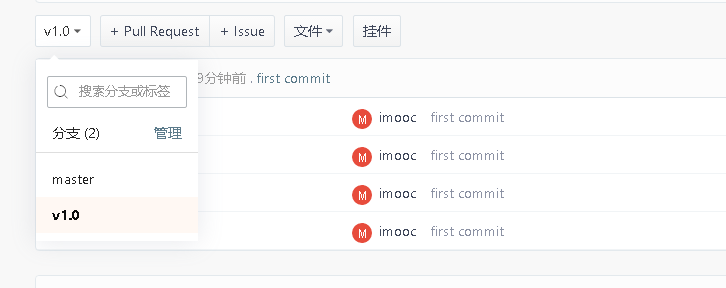
至此在idea中初始化git完成。
git在idea中使用的更多相关文章
- [转]git在eclipse中的配置
一_安装EGIT插件 http://download.eclipse.org/egit/updates/ 或者使用Eclipse Marketplace,搜索EGit 二_使用EGIT前的配置 配置个 ...
- git在myelispse中的安装
1.git在myelispse中的安装 http://blog.csdn.net/chinaonlyqiu/article/details/8830050
- 【转】git在eclipse中的配置
原文网址:http://www.cnblogs.com/zhxiaomiao/archive/2013/05/16/3081148.html 一_安装EGIT插件 http://download.ec ...
- git 在linux中的使用
1,经常使用操作 一,clone远程仓库 比如clone test项目的分支v1.0 git -c diff.mnemonicprefix=false -c core.quotepath=false ...
- git stash pop 冲突,git stash list 中的记录不会自动删除的解决方法
在使用git stash代码时,经常会碰到有冲突的情况,一旦出现冲突的话,系统会认为你的stash没有结束. 导致的结果是git stash list 中的列表依然存在,实际上代码已经pop出来了. ...
- git在工作中的用法总结-使用篇
上一篇介绍了git的环境安装配置,本篇对git在工作中常用的用法进行总结,已满足大部分的日常工作需求,对于其他的一些git命令用法在今后使用到时我也会更新上来,文中如有错误,欢迎大家指出来,谢谢~ 一 ...
- git上传中的排除的配置文件, git实际的操作代码;
git上传中的排除的配置文件: git实际的操作 在主目录建立.gitignore文件并输入以下保存: *.class #package file *.war *.ear #kdiff3 ignore ...
- 在Git.oschina.net中配置TortoiseGit使用sshkey,无需输入账号和密码
ssh的方式 git@oschina.com:用户名/版本库t.git 此篇文章针对于这种 黄海正在开发的项目位置 https://gitee.com/dslx/BigData.g ...
- Git submodule 仓库中包含另外的仓库(子仓库)
Git submodule 仓库中包含另外的仓库(子仓库) 添加 submodule 在父仓库 git 目录下: git submodule add ssh://ip/[path]/xxx.git 注 ...
- Git 2.x 中git push时遇到 push.default 警告的解决方法
近在学习使用 git&GitHub,然后今天遇到了一个问题.在执行 git add 和 git commit 操作之后,再进行 git push 操作,出现了如下提示: $ git push ...
随机推荐
- Java开发最佳实践(一) ——《Java开发手册》之"编程规约"
Java开发手册版本更新说明 专有名词解释 一. 编程规约 (一) 命名风格 (二) 常量定义 (三) 代码格式 (四) OOP 规约 (五) 集合处理 (六) 并发处理 (七) 控制语句 (八) 注 ...
- 推荐算法之因子分解机(FM)
在这篇文章我们将介绍因式分解机模型(FM),为行文方便后文均以FM表示.FM模型结合了支持向量机与因子分解模型的优点,并且能够用了回归.二分类以及排序任务,速度快,是推荐算法中召回与排序的利器.FM算 ...
- pytorch之 batch_train
import torch import torch.utils.data as Data torch.manual_seed(1) # reproducible BATCH_SIZE = 5 # BA ...
- css常用元素通用样式表
@charset "utf-8";html,body,a,h1,h2,h3,h4,h5,h6,p,a,b,i,em,s,u,dl,dt,dd,ul,ol,li,strong,spa ...
- XAMPP与ISS在80端口冲突问题
1.在control界面上通过apach行的config,选择httpd.conf,将其中的listen和ServerName localhost:后面的80改为8080. 2.打开control最右 ...
- [Redis-CentOS7]Redis哈希操作(五)
哈希相当于下面Python代码 { "person":{ "name": "peigy", "age": "1 ...
- vue路由+vue-cli实现tab切换
第一步:搭建环境 安装vue-cli cnpm install -g vue-cli安装vue-router cnpm install -g vue-router使用vue-cli初始化项目 vue ...
- DOTNET Core MVC(二)路由初探
搁置了几天,工作忙的一塌糊涂,今天终于抽空来继续看看MVC的知识.先来看看MVC的路由是如何处理的.以下为替代的路由: app.UseEndpoints(endpoints => { endpo ...
- wow.js wow.min.js animate.css animate.min.css
奉献给下载不到源码的小伙伴,下载到的请忽视 wow.js (function() { var MutationObserver, Util, WeakMap, getComputedStyle, ge ...
- SAP 对HU做转库操作,系统报错 - 系统状态HUAS是活动的 - 分析
SAP 对HU做转库操作,系统报错 - 系统状态HUAS是活动的 - 分析 近日收到业务团队报的问题,说是对某个HU做转库时候,系统报错.如下图示: HU里有是三个序列号, 1191111034011 ...