
Microsoft Azure Storage Explorer(2)
之前写过一个往Microsoft Azure Storage Explorer里存储的功能,现在又要把东西给下载下来。
记录一下:
  public string DownFileFromAzure()

         {

             StorageCredentials storageCredentials = new StorageCredentials(System.Configuration.ConfigurationManager.AppSettings["Blob_AccountName"].ToString(), System.Configuration.ConfigurationManager.AppSettings["Blob_AccountKey"].ToString());

             CloudStorageAccount storageAccount = new CloudStorageAccount(storageCredentials, "core.chinacloudapi.cn", true);

             CloudBlobClient blobClient = storageAccount.CreateCloudBlobClient();

             CloudBlobContainer blobContainer = blobClient.GetContainerReference("acsh");//容器

             CloudBlockBlob blockBlobs = blobContainer.GetBlockBlobReference("2019/7/1/131JS0E5201907000005");//除了外层的容器外的全路径

             string end=  blockBlobs.DownloadText();

             byte[] ensbyte = new byte[];

             blockBlobs.DownloadToByteArray(ensbyte, );

             blockBlobs.DownloadToFile(@"E:\DownFromAzure\Open", FileMode.OpenOrCreate);//直接下载到本地的文件

             //blockBlobs.Delete();

             return "";

         }
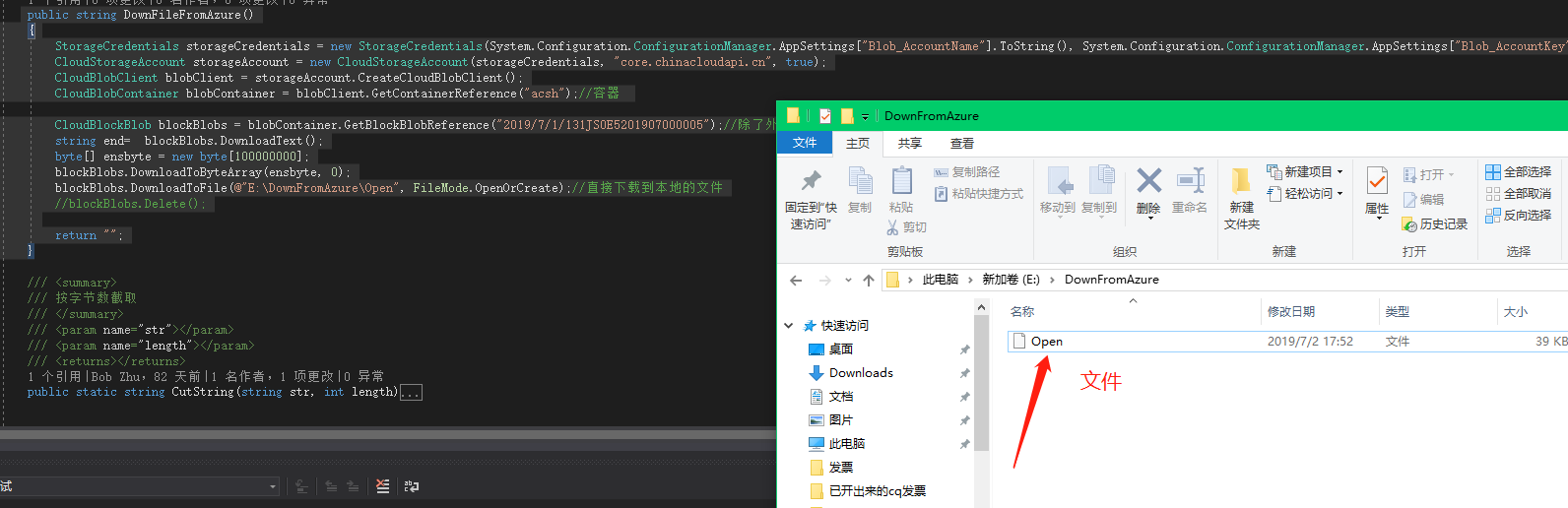
2.然后,现在要把这个从Azure Blob中下载的文件以流的形式去转成pdf的样子下载出来。
             MemoryStream stream = new MemoryStream();//声明一个流文件,用于接收DownloadToStream();

            stream.Seek(,SeekOrigin.Begin);

            blockBlobs.DownloadToStream(stream);

            byte[] b = stream.ToArray();

            //string s = System.Text.Encoding.UTF8.GetString(b, 0, b.Length);

            //byte[] fileByte = Convert.FromBase64String(s);

            return b;

            //blockBlobs.Delete();
、、、、、、、、、、、、、、、、、、、、、、、、、、、、、、、、、、、、、、、、、
SECURITY eCURITY = new SECURITY();
byte[] fileByte = eCURITY.DownFileFromAzure();
Response.Clear();
Response.AddHeader("Content-Disposition", string.Format("attachment;filename={0}.pdf","Test"));
Response.BinaryWrite(fileByte);
Response.ContentType="application/pdf";
Response.Flush();
Response.End();
return View();
在这里一开始,就是遇到超时的情况:其实这个超时是要重写ReadTimeOut的方法,MemoryStream是继承Stream类的。
但是这个length不为0,所以这个是从云上把文件给获取下来了。
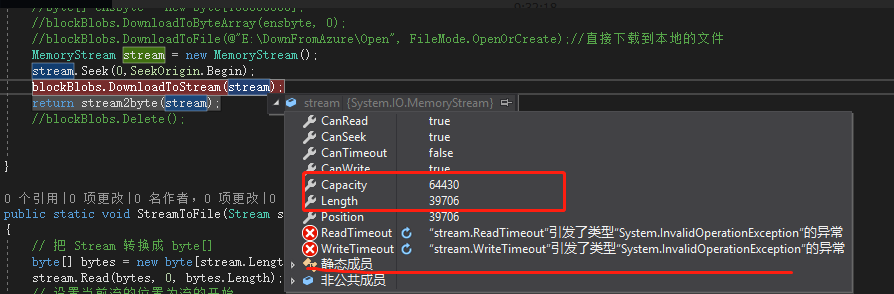
因为在前端获取是将byte文件转成流文件的。所以,我在上面的获取流文件的时候,直接将
byte[] b = stream.ToArray();
然后用前端接收下,就把pdf的文件给下载下来l。
Microsoft Azure Storage Explorer(2)的更多相关文章
- Microsoft Azure Storage Explorer
上周主管说,要把每次开过的发票,要下载成Pdf的文件,然后就实时的将这些发票存到云上面去. 就是这个Microsoft Azure ,微软的亲儿子. 先把代码贴上来吧,挺简单的. ##.链接账号密码 ...
- 推荐一款跨平台的 Azure Storage Explorer
var appInsights=window.appInsights||function(config){ function r(config){t[config]=function(){var i= ...
- 如何访问Microsoft Azure Storage
首先先要创建存储账户 http://www.cnblogs.com/SignalTips/p/4119128.html 可以通过以下的几个方式访问 通过Visual Studio 2013 Commu ...
- Microsoft Azure Storage Exployer使用指南
概述 Microsoft Azure Storage Exployer 是微软官方推荐的一款管理Azure Storage 客户端工具,客户使用完全免费.支持Windows.Mac和Linux.用户使 ...
- Azure系列2.1 —— com.microsoft.azure.storage.blob
网上azure的资料较少,尤其是API,全是英文的,中文资料更是少之又少.这次由于公司项目需要使用Azure,所以对Azure的一些学习心得做下笔记,文中不正确地方请大家指正. Azure Blob ...
- Microsoft Azure Storage架构分析
Microsoft云存储服务分为两个部分,SQL Azure和Azure Storage.云存储系统的可扩展性和功能不可兼得,必须牺牲一定的关系数据库功能换取可扩展性.Microsoft实现云存储的思 ...
- Azure Queue Storage 基本用法 -- Azure Storage 之 Queue
Azure Storage 是微软 Azure 云提供的云端存储解决方案,当前支持的存储类型有 Blob.Queue.File 和 Table. 笔者在<Azure File Storage 基 ...
- Azure File Storage 基本用法 -- Azure Storage 之 File
Azure Storage 是微软 Azure 云提供的云端存储解决方案,当前支持的存储类型有 Blob.Queue.File 和 Table. 笔者在<Azure Blob Storage 基 ...
- Azure Blob Storage 基本用法 -- Azure Storage 之 Blob
Azure Storage 是微软 Azure 云提供的云端存储解决方案,当前支持的存储类型有 Blob.Queue.File 和 Table. 笔者在<Azure Table storage ...
随机推荐
- Koa2 遇到Method Not Allowed 获取不到返回值
https://q.cnblogs.com/q/114462/ 都来找我 Haisen‘s blogs 求求各位大神了,2点多了没解决睡不着啊,我按照网上用的koa2-cors,g ...
- Mac下SVN基本操作和常见错误
一.基本操作 1 从服务器上下载代码 svn checkout http://xxx.xxx.xxx/xxx 2 获取最新的代码 svn update 3 提交代码 svn commit -m ...
- js基础——变量、作用域、内存
1.new关键字创建的是引用类型: eg. var box = new Object(); box.name = "Linda";//引用类型添加属性没问题 al ...
- LOGO的浮空显示-Verilog
为了方便生成准确的mif数据,以实现特定的透明效果.使用Photoshop将网上下载的Logo修改颜色,保存大小为120*120像素,如图1所示. 图1 ps修改后的Logo 使用Pic2mif软件, ...
- vue中动态class写法
<div class="wrap" :class="{active:index==current}"></div> <div cl ...
- HTML常用布局
一般的局部布局无非采用如下的技术: 1)div + ul(ol)-li:用于分类导航或菜单等场合 2)div + dl-dt-dd:用于图文混编场合 3)table-tr-td:用于图 ...
- Asp.NetCore3.1版本的CodeFirst与经典的三层架构与AutoFac批量注入
Core3.1 CodeFirst与AutoFac批量注入(最下面附GitHub完整 Demo,由于上传网速较慢,这里就直接压缩打包上传了) ===Core3.1 CodeFirst 数据库为远程阿里 ...
- AutoCad .Net二次开发求两曲线最小距离
测试结果: 主要思路:假设有两条曲线分别是c1和c2,把c1按照1的距离划分我这里用变量jd表示,得到一个曲线集合coll,然后遍历coll,得到coll中每一个曲线的两个端点,再用这两个端点分别求离 ...
- Redis的高并发、持久化、高可用架构设计
就是如果你用redis缓存技术的话,肯定要考虑如何用redis来加多台机器,保证redis是高并发的,还有就是如何让Redis保证自己不是挂掉以后就直接死掉了,redis高可用 我这里会选用我之前讲解 ...
- EnvironmentAware接口的作用
在SpringBoot中的应用 凡注册到Spring容器内的bean,实现了EnvironmentAware接口重写setEnvironment方法后,在工程启动时可以获得application.pr ...