
省市区三级联动 pickerView
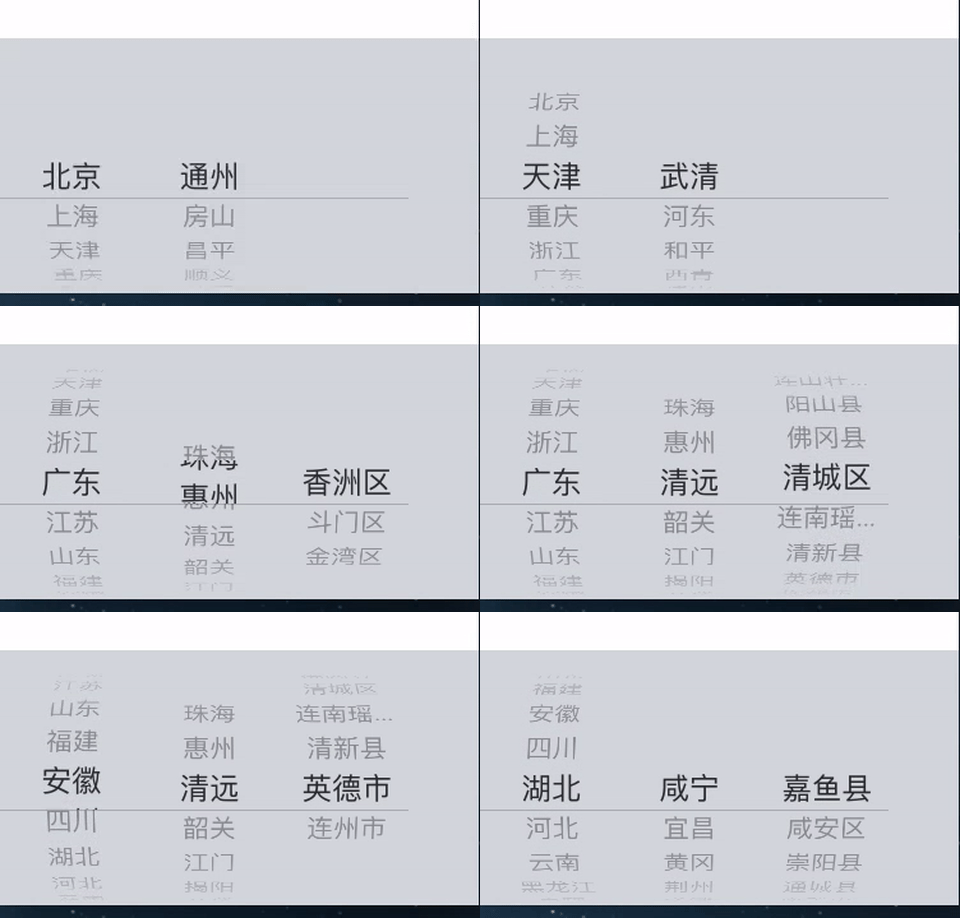
效果图
概述
关于 省市区 三级联动的 pickerView,我想大多数的 iOS 开发者应该都遇到过这样的需求。在遇到这样的需求的时候,大多数人都会觉的这个很复杂,一时无从下手。其实真的没那么复杂。在这里我们来一起看看,怎么去实现这样的 pickerView,并做一个简单的封装,使其使用的更加简单,从而也减少了 ViewController 中的代码。
实现思路
如何封装
- 我们使用一个 View(IDAddressPickerView) 来封装 PickerView,来处理 PickerView 的 dataSource 和 delegate,将原本需要在 ViewController处理的 逻辑封装的 View 中。
- ViewController 只需要为 IDAddressPickerView 提供 dataSource,并获取选中的 Address。而不去关心其他逻辑,不如说:联动逻辑,数据格式化。
- IDAddressPickerView 使用委托模式来获取 ViewController 提供的数据源。
数据如何组织
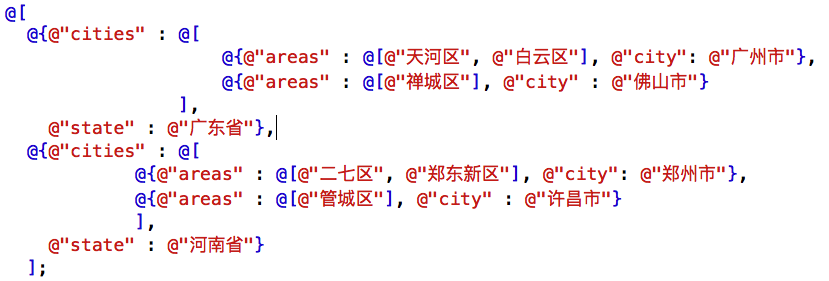
IDAddressPickerView 的数据源是一个数组,且需要满足一定的格式,这在一定程度上降低了其使用灵活性。
目前 IDAddressPickerView 数据源的需要满足的格式如图:
获取选中的地址
- 选中地址的格式,目前是通过固定的 key 包装在一个 Dictionary,灵活性不高。
- 在此没有使用委托等模式,而是通过一个属性保存当前选中的地址,让用户(IDAddressPickerView 的使用者)主动去获取选中的地址。
期望结果
- 目前实现的 IDAddressPickerView 的数据源缺乏灵活性,尽管我们可以与后台沟通约定数据格式,但是对于一个封装的 IDAddressPickerView 来说,显然是不妥当的。
- 我期望实现的结果是,在为 IDAddressPickerView 提供数据源的时候,指定一个 dataFormatter,IDAddressPickerView 根据 dataFormatter 去解析数据源的数据。而不是现在的根据固定的格式解析数据。
- 由于这些问题的存在,我将项目代码上传到 github 上,还希望有兴趣的小伙伴们多提宝贵意见。
具体实现
IDAddressPickerView
自定义 UIView 的 子类 IDAddressPickerView
@interface IDAddressPickerView : UIView

@end
添加 UIPickerView 子控件
- (UIPickerView *)pickerView {

    if (_pickerView == nil) {

        _pickerView = [[UIPickerView alloc] init];

        _pickerView.dataSource = self;

        _pickerView.delegate = self;

    }

    return _pickerView;

}
UIPickerView 的数据源
- (NSInteger)numberOfComponentsInPickerView:(UIPickerView *)pickerView {

    return 3;

}

- (NSInteger)pickerView:(UIPickerView *)pickerView numberOfRowsInComponent:(NSInteger)component {

    NSInteger numberOfRowsInComponent = 0;

    switch (component) {

        case 0:

            numberOfRowsInComponent = self.addressArray.count;

            break;

        case 1:

        {

            NSDictionary *province = self.addressArray[self.provinceIndex];

            numberOfRowsInComponent = [province[@"cities"] count];

        }

            break;

        case 2:

        {

            NSDictionary *province = self.addressArray[self.provinceIndex];

            NSDictionary *cities = province[@"cities"][self.cityIndex];

            numberOfRowsInComponent = [cities[@"areas"] count];

        }

            break;

    }

    return numberOfRowsInComponent;

}

- (NSString *)pickerView:(UIPickerView *)pickerView titleForRow:(NSInteger)row forComponent:(NSInteger)component {

    NSString *titleForRow = @"";

    switch (component) {

        case 0:

            titleForRow = self.addressArray[row][@"state"];

            break;

        case 1:

        {

            NSDictionary *province = self.addressArray[self.provinceIndex];

            titleForRow = province[@"cities"][row][@"city"];

        }

            break;

        case 2:

        {

            NSDictionary *province = self.addressArray[self.provinceIndex];

            NSDictionary *city = province[@"cities"][self.cityIndex];

            titleForRow = city[@"areas"][row];

        }

            break;

    }

    return titleForRow;

}
UIPickerView 的代理
- (void)pickerView:(UIPickerView *)pickerView didSelectRow:(NSInteger)row inComponent:(NSInteger)component {

    switch (component) {

        case 0:

        {

            self.provinceIndex = row;

            self.cityIndex = 0;

            self.areaIndex = 0;

            [pickerView reloadComponent:1];

            [pickerView reloadComponent:2];

            [pickerView selectRow:0 inComponent:1 animated:NO];

            [pickerView selectRow:0 inComponent:2 animated:NO];

            /**

             *  更新选中的 addresss,包括:市,区

             */

            NSDictionary *province = self.addressArray[self.provinceIndex];

            NSDictionary *city = province[@"cities"][self.cityIndex];

            self.selectedAddress[ProvinceKey] = self.addressArray[row][@"state"];

            if ([province[@"cities"] count] > 0) {

                self.selectedAddress[CityKey] = province[@"cities"][0][@"city"];

            } else {

                self.selectedAddress[CityKey] = @"";

            }

            if ([city[@"areas"] count] > 0) {

                self.selectedAddress[AreaKey] = city[@"areas"][0];

            } else {

                self.selectedAddress[AreaKey] = @"";

            }

        }

            break;

        case 1:

        {

            self.cityIndex = row;

            self.areaIndex = 0;

            [pickerView reloadComponent:2];

            [pickerView selectRow:0 inComponent:2 animated:NO];

            /**

             *  更新选中的 addresss,包括:区

             */

            NSDictionary *province = self.addressArray[self.provinceIndex];

            NSDictionary *city = province[@"cities"][self.cityIndex];

            self.selectedAddress[CityKey] = province[@"cities"][row][@"city"];

            if ([city[@"areas"] count] > 0) {

                self.selectedAddress[AreaKey] = city[@"areas"][0];

            } else {

                self.selectedAddress[AreaKey] = @"";

            }

        }

            break;

        case 2:

        {

            self.areaIndex = row;

            /**

             *  更新选中的 addresss

             */

            NSDictionary *province = self.addressArray[self.provinceIndex];

            NSDictionary *city = province[@"cities"][self.cityIndex];

            self.selectedAddress[AreaKey] = city[@"areas"][row];

        }

            break;

    }

}
关于 UIPickerView 的数据源
UIPickerView 的数据源 通过 IDAddressPickerViewDataSource 协议获得
- (NSArray *)addressArray {

    if (_addressArray == nil) {

        if ([self.dataSource respondsToSelector:@selector(addressArray)]) {

            _addressArray = [self.dataSource addressArray];

        } else {

            _addressArray = [NSArray array];

        }

    }

    return _addressArray;

}
联动效果的实现
原理
- 基本的原理是通过更新数据源的方式,来实现选中一列中的某一行时,更新后继(更深层次)的列。
具体实现
在此使用三个属性分别记录省市区三个层次的对应的列中选中的行,UIPickerView 通过这三个属性来获取对应的数据源。
选中一列中的某一行时,需要更新当前列及其后继列所对应的选中行信息。
/** 选中的省份 */

@property (nonatomic, assign) NSInteger provinceIndex;

/** 选中的城市 */

@property (nonatomic, assign) NSInteger cityIndex;

/** 选中的省份 */

@property (nonatomic, assign) NSInteger areaIndex;
更新后继的列
- 来实现选中一列中的某一行时,更新 所有 后继列,默认选中第一行。即,选中第一列时,更新第二列和第三列;选中第二列时,更新第三列;选中第三列时。
- (void)pickerView:(UIPickerView *)pickerView didSelectRow:(NSInteger)row inComponent:(NSInteger)component {

    switch (component) {

        case 0:

        {

            self.provinceIndex = row;

            self.cityIndex = 0;

            self.areaIndex = 0;

            [pickerView reloadComponent:1];

            [pickerView reloadComponent:2];

            [pickerView selectRow:0 inComponent:1 animated:NO];

            [pickerView selectRow:0 inComponent:2 animated:NO];

            /**

             *  更新选中的 addresss,包括:市,区

             */

            NSDictionary *province = self.addressArray[self.provinceIndex];

            NSDictionary *city = province[@"cities"][self.cityIndex];

            self.selectedAddress[ProvinceKey] = self.addressArray[row][@"state"];

            if ([province[@"cities"] count] > 0) {

                self.selectedAddress[CityKey] = province[@"cities"][0][@"city"];

            } else {

                self.selectedAddress[CityKey] = @"";

            }

            if ([city[@"areas"] count] > 0) {

                self.selectedAddress[AreaKey] = city[@"areas"][0];

            } else {

                self.selectedAddress[AreaKey] = @"";

            }

        }

            break;

        case 1:

        {

            self.cityIndex = row;

            self.areaIndex = 0;

            [pickerView reloadComponent:2];

            [pickerView selectRow:0 inComponent:2 animated:NO];

            /**

             *  更新选中的 addresss,包括:区

             */

            NSDictionary *province = self.addressArray[self.provinceIndex];

            NSDictionary *city = province[@"cities"][self.cityIndex];

            self.selectedAddress[CityKey] = province[@"cities"][row][@"city"];

            if ([city[@"areas"] count] > 0) {

                self.selectedAddress[AreaKey] = city[@"areas"][0];

            } else {

                self.selectedAddress[AreaKey] = @"";

            }

        }

            break;

        case 2:

        {

            self.areaIndex = row;

            /**

             *  更新选中的 addresss

             */

            NSDictionary *province = self.addressArray[self.provinceIndex];

            NSDictionary *city = province[@"cities"][self.cityIndex];

            self.selectedAddress[AreaKey] = city[@"areas"][row];

        }

            break;

    }

}
IDAddressPickerViewDataSource 协议
@protocol IDAddressPickerViewDataSource <NSObject>

/**

 *  地址信息,指定格式的数组

 */

- (NSArray *)addressArray;

@end
使用示例
设置 textField 的 inputView 为 IDAddressPickerView
_textField.inputView = self.addressPickerView;

// getter

- (IDAddressPickerView *)addressPickerView {

    if (_addressPickerView == nil) {

        _addressPickerView = [[IDAddressPickerView alloc] init];

        _addressPickerView.dataSource = self;

    }

    return _addressPickerView;

}
IDAddressPickerViewDataSource 提供数据
#pragma mark - IDAddressPickerViewDataSource

- (NSArray *)addressArray {

    NSString *path = [[NSBundle mainBundle] pathForResource:@"address" ofType:@"plist"];

    NSArray *addressInfo = [NSArray arrayWithContentsOfFile:path];

    return addressInfo;

}
获取选中的地址
- (void)touchesBegan:(NSSet<UITouch *> *)touches withEvent:(UIEvent *)event {

    NSLog(@"%@", self.addressPickerView.selectedAddress);

}
声明
项目代码已经上传到 gitHub,若需要请自行获取:IDAddressPickerView
省市区三级联动 pickerView的更多相关文章
- jQuery省市区三级联动插件
体验效果:http://hovertree.com/texiao/bootstrap/4/支持PC和手机移动端. 手机扫描二维码体验效果: 代码如下: <!DOCTYPE html> &l ...
- JS省市区三级联动
不需要访问后台服务器端,不使用Ajax,无刷新,纯JS实现的省市区三级联动. 当省市区数据变动是只需调正js即可. 使用方法: <!DOCTYPE html><html>< ...
- ajax省市区三级联动
jdbc+servlet+ajax开发省市区三级联动 技术点:jdbc操作数据库,ajax提交,字符拦截器,三级联动 特点:局部刷新达到省市区三级联动,举一反三可以做商品分类等 宗旨:从实战中学习 博 ...
- QQ JS省市区三级联动
如下图: 首先写一个静态的页面: <!DOCTYPE html> <html> <head> <title>QQ JS省市区三级联动</title ...
- 省市区三级联动(二)JS部分简单版
通过对上一篇<省市区三级联动>的学习发现JScript部分省市区的填充代码几乎相同,所以可以写成一个函数. 注意:html部分和chuli.php部分不变 1.下拉列表填充可以写成带参数的 ...
- 从QQ网站中提取的纯JS省市区三级联动
在 http://ip.qq.com/ 的网站中有QQ自己的JS省市区三级联动 QQ是使用引用外部JS来实现三级联动的.JS如下:http://ip.qq.com/js/geo.js <!DOC ...
- 基于ThinkPHP+AJAX的省市区三级联动
练习,就当练习. 省市区三级联动,样式如下图所示: 1,导入两个js文件并且导入数据库文件. 两个js文件分别是jquery-2.1.4.min.js和jquery-1.js,数据库文件,见附件. 2 ...
- java的JCombobox实现中国省市区三级联动
源代码下载:点击下载源代码 用xml存储中国各大城市的数据. xml数据太多了就不贴上了,贴个图片: 要解释xml,添加了一个jdom.jar,上面的源代码下载里面有. 解释xml的类: packag ...
- jquery省市区三级联动
jquery省市区三级联动(数据来源国家统计局官网)内附源码下载 很久很久没有写博了. 今天更新了项目的省市区三级联动数据,更新后最新的海南三沙都有,分享给所有需要的小伙伴们... JQUERY + ...
随机推荐
- 【记录】VS2012新建MVC3/MVC4项目时,报:此模板尝试加载组件程序集“NuGet.VisualStudio.Interop...”
最近电脑装了 VisualStudio "14" CTP,由于把其他版本的 VS 卸掉,由高到低版本安装,当时安装完 VisualStudio "14" CTP ...
- HuffmanTree的浅析和在C#中的算法实现
无论是在我们的开发项目中,还是在我们的日常生活中,都会较多的涉及到文件压缩.谈到文件压缩,可能会有人想问文件压缩到底是怎么实现的,实现的原理是什么,对于开发人员来说,怎么实现这样一个压缩的功能. 接下 ...
- Service组件简介
Service是一个应用程序组件,没有图形化界面,通常用来处理一些耗时较长的操作,可以用Service更新ContentProvider,发送Intent以及启动系统的通知等等.Service并不是一 ...
- jQuery效率提升建议
jQuery简洁通用的方法集把编码者从繁重的工作中解脱出来,也拉低了进入javascript的门槛,初学者对浏览器兼容性一无所知的情况下,几行代码就可以写出超炫的特效.网上有一篇文章转载比较泛滥,已经 ...
- 用CSS3动画特效实现弹窗效果
提示:如果大家觉得本篇实现的弹窗效果有用,可持续关注.接下会添加更多效果并且封装成插件,这样使用就方便了.效果查看: https://heavis.github.io/hidialog/index.h ...
- 7.9 数据注解特性--ForeignKey
外键特性,可以应用到类的属性中.Code-First默认的约定,对外键属性来说,假定外键属性的名称和主键属性是匹配的. 我们看一下,下面的代码: using System; using System. ...
- Rafy 领域实体框架示例(1) - 转换传统三层应用程序
Rafy 领域实体框架发布后,虽然有帮助文档,许多朋友还是反映学习起来比较复杂,希望能开发一个示例程序,展示如何使用 Rafy 领域实体框架所以,本文通过使用 Rafy 领域实体框架来改造一个传统的三 ...
- webserver[实时查询当天的天气情况]
1.webserver是什么? 日常生活中经常会使用到webserver,注册时,会收到验证码,购买东西时,会收到短信,假如,A公司网站和B公司合作,那么A公司注册对的用户可以直接推送给B网站,那怎么 ...
- Create function through MySQLdb
http://stackoverflow.com/questions/745538/create-function-through-mysqldb How can I define a multi-s ...
- Oracle学习总结_day06_视图&序列&索引
本文为博主辛苦总结,希望自己以后返回来看的时候理解更深刻,也希望可以起到帮助初学者的作用. 转载请注明 出自 : luogg的博客园 谢谢配合! day 06 视图,索引,序列 视图 什么是视图: 视 ...