
springboot + zipkin(brave-okhttp实现)
一、前提
1、zipkin基本知识:附8 zipkin
2、启动zipkin server:
2.1、在官网下载服务jar,http://zipkin.io/pages/quickstart.html,之后使用命令启动服务jar即可。
nohup java -jar zipkin-server-1.5.1-exec.jar &
之后,查看与该jar同目录下的nohup.out日志文件,发现其实该jar也是由springboot打成的,且内置的tomcat的启动端口是9411,如下:

2.2、打开浏览器,http://ip:9411/(host为服务启动的host)。
二、代码实现
1、service1
1.1、pom.xml
<dependency>
<groupId>io.zipkin.brave</groupId>
<artifactId>brave-core</artifactId>
<version>3.9.0</version>
</dependency>
<dependency>
<groupId>io.zipkin.brave</groupId>
<artifactId>brave-spancollector-http</artifactId>
<version>3.9.0</version>
</dependency>
<dependency>
<groupId>io.zipkin.brave</groupId>
<artifactId>brave-web-servlet-filter</artifactId>
<version>3.9.0</version>
</dependency>
<dependency>
<groupId>io.zipkin.brave</groupId>
<artifactId>brave-okhttp</artifactId>
<version>3.9.0</version>
</dependency>

 1         <dependency>

 2             <groupId>io.zipkin.brave</groupId>

 3             <artifactId>brave-core</artifactId>

 4             <version>3.9.0</version>

 5         </dependency>

 6         <dependency>

 7             <groupId>io.zipkin.brave</groupId>

 8             <artifactId>brave-spancollector-http</artifactId>

 9             <version>3.9.0</version>

10         </dependency>

11         <dependency>

12             <groupId>io.zipkin.brave</groupId>

13             <artifactId>brave-web-servlet-filter</artifactId>

14             <version>3.9.0</version>

15         </dependency>

16         <dependency>

17             <groupId>io.zipkin.brave</groupId>

18             <artifactId>brave-okhttp</artifactId>

19             <version>3.9.0</version>

20         </dependency>
1.2、ZipkinConfig
 1 package com.xxx.service1.zipkin;

 2

 3 import org.springframework.context.annotation.Bean;

 4 import org.springframework.context.annotation.Configuration;

 5

 6 import com.github.kristofa.brave.Brave;

 7 import com.github.kristofa.brave.EmptySpanCollectorMetricsHandler;

 8 import com.github.kristofa.brave.Sampler;

 9 import com.github.kristofa.brave.SpanCollector;

10 import com.github.kristofa.brave.http.DefaultSpanNameProvider;

11 import com.github.kristofa.brave.http.HttpSpanCollector;

12 import com.github.kristofa.brave.okhttp.BraveOkHttpRequestResponseInterceptor;

13 import com.github.kristofa.brave.servlet.BraveServletFilter;

14

15 import okhttp3.OkHttpClient;

16

17 /**

18  * zipkin配置

19  */

20 @Configuration

21 public class ZipkinConfig {

22

23     @Bean

24     public SpanCollector spanCollector() {

25         HttpSpanCollector.Config spanConfig = HttpSpanCollector.Config.builder()

26                                               .compressionEnabled(false)//默认false,span在transport之前是否会被gzipped。

27                                               .connectTimeout(5000)//5s,默认10s

28                                               .flushInterval(1)//1s

29                                               .readTimeout(6000)//5s,默认60s

30                                               .build();

31         return HttpSpanCollector.create("http://ip:9411",

32                                         spanConfig,

33                                         new EmptySpanCollectorMetricsHandler());

34     }

35

36     @Bean

37     public Brave brave(SpanCollector spanCollector) {

38         Brave.Builder builder = new Brave.Builder("service1");//指定serviceName

39         builder.spanCollector(spanCollector);

40         builder.traceSampler(Sampler.create(1));//采集率

41         return builder.build();

42     }

43

44     @Bean

45     public BraveServletFilter braveServletFilter(Brave brave) {

46         /**

47          * 设置sr、ss拦截器

48          */

49         return new BraveServletFilter(brave.serverRequestInterceptor(),

50                                       brave.serverResponseInterceptor(),

51                                       new DefaultSpanNameProvider());

52     }

53

54     @Bean

55     public OkHttpClient okHttpClient(Brave brave){

56         /**

57          * 设置cs、cr拦截器

58          */

59         return new OkHttpClient.Builder()

60                    .addInterceptor(new BraveOkHttpRequestResponseInterceptor(brave.clientRequestInterceptor(),

61                                                                              brave.clientResponseInterceptor(),

62                                                                              new DefaultSpanNameProvider()))

63                    .build();

64     }

65

66 }
说明:
- HttpSpanCollector:span信息收集器
- Brave:基本实例,注意传入的参数是serviceName
- BraveServletFilter:设置sr(server receive),ss(server send)拦截器
- OkHttpClient:构建client实例,添加拦截器,设置cs(client send),cr(client receive)拦截器
1.3、ZipkinBraveController
package com.xxx.service1.zipkin;
import org.springframework.beans.factory.annotation.Autowired;
import org.springframework.web.bind.annotation.RequestMapping;
import org.springframework.web.bind.annotation.RestController;
import io.swagger.annotations.Api;
import io.swagger.annotations.ApiOperation;
import okhttp3.OkHttpClient;
import okhttp3.Request;
import okhttp3.Response;
@Api("zipkin brave api")
@RestController
@RequestMapping("/zipkin/brave/service1")
public class ZipkinBraveController {
@Autowired
private OkHttpClient okHttpClient;
@ApiOperation("trace第一步")
@RequestMapping("/test1")
public String myboot() throws Exception {
Thread.sleep(100);//100ms
Request request = new Request.Builder().url("http://localhost:8032/zipkin/brave/service2/test2").build();
/*
* 1、执行execute()的前后,会执行相应的拦截器(cs,cr)
* 2、请求在被调用方执行的前后,也会执行相应的拦截器(sr,ss)
*/
Response response = okHttpClient.newCall(request).execute();
return response.body().string();
}
}
 1 package com.xxx.service1.zipkin;

 2

 3 import org.springframework.beans.factory.annotation.Autowired;

 4 import org.springframework.web.bind.annotation.RequestMapping;

 5 import org.springframework.web.bind.annotation.RestController;

 6

 7 import io.swagger.annotations.Api;

 8 import io.swagger.annotations.ApiOperation;

 9 import okhttp3.OkHttpClient;

10 import okhttp3.Request;

11 import okhttp3.Response;

12

13 @Api("zipkin brave api")

14 @RestController

15 @RequestMapping("/zipkin/brave/service1")

16 public class ZipkinBraveController {

17

18     @Autowired

19     private OkHttpClient okHttpClient;

20

21     @ApiOperation("trace第一步")

22     @RequestMapping("/test1")

23     public String myboot() throws Exception {

24         Thread.sleep(100);//100ms

25         Request request = new Request.Builder().url("http://localhost:8032/zipkin/brave/service2/test2").build();

26         /*

27          * 1、执行execute()的前后,会执行相应的拦截器(cs,cr)

28          * 2、请求在被调用方执行的前后,也会执行相应的拦截器(sr,ss)

29          */

30         Response response = okHttpClient.newCall(request).execute();

31         return response.body().string();

32     }

33

34 }
1.4、application.properties
1 server.port=8031
2、service2
2.1、pom.xml、ZipkinConfig与service1相似,config部分需要换掉serviceName为"service2"
2.2、controller
package com.xxx.service2.zipkin;
import org.springframework.beans.factory.annotation.Autowired;
import org.springframework.web.bind.annotation.RequestMapping;
import org.springframework.web.bind.annotation.RequestMethod;
import org.springframework.web.bind.annotation.RestController;
import io.swagger.annotations.Api;
import io.swagger.annotations.ApiOperation;
import okhttp3.OkHttpClient;
import okhttp3.Request;
import okhttp3.Response;
@Api("zipkin brave api")
@RestController
@RequestMapping("/zipkin/brave/service2")
public class ZipkinBraveController {
@Autowired
private OkHttpClient okHttpClient;
@ApiOperation("trace第二步")
@RequestMapping(value="/test2",method=RequestMethod.GET)
public String myboot() throws Exception {
Thread.sleep(200);//100ms
Request request3 = new Request.Builder().url("http://localhost:8033/zipkin/brave/service3/test3").build();
Response response3 = okHttpClient.newCall(request3).execute();
String response3Str = response3.body().string();
Request request4 = new Request.Builder().url("http://localhost:8034/zipkin/brave/service4/test4").build();
Response response4 = okHttpClient.newCall(request4).execute();
String response4Str = response4.body().string();
return response3Str + "-" +response4Str;
}
}
 1 package com.xxx.service2.zipkin;

 2

 3 import org.springframework.beans.factory.annotation.Autowired;

 4 import org.springframework.web.bind.annotation.RequestMapping;

 5 import org.springframework.web.bind.annotation.RequestMethod;

 6 import org.springframework.web.bind.annotation.RestController;

 7

 8 import io.swagger.annotations.Api;

 9 import io.swagger.annotations.ApiOperation;

10 import okhttp3.OkHttpClient;

11 import okhttp3.Request;

12 import okhttp3.Response;

13

14 @Api("zipkin brave api")

15 @RestController

16 @RequestMapping("/zipkin/brave/service2")

17 public class ZipkinBraveController {

18

19     @Autowired

20     private OkHttpClient okHttpClient;

21

22     @ApiOperation("trace第二步")

23     @RequestMapping(value="/test2",method=RequestMethod.GET)

24     public String myboot() throws Exception {

25         Thread.sleep(200);//100ms

26         Request request3 = new Request.Builder().url("http://localhost:8033/zipkin/brave/service3/test3").build();

27         Response response3 = okHttpClient.newCall(request3).execute();

28         String response3Str = response3.body().string();

29

30         Request request4 = new Request.Builder().url("http://localhost:8034/zipkin/brave/service4/test4").build();

31         Response response4 = okHttpClient.newCall(request4).execute();

32         String response4Str = response4.body().string();

33

34         return response3Str + "-" +response4Str;

35     }

36

37 }
2.3、application.properties
1 server.port=8032
3、service3
3.1、pom.xml、ZipkinConfig与service1相似,config部分需要换掉serviceName为"service3"
3.2、controller
package com.xxx.service3.zipkin;
import org.springframework.web.bind.annotation.RequestMapping;
import org.springframework.web.bind.annotation.RequestMethod;
import org.springframework.web.bind.annotation.RestController;
import io.swagger.annotations.Api;
import io.swagger.annotations.ApiOperation;
@Api("zipkin brave api")
@RestController
@RequestMapping("/zipkin/brave/service3")
public class ZipkinBraveController {
@ApiOperation("trace第三步")
@RequestMapping(value="/test3",method=RequestMethod.GET)
public String myboot() throws Exception {
Thread.sleep(300);//100ms
return "service3";
}
}
 1 package com.xxx.service3.zipkin;

 2

 3 import org.springframework.web.bind.annotation.RequestMapping;

 4 import org.springframework.web.bind.annotation.RequestMethod;

 5 import org.springframework.web.bind.annotation.RestController;

 6

 7 import io.swagger.annotations.Api;

 8 import io.swagger.annotations.ApiOperation;

 9

10 @Api("zipkin brave api")

11 @RestController

12 @RequestMapping("/zipkin/brave/service3")

13 public class ZipkinBraveController {

14

15     @ApiOperation("trace第三步")

16     @RequestMapping(value="/test3",method=RequestMethod.GET)

17     public String myboot() throws Exception {

18         Thread.sleep(300);//100ms

19         return "service3";

20     }

21

22 }
3.3、application.properties
1 server.port=8033
4、service4
4.1、pom.xml、ZipkinConfig与service1相似,config部分需要换掉serviceName为"service4"
4.2、controller
package com.xxx.service4.zipkin;
import org.springframework.web.bind.annotation.RequestMapping;
import org.springframework.web.bind.annotation.RequestMethod;
import org.springframework.web.bind.annotation.RestController;
import io.swagger.annotations.Api;
import io.swagger.annotations.ApiOperation;
@Api("zipkin brave api")
@RestController
@RequestMapping("/zipkin/brave/service4")
public class ZipkinBraveController {
@ApiOperation("trace第4步")
@RequestMapping(value = "/test4", method = RequestMethod.GET)
public String myboot() throws Exception {
Thread.sleep(400);//100ms
return "service4";
}
}
 1 package com.xxx.service4.zipkin;

 2

 3 import org.springframework.web.bind.annotation.RequestMapping;

 4 import org.springframework.web.bind.annotation.RequestMethod;

 5 import org.springframework.web.bind.annotation.RestController;

 6

 7 import io.swagger.annotations.Api;

 8 import io.swagger.annotations.ApiOperation;

 9

10 @Api("zipkin brave api")

11 @RestController

12 @RequestMapping("/zipkin/brave/service4")

13 public class ZipkinBraveController {

14

15     @ApiOperation("trace第4步")

16     @RequestMapping(value = "/test4", method = RequestMethod.GET)

17     public String myboot() throws Exception {

18         Thread.sleep(400);//100ms

19         return "service4";

20     }

21

22 }
4.3、application.properties
1 server.port=8034
三、测试
swagger访问localhost:8031/zipkin/brave/service1/test1,之后查看zipkin webUI即可。
结果:
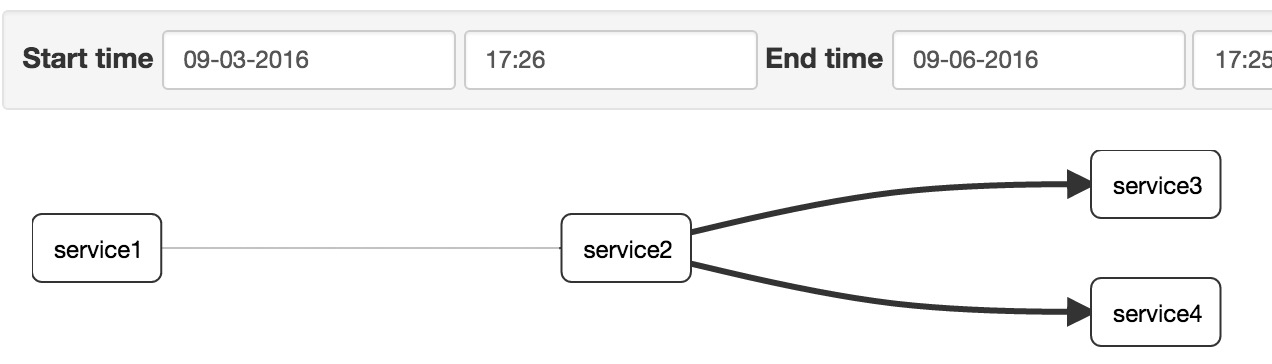
1、查看调用依赖:
2、查看调用时间对比

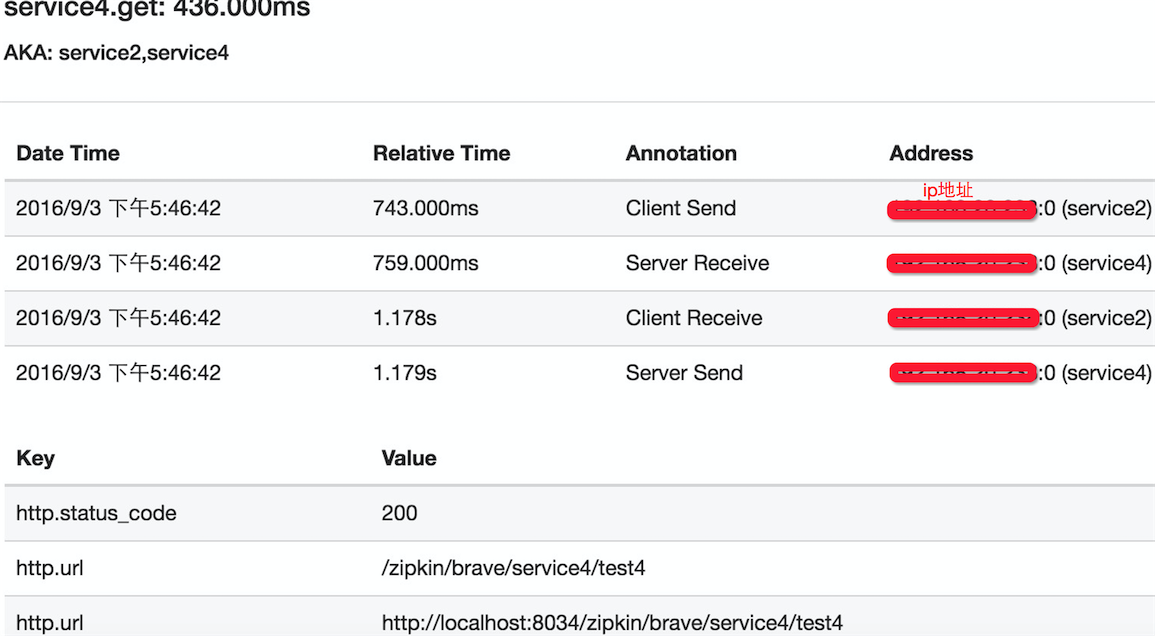
点击第4个span,查看调用详情:
springboot + zipkin(brave-okhttp实现)的更多相关文章
- 第二十八章 springboot + zipkin(brave定制-AsyncHttpClient)
brave本身没有对AsyncHttpClient提供类似于brave-okhttp的ClientRequestInterceptor和ClientResponseInterceptor,所以需要我们 ...
- 【第二十八章】 springboot + zipkin(brave定制-AsyncHttpClient)
brave本身没有对AsyncHttpClient提供类似于brave-okhttp的ClientRequestInterceptor和ClientResponseInterceptor,所以需要我们 ...
- 第二十七章 springboot + zipkin(brave-okhttp实现)
本文截取自:http://blog.csdn.net/liaokailin/article/details/52077620 一.前提 1.zipkin基本知识:附8 zipkin 2.启动zipki ...
- 【第二十七章】 springboot + zipkin(brave-okhttp实现)
本文截取自:http://blog.csdn.net/liaokailin/article/details/52077620 一.前提 1.zipkin基本知识:附8 zipkin 2.启动zipki ...
- 第二十九章 springboot + zipkin + mysql
zipkin的数据存储可以存在4个地方: 内存(仅用于测试,数据不会持久化,zipkin-server关掉,数据就没有了) 这也是之前使用的 mysql 可能是最熟悉的方式 es Cassandra ...
- 【第二十九章】 springboot + zipkin + mysql
zipkin的数据存储可以存在4个地方: 内存(仅用于测试,数据不会持久化,zipkin-server关掉,数据就没有了) 这也是之前使用的 mysql 可能是最熟悉的方式 es Cassandra ...
- springboot + zipkin + mysql
zipkin的数据存储可以存在4个地方: 内存(仅用于测试,数据不会持久化,zipkin-server关掉,数据就没有了) 这也是之前使用的 mysql 可能是最熟悉的方式 es Cassandra ...
- 微服务之分布式跟踪系统(springboot+zipkin+mysql)
通过上一节<微服务之分布式跟踪系统(springboot+zipkin)>我们简单熟悉了zipkin的使用,但是收集的数据都保存在内存中重启后数据丢失,不过zipkin的Storage除了 ...
- SpringBoot集成Zipkin实现分布式全链路监控
目录 Zipkin 简介 Springboot 集成 Zipkin 安装启动 zipkin 版本说明 项目结构 工程端口分配 引入 Maven 依赖 配置文件.收集器的设置 编写 Controller ...
随机推荐
- adb 常用命令大全
adb 常用命令大全 1. 显示系统中全部Android平台: android list targets 2. 显示系统中全部AVD(模拟器): android list avd ...
- flask中配置并使用mongodb
在你安装并运行了mongodb的情况下: 随便在一个文件中写入以下代码: import pymongo client = pymongo.MongoClient(host="localhos ...
- zabbix--ODBC 监控mysql
zabbix ODBC 数据库监控ODBC 是 C 语言开发的.用于访问数据库的中间件接口.zabbix 支持查询任何 ODBC 支持的数据库.zabbix 通过调用ODBC 来获取数据库的数据以及数 ...
- vue中checkbox 样式自定义重写;循环遍历checkbox,拿到不同的v-model绑定值;及获取当前checked 状态,全选和全不选等功能。
开始写这个功能,不得不吐槽原始的checkbox,灰色小方块的丑陋,虽说eleUI,mintUI,等各种框架的单复选框已经对其优化,但还是不想要这种.那我们就来研究一下怎么处理它. <secti ...
- shiro安全框架的使用流程
最近学了shiro安全框架流程,在这里梳理一下shiro的工作流程和一些代码,方便以后使用的时候,能快速找到对应的代码. 要使用这个shiro框架,还要新建两张表 t_authority(权限表)和t ...
- android中的国际化
java国际化步骤: 定义资源文件: baseName_language_country.properties baseName_language.properties baseName.proper ...
- stat - 打印信息节点(inode)内容
SYNOPSIS(总览) stat filename [filenames ... ] DESCRIPTION(描述) stat 打印出一个信息节点的内容,它们显示为对人可读的格式的stat(2). ...
- Docker部署web环境之Lanmt
2. 案例二 整套项目多容器分离通过docker-compose部署lanmt环境 详细的安装准备环境,省略,配置以及部署参考案例一即可 即可实现批量创建web,也可以实现多web共用一个php或my ...
- DBCP重连的问题及解决办法(转)
本文转载:http://lc87624.iteye.com/blog/1734089,欢迎大家阅读原文. 使用数据库连接池时,免不了会遇到断网.数据库挂掉等异常状况,当网络或数据库恢复时,若无法恢复连 ...
- Java的安全性如何理解
Java取消了强大但又危险的指针,而代之以引用.由于指针可进行移动运算,指针可随便指向一个内存区域,而不管这个区域是否可用,这样做是危险的,因为原来这个内存地址可能存储着重要数据或者是其他程序运行所占 ...