
开始使用 UIAlertController 吧
UIAlertView 与 UIActionSheet
- UIAlertView
样式
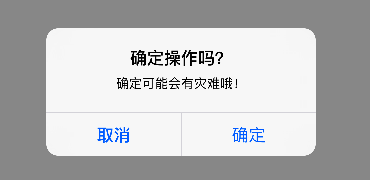
实现
- (void)showAlertView {

    self.alertView = [[UIAlertView alloc] initWithTitle:@"确定操作吗?" message:@"确定可能会有灾难哦!" delegate:self cancelButtonTitle:@"取消" otherButtonTitles:@"确定", nil];

    self.alertView.delegate = self;

    [self.alertView show];

}
注意
- 其“确定”按钮的颜色与“取消”按钮的外观一样(没有显示红色,即 normal)
- UIActionSheet
样式

实现
- (void)showActionSheet {

    self.actionSheet = [[UIActionSheet alloc] initWithTitle:@"确定操作吗?" delegate:self cancelButtonTitle:@"取消" destructiveButtonTitle:@"确定" otherButtonTitles:nil, nil];

    [self.actionSheet showInView:self.view];

}
注意
- 其“确定”按钮的颜色与“取消”按钮的外观不一样(显示红色,即 destructive)
UIAlertController
概述
UIAlertController出现的原因,我想就不必多说了。来看看苹果官方的介绍吧!
  A UIAlertController object displays an alert message to the user. This class replaces the UIActionSheet and UIAlertView classes for displaying alerts. After configuring the alert controller with the actions and style you want, present it using the presentViewController:animated:completion: method UIAlertController

  实例是用来向用户警告信息的。该类旨在替代 UIActionSheet 和 UIAlertView。若你按照自己的需求配置了 UIAlertController 的 actions 和 style,就使用 presentViewController:animated:completion: 方法来显示它吧
UIAlertController 的使用步骤
- 初始化 UIAlertController, 并设置标题,副标题,alert的样式(alert 或 actionSheet)
- 添加事件
- 使用 UIAlertAction 定义每一个事件,与事件相关的 title、style、action
- style
- UIAlertActionStyleDefault
- UIAlertActionStyleCancel
- UIAlertActionStyleDestructive
- action
- 使用 block 代替了原来的 代理模式
- 显示 alert
UIAlertController 的简单使用
显示 alertView
初始化 UIAlertController
self.alertController = [UIAlertController alertControllerWithTitle:@"确定操作吗?" message:@"确定可能会有灾难哦!" preferredStyle:UIAlertControllerStyleAlert];
添加事件(
事件的添加顺序,会影响按钮的显示顺序)UIAlertAction *cancelAction = [UIAlertAction actionWithTitle:@"取消" style:UIAlertActionStyleDefault handler:^(UIAlertAction * _Nonnull action) {
//TODO:
}];
[self.alertController addAction:cancelAction];
UIAlertAction *confirmAction = [UIAlertAction actionWithTitle:@"确定" style:UIAlertActionStyleDestructive handler:^(UIAlertAction * _Nonnull action) {
//TODO:
}];
[self.alertController addAction:confirmAction];
显示 alert
[self presentViewController:self.alertController animated:YES completion:^{

    // TODO

}];
显示 actionSheet
- 在此就不再贴代码了,把 上述代码的 UIAlertControllerStyleAlert 改成 UIAlertControllerStyleActionSheet 试试吧
UIAlertController 中的 textField
- 注意
只能向 alert 类型的 UIAlertController 中添加 textField
向 actionSheet 类型的 UIAlertController 中添加 textField,会报运行时错误
Text fields can only be added to an alert controller of style UIAlertControllerStyleAlert
- 使用 UIAlertController 实现登录界面(
demo)效果
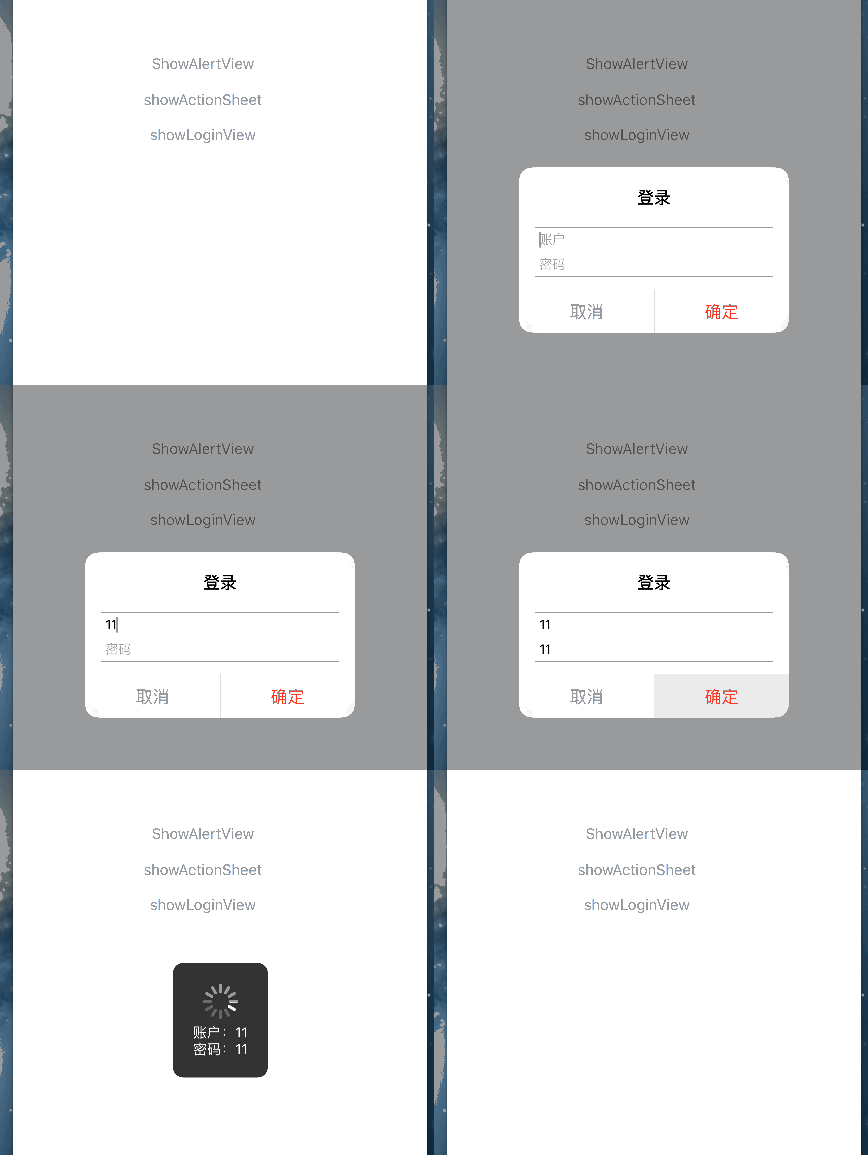
具体实现
- 使用 CocoaPods 集成 MBProgressHUD 框架(CocoaPods的安装和使用那些事(Xcode 7.2,iOS 9.2,Swift))
编辑 podfile 文件,如下:

为了使用的方便,通常会为 MBProgressHUD 添加分类,在此只添加 showMessage 方法,如下
+ (void)showMessage:(NSString *)message {

    // hud 显示的 view

    UIView *contentView = [[UIApplication sharedApplication].windows lastObject];

    // hud

    MBProgressHUD *hud = [MBProgressHUD showHUDAddedTo:contentView animated:YES];

    // hud 显示的信息

    hud.detailsLabelText = message;

    // 当 hud 隐藏时是否从父控件中移除

    hud.removeFromSuperViewOnHide = YES;

    // hub 显示的时间

    [hud hide:YES afterDelay:1.5f];

}
- 设置 UIAlertController
初始化 UIAlertController
self.alertController = [UIAlertController alertControllerWithTitle:@"登录" message:nil preferredStyle:UIAlertControllerStyleAlert];
添加 textField(
textField 与 action 的添加顺序,不影响其显示顺序)[self.alertController addTextFieldWithConfigurationHandler:^(UITextField * _Nonnull textField) {
textField.placeholder = @"账户";
}];
[self.alertController addTextFieldWithConfigurationHandler:^(UITextField * _Nonnull textField) {
textField.placeholder = @"密码";
}];
添加事件
UIAlertAction *cancelAction = [UIAlertAction actionWithTitle:@"取消" style:UIAlertActionStyleDefault handler:^(UIAlertAction * _Nonnull action) {

    // TODO:

}];

[self.alertController addAction:cancelAction];

UIAlertAction *confirmAction = [UIAlertAction actionWithTitle:@"确定" style:UIAlertActionStyleDestructive handler:^(UIAlertAction * _Nonnull action) {

    // get the account and password

    UITextField *accountTextField = self.alertController.textFields[0];

    UITextField *passwordTextField = self.alertController.textFields[1];

    NSString *message = [NSString stringWithFormat:@"账户:%@\n密码:%@", accountTextField.text, passwordTextField.text];

    // 显示 MBProgressHUD(需要在主线程中显示)

    dispatch_async(dispatch_get_main_queue(), ^{

        [MBProgressHUD showMessage:message];

    });

}];

[self.alertController addAction:confirmAction];
显示 alert
[self presentViewController:self.alertController animated:YES completion:^{

    // TODO

}];
- 使用 CocoaPods 集成 MBProgressHUD 框架(CocoaPods的安装和使用那些事(Xcode 7.2,iOS 9.2,Swift))
开始使用 UIAlertController 吧的更多相关文章
- UIAlertController
楼主在整理项目的警告,于是乎你懂的. 然后自己整理了一下以后方便自己忘了之后能及时找到它 关于UIAlertController .h文件的解析 /** 关于UIAlertController的解析 ...
- iOS UIAlertController跟AlertView用法一样 && otherButtonTitles:(nullable NSString *)otherButtonTitles, ... 写法
今天写弹出框UIAlertController,用alertView习惯了,所以封装了一下,跟alertView用法一样,不说了,直接上代码: 先来了解一下otherButtonTitles:(nul ...
- UIAlertController使用
// 将UIAlertController模态出来 相当于UIAlertView show 的方法// 初始化一个一个UIAlertController // 参数preferredStyle: ...
- IOS UIAlertController 使用方法
在很多种语言中,alert都表示弹窗操作,弹窗功能非常有用,不仅可以用于正式的app功能中,也可以在调试中使用.在OC中,UIAlertController类用来控制弹窗操作.在IOS 8.0之前, ...
- UI控件(UIAlertController)
@implementation ViewController - (void)viewDidLoad { [super viewDidLoad]; UIButton *_button = [UIBut ...
- UIAlertController 部分用法及属性
//创建UIAlertController:初始化UIAlertController 需要使用alertControllerWithTitle UIAlertController *alertCont ...
- iOS--UIAlertView与UIAlertController和UIAlertAction之间的事儿
iOS 8的新特性之一就是让接口更有适应性.更灵活,因此许多视图控制器的实现方式发生了巨大的变化.全新的UIPresentationController在实现视图控制器间的过渡动画效果和自适应设备 ...
- UI第十四节——UIAlertController
- (void)viewDidLoad { [super viewDidLoad]; UIButton *alertBtn = [UIButton buttonWithType:U ...
- iOS 8.0后使用UIAlertController
iOS 8的新特性之一就是让接口更有适应性.更灵活,因此许多视图控制器的实现方式发生了巨大的变化.全新的UIPresentationController在实现视图控制器间的过渡动画效果和自适应设备尺寸 ...
随机推荐
- 为什么要学习Linux
作者:Vamei 出处:http://www.cnblogs.com/vamei 欢迎转载,也请保留这段声明.谢谢! 本篇修改自我在知乎上回答的问题,为什么要学习 Linux? 我最开始用Linux是 ...
- MongoDB碎碎念
1. 如何从备份节点读取数据 默认是不允许的,会报如下错误: testReplSet:SECONDARY> show dbs --19T10:: E QUERY [thread1] Error: ...
- sqoop数据导出导入命令
1. 将mysql中的数据导入到hive中 sqoop import --connect jdbc:mysql://localhost:3306/sqoop --direct --username r ...
- geotrellis使用(五)使用scala操作Accumulo
要想搞明白Geotrellis的数据处理情况,首先要弄清楚数据的存放,Geotrellis将数据存放在Accumulo中. Accumulo是一个分布式的Key Value型NOSQL数据库,官网为( ...
- 关于IIS和.NET 4.0的问题总结
注册asp.net 4.0 到iis 如果没有按照正常的先装iis后装.net的顺序,可以使用此命令重新注册一下 运行->cmd Microsoft Windows [版本 6.1.7601 ...
- jquery改变链接移上光标时的颜色实例
效果体验http://hovertree.com/texiao/jquery/18/ 完整代码如下: <!DOCTYPE html> <html> <head> & ...
- 小米网css3导航下拉菜单代码
效果:http://hovertree.com/texiao/css3/19/ 代码如下: <!doctype html> <!-- W3C规范 --> <html la ...
- 在DirectShow中支持DXVA 2.0(Supporting DXVA 2.0 in DirectShow)
这几天在做dxva2硬件加速,找不到什么资料,翻译了一下微软的两篇相关文档.并准备记录一下用ffmpeg实现dxva2,将在第三篇写到.这是第二篇.,英文原址:https://msdn.microso ...
- 转载:《TypeScript 中文入门教程》 12、类型推导
版权 文章转载自:https://github.com/zhongsp 建议您直接跳转到上面的网址查看最新版本. 介绍 这节介绍TypeScript里的类型推论.即,类型是在哪里如何被推断的. 基础 ...
- tet
施大峰[[昂司法部]]... [[分公司电饭煲]]