
Annotation详解
转自:http://www.doc88.com/p-995532241886.html
首先我们定义一个简单的注解
 package com.qjy.annotation;

 import java.lang.annotation.Documented;

 import java.lang.annotation.ElementType;

 import java.lang.annotation.Retention;

 import java.lang.annotation.RetentionPolicy;

 import java.lang.annotation.Target;

 @Target(ElementType.TYPE)

 @Retention(RetentionPolicy.RUNTIME)

 @Documented

 public @interface MyAnnotation1 {

     String value();

 }
java用 @interface Annotation{ } 定义一个注解 @Annotation,一个注解是一个类。注解相当于一种标记,在程序中加上了注解就等于为程序加上了某种标记,以后,JAVAC编译器,开发工具和其他程序可以用反射来了解你的类以及各种元素上有无任何标记,看你有什么标记,就去干相应的事。
@interface
java用@interface MyAnnotation1定义一个注解
@Target
表明注解标注位置。
ElementType枚举有:
1)TYPE 类、接口、enum声明
2)FIELD 域、属性声明
3)METHOD 方法声明
4)PARAMETER 参数声明
5)CONSTRUCTOR 构造方法声明
6)PACKAGE 包声明
7)ANNOTATION_TYPE 注释类型声明
8)LOCAL_VARIABLE 局部变量声明
@Retention
表明该注解类的生命周期。
RetentionPolicy枚举有:
1)SOURCE 在源文件中有效
2)CLASS 在class文件中有效
3)RUNNTIME 在运行时有效
只有指定注解RetentionPolicy.RUNNTIME,我们才可以在注解处理器中通过反射读取
@Documented
表明此注解是否包含在javadoc中
接下来,我们定义一个包含两个值的注解
 package com.qjy.annotation;

 import java.lang.annotation.Documented;

 import java.lang.annotation.ElementType;

 import java.lang.annotation.Retention;

 import java.lang.annotation.RetentionPolicy;

 import java.lang.annotation.Target;

 @Target(ElementType.METHOD)

 @Retention(RetentionPolicy.RUNTIME)

 @Documented

 public @interface MyAnnotation2 {

     String description();

     boolean isAnnotation();

 }
下面我们看下这两个注解的用法
 package com.qjy.annotation;

 @MyAnnotation1(value="this is annotation1")

 public class AnnotationDemo {

     @MyAnnotation2(description="this is Annotation2",isAnnotation=true)

     public void sayhello(){

         System.out.println("hello world");

     }

 }
当我们互换@MyAnnotation1和@MyAnnotation2时,ide会报错,这就是@Target作用啦!
下面我们通过命令行执行:javadoc -d doc *.java,生成javadoc文档。注解MyAnnotation2使用@Documented时,文档方法如下:
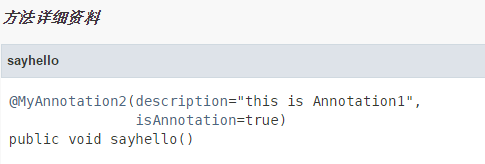
如果不使用@Documented时,文档如下:
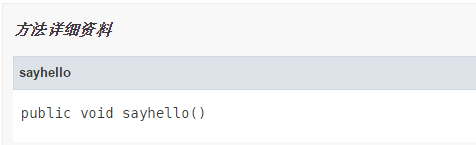
这就是@Documented作用啦!
下面我们编写一个完整的自定义注解。
第一步:编写一个用于对象赋值的注解
 package com.qjy.annotation;

 import java.lang.annotation.Documented;

 import java.lang.annotation.ElementType;

 import java.lang.annotation.Retention;

 import java.lang.annotation.RetentionPolicy;

 import java.lang.annotation.Target;

 @Target(ElementType.METHOD)

 @Retention(RetentionPolicy.RUNTIME)

 @Documented

 public @interface ValueBind {

     enum fieldType{STRING,INT};

     fieldType type();

     String value();

 }
第二步:使用注解
 package com.qjy.annotation;

 import com.qjy.annotation.ValueBind.fieldType;

 public class Student {

     private String name = "";

     private int age = 0;

     private String studentid = "";

     public String getName() {

         return name;

     }

     @ValueBind(type=fieldType.STRING,value="aa")

     public void setName(String name) {

         this.name = name;

     }

     public int getAge() {

         return age;

     }

     @ValueBind(type=fieldType.INT,value="25")

     public void setAge(int age) {

         this.age = age;

     }

     public String getStudentid() {

         return studentid;

     }

     @ValueBind(type=fieldType.STRING,value="101")

     public void setStudentid(String studentid) {

         this.studentid = studentid;

     }

     @Override

     public String toString() {

         return "Student [name=" + name + ", age=" + age + ", studentid="

                 + studentid + "]";

     }

 }
第三步:编写注解处理器
 package com.qjy.annotation;

 import java.lang.reflect.Method;

 /**

  * 注解处理器

  *

  * @author admin

  *

  */

 public class PersistStudent {

     public static void main(String[] args) throws Exception{

         Object obj = Class.forName("com.qjy.annotation.Student").newInstance();

         //获取类所有方法(包含私有)

         Method[] methodArray = obj.getClass().getDeclaredMethods();

         for(int i = 0; i < methodArray.length; i ++) {

             //如果该方法上存在ValueBind注解

             if(methodArray[i].isAnnotationPresent(ValueBind.class)) {

                 ValueBind annotation = methodArray[i].getAnnotation(ValueBind.class);

                 String type = String.valueOf(annotation.type());

                 String value = annotation.value();

                 //根据类型,执行set方法

                 if(type.equals("INT")) {

                     methodArray[i].invoke(obj, new Integer[]{new Integer(value)});

                 } else {

                     methodArray[i].invoke(obj, new String[]{value});

                 }

             }

         }

         System.out.println(obj.toString());

     }

 }
运行结果为:
Student [name=aa, age=25, studentid=101]
如果将ValueBind中Retention改为:@Retention(RetentionPolicy.SOURCE)或者@Retention(RetentionPolicy.CLASS),运行结果为:
Student [name=, age=0, studentid=]
我们就无法通过反射获取注解指定的值。
Annotation详解的更多相关文章
- Java Annotation详解 理解和使用Annotation
系统中用到了java注解: 查了一下如何使用注解,到底注解是什么: (1)创建方法:MsgTrace Java Class==> 在Create New Class中: name:输入MsgTr ...
- Java注解(Annotation)详解
转: Java注解(Annotation)详解 幻海流心 2018.05.23 15:20 字数 1775 阅读 380评论 0喜欢 1 Java注解(Annotation)详解 1.Annotati ...
- Java Annotation详解(二): 反射和Annotation
前面一篇文<Java Annotation详解(一): 理解和使用Annotation>中,我们或许会觉得,Annotation注释其实并没有多大的作用,除了几个内建的Annotation ...
- 注解Annotation 详解(转)
要深入学习注解,我们就必须能定义自己的注解,并使用注解,在定义自己的注解之前,我们就必须要了解Java为我们提供的元注解和相关定义注解的语法. 元注解: 元注解的作用就是负责注解其他注解.Java5. ...
- 转:Java Annotation详解
转载自:http://william750214.javaeye.com/blog/298104 元数据的作用 如果要对于元数据的作用进行分类,目前还没有明确的定义,不过我们可以根据它所起的作用,大致 ...
- Java注解Annotation详解
从JDK5开始,Java增加了Annotation(注解),Annotation是代码里的特殊标记,这些标记可以在编译.类加载.运行时被读取,并执行相应的处理.通过使用Annotation,开发人员可 ...
- Swagger Annotation 详解(建议收藏)
转载:https://www.jianshu.com/p/b0b19368e4a8 在软件开发行业,管理文档是件头疼的事.不是文档难于撰写,而是文档难于维护,因为需求与代码会经常变动,尤其在采用敏捷软 ...
- Swagger Annotation 详解
在软件开发行业,管理文档是件头疼的事.不是文档难于撰写,而是文档难于维护,因为需求与代码会经常变动,尤其在采用敏捷软件开发模式的系统中.好的工具能够提高团队沟通效率,保证系统质量以及缩短项目的交付周期 ...
- Java 基础之--注解Annotation详解
自定义注解入门: public @interface Annotation01 { //set default value ""; String value() default & ...
- Java自定义注解Annotation详解
注解相当于一种标记,在程序中加了注解就等于为程序打上了某种标记,没加,则等于没有某种标记,以后,javac编译器,开发工具和其他程序可以用反射来了解你的类及各种元素上有无何种标记,看你有什么标记,就去 ...
随机推荐
- 【leetcode】963. Minimum Area Rectangle II
题目如下: Given a set of points in the xy-plane, determine the minimum area of any rectangle formed from ...
- 【JZOJ3673】【luoguP4040】【BZOJ3874】宅男计划
description 外卖店一共有N种食物,分别有1到N编号.第i种食物有固定的价钱Pi和保质期Si.第i种食物会在Si天后过期.JYY是不会吃过期食物的. 比如JYY如果今天点了一份保质期为1天的 ...
- cmake README.TXT
{ cmake .//在当前路径下构建项目 cmake --build .//在当前路径下生成项目(默认为debug)//cmake --build . --config release//在当前路径 ...
- move_base 分层代价地图的作用(翻译)
A. 标准层 Static Map Layer:为了做全局规划,机器人需要一个超越其传感器的地图,以了解墙壁和其他静态障碍物的位置. 静态地图可以先用SLAM算法生成,也可以从架构图中创建. 当层 ...
- NX二次开发-基于NX开发向导模板的NX对Excel读写操作(OLE方式(COM组件))
在看这个博客前,请读者先去完整看完:NX二次开发-基于MFC界面的NX对Excel读写操作(OLE方式(COM组件))https://ufun-nxopen.blog.csdn.net/article ...
- CSS:CSS 列表
ylbtech-CSS:CSS 列表 1.返回顶部 1. CSS 列表 CSS列表属性作用如下: 设置不同的列表项标记为有序列表 设置不同的列表项标记为无序列表 设置列表项标记为图像 列表 在HTML ...
- (14)centos7 进程管理
一.查询进程 1. 进程显示 ps -a 显示当前所有的进程信息 -u 以用户的格式显示进程信息 -x 显示后台进程运行的参数 ps -aux #通常查看内存 USER #执行进程的用户 PID #进 ...
- Fiddler设置抓一个域名下个包
设置抓一个域名下个包 右侧Filters 勾选Use Filters 勾选Hosts 选择 Show only the follwing Hosts 设置好自己的抓包的域名
- delphi基础篇之数据类型概论
delphi基础篇之数据类型概论 Object Pascal 语言提供了非常丰富的数据类型,即简单类型(Simple).字符串类型(String).结构类型(Struct).指针类型(Pointer) ...
- vbs 之 解决打开Excel文件格式与扩展名指定格式不一致的问题
' Q:解决打开Excel文件格式与扩展名指定格式不一致的问题' A: 使用工作簿saveAs时,往往忽略掉它的第二个参数FileFormat,添加即可. 比如: set bookDiff = oEx ...