
1 时间戳 2 C# 如何生成一个时间戳 3 js 时间加一分钟... 4 js string->date 5 js 取得当天0点 / 23:59:59 时间
var str = 'Jan 23, 2019 10:25:47 AM';
var strnow = new Date(str);
时间戳(timestamp),一个能表示一份数据在某个特定时间之前已经存在的、 完整的、 可验证的数据,通常是一个字符序列,唯一地标识某一刻的时间。使用数字签名技术产生的数据, 签名的对象包括了原始文件信息、 签名参数、 签名时间等信息。广泛的运用在知识产权保护、 合同签字、 金融帐务、 电子报价投标、 股票交易等方面。
时间戳是指格林威治时间1970年01月01日00时00分00秒(北京时间1970年01月01日08时00分00秒)起至现在的总秒数。通俗的讲, 时间戳是一份能够表示一份数据在一个特定时间点已经存在的完整的可验证的数据。 它的提出主要是为用户提供一份电子证据, 以证明用户的某些数据的产生时间。 在实际应用上, 它可以使用在包括电子商务、 金融活动的各个方面, 尤其可以用来支撑公开密钥基础设施的 “不可否认” 服务。
C# 如何生成一个时间戳
|
1
2
3
4
5
6
7
8
9
|
/// <summary> /// 获取时间戳 /// </summary> /// <returns></returns> public static string GetTimeStamp() { TimeSpan ts = DateTime.UtcNow - new DateTime(1970, 1, 1, 0, 0, 0, 0); return Convert.ToInt64(ts.TotalSeconds).ToString(); } |
经常发现很多地方使用一个时间戳表示时间。比如: 1370838759 表示 2013年6月10日 12:32:39。 我们就需要一个工具,方便地转换这种时间格式
什么是时间戳?
时间戳, 又叫Unix Stamp. 从1970年1月1日(UTC/GMT的午夜)开始所经过的秒数,不考虑闰秒。
C# 时间戳转换为普通时间
|
1
2
3
4
5
6
7
8
9
10
11
12
13
14
15
16
|
// 时间戳转为C#格式时间 private DateTime StampToDateTime(string timeStamp) { DateTime dateTimeStart = TimeZone.CurrentTimeZone.ToLocalTime(new DateTime(1970, 1, 1)); long lTime = long.Parse(timeStamp + "0000000"); TimeSpan toNow = new TimeSpan(lTime); return dateTimeStart.Add(toNow); } // DateTime时间格式转换为Unix时间戳格式 private int DateTimeToStamp(System.DateTime time) { System.DateTime startTime = TimeZone.CurrentTimeZone.ToLocalTime(new System.DateTime(1970, 1, 1)); return (int)(time - startTime).TotalSeconds; } |
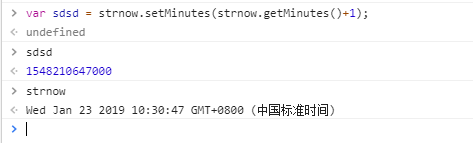

相差格林威治时间 8个小时 中国是北京时间
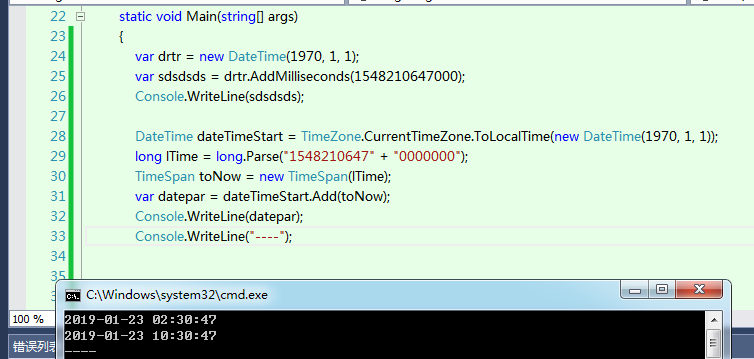
var drtr = new DateTime(1970, 1, 1);
var sdsdsds = drtr.AddMilliseconds(1548210647000);
Console.WriteLine(sdsdsds);
DateTime dateTimeStart = TimeZone.CurrentTimeZone.ToLocalTime(new DateTime(1970, 1, 1));
long lTime = long.Parse("1548210647" + "0000000");
TimeSpan toNow = new TimeSpan(lTime);
var datepar = dateTimeStart.Add(toNow);
Console.WriteLine(datepar);
Console.WriteLine("----");
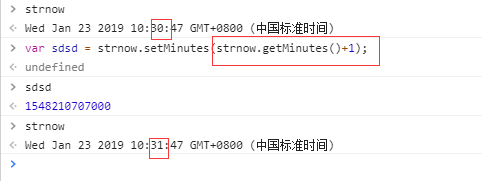
strnow.setMinutes(strnow.getMinutes()+1);
// strnow加上一分钟 返回时间的 时间戳
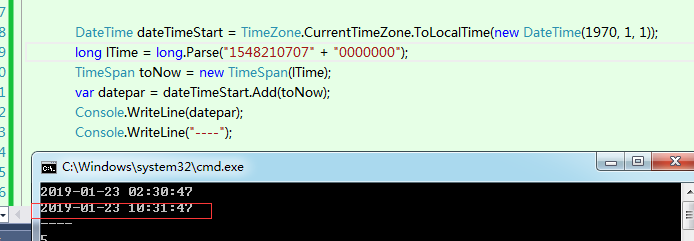
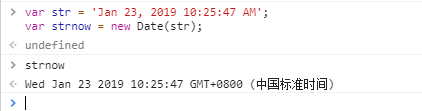
var str = 'Jan 23, 2019 10:25:47 AM';
var strnow = new Date(str);
js 取得当天0点 / 23:59:59 时间
js 取得今天0点:
const start = new Date(new Date(new Date().toLocaleDateString()).getTime());
console.log(start); //Mon Dec 04 2017 00:00:00 GMT+0800 (中国标准时间)
同理算出:
js 取得今天 23:59:59
const start = new Date(new Date(new Date().toLocaleDateString()).getTime()+24*60*60*1000-1);
console.log(start); //Mon Dec 04 2017 23:59:59 GMT+0800 (中国标准时间)
其他也是同理类推
1 时间戳 2 C# 如何生成一个时间戳 3 js 时间加一分钟... 4 js string->date 5 js 取得当天0点 / 23:59:59 时间的更多相关文章
- C# 如何生成一个时间戳
在程序中,常常会用到时间戳,如何生成一个时间戳呢? /// <summary> /// 获取时间戳 /// </summary> /// <returns>< ...
- js生成一个不重复的ID的函数的进化之路
在MongoDB中的ObjectID,可以理解为是一个不会重复的ID,这里有个链接http://blog.csdn.net/xiamizy/article/details/41521025感兴趣可以去 ...
- js 如何生成一个不重复的ID的函数
在MongoDB中的ObjectID,可以理解为是一个不会重复的ID,这里有个链接http://www.jb51.net/article/101164.htm感兴趣可以去研究一下. 我今天要做的就是做 ...
- JavaScript生成一个不重复的ID
/** * 生成一个用不重复的ID */ function GenNonDuplicateID():String{ } 先看看下面的几个方法 1.生成[0,1)的随机数的Math.random,例如 ...
- PHP生成一个六位数的邀请码
PHP生成一个六位数的邀请码 $unique_no = substr(base_convert(md5(uniqid(md5(microtime(true)),true)), 16, 10), 0, ...
- 【高性能】生成唯一时间戳ID,1毫秒预计能生成1000个
凡事涉及到高性能貌似都是高大上的东西,所以嘛我也试试:其实这个时间戳ID的生成主要为了解决我们公司内部的券号生成,估计有小伙伴认为券号生成有这么麻烦嘛,搞个自增ID完全可以用起来,或者时间取毫微米时间 ...
- php生成毫秒时间戳的例子
php时间函数time()生成当前时间的秒数,但是在一些情况下我们需要获取当前服务器时间和GMT(格林威治时间)1970年1月0时0分0秒的毫秒数,与Java中的currentTimeMilis()函 ...
- php获取一个月前的时间戳,获取三个月前的时间戳,获取一年前的时间戳
strtotime 非常强大的一个获取时间戳的函数 php获取一个月前的时间戳: strtotime("-0 year -1 month -0 day"); php获取三个月前的时 ...
- js后端返回一个时间戳,用原生怎么对时间进行格式化?
function fn(time) { var date = new Date(time); var len = time.toString().length; // 时间戳不足13位则在后面加零 i ...
随机推荐
- 开源的DirectUI界面库
1. duilib简介 duilib是一个开源的DirectUI界面库,简洁但是功能强大.而且还是BSD的license,所以即便是在商业上,大家也可以安心使用.现在大家可以从这个网站获取到他们所有的 ...
- Spring AspectJ切入点语法详解
1.Spring AOP支持的AspectJ切入点指示符 切入点指示符用来指示切入点表达式目的,,在Spring AOP中目前只有执行方法这一个连接点,Spring AOP支持的AspectJ切入点指 ...
- 使用Genymotion模拟器或者手机运行ionic4程序
1.使用命令行 #添加android, 如果是ios ,设置ioscordova platform add android #编译成apkionic build #开启cordova run andr ...
- 微软BI 之SSRS 系列 - 解决Pie Chart 中控制标签外部显示与标签重叠的问题
当 Pie Chart 页面标签过多的时候,往往数字标签内容挤做一团.我们要做的是:第一,让标签在饼图外部显示:第二,不让标签重叠. 一种做法是通过修改数字标签属性 - Series Label Pr ...
- TaskFactory设置并发量
Task对象很多人知道了(使用Task代替ThreadPool和Thread, C#线程篇—Task(任务)和线程池不得不说的秘密(5)) 相对的还有TaskScheduler 这个调度器,可以自定义 ...
- 通过HttpClient4.5模拟Form表单文件上传
public static void main(String[] args) { CloseableHttpClient httpclient = HttpClients.createDefault( ...
- 一致性哈希算法——PHP实现代码
<?php /** * Flexihash - A simple consistent hashing implementation for PHP. * * The MIT License * ...
- Java I/O 操作及优化建议
Java I/O I/O,即 Input/Output(输入/输出) 的简称.就 I/O 而言.概念上有 5 种模型:blocking I/O.nonblocking I/O,I/O multiple ...
- Porting .Net RSA xml keys to Java
byte[] expBytes = Base64.decodeBase64(exponentElem.getText().trim())); byte[] modBytes = Base64.deco ...
- Android 百度地图开发(一)
在自己的Android项目中增加百度地图的功能. 一 申请API key 在使用百度地图之前,我们必须去申请一个百度地图的API key,申请地址http://lbsyun.baidu.com/api ...