
0_Simple__simpleCubemapTexture
立方体纹理贴图
▶ 源代码。用纹理方法把元素按原顺序从 CUDA3D 数组中取出来,求个相反数放入全局内存,输出。
 #include <stdio.h>

 #include "cuda_runtime.h"

 #include "device_launch_parameters.h"

 #include <helper_functions.h>

 #include <helper_cuda.h>

 #define MIN_EPSILON_ERROR 5e-3f

 texture<float, cudaTextureTypeCubemap> tex;

 __global__ void transformKernel(float *g_odata, int width)

 {

     unsigned int x = blockIdx.x*blockDim.x + threadIdx.x;

     unsigned int y = blockIdx.y*blockDim.y + threadIdx.y;

     float u = ((x + 0.5f) / (float)width) * .f - .f;// [0, width-1] 间隔 1 的坐标变换为 [-1+1/width,1-1/width] 间隔 1/width 的坐标

     float v = ((y + 0.5f) / (float)width) * .f - .f;

     float cx, cy, cz;

     for (unsigned int face = ; face < ; face++)

     {

         if (face == )// x 正层

         {

             cx = ;

             cy = -v;

             cz = -u;

         }

         else if (face == )// x 负层

         {

             cx = -;

             cy = -v;

             cz = u;

         }

         else if (face == )// y 正层

         {

             cx = u;

             cy = ;

             cz = v;

         }

         else if (face == )// y 负层

         {

             cx = u;

             cy = -;

             cz = -v;

         }

         else if (face == )// z 正层

         {

             cx = u;

             cy = -v;

             cz = ;

         }

         else if (face == )// z 负层

         {

             cx = -u;

             cy = -v;

             cz = -;

         }

         g_odata[face*width*width + y*width + x] = - texCubemap(tex, cx, cy, cz);// 纹理数据读取到全局内存中输出

     }

 }

 int main(int argc, char** argv)

 {

     unsigned int width = , num_faces = , num_layers = ;

     unsigned int cubemap_size = width * width * num_faces;

     unsigned int size = cubemap_size * num_layers * sizeof(float);

     float *h_data = (float *)malloc(size);

     float *h_data_ref = (float *)malloc(size);  // 理论输出

     float *d_data = NULL;

     cudaMalloc((void **)&d_data, size);

     for (int i = ; i < (int)(cubemap_size * num_layers); i++)

         h_data[i] = (float)i;

     for (unsigned int layer = ; layer < num_layers; layer++)

     {

         for (int i = ; i < (int)(cubemap_size); i++)

             h_data_ref[layer*cubemap_size + i] = -h_data[layer*cubemap_size + i] + layer;

     }

     printf("\n\t\Input data.n\t");

     for (int i = ; i < width * num_faces * num_layers; i++)

     {

         printf("%2.1f ", h_data[i]);

         if ((i + ) % width == )

             printf("\n\t");

         if ((i + ) % (width *width) == )

             printf("\n\t");

     }

     printf("\n\tIdeal output data\n\t");

     for (int i = ; i < width * num_faces * num_layers; i++)

     {

         printf("%2.1f ", h_data_ref[i]);

         if ((i + ) % width == )

             printf("\n\t");

         if ((i + ) % (width *width) == )

             printf("\n\t");

     }

     // 设置 CUDA 3D 数组参数和数据拷贝

     cudaChannelFormatDesc channelDesc = cudaCreateChannelDesc(, , , , cudaChannelFormatKindFloat);

     cudaArray *cu_3darray;

     cudaMalloc3DArray(&cu_3darray, &channelDesc, make_cudaExtent(width, width, num_faces), cudaArrayCubemap);

     cudaMemcpy3DParms myparms = {  };

     myparms.srcPos = make_cudaPos(, , );

     myparms.dstPos = make_cudaPos(, , );

     myparms.srcPtr = make_cudaPitchedPtr(h_data, width * sizeof(float), width, width);

     myparms.dstArray = cu_3darray;

     myparms.extent = make_cudaExtent(width, width, num_faces);

     myparms.kind = cudaMemcpyHostToDevice;

     cudaMemcpy3D(&myparms);

     // 设置纹理参数并绑定

     tex.addressMode[] = cudaAddressModeWrap;

     tex.addressMode[] = cudaAddressModeWrap;

     tex.filterMode = cudaFilterModeLinear;

     tex.normalized = true;

     cudaBindTextureToArray(tex, cu_3darray, channelDesc);

     dim3 dimBlock(, , );

     dim3 dimGrid(width / dimBlock.x, width / dimBlock.y, );

     printf("\n\tCubemap data of %d * %d * %d: Grid size is %d x %d, each block has 8 x 8 threads.\n", width, width, num_layers, dimGrid.x, dimGrid.y);

     transformKernel << < dimGrid, dimBlock >> >(d_data, width);// 预跑

     cudaDeviceSynchronize();

     StopWatchInterface *timer = NULL;// 新的计时工具

     sdkCreateTimer(&timer);

     sdkStartTimer(&timer);

     transformKernel << < dimGrid, dimBlock,  >> >(d_data, width);

     cudaDeviceSynchronize();

     sdkStopTimer(&timer);

     printf("\n\Time: %.3f msec, %.2f Mtexlookups/sec\n", sdkGetTimerValue(&timer), (cubemap_size / (sdkGetTimerValue(&timer) / 1000.0f) / 1e6));

     sdkDeleteTimer(&timer);

     // 返回计算结果并检验

     memset(h_data, , size);

     cudaMemcpy(h_data, d_data, size, cudaMemcpyDeviceToHost);

     if (checkCmdLineFlag(argc, (const char **)argv, "regression"))

         sdkWriteFile<float>("./data/regression.dat", h_data, width * width, 0.0f, false);

     else

         printf("Comparing kernel output to expected data return %d\n", compareData(h_data, h_data_ref, cubemap_size, MIN_EPSILON_ERROR, 0.0f));

     printf("\n\tActual output data\n\t");

     for (int i = ; i < width * num_faces * num_layers; i++)

     {

         printf("%2.1f ", h_data[i]);

         if ((i + ) % width == )

             printf("\n\t");

         if ((i + ) % (width * width) == )

             printf("\n\t");

     }

     free(h_data);

     free(h_data_ref);

     cudaFree(d_data);

     cudaFreeArray(cu_3darray);

     getchar();

     return ;

 }
▶ 输出结果
    Input data.n    0.0 1.0 2.0 3.0 4.0 5.0 6.0 7.0 8.0 9.0 10.0 11.0 12.0 13.0 14.0 15.0 16.0 17.0 18.0 19.0 20.0 21.0 22.0 23.0 24.0 25.0 26.0 27.0 28.0 29.0 30.0 31.0 32.0 33.0 34.0 35.0 36.0 37.0 38.0 39.0 40.0 41.0 42.0 43.0 44.0 45.0 46.0 47.0 48.0 49.0 50.0 51.0 52.0 53.0 54.0 55.0 56.0 57.0 58.0 59.0 60.0 61.0 62.0 63.0

    64.0 65.0 66.0 67.0 68.0 69.0 70.0 71.0 72.0 73.0 74.0 75.0 76.0 77.0 78.0 79.0 80.0 81.0 82.0 83.0 84.0 85.0 86.0 87.0 88.0 89.0 90.0 91.0 92.0 93.0 94.0 95.0 96.0 97.0 98.0 99.0 100.0 101.0 102.0 103.0 104.0 105.0 106.0 107.0 108.0 109.0 110.0 111.0 112.0 113.0 114.0 115.0 116.0 117.0 118.0 119.0 120.0 121.0 122.0 123.0 124.0 125.0 126.0 127.0

    128.0 129.0 130.0 131.0 132.0 133.0 134.0 135.0 136.0 137.0 138.0 139.0 140.0 141.0 142.0 143.0 144.0 145.0 146.0 147.0 148.0 149.0 150.0 151.0 152.0 153.0 154.0 155.0 156.0 157.0 158.0 159.0 160.0 161.0 162.0 163.0 164.0 165.0 166.0 167.0 168.0 169.0 170.0 171.0 172.0 173.0 174.0 175.0 176.0 177.0 178.0 179.0 180.0 181.0 182.0 183.0 184.0 185.0 186.0 187.0 188.0 189.0 190.0 191.0

    192.0 193.0 194.0 195.0 196.0 197.0 198.0 199.0 200.0 201.0 202.0 203.0 204.0 205.0 206.0 207.0 208.0 209.0 210.0 211.0 212.0 213.0 214.0 215.0 216.0 217.0 218.0 219.0 220.0 221.0 222.0 223.0 224.0 225.0 226.0 227.0 228.0 229.0 230.0 231.0 232.0 233.0 234.0 235.0 236.0 237.0 238.0 239.0 240.0 241.0 242.0 243.0 244.0 245.0 246.0 247.0 248.0 249.0 250.0 251.0 252.0 253.0 254.0 255.0

    256.0 257.0 258.0 259.0 260.0 261.0 262.0 263.0 264.0 265.0 266.0 267.0 268.0 269.0 270.0 271.0 272.0 273.0 274.0 275.0 276.0 277.0 278.0 279.0 280.0 281.0 282.0 283.0 284.0 285.0 286.0 287.0 288.0 289.0 290.0 291.0 292.0 293.0 294.0 295.0 296.0 297.0 298.0 299.0 300.0 301.0 302.0 303.0 304.0 305.0 306.0 307.0 308.0 309.0 310.0 311.0 312.0 313.0 314.0 315.0 316.0 317.0 318.0 319.0

    320.0 321.0 322.0 323.0 324.0 325.0 326.0 327.0 328.0 329.0 330.0 331.0 332.0 333.0 334.0 335.0 336.0 337.0 338.0 339.0 340.0 341.0 342.0 343.0 344.0 345.0 346.0 347.0 348.0 349.0 350.0 351.0 352.0 353.0 354.0 355.0 356.0 357.0 358.0 359.0 360.0 361.0 362.0 363.0 364.0 365.0 366.0 367.0 368.0 369.0 370.0 371.0 372.0 373.0 374.0 375.0 376.0 377.0 378.0 379.0 380.0 381.0 382.0 383.0

    Ideal output data

    0.0 -1.0 -2.0 -3.0 -4.0 -5.0 -6.0 -7.0 -8.0 -9.0 -10.0 -11.0 -12.0 -13.0 -14.0 -15.0 -16.0 -17.0 -18.0 -19.0 -20.0 -21.0 -22.0 -23.0 -24.0 -25.0 -26.0 -27.0 -28.0 -29.0 -30.0 -31.0 -32.0 -33.0 -34.0 -35.0 -36.0 -37.0 -38.0 -39.0 -40.0 -41.0 -42.0 -43.0 -44.0 -45.0 -46.0 -47.0 -48.0 -49.0 -50.0 -51.0 -52.0 -53.0 -54.0 -55.0 -56.0 -57.0 -58.0 -59.0 -60.0 -61.0 -62.0 -63.0

    -64.0 -65.0 -66.0 -67.0 -68.0 -69.0 -70.0 -71.0 -72.0 -73.0 -74.0 -75.0 -76.0 -77.0 -78.0 -79.0 -80.0 -81.0 -82.0 -83.0 -84.0 -85.0 -86.0 -87.0 -88.0 -89.0 -90.0 -91.0 -92.0 -93.0 -94.0 -95.0 -96.0 -97.0 -98.0 -99.0 -100.0 -101.0 -102.0 -103.0 -104.0 -105.0 -106.0 -107.0 -108.0 -109.0 -110.0 -111.0 -112.0 -113.0 -114.0 -115.0 -116.0 -117.0 -118.0 -119.0 -120.0 -121.0 -122.0 -123.0 -124.0 -125.0 -126.0 -127.0

    -128.0 -129.0 -130.0 -131.0 -132.0 -133.0 -134.0 -135.0 -136.0 -137.0 -138.0 -139.0 -140.0 -141.0 -142.0 -143.0 -144.0 -145.0 -146.0 -147.0 -148.0 -149.0 -150.0 -151.0 -152.0 -153.0 -154.0 -155.0 -156.0 -157.0 -158.0 -159.0 -160.0 -161.0 -162.0 -163.0 -164.0 -165.0 -166.0 -167.0 -168.0 -169.0 -170.0 -171.0 -172.0 -173.0 -174.0 -175.0 -176.0 -177.0 -178.0 -179.0 -180.0 -181.0 -182.0 -183.0 -184.0 -185.0 -186.0 -187.0 -188.0 -189.0 -190.0 -191.0

    -192.0 -193.0 -194.0 -195.0 -196.0 -197.0 -198.0 -199.0 -200.0 -201.0 -202.0 -203.0 -204.0 -205.0 -206.0 -207.0 -208.0 -209.0 -210.0 -211.0 -212.0 -213.0 -214.0 -215.0 -216.0 -217.0 -218.0 -219.0 -220.0 -221.0 -222.0 -223.0 -224.0 -225.0 -226.0 -227.0 -228.0 -229.0 -230.0 -231.0 -232.0 -233.0 -234.0 -235.0 -236.0 -237.0 -238.0 -239.0 -240.0 -241.0 -242.0 -243.0 -244.0 -245.0 -246.0 -247.0 -248.0 -249.0 -250.0 -251.0 -252.0 -253.0 -254.0 -255.0

    -256.0 -257.0 -258.0 -259.0 -260.0 -261.0 -262.0 -263.0 -264.0 -265.0 -266.0 -267.0 -268.0 -269.0 -270.0 -271.0 -272.0 -273.0 -274.0 -275.0 -276.0 -277.0 -278.0 -279.0 -280.0 -281.0 -282.0 -283.0 -284.0 -285.0 -286.0 -287.0 -288.0 -289.0 -290.0 -291.0 -292.0 -293.0 -294.0 -295.0 -296.0 -297.0 -298.0 -299.0 -300.0 -301.0 -302.0 -303.0 -304.0 -305.0 -306.0 -307.0 -308.0 -309.0 -310.0 -311.0 -312.0 -313.0 -314.0 -315.0 -316.0 -317.0 -318.0 -319.0

    -320.0 -321.0 -322.0 -323.0 -324.0 -325.0 -326.0 -327.0 -328.0 -329.0 -330.0 -331.0 -332.0 -333.0 -334.0 -335.0 -336.0 -337.0 -338.0 -339.0 -340.0 -341.0 -342.0 -343.0 -344.0 -345.0 -346.0 -347.0 -348.0 -349.0 -350.0 -351.0 -352.0 -353.0 -354.0 -355.0 -356.0 -357.0 -358.0 -359.0 -360.0 -361.0 -362.0 -363.0 -364.0 -365.0 -366.0 -367.0 -368.0 -369.0 -370.0 -371.0 -372.0 -373.0 -374.0 -375.0 -376.0 -377.0 -378.0 -379.0 -380.0 -381.0 -382.0 -383.0

    Cubemap data of  *  * : Grid size is  x , each block has  x  threads.

Time: 0.098 msec, 249.50 Mtexlookups/sec

Comparing kernel output to expected data return

    Actual output data

    -0.0 -1.0 -2.0 -3.0 -4.0 -5.0 -6.0 -7.0 -8.0 -9.0 -10.0 -11.0 -12.0 -13.0 -14.0 -15.0 -16.0 -17.0 -18.0 -19.0 -20.0 -21.0 -22.0 -23.0 -24.0 -25.0 -26.0 -27.0 -28.0 -29.0 -30.0 -31.0 -32.0 -33.0 -34.0 -35.0 -36.0 -37.0 -38.0 -39.0 -40.0 -41.0 -42.0 -43.0 -44.0 -45.0 -46.0 -47.0 -48.0 -49.0 -50.0 -51.0 -52.0 -53.0 -54.0 -55.0 -56.0 -57.0 -58.0 -59.0 -60.0 -61.0 -62.0 -63.0

    -64.0 -65.0 -66.0 -67.0 -68.0 -69.0 -70.0 -71.0 -72.0 -73.0 -74.0 -75.0 -76.0 -77.0 -78.0 -79.0 -80.0 -81.0 -82.0 -83.0 -84.0 -85.0 -86.0 -87.0 -88.0 -89.0 -90.0 -91.0 -92.0 -93.0 -94.0 -95.0 -96.0 -97.0 -98.0 -99.0 -100.0 -101.0 -102.0 -103.0 -104.0 -105.0 -106.0 -107.0 -108.0 -109.0 -110.0 -111.0 -112.0 -113.0 -114.0 -115.0 -116.0 -117.0 -118.0 -119.0 -120.0 -121.0 -122.0 -123.0 -124.0 -125.0 -126.0 -127.0

    -128.0 -129.0 -130.0 -131.0 -132.0 -133.0 -134.0 -135.0 -136.0 -137.0 -138.0 -139.0 -140.0 -141.0 -142.0 -143.0 -144.0 -145.0 -146.0 -147.0 -148.0 -149.0 -150.0 -151.0 -152.0 -153.0 -154.0 -155.0 -156.0 -157.0 -158.0 -159.0 -160.0 -161.0 -162.0 -163.0 -164.0 -165.0 -166.0 -167.0 -168.0 -169.0 -170.0 -171.0 -172.0 -173.0 -174.0 -175.0 -176.0 -177.0 -178.0 -179.0 -180.0 -181.0 -182.0 -183.0 -184.0 -185.0 -186.0 -187.0 -188.0 -189.0 -190.0 -191.0

    -192.0 -193.0 -194.0 -195.0 -196.0 -197.0 -198.0 -199.0 -200.0 -201.0 -202.0 -203.0 -204.0 -205.0 -206.0 -207.0 -208.0 -209.0 -210.0 -211.0 -212.0 -213.0 -214.0 -215.0 -216.0 -217.0 -218.0 -219.0 -220.0 -221.0 -222.0 -223.0 -224.0 -225.0 -226.0 -227.0 -228.0 -229.0 -230.0 -231.0 -232.0 -233.0 -234.0 -235.0 -236.0 -237.0 -238.0 -239.0 -240.0 -241.0 -242.0 -243.0 -244.0 -245.0 -246.0 -247.0 -248.0 -249.0 -250.0 -251.0 -252.0 -253.0 -254.0 -255.0

    -256.0 -257.0 -258.0 -259.0 -260.0 -261.0 -262.0 -263.0 -264.0 -265.0 -266.0 -267.0 -268.0 -269.0 -270.0 -271.0 -272.0 -273.0 -274.0 -275.0 -276.0 -277.0 -278.0 -279.0 -280.0 -281.0 -282.0 -283.0 -284.0 -285.0 -286.0 -287.0 -288.0 -289.0 -290.0 -291.0 -292.0 -293.0 -294.0 -295.0 -296.0 -297.0 -298.0 -299.0 -300.0 -301.0 -302.0 -303.0 -304.0 -305.0 -306.0 -307.0 -308.0 -309.0 -310.0 -311.0 -312.0 -313.0 -314.0 -315.0 -316.0 -317.0 -318.0 -319.0

    -320.0 -321.0 -322.0 -323.0 -324.0 -325.0 -326.0 -327.0 -328.0 -329.0 -330.0 -331.0 -332.0 -333.0 -334.0 -335.0 -336.0 -337.0 -338.0 -339.0 -340.0 -341.0 -342.0 -343.0 -344.0 -345.0 -346.0 -347.0 -348.0 -349.0 -350.0 -351.0 -352.0 -353.0 -354.0 -355.0 -356.0 -357.0 -358.0 -359.0 -360.0 -361.0 -362.0 -363.0 -364.0 -365.0 -366.0 -367.0 -368.0 -369.0 -370.0 -371.0 -372.0 -373.0 -374.0 -375.0 -376.0 -377.0 -378.0 -379.0 -380.0 -381.0 -382.0 -383.0
▶ 涨姿势
● helper_time.h 中新定义的计时函数
 // 关键步骤

 StopWatchInterface *timer = NULL;

 sdkCreateTimer(&timer);

 sdkStartTimer(&timer);

 sdkStopTimer(&timer);

 sdkGetTimerValue(&timer);

 sdkDeleteTimer(&timer);

 // helper_time.h

 class StopWatchInterface

 {

     public:

         StopWatchInterface() {};

         virtual ~StopWatchInterface() {};

     public:

         virtual void start() = ;

         virtual void stop() = ;

         virtual void reset() = ;

         virtual float getTime() = ;// 获取计时(计时器不停)

         virtual float getAverageTime() = ;

 };

 inline bool sdkCreateTimer(StopWatchInterface **timer_interface)

 {

 #if defined(WIN32) || defined(_WIN32) || defined(WIN64) || defined(_WIN64)

     *timer_interface = (StopWatchInterface *)new StopWatchWin();

 #else

     *timer_interface = (StopWatchInterface *)new StopWatchLinux();

 #endif

     return (*timer_interface != NULL) ? true : false;

 }

 inline bool sdkDeleteTimer(StopWatchInterface **timer_interface)

 {

     if (*timer_interface)

     {

         delete *timer_interface;

         *timer_interface = NULL;

     }

     return true;

 }

 inline bool sdkStartTimer(StopWatchInterface **timer_interface)

 {

     if (*timer_interface)

         (*timer_interface)->start();

     return true;

 }

 inline bool sdkStopTimer(StopWatchInterface **timer_interface)

 {

     if (*timer_interface)

         (*timer_interface)->stop();

     return true;

 }

 inline float sdkGetTimerValue(StopWatchInterface **timer_interface)

 {

     if (*timer_interface)

         return (*timer_interface)->getTime();

     else

         return 0.0f;

 }
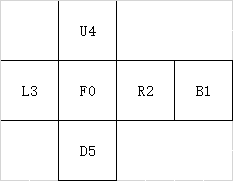
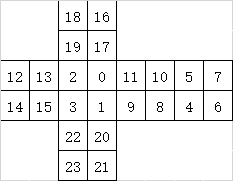
● 立方体纹理贴图。六个面分别为 x = 1 正面、x = -1 轴负面、y = 1 正面、y = -1 负面、z = 1 正面、x = -1 负面,对应前、后、右、左、上、下。按照线性下标 [0, width * width * 6 - 1] 顺序访问时,各元素存储位置如下图所示(width == 2 为例)。
0_Simple__simpleCubemapTexture的更多相关文章
随机推荐
- Knight Tournament 合并区间
Hooray! Berl II, the king of Berland is making a knight tournament. The king has already sent the me ...
- asp.net excel 操作
/// <summary> /// 数据操作 /// </summary> /// <param name="fileName"></pa ...
- js实现表格行的动态加入------Day56
版权声明:本文为博主原创文章,未经博主同意不得转载. https://blog.csdn.net/marSmile_tbo/article/details/36752655 现代页面通常都是用div+ ...
- C#中Task的使用简单总结
Task在并行计算中的作用很凸显,但是他的使用却有点小复杂,下面是任务的一些基本使用说明(转载与总结于多篇文章) 简单点说说吧! 创建 Task 创建Task有两种方式,一种是使用构造函数创建,另一种 ...
- 理解git
为了真正了解git,我们从底部.底层开始,了解git核心,知其然并知其所以然. 为什么要进行版本控制呢? 因为编写文件不可能一次到位,文件总是有不同的状态需要保存下来,方便以后出错回滚. git 是目 ...
- install kde in ubuntu
http://www.arthurtoday.com/2012/08/ubuntu-12.04-install-kde-4.9.html sudo apt-get install kubuntu-de ...
- task optimization之superglue分析
开启logging (例子F:\wamp\www\git_repos\GitHub\GeneralUtility\superglue-master\examples\src\logging.cpp) ...
- Oracle误删除表空间的恢复
对于误删除表空间的恢复,本文通过基于数据库的时间点恢复和基于表空间的时间点恢复分别加以讨论 一 通过基于数据库的时间点恢复被误删除的表空间 1 需要注意的事项 a 基于数据库的时间点恢复将会回退整个数 ...
- JUC集合之 JUC中的集合类
Java集合包 在"Java 集合系列01之 总体框架"中,介绍java集合的架构.主体内容包括Collection集合和Map类:而Collection集合又可以划分为List( ...
- IE 10 如何设置支持CRM4 正常浏览
通过工具—> 选择兼容性视图 就可以了.具体如下图: