
水晶报表填充.Net Objects数据源
Crystal Reports(水晶报表)是一款商务智能(BI)软件,主要用于设计及产生报表。是业内最专业、功能最强的报表系统。
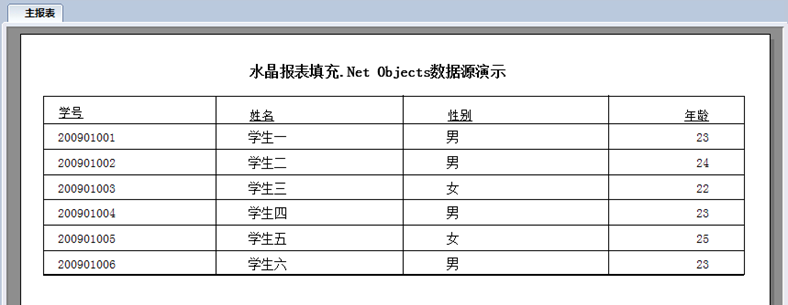
查看网络资料及课本图书,鲜有介绍通过.NET Objects作为数据源填充水晶报表的示例。本文将通过两个简单的示例演示水晶报表填充.Net Objects数据源的过程。
示例一:打印学生信息(一个.NET Objects数据源的填充)
示例效果:
Student.cs
using System;
using System.Collections.Generic;
using System.Web;
namespace CrystalReportsDemo
{
public class Student
{
public Student(string studentNo,string studentName,string sex,int age)
{
this.StudentNo = studentNo;
this.StudentName = studentName;
this.Sex = sex;
this.Age = age;
}
public string StudentNo
{ set; get; }
public string StudentName
{ set; get; }
public string Sex
{ get; private set; }
public int Age
{ get; private set; }
}
}
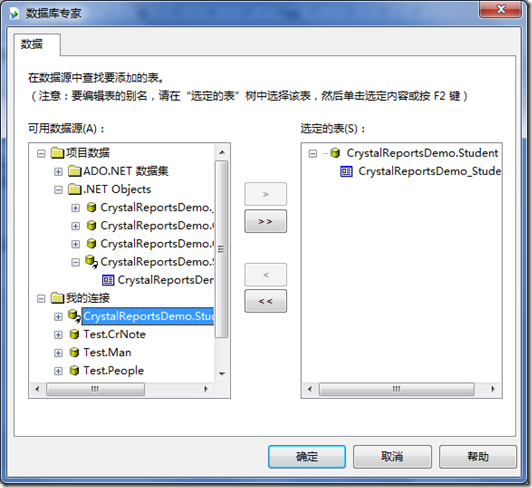
将其编译后,即可通过数据库专家将其作为数据源导入到字段资源管理器。
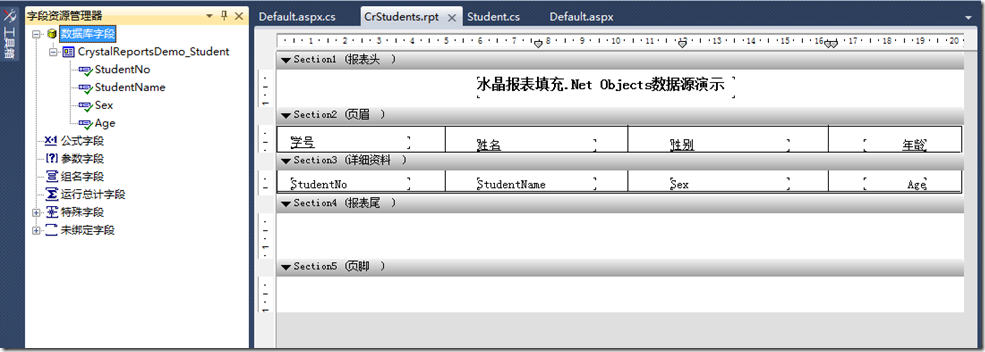
绘制报表样式并插入数据库字段:
在Default.aspx页面拖入CrystalReportViewer控件:
<%@ Page Language="C#" AutoEventWireup="true" CodeBehind="Default.aspx.cs" Inherits="CrystalReportsDemo._Default" %>
<%@ Register assembly="CrystalDecisions.Web, Version=13.0.2000.0, Culture=neutral, PublicKeyToken=692fbea5521e1304" namespace="CrystalDecisions.Web" tagprefix="CR" %>
<!DOCTYPE html PUBLIC "-//W3C//DTD XHTML 1.0 Transitional//EN" "http://www.w3.org/TR/xhtml1/DTD/xhtml1-transitional.dtd">
<html xmlns="http://www.w3.org/1999/xhtml">
<head runat="server">
<title></title>
</head>
<body>
<form id="form1" runat="server">
<div>
<CR:CrystalReportViewer ID="crvReport" runat="server" AutoDataBind="true" />
</div>
</form>
</body>
</html>
Default.aspx.cs
using System;
using System.Collections.Generic;
using System.Web;
using System.Web.UI;
using System.Web.UI.WebControls;
namespace CrystalReportsDemo
{
public partial class _Default : System.Web.UI.Page
{
protected void Page_Load(object sender, EventArgs e)
{
FillReport();
}
private void FillReport()
{
List<Student> studentList = new List<Student>();
studentList.Add(new Student("200901001", "学生一", "男", 23));
studentList.Add(new Student("200901002", "学生二", "男", 24));
studentList.Add(new Student("200901003", "学生三", "女", 22));
studentList.Add(new Student("200901004", "学生四", "男", 23));
studentList.Add(new Student("200901005", "学生五", "女", 25));
studentList.Add(new Student("200901006", "学生六", "男", 23));
CrStudents studentsReport = new CrStudents();
studentsReport.SetDataSource(studentList);
crvReport.ReportSource = studentsReport;
}
}
}
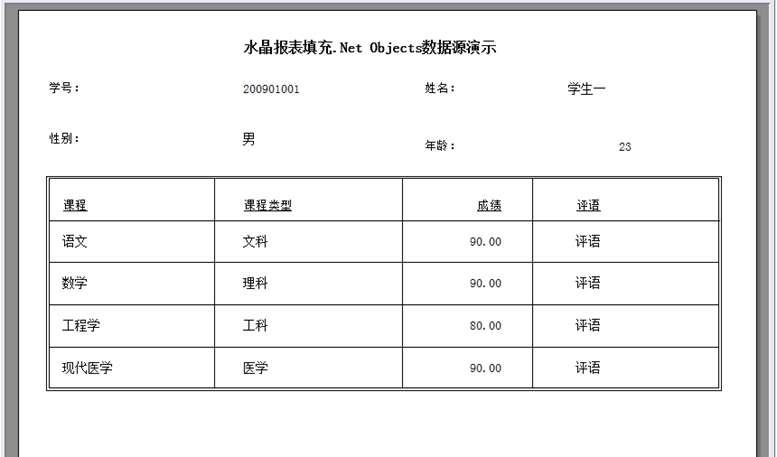
示例二:打印学生成绩(多个.NET Objects数据源的填充)
示例效果:
Subject.cs
using System;
using System.Collections.Generic;
using System.Web;
namespace CrystalReportsDemo
{
public class Subject
{
public Subject(string subjectName,string subjectType,double result,string comment)
{
this.SubjectName = subjectName;
this.SubjectType = subjectType;
this.Result = result;
this.Comment = comment;
}
public string SubjectName
{ set; get; }
public string SubjectType
{ set; get; }
public double Result
{ set; get; }
public string Comment
{ set; get; }
}
}
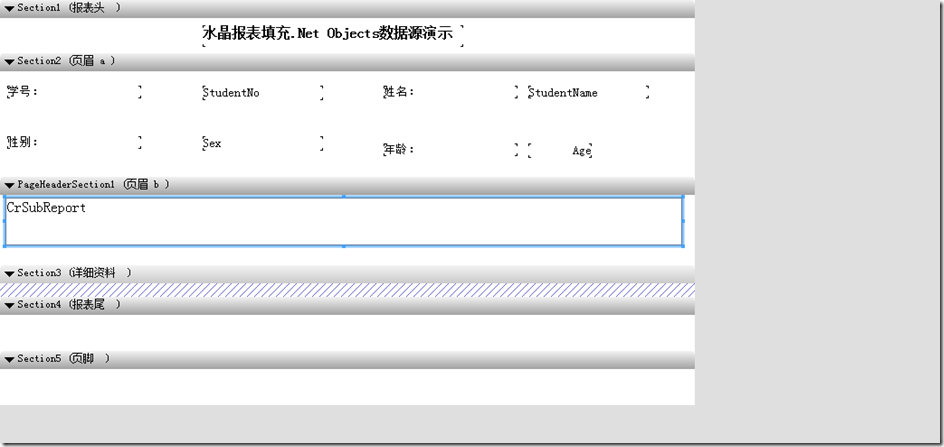
主报表:(CrSupReport.rpt)
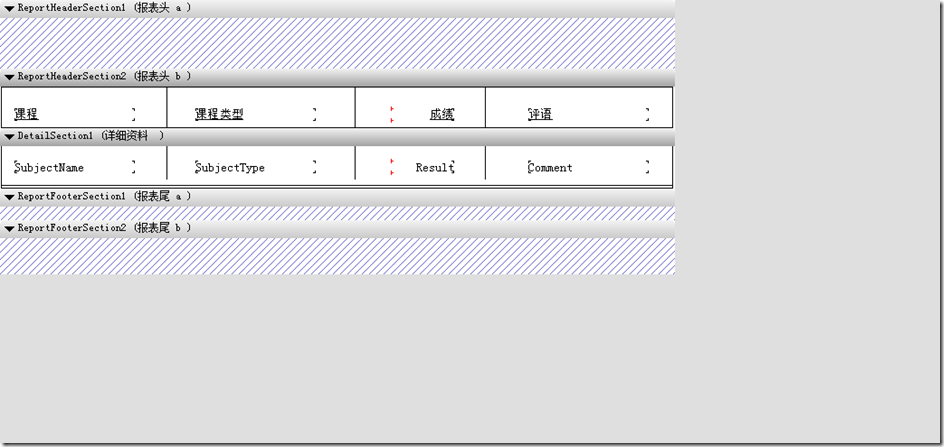
子报表:(CrSubReport.rpt)
Default2.aspx
<%@ Page Language="C#" AutoEventWireup="true" CodeBehind="Default2.aspx.cs" Inherits="CrystalReportsDemo.Default2" %>
<%@ Register Assembly="CrystalDecisions.Web, Version=13.0.2000.0, Culture=neutral, PublicKeyToken=692fbea5521e1304"
Namespace="CrystalDecisions.Web" TagPrefix="CR" %>
<!DOCTYPE html PUBLIC "-//W3C//DTD XHTML 1.0 Transitional//EN" "http://www.w3.org/TR/xhtml1/DTD/xhtml1-transitional.dtd">
<html xmlns="http://www.w3.org/1999/xhtml">
<head runat="server">
<title></title>
</head>
<body>
<form id="form1" runat="server">
<div>
<CR:CrystalReportViewer ID="crvReport2" runat="server" AutoDataBind="true" />
</div>
</form>
</body>
</html>
Default2.aspx.cs
using System;
using System.Collections.Generic;
using System.Web;
using System.Web.UI;
using System.Web.UI.WebControls;
using CrystalDecisions.CrystalReports.Engine;
namespace CrystalReportsDemo
{
public partial class Default2 : System.Web.UI.Page
{
protected void Page_Load(object sender, EventArgs e)
{
FillReport();
}
private void FillReport()
{
List<Student> studentList = new List<Student>();
studentList.Add(new Student("200901001", "学生一", "男", 23));
ReportDocument supReport = new CrSupReport();
supReport.SetDataSource(studentList);
crvReport2.ReportSource = supReport;
List<Subject> subjectList = new List<Subject>();
subjectList.Add(new Subject("语文","文科",90,"评语"));
subjectList.Add(new Subject("数学", "理科", 90, "评语"));
subjectList.Add(new Subject("工程学", "工科", 80, "评语"));
subjectList.Add(new Subject("现代医学", "医学", 90, "评语"));
ReportDocument subReport = supReport.Subreports["CrSubReport"];
subReport.SetDataSource(subjectList);
}
}
}
水晶报表填充.Net Objects数据源的更多相关文章
- MS SQL自定义函数IsPositiveInteger MS SQL自定义函数IsNumeric 水晶报表使用IEnumerable<T>数据源
MS SQL自定义函数IsPositiveInteger 判断字符串是否为正整数,0开始的的数字不算. SET ANSI_NULLS ON GO SET QUOTED_IDENTIFIER ON ...
- 水晶报表使用IEnumerable<T>数据源
这篇我们学习水晶报表,报表呈现的数据源是IEnumerable<T>.比如下面的数据: using System; using System.Collections.Generic; us ...
- WinForm中使用CrystalReport水晶报表——基础,分组统计,自定义数据源
开篇 本篇文章主要是帮助刚开始接触CrystalReport报表的新手提供一个循序渐进的教程.该教程主要分为三个部分1)CrystalReport的基本使用方法:2)使用CrystalReport对数 ...
- c# 水晶报表的设计(非常的基础)
最近在公司实习,由于公司需要用到的一种叫做水晶报表的神奇的东东,老大就叫我们学习学习.怕自己以后忘了,也为了以后阅读方便,将其记录下来. 使用工具:vs2008 基本方法一.使用水晶报表的推模式 步骤 ...
- 水晶报表(web)表格信息展示
一.环境安装 开发工具使用VS2010+SAP Crystal Reports13_0+.NETformwork4.0 因为vs2010已经不再集成水晶报表,所以需要我们去找合适的版本下载http:/ ...
- asp.net实现通用水晶报表
此片博文是在你有一定水晶报表基础的前提下参阅的:如果对于水晶报表的基础知识比较薄弱建议先去了解下水晶报表: 因为项目需要,研究了下水晶报表.说实在,这个组件很强大,但是用起来也很麻烦.刚开始使用遇到了 ...
- 水晶报表初体验(Visual Studio 2010)
安装水晶报表后如下使用: 配置rpt文件,如图 前台(Asp.net页面): <%@ Register Assembly="CrystalDecisions.Web, Version= ...
- 水晶报表连接Oracle做数据报表笔记
首先,新建一个水晶报表的文件,这个时候要给这个报表文件绑定一个oracle数据源, 选择右侧菜单的这个东西,选择“数据库专家”,打开之后是这么一个界面: 选择建立新连接: 这个地方最关键,也是我为什么 ...
- 用C#代码控制水晶报表中的对象
在C#代码中调用水晶报表的各个对象:字段对象:FieldObject obj=(FieldObject)oRpt.ReportDefinition.ReportObjects["FieldO ...
随机推荐
- 让.aspx同样实现.ashx文件的功能: IHttpHandler
我们需要一个能够调用该处理程序的入口点.在此上下文中,该处理程序代码的入口点只不过是一个HTTP终点——即,一个公共的URL.该URL必须有一个惟一的名称,使IIS和ASP.NET运行库能够把它映射到 ...
- Volume Shadow Copy Service(VSS)如何工作
VSS卷影拷贝服务其实不是一项新技术了,在2003年前后发布的Windows 2003和Windows XP SP1都提供了对VSS的支持.最近几年微软的一线产品对VSS支持的越来越多,包括Excha ...
- mysql 备份还原
1.文件备份 2.dump mysqldump -h 192.168.102.73 -uroot -p123456 edc >/webapp/edcapp/edc.sql mysql ...
- EL表达式学习笔记
转载请注明原文地址:http://www.cnblogs.com/ygj0930/p/6684424.html 一:EL表达式的用途 1.获取数据:(某个web域 中的对象,访问javabean的 ...
- Java类中代码的执行顺序 静态代码块>构造代码块>构造方法
一:静态代码块 注意是代码块,不是静态函数.函数要调用才执行,代码块加载就执行,一般是静态变量的声明与初始化.被static修饰的代码块(赋值.输出操作等).类中静态语句块仅在类加载时被执行一次 如 ...
- add-binary 字符串操作,二进制字符串相加
Given two binary strings, return their sum (also a binary string). For example,a ="11"b =& ...
- JSFL 获取当前脚本路径,执行其他脚本
Application.jsfl为程序入口,导入其他jsfl [Common.jsfl] function trace() { fl.trace(Array.prototype.join.call(a ...
- 使用Bootstrap+metisMenu完成简单的后台管理界面
零. 写在前面 作者最近在一个小项目中需要写后台管理界面,在互联网上绕了一圈,最后决定使用Bootstrap+metisMenu来完成.理由1:Bootstrap是目前流行的前端框架,风格简约,简单易 ...
- Axure 实现数字自动加键功能(点击“+”数字加1,点击“-”数字减1)
百度网盘:http://pan.baidu.com/s/1gfPQ9V1 在上面的元件库中,拖“数字框(仅正数)”即可实现自动加减的功能 如图:
- DLib Http Server程序示例
/* 这个示例是一个使用了Dlib C++ 库的server组件的HTTP扩展 它创建一个始终以简单的HTML表单为响应的服务器. 要查看这个页面,你应该访问 http://localhost:500 ...