
android:fitsSystemWindows属性的用法
属性说明
fitsSystemWindows属性可以让view根据系统窗口来调整自己的布局;简单点说就是我们在设置应用布局时是否考虑系统窗口布局,这里系统窗口包括系统状态栏、导航栏、输入法等,包括一些手机系统带有的底部虚拟按键。
android:fitsSystemWindows=”true” (触发View的padding属性来给系统窗口留出空间)
这个属性可以给任何view设置,只要设置了这个属性此view的其他所有padding属性失效,同时该属性的生效条件是只有在设置了透明状态栏(StatusBar)或者导航栏(NavigationBar)此属性才会生效。
注意: fitsSystemWindows只作用在Android4.4及以上的系统,因为4.4以下的系统StatusBar没有透明状态。
应用场景
在不同Android版本下,App状态栏和不同版本中系统本身的状态栏的适配;
兼容带有底部虚拟按键的手机系统。
属性使用
1、默认效果
先贴一张未对系统状态栏和导航栏做透明设置时测试布局效果图:
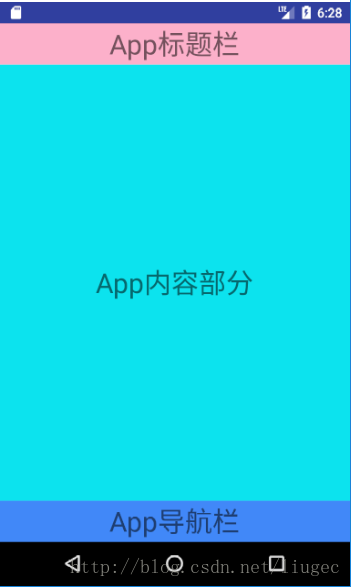
2、系统窗口透明后效果
当设置了透明状态栏(StatusBar)和透明导航栏(NavigationBar)时效果图:
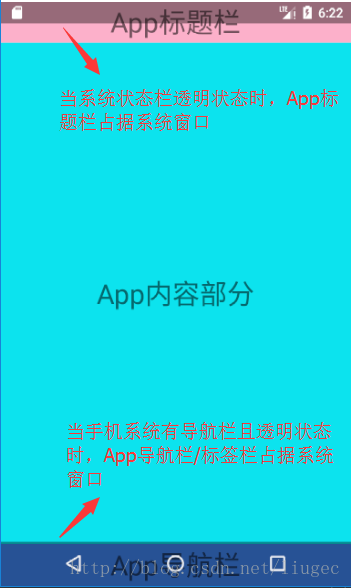
透明状态栏代码设置:
//布局设置

<item name="android:windowTranslucentStatus">true</item>

//或者代码设置

if (Build.VERSION.SDK_INT >= Build.VERSION_CODES.KITKAT) {

    getWindow().addFlags(WindowManager.LayoutParams.FLAG_TRANSLUCENT_NAVIGATION);

}
透明导航栏代码设置:
//布局设置

<item name="android:windowTranslucentNavigation">true</item>

//或者代码设置

if (Build.VERSION.SDK_INT >= Build.VERSION_CODES.KITKAT) {

    getWindow().addFlags(WindowManager.LayoutParams.FLAG_TRANSLUCENT_NAVIGATION);

}
如果有以上两种情况之一,我们的状态栏(StatusBar)或导航栏(NavigationBar)就会变成透明,并且布局会扩展到StatusBar或NavigationBar的位置。
注意:这里有个关于状态栏和导航栏透明样式的问题,这个是受Android版本决定,4.4以下无透明效果,4.4~5.0是全透明,5.0以上是半透明。我使用的是5.0以上的版本模拟器进行测试的,所以是半透明。
3、设置fitsSystemWindows属性后效果
现在就到了我们关键的fitsSystemWindows属性登场了,只要在根布局中加上android:fitsSystemWindows=”true”效果如下图:
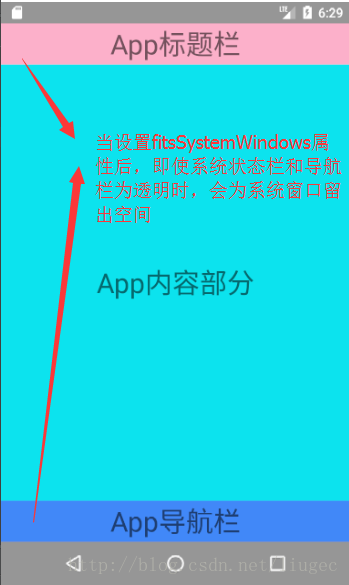
设置了android:fitsSystemWindows=”true”属性后针对透明的状态栏会自动添加一个值等于状态栏高度的paddingTop;针对透明的系统导航栏会自动添加一个值等于导航栏高度的paddingBottom
贴上布局的代码:
<?xml version="1.0" encoding="utf-8"?>

<LinearLayout xmlns:android="http://schemas.android.com/apk/res/android"

              android:layout_width="match_parent"

              android:layout_height="match_parent"

              android:fitsSystemWindows="true"

              android:orientation="vertical">

    <TextView

        android:layout_width="match_parent"

        android:layout_height="45dp"

        android:background="#66FF4081"

        android:gravity="center"

        android:text="App标题栏"

        android:textSize="30sp"

        />

    <TextView

        android:layout_width="match_parent"

        android:layout_height="0dp"

        android:layout_weight="1"

        android:background="#0CE3EE"

        android:gravity="center"

        android:text="App内容部分"

        android:textSize="30sp"/>

    <TextView

        android:layout_width="match_parent"

        android:layout_height="45dp"

        android:background="#4188F8"

        android:gravity="center"

        android:text="App导航栏"

        android:textSize="30sp"/>

</LinearLayout>
追及
附加一个获取状态栏StatusBar的和一个获取导航栏NavigationBar高度的java代码:
//返回值就是状态栏的高度,得到的值单位px

public float getStatusBarHeight() {

    float result = 0;

    int resourceId = getResources().getIdentifier("status_bar_height", "dimen", "android");

    if (resourceId > 0) {

        result = getResources().getDimension(resourceId);

    }

    return result;

}
//返回值就是导航栏的高度,得到的值单位px
public float getNavigationBarHeight() {
float result = 0;
int resourceId = getResources().getIdentifier("navigation_bar_height", "dimen", "android");
if (resourceId > 0) {
result = getResources().getDimension(resourceId);
}
return result;
} android:fitsSystemWindows属性的用法的更多相关文章
- Android SystemProperties设置/取得系统属性的用法总结
通过调查得知,Android系统中取得/设置系统属性的用法参考以下3篇文章就足够了. 1.Android SystemProperties简介 介绍了设置属性需要的权限,已经设置权限的方法. Syst ...
- android.view.animation(1) - alpha、scale、translate、rotate、set的xml属性和用法(转)
一.ScaleAnimation ScaleAnimation(float fromX, float toX, float fromY, float toY, int pivotXType, floa ...
- Android 组件属性
属性名称 描述 android:background 设置背景色/背景图片.可以通过以下两种方法设置背景为透明:”@android:color/transparent”和”@null”.注意TextV ...
- EditText的一些属性及用法
EditText的一些属性及用法设置当EditText获得焦点时把文本框的内容全选中android:selectAllOnFocus="true"设置某个EditText默认获得焦 ...
- 怎么通过activity里面的一个按钮跳转到另一个fragment(android FragmentTransaction.replace的用法介绍)
即:android FragmentTransaction.replace的用法介绍 Fragment的生命周期和它的宿主Activity密切相关,几乎和宿主Activity的生命周期一致,他们之间最 ...
- Android layout属性大全
第一类:属性值 true或者 false android:layout_centerHrizontal 水平居中 android:layout_centerVertical 垂直居中 ...
- Animation 动画详解(一)——alpha、scale、translate、rotate、set的xml属性及用法
一.概述 Android的animation由四种类型组成:alpha.scale.translate.rotate,对应android官方文档地址:<Animation Resources&g ...
- android application类的用法
android application类的用法 Application是android系统Framework提供的一个组件,它是单例模式(singleton),即每个应用只有一个实例,用来存储系统的一 ...
- [转]Animation 动画详解(一)——alpha、scale、translate、rotate、set的xml属性及用法
转载:http://blog.csdn.net/harvic880925/article/details/39996643 前言:这几天做客户回访,感触很大,用户只要是留反馈信息,总是一种恨铁不成钢的 ...
随机推荐
- CSS3实现的苹果网站搜索框效果
在线演示 本地下载 用CSS3相关属性生成的动态搜索框效果.
- iOS 一个开发者账号 多台Mac 共用
iOS 开发者账号有时候需要多台Mac 一起用.这个时候就得要证书了, 首先如果一个账号能在第一台电脑上能正常使用了.那么这时就可以把相应的证书导出来,再台PC的时候也可以用. 先导私有的证书.这个是 ...
- 如何设置Apache中的最大连接数
Apache的主要工作模式有两种:prefork和worker 一.两种模式 prefork模式(缺省模式) prefork是Unix平台上的默认(缺省)MPM,使用多个子进程,每个子进程只有一个线程 ...
- ZH奶酪:Git简明教程
这里是原网站:https://try.github.io/levels/1/challenges/1 这篇博文就当是笔记+翻译吧. 几个名词相关 changes:变更 repository:仓库 st ...
- Android 之 SharedPreferences应用
Android 平台给我们提供了一个 SharedPreferences 类,它是一个轻量级的存储类,特别适合用于保存共享数据.使用SharedPreferences保存数据,其背后是用xml文件存放 ...
- 学习 Linux,302(混合环境): 概念
http://www.ibm.com/developerworks/cn/linux/l-lpic3-310-1/ 概述 在本文中,学习以下概念: Server Message Block (SMB) ...
- 解决Maven报Plugin execution not covered by lifecycle configuration
来自:http://blog.csdn.net/xxd851116/article/details/25197373 环境 eclipse 4.3.0 maven 3.0.4 ...
- 安装了XAMPP,PHP怎么显示中文
1.输出前加文件头.header("Content-type: text/html; charset=utf-8"); 另外注意你的文件编码要和 charset一致. 2. 可能是 ...
- Eclipse 写 Python的一些小问题
- Got fatal error 1236 from master when reading data from binary log: 'Could not find first log file name in binary log index file'系列三:重置主从同步
1:停止slave服务器的主从同步 stop slave; 2:对Master数据库加锁 flush tables with read lock; 3:备份Master上的数据 mysqldump - ...