
hbase操作
名称
命令表达式
创建表
create '表名称','列簇名称1','列簇名称2'.......
添加记录
put '表名称', '行名称','列簇名称:','值'
查看记录
get '表名称','行名称'
查看表中的记录总数
count '表名称'
删除记录
delete '表名',行名称','列簇名称'
删除表
①disable '表名称' ②drop '表名称'
查看所有记录
scan '表名称'
查看某个表某个列中所有数据
scan '表名称',['列簇名称:']
更新记录
即重写一遍进行覆盖
hbase(main):050:0> create 'ddl', 'id', 'info'
0 row(s) in 0.0680 seconds
hbase(main):050:0> is_enabled 'ddl'
false
0 row(s) in 0.0680 seconds
hbase(main):051:0> enable 'ddl'
0 row(s) in 0.6200 seconds
hbase(main):052:0> count 'ddl'
0 row(s) in 0.0380 seconds
=> 0
hbase(main):053:0> put 'ddl', 'example', 'info:age', '22'
0 row(s) in 0.0340 seconds
hbase(main):054:0> count 'ddl'
1 row(s) in 0.0290 seconds
=> 1
hbase(main):055:0> get 'ddl' , 'example'
COLUMN CELL
info:age timestamp=1436785857172, value=22
1 row(s) in 0.0170 seconds
hbase(main):056:0> describe 'ddl'
DESCRIPTION ENABLED
'ddl', {NAME => 'info', BLOOMFILTER => 'ROW', VERSIONS => '1', IN_MEMORY => 'false', KEEP_DELETED_CELLS => 'false', DATA_BLOCK_ENCOD true
ING => 'NONE', TTL => 'FOREVER', COMPRESSION => 'NONE', MIN_VERSIONS => '0', BLOCKCACHE => 'true', BLOCKSIZE => '65536', REPLICATION
_SCOPE => '0'}
1 row(s) in 0.0630 seconds
hbase(main):057:0> put 'ddl', 'example', 'info:birthday', '1999-09-09'
0 row(s) in 0.0210 seconds
hbase(main):058:0> get 'ddl', 'example'
COLUMN CELL
info:age timestamp=1436785857172, value=22
info:birthday timestamp=1436785968230, value=1999-09-09
2 row(s) in 0.0160 seconds
hbase(main):059:0> put 'ddl', 'example', 'info:company', 'taobao'
0 row(s) in 0.0230 seconds
hbase(main):060:0> get 'ddl', 'example'
COLUMN CELL
info:age timestamp=1436785857172, value=22
info:birthday timestamp=1436785968230, value=1999-09-09
info:company timestamp=1436786030921, value=taobao
3 row(s) in 0.0340 seconds
hbase(main):063:0> put 'ddl', 'taobao', 'info:age', '88'
0 row(s) in 0.0240 seconds
hbase(main):064:0> get 'ddl', 'taobao'
COLUMN CELL
info:age timestamp=1436786189132, value=88
1 row(s) in 0.0180 seconds
hbase(main):065:0> put 'ddl', 'taobao', 'info:addres', 'china'
0 row(s) in 0.0210 seconds
hbase(main):066:0> get 'ddl', 'taobao'
COLUMN CELL
info:addres timestamp=1436786262126, value=china
info:age timestamp=1436786189132, value=88
2 row(s) in 0.0180 seconds
hbase(main):067:0> put 'ddl' , 'taobao', 'info:birthday', '2001-01-01'
0 row(s) in 0.0260 seconds
hbase(main):068:0> get 'ddl', 'taobao'
COLUMN CELL
info:addres timestamp=1436786262126, value=china
info:age timestamp=1436786189132, value=88
info:birthday timestamp=1436786301656, value=2001-01-01
3 row(s) in 0.0270 seconds
hbase(main):069:0> put 'ddl', 'taobao', 'info:compayn', 'alibaba'
0 row(s) in 0.0400 seconds
hbase(main):070:0> get 'ddl', 'taobao'
COLUMN CELL
info:addres timestamp=1436786262126, value=china
info:age timestamp=1436786189132, value=88
info:birthday timestamp=1436786301656, value=2001-01-01
info:compayn timestamp=1436786328287, value=alibaba
4 row(s) in 0.0200 seconds
hbase(main):071:0> get 'ddl', 'example'
COLUMN CELL
info:address timestamp=1436786098272, value=china
info:age timestamp=1436785857172, value=22
info:birthday timestamp=1436785968230, value=1999-09-09
info:company timestamp=1436786030921, value=taobao
4 row(s) in 0.0170 seconds
获取一个id的所有数据:
hbase(main):072:0> get 'ddl', 'taobao'
COLUMN CELL
info:addres timestamp=1436786262126, value=china
info:age timestamp=1436786189132, value=88
info:birthday timestamp=1436786301656, value=2001-01-01
info:compayn timestamp=1436786328287, value=alibaba
4 row(s) in 0.0240 seconds
获取一个id, 一个列簇的所有数据:
hbase(main):073:0> get 'ddl', 'taobao', 'info'
COLUMN CELL
info:addres timestamp=1436786262126, value=china
info:age timestamp=1436786189132, value=88
info:birthday timestamp=1436786301656, value=2001-01-01
info:compayn timestamp=1436786328287, value=alibaba
4 row(s) in 0.0210 seconds
获取一个id的一个列簇中的一个列的所有数据:
hbase(main):074:0> get 'ddl', 'taobao', 'info:age'
COLUMN CELL
info:age timestamp=1436786189132, value=88
1 row(s) in 0.0230 seconds
更新一条数据:
hbase(main):076:0> put 'ddl', 'example', 'info:age', '66'
0 row(s) in 0.0250 seconds
hbase(main):077:0> get 'ddl', 'example'
COLUMN CELL
info:address timestamp=1436786098272, value=china
info:age timestamp=1436786652004, value=66
info:birthday timestamp=1436785968230, value=1999-09-09
info:company timestamp=1436786030921, value=taobao
4 row(s) in 0.0230 seconds
更新记录:
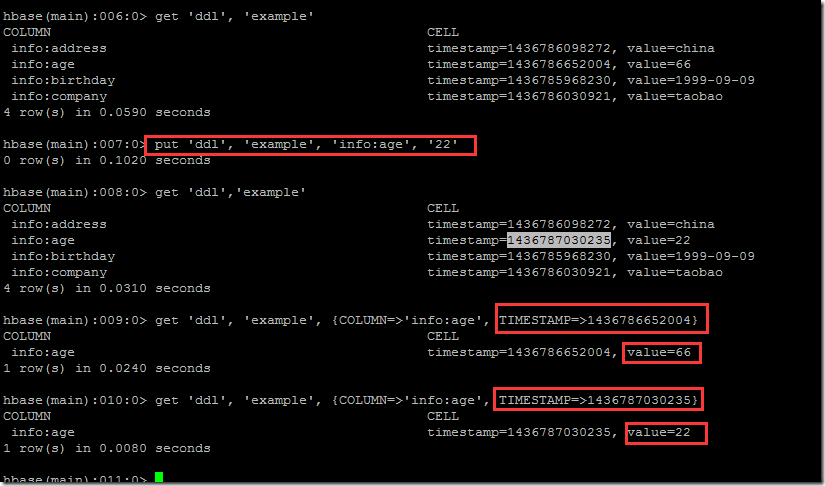
hbase(main):006:0> get 'ddl', 'example'
COLUMN CELL
info:address timestamp=1436786098272, value=china
info:age timestamp=1436786652004, value=66
info:birthday timestamp=1436785968230, value=1999-09-09
info:company timestamp=1436786030921, value=taobao
4 row(s) in 0.0590 seconds
hbase(main):007:0> put 'ddl', 'example', 'info:age', '22'
0 row(s) in 0.1020 seconds
hbase(main):008:0> get 'ddl','example'
COLUMN CELL
info:address timestamp=1436786098272, value=china
info:age timestamp=1436787030235, value=22
info:birthday timestamp=1436785968230, value=1999-09-09
info:company timestamp=1436786030921, value=taobao
4 row(s) in 0.0310 seconds
hbase(main):009:0> get 'ddl', 'example', {COLUMN=>'info:age', TIMESTAMP=>1436786652004}
COLUMN CELL
info:age timestamp=1436786652004, value=66
1 row(s) in 0.0240 seconds
hbase(main):010:0> get 'ddl', 'example', {COLUMN=>'info:age', TIMESTAMP=>1436787030235}
COLUMN CELL
info:age timestamp=1436787030235, value=22
1 row(s) in 0.0080 seconds
hbase(main):011:0> scan 'ddl'
ROW COLUMN+CELL
example column=info:address, timestamp=1436786098272, value=china
example column=info:age, timestamp=1436787030235, value=22
example column=info:birthday, timestamp=1436785968230, value=1999-09-09
example column=info:company, timestamp=1436786030921, value=taobao
taobao column=info:addres, timestamp=1436786262126, value=china
taobao column=info:age, timestamp=1436786189132, value=88
taobao column=info:birthday, timestamp=1436786301656, value=2001-01-01
taobao column=info:compayn, timestamp=1436786328287, value=alibaba
2 row(s) in 0.0560 seconds
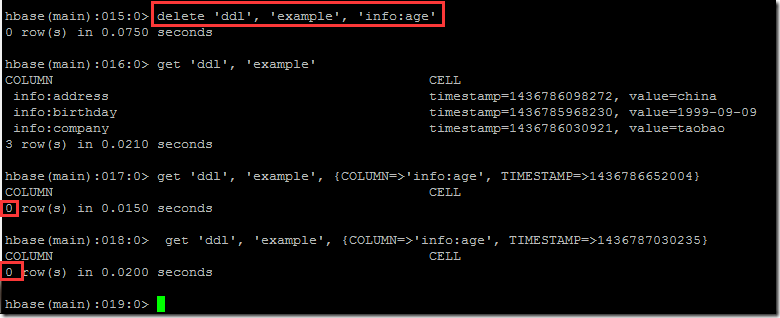
hbase(main):015:0> delete 'ddl', 'example', 'info:age'
0 row(s) in 0.0750 seconds
hbase(main):016:0> get 'ddl', 'example'
COLUMN CELL
info:address timestamp=1436786098272, value=china
info:birthday timestamp=1436785968230, value=1999-09-09
info:company timestamp=1436786030921, value=taobao
3 row(s) in 0.0210 seconds
删除整行数据:
hbase(main):019:0> scan 'ddl'
ROW COLUMN+CELL
example column=info:address, timestamp=1436786098272, value=china
example column=info:birthday, timestamp=1436785968230, value=1999-09-09
example column=info:company, timestamp=1436786030921, value=taobao
taobao column=info:addres, timestamp=1436786262126, value=china
taobao column=info:age, timestamp=1436786189132, value=88
taobao column=info:birthday, timestamp=1436786301656, value=2001-01-01
taobao column=info:compayn, timestamp=1436786328287, value=alibaba
2 row(s) in 0.0460 seconds
hbase(main):020:0> deleteall 'ddl', 'taobao'
0 row(s) in 0.0300 seconds
hbase(main):021:0> scan 'ddl'
ROW COLUMN+CELL
example column=info:address, timestamp=1436786098272, value=china
example column=info:birthday, timestamp=1436785968230, value=1999-09-09
example column=info:company, timestamp=1436786030921, value=taobao
1 row(s) in 0.0300 seconds
给example增加'info:age'字段,并且使用counter实现递增:
hbase(main):022:0> incr 'ddl', 'example', 'info:age'
0 row(s) in 0.0330 seconds
hbase(main):023:0> scan 'ddl'
ROW COLUMN+CELL
example column=info:address, timestamp=1436786098272, value=china
example column=info:age, timestamp=1436787516930, value=\x00\x00\x00\x00\x00\x00\x00\x01
example column=info:birthday, timestamp=1436785968230, value=1999-09-09
example column=info:company, timestamp=1436786030921, value=taobao
1 row(s) in 0.0290 seconds
hbase(main):024:0> incr 'ddl', 'example', 'info:age'
0 row(s) in 0.0260 seconds
hbase(main):025:0> scan 'ddl'
ROW COLUMN+CELL
example column=info:address, timestamp=1436786098272, value=china
example column=info:age, timestamp=1436787556057, value=\x00\x00\x00\x00\x00\x00\x00\x02
example column=info:birthday, timestamp=1436785968230, value=1999-09-09
example column=info:company, timestamp=1436786030921, value=taobao
1 row(s) in 0.0770 seconds
hbase(main):026:0> incr 'ddl', 'example', 'info:age'
0 row(s) in 0.0130 seconds
hbase(main):027:0> scan 'ddl'
ROW COLUMN+CELL
example column=info:address, timestamp=1436786098272, value=china
example column=info:age, timestamp=1436787562408, value=\x00\x00\x00\x00\x00\x00\x00\x03
example column=info:birthday, timestamp=1436785968230, value=1999-09-09
example column=info:company, timestamp=1436786030921, value=taobao
1 row(s) in 0.0170 seconds
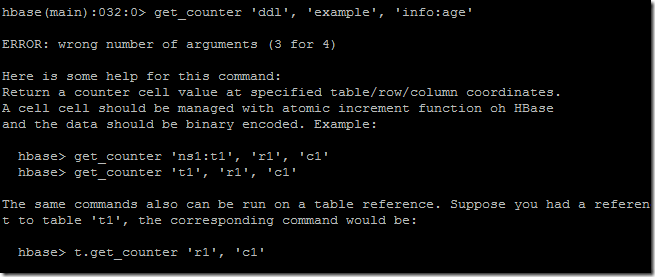
获取当前count值:
hbase(main):041:0> get_counter 'ddl', 'example', 'info:age', 'dummy'
COUNTER VALUE = 3
hbase(main):042:0> get 'ddl', 'example', 'info:age'
COLUMN CELL
info:age timestamp=1436787562408, value=\x00\x00\x00\x00\x00\x00\x00\x03
1 row(s) in 0.0210 seconds
https://issues.apache.org/jira/browse/HBASE-11613
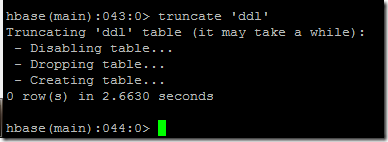
清空表格:
hbase操作的更多相关文章
- HBase操作(Shell与Java API)
版权声明:本文为博主原创文章,未经博主允许不得转载. 转: http://blog.csdn.net/u013980127/article/details/52443155 下面代码在Hado ...
- Oracle数据迁移至HBase操作记录
Oracle数据迁移至HBase操作记录 @(HBase) 近期需要把Oracle数据库中的十几张表T级别的数据迁移至HBase中,过程中遇到了许多苦难和疑惑,在此记录一下希望能帮到一些有同样需求的兄 ...
- 实验3- 熟悉常用的 HBase 操作
石家庄铁道大学信息科学与技术学院 实验报告 2018年----2019年 第一学期 题目: 熟悉常用的 HBase ...
- hbase操作(shell 命令,如建表,清空表,增删改查)以及 hbase表存储结构和原理
两篇讲的不错文章 http://www.cnblogs.com/nexiyi/p/hbase_shell.html http://blog.csdn.net/u010967382/article/de ...
- HBase篇--HBase操作Api和Java操作Hbase相关Api
一.前述. Hbase shell启动命令窗口,然后再Hbase shell中对应的api命令如下. 二.说明 Hbase shell中删除键是空格+Ctrl键. 三.代码 1.封装所有的API pa ...
- 熟悉常用的HBase操作,编写MapReduce作业
1. 以下关系型数据库中的表和数据,要求将其转换为适合于HBase存储的表并插入数据: 学生表(Student) 学号(S_No) 姓名(S_Name) 性别(S_Sex) 年龄(S_Age) 201 ...
- Oracle数据导入Hbase操作步骤
——本文非本人原创,为公司同事整理,发布至此以便查阅 一.入库前数据准备 1.入hbase详细要求及rowkey生成规则,参考文档“_入HBase库要求 20190104.docx”. 2.根据标准库 ...
- Hbase操作table常见方法示例
首先上我的输出类: /** * 功能:电池历史数据数据结构 * Created by liuhuichao on 2016/12/5. */ public class ResBatteryDataHi ...
- 第9章 HBase操作
目录 9.1 集群环境搭建 1.上传解压HBase安装包 2.hbase-env.sh文件配置 3.hbase-site.xml文件配置 4.regionservers文件配置 5.拷贝hbase到其 ...
- spark 对hbase 操作
本文将分两部分介绍,第一部分讲解使用 HBase 新版 API 进行 CRUD 基本操作:第二部分讲解如何将 Spark 内的 RDDs 写入 HBase 的表中,反之,HBase 中的表又是如何以 ...
随机推荐
- SQL Server配置支持中文
- 分分钟带你玩转 Web Services【1】JAX-WS
当大型需求被数个公司分割开来,各公司系统相互交换数据的问题就会接踵而来. 毕竟是多家不同的公司的产品,研发开发语言.采用技术框架基本上是百花齐放. 怎样让自家系统提供的服务具有跨平台.跨语言.跨各种防 ...
- 在Ubuntu上安装pyenv 相关问题Common build problems
Requirements: Ubuntu/Debian: sudo apt-get install -y make build-essential libssl-dev zlib1g-dev libb ...
- Oracle官方文档
Oracle DBA 10g 两日速成课程 http://www.oracle.com/webfolder/technetwork/cn/tutorials/obe/db/10g/r2/2day_db ...
- cocos2d-js Shader系列1:cocos2d-js Shader和OpenGL ES2.0
cocos2d的Shader也就是差不多直接跟GPU打交道了,跟Flash的Stage3D(AGAL)类似,不过没有AGAL这么恶心,不需要直接编写汇编语言.而Fragment Shader又跟Fla ...
- Oracle NET工作原理、配置及连接问题排查
一.Oracle NET配置文件 Oracle NET是一个软件层,支持不同网络协议之间的转换.不同的物理机器可以借助这个软件层实现相互间的通信,具体而言就是实现对oracle的远程访问. oracl ...
- Kettle实现数据库迁移
Kettle实现数据库迁移 需求: 做数据仓库时,需要将业务系统CRM抽取到数据仓库的缓冲层,业务系统使用的是SqlServer数据库,数据仓库的缓冲层使用的是mysql数据库,为实现数据库的迁移,即 ...
- 解决java网络编程IPv6问题
如果系统中开启了IPV6协议(比如window7),java网络编程经常会获取到IPv6的地址,这明显不是我们想要的结果,搜索发现很多蹩脚的做法是:禁止IPv6协议.其实查看官方文档有详细的说明: j ...
- Windows开发之VC++仿QQ迷你首页(迷你资讯)
技术:VC++,MFC,WTL,,C++,Windows 概述 之前由于需求和兴趣,需要实现类似QQ迷你资讯首页的东西,看起来很酷,于是就写了个实现方案,主要还是基于WIndows C++ 和MF ...
- Librec的AoBPR算法实现
Librec的AoBPR算法实现:(基于1.3版本) 要用AoBPR,但是没有找到相应的配置文件,应该怎么办呢? ——因为用的是1.3版本,所以没有,2.0版本有的.[跟BPR参数一样,就 ...