
jvisualvm连接远程应用终于成功,附踩大坑记录!!(二:jmx方式)
一、问题概述
参考前一篇:
jvisualvm连接远程应用终于成功,附踩大坑记录!!(一:jstatd方式)
这篇主要讲讲jmx方式。
二、启动前设置jmx参数
我这边拿tomcat举例,其余java应用只会比它更简单,读者可以自行尝试下。
在tomcat的bin目录下,创建setenv.sh(文件名不能错,这个是tomcat提供的一个定制参数的钩子,名字不同就找不到了)
内容如下:
#!/bin/sh

JAVA_OPTS="$JAVA_OPTS -Xmx1024m -Djava.rmi.server.hostname=192.168.19.114 -Dcom.sun.management.jmxremote -Dcom.sun.management.jmxremote.port=9998 -Dcom.sun.management.jmxremote.authenticate=false -Dcom.sun.management.jmxremote.ssl=false"
其中,
-Djava.rmi.server.hostname=192.168.19.114 ---------------- 192.168.19.114为tomcat所在机器的ip地址。
-Dcom.sun.management.jmxremote ----------------- 开启jmx,jdk1.5之前还要手动开启,现在已经默认开启了,所以可以省略

-Dcom.sun.management.jmxremote.port=9998 -------------------jmx的端口
-Dcom.sun.management.jmxremote.authenticate=false ---------------- 不开启验证

-Dcom.sun.management.jmxremote.ssl=false ----------------------不开启ssl通信

配置好了之后,正常启动应用即可。接下来验证是否可以连接。
除了上面几个参数,oralce官方(jdk1.8版本)还公布了其他的相关参数,如下:
| Property | Description | Values |
|---|---|---|
|
com.sun.management.jmxremote |
Enables the JMX remote agent and local monitoring via a JMX connector published on a private interface used by JConsole and any other local JMX clients that use the Attach API. JConsole can use this connector if it is started by the same user as the user that started the agent. No password or access files are checked for requests coming via this connector. |
true / false. Default is true. |
|
com.sun.management.jmxremote. port |
Enables the JMX remote agent and creates a remote JMX connector to listen through the specified port. By default, the SSL, password, and access file properties are used for this connector. It also enables local monitoring as described for the com.sun.management.jmxremote property. |
Port number. No default. |
|
com.sun.management.jmxremote. registry.ssl |
Binds the RMI connector stub to an RMI registry protected by SSL. |
true / false. Default is false. |
|
com.sun.management.jmxremote. ssl |
Enables secure monitoring via SSL. If false, then SSL is not used. |
true / false. Default is true. |
|
com.sun.management.jmxremote. ssl.enabled.protocols |
A comma-delimited list of SSL/TLS protocol versions to enable. Used in conjunction with com.sun.management.jmxremote.ssl. |
Default SSL/TLS protocol version. |
|
com.sun.management.jmxremote. ssl.enabled.cipher.suites |
A comma-delimited list of SSL/TLS cipher suites to enable. Used in conjunction with com.sun.management.jmxremote.ssl. |
Default SSL/TLS cipher suites. |
|
com.sun.management.jmxremote. ssl.need.client.auth |
If this property is true and the property com.sun.management.jmxremote.ssl is also true, then client authentication will be performed. It is recommended that you set this property to true. |
true / false. Default is false. |
|
com.sun.management.jmxremote. authenticate |
If this property is false then JMX does not use passwords or access files: all users are allowed all access. |
true / false. Default is true. |
|
com.sun.management.jmxremote. password.file |
Specifies location for password file. If com.sun.management.jmxremote.authenticate is false, then this property and the password and access files are ignored. Otherwise, the password file must exist and be in the valid format. If the password file is empty or nonexistent, then no access is allowed. |
JRE_HOME/lib/management/ jmxremote.password |
|
com.sun.management.jmxremote. access.file |
Specifies location for the access file. If com.sun.management.jmxremote.authenticate is false, then this property and the password and access files are ignored. Otherwise, the access file must exist and be in the valid format. If the access file is empty or nonexistent, then no access is allowed. |
JRE_HOME/lib/management/ jmxremote.access |
|
com.sun.management.jmxremote.login.config |
Specifies the name of a Java Authentication and Authorization Service (JAAS) login configuration entry to use when the JMX agent authenticates users. When using this property to override the default login configuration, the named configuration entry must be in a file that is loaded by JAAS. In addition, the login modules specified in the configuration should use the name and password callbacks to acquire the user's credentials. For more information, see the API documentation forjavax.security.auth.callback.NameCallback and javax.security.auth.callback.PasswordCallback. |
Default login configuration is a file-based password authentication. |
链接如下:
https://docs.oracle.com/javase/8/docs/technotes/guides/management/agent.html#gdeum
三、设置setenv.sh的可执行权限
[root@localhost bin]# chmod +x setenv.sh

[root@localhost bin]# pwd

/home/apache-tomcat-8.5./bin

[root@localhost bin]# ll setenv.sh

-rwxr-xr-x  root root  Mar  : setenv.sh

[root@localhost bin]# pwd

/home/apache-tomcat-8.5./bin

// 添加可执行权限

[root@localhost bin]# chmod +x setenv.sh
然后启动startup.sh来启动tomcat。
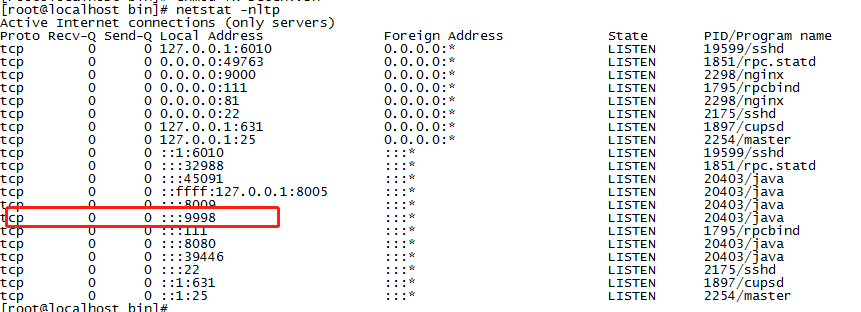
等待tomcat启动后,查看9998端口是否开启:
netstat -nltp
三、本机visualvm进行连接
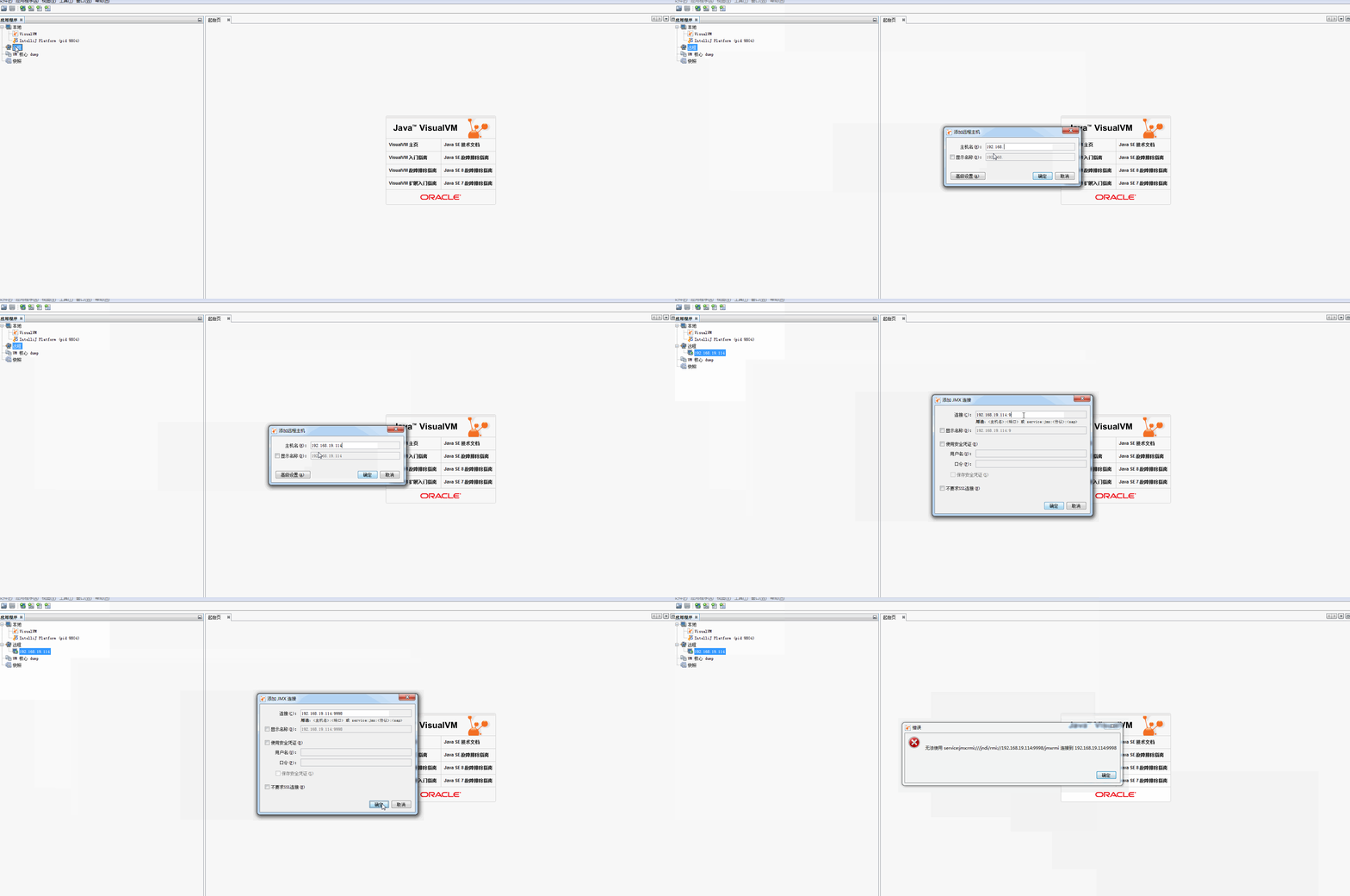
参考前一篇,在本机的visualvm上,依然是失败的。
四、换台机器试试

五、jconsole连接
更新于2020-3-13,
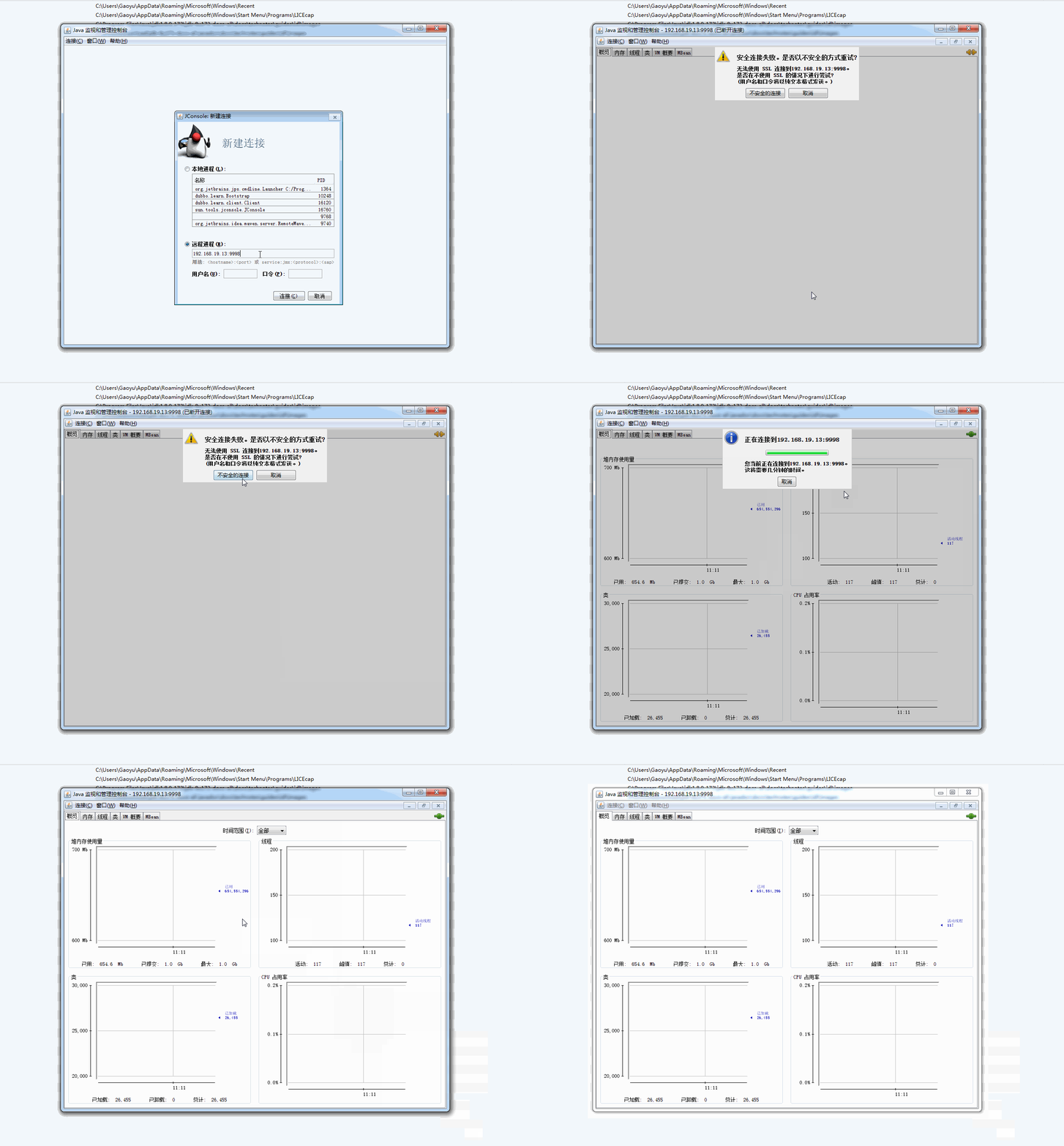
今天被同事问到这个,于是用jconsole也试了下,发现可以连接:
六、结论
依然是,遇到bug不要怕,换个客户端,不行就换台机器试试
jvisualvm连接远程应用终于成功,附踩大坑记录!!(二:jmx方式)的更多相关文章
- jvisualvm连接远程应用终于成功,附踩大坑记录!!(一:jstatd方式)
一.问题概述 连接远程java应用除了jstatd方式,还有jmx方式.不必拘泥于一种,一种不行可以果断尝试另一种,兴许就行了. 姊妹篇在这: jvisualvm连接远程应用终于成功,附踩大坑记录!! ...
- VUE使用微信JDK(附踩坑记录)
VUE使用微信分享SDK(附踩坑记录) 微信分享官方文档 安装JS-SDK npm i -S weixin-jsapi 引入包 ES5 写法 const wx = require('weixin-js ...
- 我用EasyExcel优化了公司的导出(附踩坑记录)
背景介绍 最近要改一个导出的功能,在原有的基础上,在导出一份明细数据,要求导出内容加在原有 excel 的第二个 sheet 上.考虑到数据量还比较大,干脆引入阿里的 EasyExcel 来做. 下面 ...
- Spring Cloud Feign踩坑记录(二)
注意,以下的Feign遇到的坑,在高版本中有些已经修复. 某些项目由于历史包袱原因,无法进行全面升级,才需要修补这些坑. 1.启动报错:not annotated with HTTP method t ...
- React-Native踩坑记录二
1.Image组件的borderRadius画圆有平台兼容性问题,在IOS下会失效 解决方法有几种 (1)在外面包裹一层View,对View组件使用borderRadius就可以了,这是我的做法 (2 ...
- TF-GNN踩坑记录(二)
引言 最近在尝试构建GraphTensor时,尝试把默认的特征名hidden_state改成其他时,出现了奇怪的报错. 报错 WARNING:tensorflow:Gradients do not e ...
- 用JvisualVM监视远程tomcat
在tomcat的catcalina.sh 中java_opts 环境变量中添加以下参数: -Dcom.sun.management.jmxremote -Dcom.sun.management.jmx ...
- jvisualvm_使用jmx连接远程linux应用
[前提] JVisualVM是由Sun提供的性能分析工具,在Jdk6.0以后的版本中是自带的,如果是用Jdk1.5或以前版本的就得要单独安装了. [1]远程机器需要开启jmx 在使用jvisualvm ...
- jvisualvm_使用jstatd连接远程linux应用
[1]确定linux系统正确安装了ssh # sudo ps -e | grep ssh ①注意使用root,使用$会报如下错误: [appadmin@webcsuat2 ~]$ sudo ps -e ...
随机推荐
- JAVA构造方法与方法是啥意思,方法重载方法覆盖俗谈
构造函数跟构造方法是一样的,只是称呼不同; C语言里叫函数,Java里叫方法. 成员方法必须有返回类型即使是没有返回,也要写上void 构造方法没有返回类型,而且和类名一样!一个类里面,一看就知道了譬 ...
- 64位系统web项目导出excel问题分析及解决方法汇总
最近在web项目中做了一个导出Excel功能.在导出的时候报错:检索 COM 类工厂中 CLSID 为 {00024500-0000-0000-C000-000000000046} 的组件时失败. 一 ...
- FuzzyAutocomplete代码模糊匹配智能提示
下载地址:https://github.com/FuzzyAutocomplete/FuzzyAutocompletePlugin Xcode 7.3.1 中已经对代码模糊匹配智能提示优化,已经不需要 ...
- 19 Go的全能ORM简单入门
gorm 昨天我的ldap账户改了以后,openfalcon(v2.1)-dashboard竟然无法登陆了!显然,没有把我的密码同步到本地数据库里面,怎么办?只能改openfalcon用户认证的源码了 ...
- mysql中,创建包含json数据类型的表?创建json表时候的注意事项?查询json字段中某个key的值?
需求描述: 在mysql数据库中,创建包含json数据类型的表.记录下,在创建的过程中,需要注意的问题. 操作过程: 1.通过以下的语句,创建包含json数据类型的表 mysql> create ...
- 【D】分布式系统的CAP理论
2000年7月,加州大学伯克利分校的Eric Brewer教授在ACM PODC会议上提出CAP猜想.2年后,麻省理工学院的Seth Gilbert和Nancy Lynch从理论上证明了CAP.之后, ...
- easyui datagrid 单元格编辑(cell editing)
demo中有row editing 项目中发现个cell editing,但是有bug,修改好了 主要实现功能:单击数据表格单元格,编辑单元格数据 js代码如下: $.extend($.fn.data ...
- C#------如何处理缺少对公共可见类型或成员的xml注释的警告
出现警告的原因: 使用Swagger框架时 如图,只要加上注释就可以了 使用前: 使用后:
- Java实现两个变量的互换(不借助第3个变量)
创建一个类,在该类中定义两个变量并为其指定初始值,然后交换两个变量的值,要求不允许借助第三个变量,只能使用异或运行实现两个变量值的交换. import java.util.Scanner; publi ...
- 7 -- Spring的基本用法 -- 9...容器中Bean的生命周期
7.9 容器中Bean的生命周期 Spring可以管理singleton作用域的Bean的生命周期,Spring可以精确地知道该Bean何时被创建,何时被初始化完成.容器何时准备销毁该Bean实例. ...