
jvisualvm连接远程应用终于成功,附踩大坑记录!!(二:jmx方式)
一、问题概述
参考前一篇:
jvisualvm连接远程应用终于成功,附踩大坑记录!!(一:jstatd方式)
这篇主要讲讲jmx方式。
二、启动前设置jmx参数
我这边拿tomcat举例,其余java应用只会比它更简单,读者可以自行尝试下。
在tomcat的bin目录下,创建setenv.sh(文件名不能错,这个是tomcat提供的一个定制参数的钩子,名字不同就找不到了)
内容如下:
#!/bin/sh

JAVA_OPTS="$JAVA_OPTS -Xmx1024m -Djava.rmi.server.hostname=192.168.19.114 -Dcom.sun.management.jmxremote -Dcom.sun.management.jmxremote.port=9998 -Dcom.sun.management.jmxremote.authenticate=false -Dcom.sun.management.jmxremote.ssl=false"
其中,
-Djava.rmi.server.hostname=192.168.19.114 ---------------- 192.168.19.114为tomcat所在机器的ip地址。
-Dcom.sun.management.jmxremote ----------------- 开启jmx,jdk1.5之前还要手动开启,现在已经默认开启了,所以可以省略

-Dcom.sun.management.jmxremote.port=9998 -------------------jmx的端口
-Dcom.sun.management.jmxremote.authenticate=false ---------------- 不开启验证

-Dcom.sun.management.jmxremote.ssl=false ----------------------不开启ssl通信

配置好了之后,正常启动应用即可。接下来验证是否可以连接。
除了上面几个参数,oralce官方(jdk1.8版本)还公布了其他的相关参数,如下:
| Property | Description | Values |
|---|---|---|
|
com.sun.management.jmxremote |
Enables the JMX remote agent and local monitoring via a JMX connector published on a private interface used by JConsole and any other local JMX clients that use the Attach API. JConsole can use this connector if it is started by the same user as the user that started the agent. No password or access files are checked for requests coming via this connector. |
true / false. Default is true. |
|
com.sun.management.jmxremote. port |
Enables the JMX remote agent and creates a remote JMX connector to listen through the specified port. By default, the SSL, password, and access file properties are used for this connector. It also enables local monitoring as described for the com.sun.management.jmxremote property. |
Port number. No default. |
|
com.sun.management.jmxremote. registry.ssl |
Binds the RMI connector stub to an RMI registry protected by SSL. |
true / false. Default is false. |
|
com.sun.management.jmxremote. ssl |
Enables secure monitoring via SSL. If false, then SSL is not used. |
true / false. Default is true. |
|
com.sun.management.jmxremote. ssl.enabled.protocols |
A comma-delimited list of SSL/TLS protocol versions to enable. Used in conjunction with com.sun.management.jmxremote.ssl. |
Default SSL/TLS protocol version. |
|
com.sun.management.jmxremote. ssl.enabled.cipher.suites |
A comma-delimited list of SSL/TLS cipher suites to enable. Used in conjunction with com.sun.management.jmxremote.ssl. |
Default SSL/TLS cipher suites. |
|
com.sun.management.jmxremote. ssl.need.client.auth |
If this property is true and the property com.sun.management.jmxremote.ssl is also true, then client authentication will be performed. It is recommended that you set this property to true. |
true / false. Default is false. |
|
com.sun.management.jmxremote. authenticate |
If this property is false then JMX does not use passwords or access files: all users are allowed all access. |
true / false. Default is true. |
|
com.sun.management.jmxremote. password.file |
Specifies location for password file. If com.sun.management.jmxremote.authenticate is false, then this property and the password and access files are ignored. Otherwise, the password file must exist and be in the valid format. If the password file is empty or nonexistent, then no access is allowed. |
JRE_HOME/lib/management/ jmxremote.password |
|
com.sun.management.jmxremote. access.file |
Specifies location for the access file. If com.sun.management.jmxremote.authenticate is false, then this property and the password and access files are ignored. Otherwise, the access file must exist and be in the valid format. If the access file is empty or nonexistent, then no access is allowed. |
JRE_HOME/lib/management/ jmxremote.access |
|
com.sun.management.jmxremote.login.config |
Specifies the name of a Java Authentication and Authorization Service (JAAS) login configuration entry to use when the JMX agent authenticates users. When using this property to override the default login configuration, the named configuration entry must be in a file that is loaded by JAAS. In addition, the login modules specified in the configuration should use the name and password callbacks to acquire the user's credentials. For more information, see the API documentation forjavax.security.auth.callback.NameCallback and javax.security.auth.callback.PasswordCallback. |
Default login configuration is a file-based password authentication. |
链接如下:
https://docs.oracle.com/javase/8/docs/technotes/guides/management/agent.html#gdeum
三、设置setenv.sh的可执行权限
[root@localhost bin]# chmod +x setenv.sh

[root@localhost bin]# pwd

/home/apache-tomcat-8.5./bin

[root@localhost bin]# ll setenv.sh

-rwxr-xr-x  root root  Mar  : setenv.sh

[root@localhost bin]# pwd

/home/apache-tomcat-8.5./bin

// 添加可执行权限

[root@localhost bin]# chmod +x setenv.sh
然后启动startup.sh来启动tomcat。
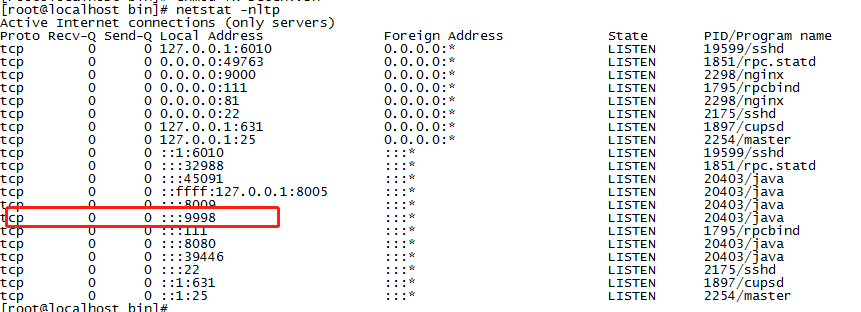
等待tomcat启动后,查看9998端口是否开启:
netstat -nltp
三、本机visualvm进行连接
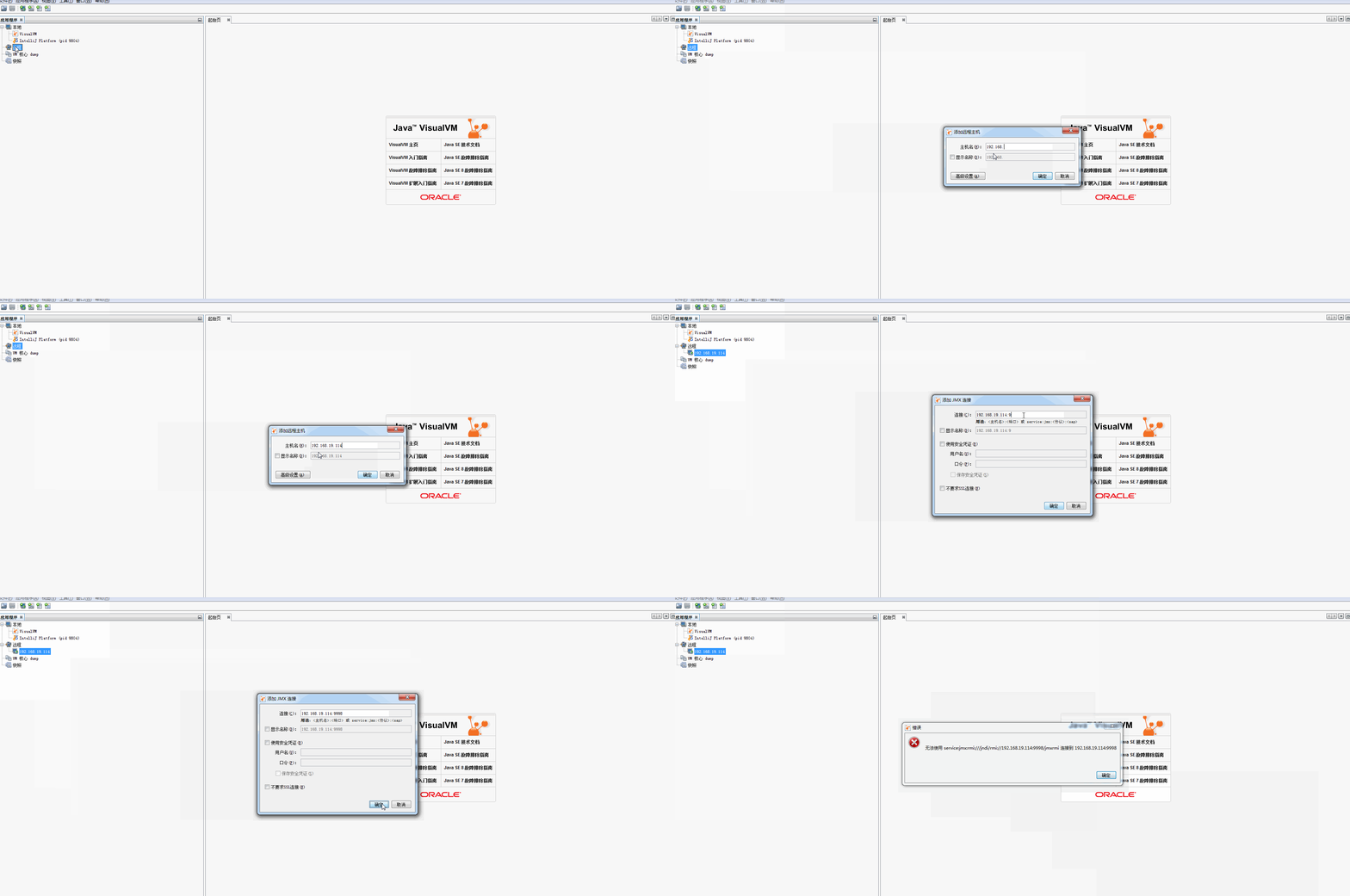
参考前一篇,在本机的visualvm上,依然是失败的。
四、换台机器试试

五、jconsole连接
更新于2020-3-13,
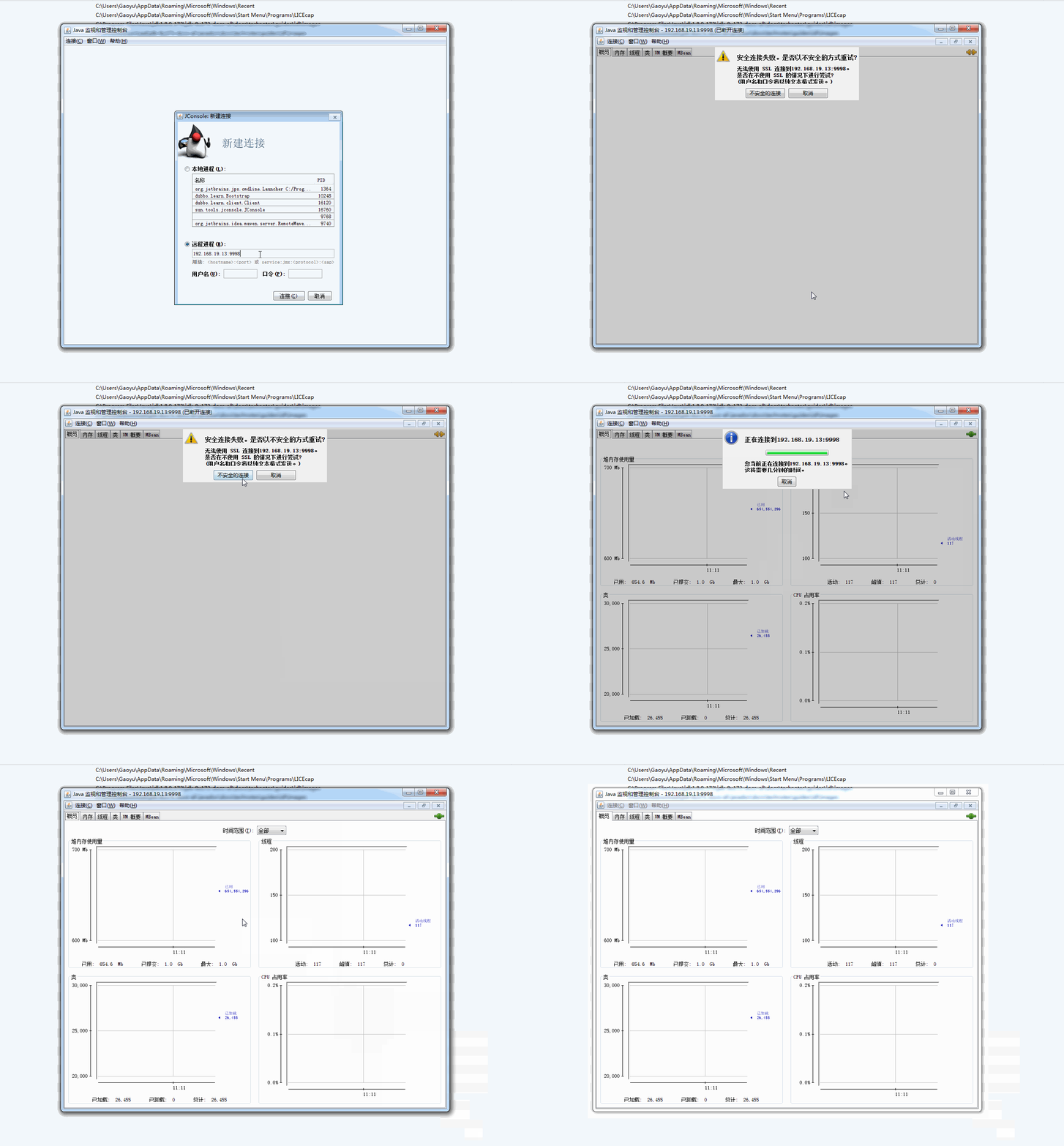
今天被同事问到这个,于是用jconsole也试了下,发现可以连接:
六、结论
依然是,遇到bug不要怕,换个客户端,不行就换台机器试试
jvisualvm连接远程应用终于成功,附踩大坑记录!!(二:jmx方式)的更多相关文章
- jvisualvm连接远程应用终于成功,附踩大坑记录!!(一:jstatd方式)
一.问题概述 连接远程java应用除了jstatd方式,还有jmx方式.不必拘泥于一种,一种不行可以果断尝试另一种,兴许就行了. 姊妹篇在这: jvisualvm连接远程应用终于成功,附踩大坑记录!! ...
- VUE使用微信JDK(附踩坑记录)
VUE使用微信分享SDK(附踩坑记录) 微信分享官方文档 安装JS-SDK npm i -S weixin-jsapi 引入包 ES5 写法 const wx = require('weixin-js ...
- 我用EasyExcel优化了公司的导出(附踩坑记录)
背景介绍 最近要改一个导出的功能,在原有的基础上,在导出一份明细数据,要求导出内容加在原有 excel 的第二个 sheet 上.考虑到数据量还比较大,干脆引入阿里的 EasyExcel 来做. 下面 ...
- Spring Cloud Feign踩坑记录(二)
注意,以下的Feign遇到的坑,在高版本中有些已经修复. 某些项目由于历史包袱原因,无法进行全面升级,才需要修补这些坑. 1.启动报错:not annotated with HTTP method t ...
- React-Native踩坑记录二
1.Image组件的borderRadius画圆有平台兼容性问题,在IOS下会失效 解决方法有几种 (1)在外面包裹一层View,对View组件使用borderRadius就可以了,这是我的做法 (2 ...
- TF-GNN踩坑记录(二)
引言 最近在尝试构建GraphTensor时,尝试把默认的特征名hidden_state改成其他时,出现了奇怪的报错. 报错 WARNING:tensorflow:Gradients do not e ...
- 用JvisualVM监视远程tomcat
在tomcat的catcalina.sh 中java_opts 环境变量中添加以下参数: -Dcom.sun.management.jmxremote -Dcom.sun.management.jmx ...
- jvisualvm_使用jmx连接远程linux应用
[前提] JVisualVM是由Sun提供的性能分析工具,在Jdk6.0以后的版本中是自带的,如果是用Jdk1.5或以前版本的就得要单独安装了. [1]远程机器需要开启jmx 在使用jvisualvm ...
- jvisualvm_使用jstatd连接远程linux应用
[1]确定linux系统正确安装了ssh # sudo ps -e | grep ssh ①注意使用root,使用$会报如下错误: [appadmin@webcsuat2 ~]$ sudo ps -e ...
随机推荐
- 在Centos7下发布.NET CORE项目[转]
1.安装安装前准备开发环境 编译类库:yum -y install gcc make gcc-c++ openssl-devel 系统信息: CentOS Linux release 7.2.1511 ...
- 移植最新Uboot到JZ2440开发板
下载最新版U-boot,建立Source Insight工程,在建立工程的时候注意,去掉一些很明显不属于硬件的分支代码. 例如,arch目录下面的除开arm子目录之外的其他目录,都可 ...
- gridview根据条件来改变行的颜色以及改变单元格的颜色。
gridview根据条件来改变行的颜色以及改变单元格的颜色. 通过在RowDataBound事件中写代码来实现,见代码. protected void GridView1_RowDataBound(o ...
- Oracle12c 在 Ubuntu 12.04 ~ 18.04 的安装注意事项
必须的注意点: 1:/bin/sh 必须指向 bash or ksh 2:/usr/lib64 可以忽略的事情: 1:gcc 版本无所谓 2:libstdc++5 无需安装 3:libaio 版本无所 ...
- 使用php用IE打开指定网页
$cmd = '"C:\Program Files\Internet Explorer\iexplore.exe" http://www.baidu.com'; exec($cmd ...
- 解决计算机改名无法连接TFS的问题
闲着没事改了下计算机名字,结果造成TFS无法连接. 报错讯息如下: ---------------------------Microsoft Visual Studio---------------- ...
- JSP求和计算
已知两个数的值,如何求和并输出? <%@ page language="java" import="java.util.*,java.text.*" co ...
- oracle 定义带参数的视图
1.定义包 CREATE OR REPLACE package p_view_param is --定义开始日期-- function set_beginTime(beginTime varchar2 ...
- Dubbo -- 系统学习 笔记 -- 示例 -- 结果缓存
Dubbo -- 系统学习 笔记 -- 目录 示例 想完整的运行起来,请参见:快速启动,这里只列出各种场景的配置方式 结果缓存 结果缓存,用于加速热门数据的访问速度,Dubbo提供声明式缓存,以减少用 ...
- MySQL存储过程的创建及调用
阅读目录:MySQL存储过程_创建-调用-参数 存储过程:SQL中的“脚本” 1.创建存储过程 2.调用存储过程 3.存储过程体 4.语句块标签 存储过程的参数 1.in:向过程里传参 2.out:过 ...