
Android——Service

xml
<?xml version="1.0" encoding="utf-8"?>

<LinearLayout xmlns:android="http://schemas.android.com/apk/res/android"

    xmlns:tools="http://schemas.android.com/tools"

    android:layout_width="match_parent"

    android:layout_height="match_parent"

    android:paddingBottom="@dimen/activity_vertical_margin"

    android:paddingLeft="@dimen/activity_horizontal_margin"

    android:paddingRight="@dimen/activity_horizontal_margin"

    android:paddingTop="@dimen/activity_vertical_margin"

    tools:context="com.example.chenshuai.myapplication.ActivityService"

    android:orientation="vertical">

    <TextView

        android:layout_width="match_parent"

        android:layout_height="wrap_content"

        android:text="测试普通服务"

        android:textSize="30sp"/>

    <LinearLayout

        android:layout_width="match_parent"

        android:layout_height="wrap_content">

        <Button

            android:layout_width="0dp"

            android:layout_height="wrap_content"

            android:layout_weight="1"

            android:text="一般启动服务"

            android:onClick="yibanqdonclick"/>

        <Button

            android:layout_width="0dp"

            android:layout_height="wrap_content"

            android:layout_weight="1"

            android:text="一般停止服务"

            android:onClick="yibantzonclick" />

    </LinearLayout>

    <TextView

        android:layout_width="match_parent"

        android:layout_height="wrap_content"

        android:text="测试绑定服务"

        android:textSize="30sp"/>

    <LinearLayout

        android:layout_width="match_parent"

        android:layout_height="wrap_content">

        <Button

            android:layout_width="0dp"

            android:layout_height="wrap_content"

            android:layout_weight="1"

            android:text="绑定启动服务"

            android:onClick="bangdingqdonclick"/>

        <Button

            android:layout_width="0dp"

            android:layout_height="wrap_content"

            android:layout_weight="1"

            android:text="绑定停止服务"

            android:onClick="bangdingtzonclick" />

    </LinearLayout>

</LinearLayout>
MyService_1.java
package com.example.chenshuai.myapplication;

import android.content.ComponentName;

import android.content.Context;

import android.content.Intent;

import android.content.ServiceConnection;

import android.os.Bundle;

import android.os.IBinder;

import android.support.v7.app.AppCompatActivity;

import android.util.Log;

import android.view.View;

import android.widget.Toast;

public class ActivityService extends AppCompatActivity {

    @Override

    protected void onCreate(Bundle savedInstanceState) {

        super.onCreate(savedInstanceState);

        setContentView(R.layout.activity_activity_service);

    }

    //普通方式启动Service

    //参考Activity的启动方式

    public void yibanqdonclick(View view)

    {

        //通过意图

        //显示意图

        Intent intent = new Intent(this,MyService_1.class);

        startService(intent);

        Toast.makeText(ActivityService.this, "启动Service", Toast.LENGTH_SHORT).show();

    }

    public void yibantzonclick(View view)

    {

        //通过意图

        //显示意图

        Intent intent = new Intent(this,MyService_1.class);

        stopService(intent);

        Toast.makeText(ActivityService.this, "启动Service", Toast.LENGTH_SHORT).show();

    }

    ServiceConnection serviceConnection;

    public void bangdingqdonclick(View view)

    {

        Intent intent = new Intent(this,MyService_1.class);

        //实现ServiceConnection接口

        if (serviceConnection == null) {

            serviceConnection = new ServiceConnection() {

                @Override

                public void onServiceConnected(ComponentName name, IBinder service) {

                    Log.e("TAG", "连接服务");

                }

                @Override

                public void onServiceDisconnected(ComponentName name) {

                    Log.e("TAG", "断开连接");

                }

            };

        }

        //参数:意图,连接,连接方式 BIND_AUTO_CREATE自动创建

        bindService(intent,serviceConnection, Context.BIND_AUTO_CREATE);

        Toast.makeText(ActivityService.this, "连接服务成功", Toast.LENGTH_SHORT).show();

    }

    public void bangdingtzonclick(View view)

    {

        //判断是否已经绑定,连接是否为空

        if (serviceConnection != null)

        {

            //解除绑定

            unbindService(serviceConnection);

            serviceConnection = null;

            Toast.makeText(ActivityService.this, "解除绑定", Toast.LENGTH_SHORT).show();

        }

        else

        {

            Toast.makeText(ActivityService.this, "尚未绑定", Toast.LENGTH_SHORT).show();

        }

    }

    //重写回调方法,防止强制退出时,绑定服务还在运行

    @Override

    protected void onDestroy() {

        if (serviceConnection != null) {

            //解除绑定

            unbindService(serviceConnection);

            serviceConnection = null;

        }

        super.onDestroy();

    }

}
ActivityService.java
package com.example.chenshuai.myapplication;

import android.content.ComponentName;

import android.content.Context;

import android.content.Intent;

import android.content.ServiceConnection;

import android.os.Bundle;

import android.os.IBinder;

import android.support.v7.app.AppCompatActivity;

import android.util.Log;

import android.view.View;

import android.widget.Toast;

public class ActivityService extends AppCompatActivity {

    @Override

    protected void onCreate(Bundle savedInstanceState) {

        super.onCreate(savedInstanceState);

        setContentView(R.layout.activity_activity_service);

    }

    //普通方式启动Service

    //参考Activity的启动方式

    public void yibanqdonclick(View view)

    {

        //通过意图

        //显示意图

        Intent intent = new Intent(this,MyService_1.class);

        startService(intent);

        Toast.makeText(ActivityService.this, "启动Service", Toast.LENGTH_SHORT).show();

    }

    public void yibantzonclick(View view)

    {

        //通过意图

        //显示意图

        Intent intent = new Intent(this,MyService_1.class);

        stopService(intent);

        Toast.makeText(ActivityService.this, "启动Service", Toast.LENGTH_SHORT).show();

    }

    ServiceConnection serviceConnection;

    public void bangdingqdonclick(View view)

    {

        Intent intent = new Intent(this,MyService_1.class);

        //实现ServiceConnection接口

        if (serviceConnection == null) {

            serviceConnection = new ServiceConnection() {

                @Override

                public void onServiceConnected(ComponentName name, IBinder service) {

                    Log.e("TAG", "连接服务");

                }

                @Override

                public void onServiceDisconnected(ComponentName name) {

                    Log.e("TAG", "断开连接");

                }

            };

        }

        //参数:意图,连接,连接方式 BIND_AUTO_CREATE自动创建

        bindService(intent,serviceConnection, Context.BIND_AUTO_CREATE);

        Toast.makeText(ActivityService.this, "连接服务成功", Toast.LENGTH_SHORT).show();

    }

    public void bangdingtzonclick(View view)

    {

        //判断是否已经绑定,连接是否为空

        if (serviceConnection != null)

        {

            //解除绑定

            unbindService(serviceConnection);

            serviceConnection = null;

            Toast.makeText(ActivityService.this, "解除绑定", Toast.LENGTH_SHORT).show();

        }

        else

        {

            Toast.makeText(ActivityService.this, "尚未绑定", Toast.LENGTH_SHORT).show();

        }

    }

    //重写回调方法,防止强制退出时,绑定服务还在运行

    @Override

    protected void onDestroy() {

        if (serviceConnection != null) {

            //解除绑定

            unbindService(serviceConnection);

            serviceConnection = null;

        }

        super.onDestroy();

    }

}
minifest.xml
 <service

            android:name=".MyService_1"

            android:enabled="true"

            android:exported="true" />

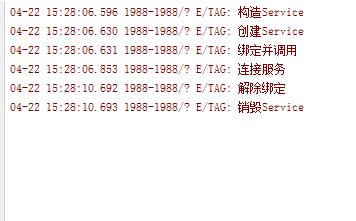
Android——Service的更多相关文章
- android service两种启动方式
android service的启动方式有以下两种: 1.Context.startService()方式启动,生命周期如下所示,启动时,startService->onCreate()-> ...
- 1、Android Studio集成极光推送(Jpush) 报错 java.lang.UnsatisfiedLinkError: cn.jpush.android.service.PushProtoco
Android studio 集成极光推送(Jpush) (华为手机)报错, E/JPush: [JPushGlobal] Get sdk version fail![获取sdk版本失败!] W/Sy ...
- Android Service完全解析,关于服务你所需知道的一切(下)
转载请注册出处:http://blog.csdn.net/guolin_blog/article/details/9797169 在上一篇文章中,我们学习了Android Service相关的许多重要 ...
- Android Service完全解析,关于服务你所需知道的一切(上)
转载请注明出处:http://blog.csdn.net/guolin_blog/article/details/11952435 相信大多数朋友对Service这个名词都不会陌生,没错,一个老练的A ...
- android service 的各种用法(IPC、AIDL)
http://my.oschina.net/mopidick/blog/132325 最近在学android service,感觉终于把service的各种使用场景和用到的技术整理得比较明白了,受益颇 ...
- Android service介绍和启动方式
1.Android service的作用: service通常是用来处理一些耗时操作,或后台执行不提供用户交互界面的操作,例如:下载.播放音乐. 2.Android service的生命周期: ser ...
- Android Service初始
一.Service概念 1.Service是一个应用程序组件 2.Service没有图像化界面 3.Service通常用来处理一些耗时比较长的操作 4.可以使用Service更新ContentProv ...
- Android Service与Thread的区别
Android Service,后台,Android的后台就是指,它的运行是完全不依赖UI的.即使Activity被销毁,或者程序被关闭,只要进程还在,Service就可以继续运行.比如说一些应用程序 ...
- Android service binder aidl 关系
/********************************************************************************** * Android servic ...
- Android Service AIDL 远程调用服务 【简单音乐播放实例】
Android Service是分为两种: 本地服务(Local Service): 同一个apk内被调用 远程服务(Remote Service):被另一个apk调用 远程服务需要借助AIDL来完成 ...
随机推荐
- selenium webdriver如何拿到页面的加载时间
这个问题与语言无关,对于现代浏览器来说,使用 window.performance.timing这个对象就好了. 用execute_script方法(java用executeScript)方法执行 w ...
- Intellij idea 配置热部署
1. 采用外部tomcat的配置 1)打开右上角Run的Edit Configuration进入Tomcat配置选项页面 2)将On frame deactivation选项更改为 Update ...
- TF 设置GPU模式训练
https://blog.csdn.net/confuciust/article/details/78982264 在终端执行程序时指定GPU CUDA_VISIBLE_DEVICES=1 pytho ...
- RxJava学习笔记(组合Observables)(转)
组合Observable 当我们需要处理多个Observable的时候,我们可以通过Rxjava的组合函数来创建我们自己想要的Observable. Merge RxJava的 merge() 方法将 ...
- Python 实现进程间通信(网络编程)
[网络编程] 1):网络编程是什么意思,网络编程指的是不同机器之间通过网编相互发信息,我们常用的“QQ”,“微信”,“邮箱” 都个网编编程的应用: 网编编程在技术上还有另一个叫法叫“进程间通信”,进程 ...
- Mac 下安装Ruby环境
步骤1 - 安装 RVM RVM 是干什么的这里就不解释了,后面你将会慢慢搞明确. $ curl -L https://get.rvm.io | bash -s stable 期间可能会问你sudo管 ...
- Shell脚本大量示例
Shell基础之控制流结构 一.控制结构 几乎所有的脚本里都有某种流控制结构,很少有例外.流控制是什么?假定有一个脚本,包含下列几个命令: #!/bin/sh # make a directory ...
- C++的iterator与const_iterator
所有的标准库容器都定义了相应的迭代器类型.迭代器对所有的容器都适用,现代 C++ 程序更倾向于使用迭代器而不是下标操作访问容器元素. 1.iterator,const_iterator作用:遍历容器内 ...
- Atitit atiplat_reader 基于url阅读器的新特性
Atitit atiplat_reader 基于url阅读器的新特性 1.1. feature功能特性1 1.2. note1 1.1. feature功能特性 支持url数据源,实际就是只支持一层连 ...
- spring cloud 路由Zuul的高可用
Zuul的高可用非常关键,因为外部请求到后端微服务的流量都会经过Zuul.故而在生产环境中,我们一般都需要部署高可用的Zuul以避免单点故障. 笔者分两种场景讨论Zuul的高可用. Zuul客户端也注 ...