
服务注册发现Eureka之三:Spring Cloud Ribbon实现客户端负载均衡(客户端负载均衡Ribbon之三:使用Ribbon实现客户端的均衡负载)
在使用RestTemplate来消费spring boot的Restful服务示例中,我们提到,调用spring boot服务的时候,需要将服务的URL写死或者是写在配置文件中,但这两种方式,无论哪一种,一旦ip地址发生了变化,都需要改动程序,并重新部署服务,使用Ribbon的时候,可以有效的避免这个问题。
前言:
软负载均衡的实现方式有两种,分别是服务端的负载均衡和客户端的负载均衡
服务端负载均衡:当浏览器向后台发出请求的时候,会首先向反向代理服务器发送请求,反向代理服务器会根据客户端部署的ip:port映射表以及负载均衡策略,来决定向哪台服务器发送请求,一般会使用到nginx反向代理技术。
客户端负载均衡:当浏览器向后台发出请求的时候,客户端会向服务注册器(例如:Eureka Server),拉取注册到服务器的可用服务信息,然后根据负载均衡策略,直接命中哪台服务器发送请求。这整个过程都是在客户端完成的,并不需要反向代理服务器的参与。
一、启动Eureka Server 和 启动微服务,并注册到Eureka Server上
请参考该例: 《服务注册发现Eureka之一:Spring Cloud Eureka的服务注册与发现》
二、服务提供端
2.1、为了更好的追踪负载均衡的分发,我将《服务注册发现Eureka之一:Spring Cloud Eureka的服务注册与发现》的示例修改一下,增加计数器的展示:
package com.dxz.compute;

import java.time.LocalDateTime;

import org.apache.log4j.Logger;

import org.springframework.beans.factory.annotation.Autowired;

import org.springframework.cloud.client.ServiceInstance;

import org.springframework.cloud.client.discovery.DiscoveryClient;

import org.springframework.web.bind.annotation.RequestMapping;

import org.springframework.web.bind.annotation.RequestMethod;

import org.springframework.web.bind.annotation.RequestParam;

import org.springframework.web.bind.annotation.RestController;

@RestController

public class ComputeController {

    private final Logger logger = Logger.getLogger(getClass());

    @Autowired

    private DiscoveryClient client;

    @RequestMapping(value = "/add", method = RequestMethod.GET)

    public Integer add(@RequestParam Integer a, @RequestParam Integer b, @RequestParam Integer sn) {

        ServiceInstance instance = client.getLocalServiceInstance();

        Integer r = a + b;

        logger.info("/add, host:" + instance.getHost() + ", service_id:" + instance.getServiceId() + ", result:" + r+ ",sn="+sn +",time="+ LocalDateTime.now());

        return r;

    }

}
2.2、为了演示负载均衡的效果,再启动一个为服务,注意需要将端口号改成不一致
如在eclipse中再拷贝一个
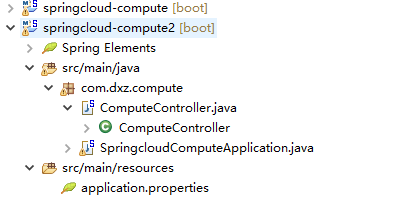
spring.application.name=compute-service

server.port=2224

eureka.client.serviceUrl.defaultZone=http://localhost:1111/eureka/
三、服务消费端
1、构建consumer-movie-ribbon项目,在pom.xml中引入ribbon依赖
在引入Eureka依赖的时候,默认里面含有ribbon依赖
<project xmlns="http://maven.apache.org/POM/4.0.0" xmlns:xsi="http://www.w3.org/2001/XMLSchema-instance"

    xsi:schemaLocation="http://maven.apache.org/POM/4.0.0 http://maven.apache.org/xsd/maven-4.0.0.xsd">

    <modelVersion>4.0.0</modelVersion>

    <groupId>com.dxz</groupId>

    <artifactId>consume-movie-ribbon</artifactId>

    <version>0.0.1-SNAPSHOT</version>

    <parent>

        <groupId>org.springframework.boot</groupId>

        <artifactId>spring-boot-starter-parent</artifactId>

        <version>1.3.5.RELEASE</version>   <!--配合spring cloud版本 -->

        <relativePath /> <!-- lookup parent from repository -->

    </parent>

    <properties>

        <!--设置字符编码及java版本 -->

        <project.build.sourceEncoding>UTF-8</project.build.sourceEncoding>

        <java.version>1.8</java.version>

    </properties>

    <dependencies>

        <!--增加eureka-server的依赖 -->

        <dependency>

            <groupId>org.springframework.cloud</groupId>

            <artifactId>spring-cloud-starter-eureka-server</artifactId>

        </dependency>

        <!--用于测试的,本例可省略 -->

        <dependency>

            <groupId>org.springframework.boot</groupId>

            <artifactId>spring-boot-starter-test</artifactId>

            <scope>test</scope>

        </dependency>

    </dependencies>

    <!--依赖管理,用于管理spring-cloud的依赖 -->

    <dependencyManagement>

        <dependencies>

            <dependency>

                <groupId>org.springframework.cloud</groupId>

                <artifactId>spring-cloud-starter-parent</artifactId>

                <version>Brixton.SR3</version>   <!--官网为Angel.SR4版本,但是我使用的时候总是报错 -->

                <type>pom</type>

                <scope>import</scope>

            </dependency>

        </dependencies>

    </dependencyManagement>

    <build>

        <plugins>

            <!--使用该插件打包 -->

            <plugin>

                <groupId>org.springframework.boot</groupId>

                <artifactId>spring-boot-maven-plugin</artifactId>

            </plugin>

        </plugins>

    </build>

</project>
2、添加@LoadBalanced注解,实现负载均衡
ribbon负载均衡策略默认为轮循方式
package com.dxz.compute.demo1;

import org.springframework.boot.SpringApplication;

import org.springframework.boot.autoconfigure.SpringBootApplication;

import org.springframework.cloud.client.loadbalancer.LoadBalanced;

import org.springframework.cloud.netflix.eureka.EnableEurekaClient;

import org.springframework.cloud.netflix.ribbon.RibbonClient;

import org.springframework.context.annotation.Bean;

import org.springframework.context.annotation.ComponentScan;

import org.springframework.context.annotation.FilterType;

import org.springframework.web.client.RestTemplate;

import com.dxz.compute.loadbalance.ExcludeFromComponentScan;

import com.dxz.compute.loadbalance.TestConfiguration;

@SpringBootApplication

@EnableEurekaClient

@RibbonClient(name = "compute-service", configuration = TestConfiguration.class)

@ComponentScan(excludeFilters = {@ComponentScan.Filter(type=FilterType.ANNOTATION,value=ExcludeFromComponentScan.class)})

public class SpringbootRestTemplateApplication {

    @Bean

    @LoadBalanced  // 添加负载均衡支持,很简单,只需要在RestTemplate上添加@LoadBalanced注解,那么RestTemplate即具有负载均衡的功能

    public RestTemplate restTemplate() {

        return new RestTemplate();

    }

    public static void main(String[] args) {

        SpringApplication.run(SpringbootRestTemplateApplication.class, args);

    }

}
在consumer-movie-ribbon中通过RestTemplate 调用上面的2个服务提供方的服务。注意下面的url,是实例名称(不需要ip:port),restTemplate将有Ribbon提供的负载均衡功能。
package com.dxz.compute.demo1;

import java.util.concurrent.atomic.AtomicInteger;

import org.springframework.beans.factory.annotation.Autowired;

import org.springframework.web.bind.annotation.PathVariable;

import org.springframework.web.bind.annotation.RequestMapping;

import org.springframework.web.bind.annotation.RequestMethod;

import org.springframework.web.bind.annotation.RequestParam;

import org.springframework.web.bind.annotation.RestController;

import org.springframework.web.client.RestTemplate;

@RestController

public class RestTemplateController {

    @Autowired

    private RestTemplate restTemplate;

    private AtomicInteger sn = new AtomicInteger(0);

    @RequestMapping(value = "/test", method = RequestMethod.GET)

    public void test(@RequestParam Integer a, @RequestParam Integer b) {// 将原来的ip:port的形式,改成注册到Eureka Server上的应用名即可

        System.out.println("==============================");

        String result = restTemplate.getForObject("http://compute-service/add?a="+a +"&b="+b + "&sn="+sn.incrementAndGet(), String.class);

        System.out.println("返回结果:"+result);

    }

}
3、自定义负载均衡策略
package com.dxz.compute.loadbalance;

import org.springframework.context.annotation.Bean;

import org.springframework.context.annotation.Configuration;

import com.netflix.loadbalancer.IRule;

import com.netflix.loadbalancer.RandomRule;

import com.netflix.loadbalancer.RetryRule;

import com.netflix.loadbalancer.RoundRobinRule;

/**

 * @Configuration注解不能放在@SpringBootApplication所在的包下 如果放在此包下,默认全部负载均衡使用此策略

 */

@Configuration

@ExcludeFromComponentScan

public class TestConfiguration {

    @Bean

    public IRule ribbonRule() {

        //return new RandomRule(); //设置负载均衡的规则为随机

        return new RoundRobinRule(); //默认的轮询策略

    }

}
4、指定对某个客户端使用自定义负载均衡
@RibbonClient(name = "compute-service", configuration = TestConfiguration.class)指定调用“compute-service”服务的客户端,使用TestConfiguration.class里配置的负载均衡策略。其他客户端不受影响。
package com.dxz.compute.demo1;

import org.springframework.boot.SpringApplication;

import org.springframework.boot.autoconfigure.SpringBootApplication;

import org.springframework.cloud.client.loadbalancer.LoadBalanced;

import org.springframework.cloud.netflix.eureka.EnableEurekaClient;

import org.springframework.cloud.netflix.ribbon.RibbonClient;

import org.springframework.context.annotation.Bean;

import org.springframework.context.annotation.ComponentScan;

import org.springframework.context.annotation.FilterType;

import org.springframework.web.client.RestTemplate;

import com.dxz.compute.loadbalance.ExcludeFromComponentScan;

import com.dxz.compute.loadbalance.TestConfiguration;

@SpringBootApplication

@EnableEurekaClient

@RibbonClient(name = "compute-service", configuration = TestConfiguration.class)

@ComponentScan(excludeFilters = {@ComponentScan.Filter(type=FilterType.ANNOTATION,value=ExcludeFromComponentScan.class)})

public class SpringbootRestTemplateApplication {

...

}
5、如果将上面的TestConfiguration@Configuration注解放在@SpringBootApplication所在的包下,所以的客户端都按照这个策略进行。
a、在@Configuration包下创建ExcludeFromComponentScan注解,注解见下面:
package com.dxz.compute.loadbalance;

public @interface ExcludeFromComponentScan {

}
b、在入口类中排除此注解不扫描
package com.dxz.compute.demo1;

@SpringBootApplication

@EnableEurekaClient

@RibbonClient(name = "compute-service", configuration = TestConfiguration.class)

@ComponentScan(excludeFilters = {@ComponentScan.Filter(type=FilterType.ANNOTATION,value=ExcludeFromComponentScan.class)})

public class SpringbootRestTemplateApplication {

    @Bean

    @LoadBalanced  // 添加负载均衡支持,很简单,只需要在RestTemplate上添加@LoadBalanced注解,那么RestTemplate即具有负载均衡的功能

    public RestTemplate restTemplate() {

        return new RestTemplate();

    }

   ...

}
c、在TestConfiguration中使用此注解
@Configuration

@ExcludeFromComponentScan

public class TestConfiguration {

    @Bean

    public IRule ribbonRule() {

        //return new RandomRule(); //设置负载均衡的规则为随机

        return new RoundRobinRule(); //默认的轮询策略

    }

}
6、开启多个compute-service微服务,测试结果

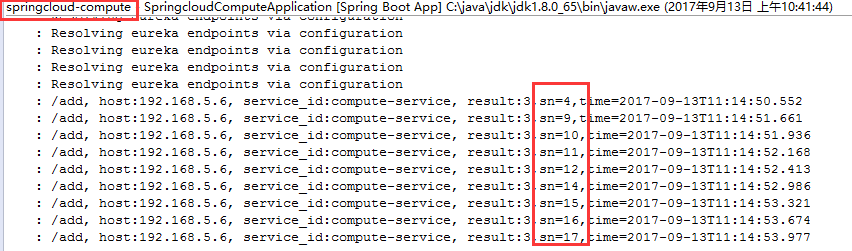
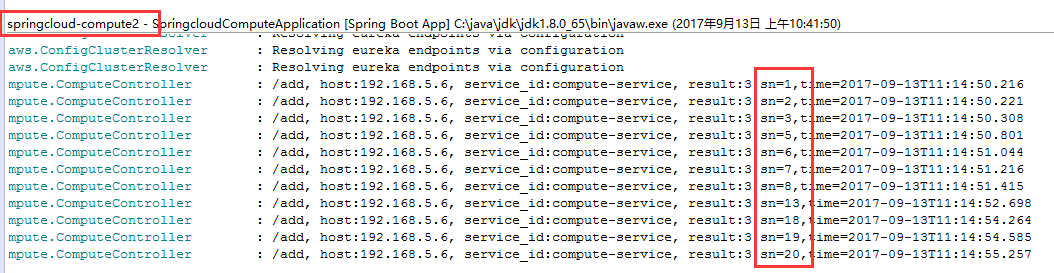
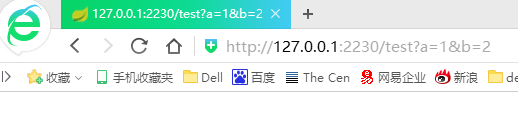
通过消费端服务调用服务提供方,负载均衡的结果如下:
第一种用轮询策略:
@Bean

    public IRule ribbonRule() {

        //return new RandomRule(); //设置负载均衡的规则为随机

        return new RoundRobinRule(); //默认的轮询策略

    }
下面2台服务提供方日志:


第二种:随机策略
@Configuration

@ExcludeFromComponentScan

public class TestConfiguration {

    @Bean

    public IRule ribbonRule() {

        return new RandomRule(); //设置负载均衡的规则为随机

        //return new RoundRobinRule(); //默认的轮询策略

    }

}
两台服务提供方日志如下:
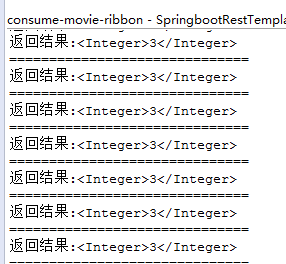
服务消费端日志:
服务注册发现Eureka之三:Spring Cloud Ribbon实现客户端负载均衡(客户端负载均衡Ribbon之三:使用Ribbon实现客户端的均衡负载)的更多相关文章
- 服务注册发现Eureka之二:高可用服务注册中心
前言 在Spring Cloud系列文章的开始,我们就介绍了服务注册与发现,其中,主要演示了如何构建和启动服务注册中心Eureka Server,以及如何将服务注册到Eureka Server中,但是 ...
- 服务注册发现Eureka
一 Eureka相关概念 1 Peer 2 Zone 3 Region 地理区域 3 CAP理论 4 在线扩容 5 二 注册发现 Eureka 1 搭建Server服务端 ...
- 服务注册发现Eureka之一:Spring Cloud Eureka的服务注册与发现
Spring Cloud简介 Spring Cloud是一个基于Spring Boot实现的云应用开发工具,它为基于JVM的云应用开发中的配置管理.服务发现.断路器.智能路由.微代理.控制总线.全局锁 ...
- spring cloud(二)服务(注册)中心Eureka
Eureka是Netflix开源的一款提供服务注册和发现的产品,它提供了完整的Service Registry和Service Discovery实现.也是springcloud体系中最重要最核心的组 ...
- SpringCloud服务的注册发现--------Eureka
1,什么叫做服务的注册与发现 服务的注册与发现基于注册中心,注册中心本身是一个服务,也相当于一个载体,其他服务的注册需要注册到这个注册中心上. 注册:当服务器启动的时候,会将自己的服务器信息,通过别名 ...
- SpringCloud服务的注册发现--------Eureka自我保护机制
1,Eureka 自我保护机制 Eureka注册中心,一些服务会注册到Eureka 服务器上,例如之前的member服务,order服务. 在网络不通的情况下,如果一个bmember 挂了,但是Eur ...
- SpringCloud服务的注册发现--------Eureka实现高可用
1,Eureka作为注册中心,掌管者服务治理的功能,十分重要,如果注册中心的服务一旦宕机,所有的服务就会挂了,为此,实现注册中心的集群(高可用)就显得十分必要了 2,Eureka 搭建集群 实现原理就 ...
- springcloud(五,多个服务注册中心eureka)
spring cloud (一.服务注册demo_eureka) spring cloud (二.服务注册安全demo_eureka) spring cloud (三.服务提供者demo_provid ...
- 服务注册发现consul之三:服务发现比较:Consul vs Zookeeper vs Etcd vs Eureka
这里就平时经常用到的服务发现的产品进行下特性的对比,首先看下结论: Feature Consul zookeeper etcd euerka 服务健康检查 服务状态,内存,硬盘等 (弱)长连接,kee ...
随机推荐
- css控制编辑器内容自动换行
在编辑器或者文本框中按住数字或字母不放 当字符很长时,就会撑破页面, 可以用一下方法控制字符自动换行 style="word-break:break-all;"
- 玩转X-CTR100 | X-PrintfScope波形显示
我造轮子,你造车,创客一起造起来!塔克创新资讯[塔克社区 www.xtark.cn ][塔克博客 www.cnblogs.com/xtark/ ] X-CTR100控制器配套的X-Print ...
- Hibernate: ids for this class must be manually assigned before calling save():
原文: http://blog.csdn.net/softimes/article/details/7008875 引起问题的原因: 由Hibernate根据数据库表自动生成的"类名.hbm ...
- Cross-Site Script
Cross-Site Script(跨站脚本)XSS 整理于<浅析XSS(Cross Site Script)漏洞原理> 了解XSS的触发条件就先得从HTML(超文本标记语言)开始,我 ...
- REST easy with kbmMW #14 – DB Controlled login
介绍 关于如何使用授权和登录管理来构建应用服务器还存在一些问题,其中之一就是用户及其角色如何在在数据库中定义.该文将解释使用TkbmMWAuthorizationManager解决此问题的一种方法.有 ...
- memmove 对同一个指针不操作
memmove 对同一个指针不操作,所以调用memmove之前不用比较两个指针是否相同 void CTestDLLDlg::OnBnClickedButton6() { ; char* data = ...
- TimeSpan格式化字符串格式(摘)
一直在用DateTime, 却不常用TimeSpan , 今天突然用到了, 发现不知道咋做格式化...百度一下,找到了答案, 在这记录一下, 免得以后找花费时间 以下内容摘抄自 Microsoft D ...
- Docker教程-01.安装docker-ce-18.06
参考文章:http://www.runoob.com/docker/docker-tutorial.html 1.Docker简介 1)Docker 是一个开源的应用容器引擎,基于 Go 语言 并遵从 ...
- HAL_RTC_MspInit Msp指代什么?
/********************************************************************************* * HAL_RTC_MspInit ...
- CTF之LSB信息隐藏术
LSB也就是最低有效位,原理是图片中的像素一般是由三种颜色构成,即三原色(绿红蓝),由这三种颜色可以组成其它各种颜色. 例如在PNG图片的储存中,每个颜色会有8bit,LSB隐写就是修改了像素中的最低 ...