
ASP.NET Web API编程——客户端调用
可以使用HttpClient这个调用Web API,下面是HttpClient的定义,列举了一些常用的方法,其中还有一些没有列举,包括重载的方法。
public class HttpClient : HttpMessageInvoker

{

  public HttpClient();

  public HttpClient(HttpMessageHandler handler);

  //统一资源标识符 (URI) 的基地址

  public Uri BaseAddress { get; set; }

  //获取或设置请求超时前等待的毫秒数

  public TimeSpan Timeout { get; set; }

  //发送异步GET请求

  public Task<HttpResponseMessage> GetAsync(Uri requestUri);

  //发送异步POST请求

  public Task<HttpResponseMessage> PostAsync(Uri requestUri, HttpContent content);

  //发生异步请求,可以指定HTTP动作

  public Task<HttpResponseMessage> SendAsync(HttpRequestMessage request);

}
HttpClient的使用
上面几个方法GetAsync、PostAsync、SendAsync的返回值类型都是Task<HttpResponseMessage>,可以调用Task<TResult>.Result属性获得类型为HttpResponseMessage的实例。HttpResponseMessage的Content属性有一个异步方法ReadAsStringAsync可以获得响应消息体的内容(服务端传过来的字符串),使用ReadAsAsync<T>方法已获得反序列化后的CLR类型数据。
例:读取字符串。
为了看清返回类型,客户端每个方法的调用返回值赋给一个强类型的变量,方便观察返回值和理解,也可以将返回值变量赋给一个var类型的变量。
客户端:
        public static void TestClient()

        {

            string url = "http://localhost/webApi_test/api/testapi";

            using (HttpClient client = new HttpClient())

            {

                Task<HttpResponseMessage> taskResult = client.GetAsync(url);

                HttpResponseMessage responseMessage = taskResult.Result;

                Task<string> contentStr = responseMessage.Content.ReadAsStringAsync();

                contentStr.Wait();

                Console.WriteLine(contentStr.Result);

            }

            Console.ReadLine();

        }
服务端:
public class TestApiController : ApiController

{

        public IHttpActionResult Get()

        {

            return Ok("hello web api client");

        }

}
路由配置:
config.Routes.MapHttpRoute(

                name: "DefaultApi",

                routeTemplate: "api/{controller}/{id}",

                defaults: new { id = RouteParameter.Optional }

            );
例:获得实体,并序列化显示
调用响应的Content.ReadAsAsync<T>方法获得实体。
客户端:
        public static void TestClient()

        {

            string url = "http://localhost/webApi_test/api/testapi/1";

            using (HttpClient client = new HttpClient())

            {

                Task<HttpResponseMessage> taskResult = client.GetAsync(url);

                HttpResponseMessage responseMessage = taskResult.Result;

                Task<DataModel> model = responseMessage.Content.ReadAsAsync<DataModel>();

                model.Wait();

                Console.WriteLine(JsonConvert.SerializeObject(model.Result,Formatting.Indented));

            }

            Console.ReadLine();

        }
服务端(路由配置同上):
        public IHttpActionResult Get(int id = )

        {

            DataModel model = new DataModel { Id = id, Field1Name = "f1", Field2Name = "f2", DT = DateTime.Now };

            return Ok(model);

        }
返回结果:

例:客户端向服务端传递复杂数据。
使用SendAsync方法,但是注意无法发送GET和HEAD请求。下面的例子向服务端发送PUT请求,并且将发送给服务端的数据放入了请求消息的消息体中,为了让服务端获取消息体内容的格式信息以便其选择多媒体格式化器绑定模型,将HttpContent.Headers.ContentType设置为application/json类型,因为向请求消息体中写入的是JSON格式的字符串。
客户端:
public static void TestClient()

{

            string url = "http://localhost/webApi_test/api/testapi";

            var modelRequest = new { Id = , Field1Name = "1name", Field2Name = "2name", DT = DateTime.Now };

            using (HttpClient client = new HttpClient())

            {

                using (HttpContent content = new StringContent(JsonConvert.SerializeObject(modelRequest)))

                {

                    content.Headers.ContentType = new MediaTypeHeaderValue("application/json");

                    using (HttpRequestMessage request = new HttpRequestMessage(HttpMethod.Put, url))

                    {

                        request.Content = content;

                        Task<HttpResponseMessage> taskResult = client.SendAsync(request);

                        HttpResponseMessage responseMessage = taskResult.Result;

                        Task<DataModel> model = responseMessage.Content.ReadAsAsync<DataModel>();

                        model.Wait();

                        Console.WriteLine(JsonConvert.SerializeObject(model.Result, Formatting.Indented));

                    }

                }

            }

            Console.ReadLine();

        }
服务端:
public IHttpActionResult Put(DataModel model)

{

      return Ok(model);

}
路由:
config.Routes.MapHttpRoute(

                name: "DefaultApi",

                routeTemplate: "api/{controller}/{id}",

                defaults: new { id = RouteParameter.Optional }
例:将数据写入请求消息体的方式
有几种方式为HttpRequestMessage.Content属性赋值,可以使用FormUrlEncodedContent、StringContent,他们都派生自ByteArrayContent。FormUrlEncodedContent指定的多媒体格式为application/x-www-form-urlencoded,如果将写入请求消息体的内容格式设置为application/x-www-form-urlencoded,即HttpContent.Headers.ContentType = application/x-www-form-urlencoded,可以正常传递数据,不设置就默认指定为application/x-www-form-urlencoded类型。
客户端调用
            var list = new List<KeyValuePair<string, string>>

            {

                new KeyValuePair<string, string>("Field21", "f1"),

                new KeyValuePair<string, string>("Field22", "f2")

            };

            using (HttpClient client = new HttpClient())

            {

                using (HttpContent content = new FormUrlEncodedContent(list))

                {

                    content.Headers.ContentType = new MediaTypeHeaderValue("application/x-www-form-urlencoded");

                    using (HttpRequestMessage request = new HttpRequestMessage(HttpMethod.Post, url))

                    {

                        request.Content = content;

                        Task<HttpResponseMessage> taskResult = client.SendAsync(request);

                        HttpResponseMessage responseMessage = taskResult.Result;

                        Task<Model2> model = responseMessage.Content.ReadAsAsync<Model2>();

                        model.Wait();

                        Console.WriteLine(JsonConvert.SerializeObject(model.Result, Formatting.Indented));

                    }

                }

            }

            Console.ReadLine();
服务器:
        public IHttpActionResult Post(Model2 model)

        {

            return Ok(model);

        }

        public class Model2

        {

            public string Field21 { get; set; }

            public string Field22 { get; set; }

        }
运行结果:

如果将上述客户端代码的content.Headers.ContentType = new MediaTypeHeaderValue("application/x-www-form-urlencoded");
改为:content.Headers.ContentType = new MediaTypeHeaderValue("application/json"),则服务端无法正常为操作参数赋值:

此外FormUrlEncodedContent不适合传递集合或数据模型中属性为集合类型的实体。如下面的实体类型,若服务端接收的参数类型为Model1,则不适合使用FormUrlEncodedContent。而应使用StringContent
public class Model1

{

public List<Model2> List1 { get; set; }

public string Name { get; set; }

}

public class Model2

{

public string Field21{get;set;}

public string Field22{get;set;}

}
例:使用HttpClientExtensions
HttpClientExtensions提供了HttpClient的扩展方法,PostAsJsonAsync<T>可以将实体T序列化为JSON格式放入请求消息体中,同样地PutAsJsonAsync也如此,只不过前者发送POST请求后者发送PUT请求。另外,他们的重载方法可以指定多媒体格式化器。
客户端:
            string url = "http://localhost/webApi_test/api/testapi";

            List<Model2> model2List = new List<Model2> { new Model2 { Field21 = "f1", Field22 = "f2" }, new Model2 { Field21 = "f21", Field22 = "f22" } };

            Model1 model = new Model1 { Name = "集合", List1 = model2List };

            using (HttpClient client = new HttpClient())

            {

                Task<HttpResponseMessage> taskResult = client.PostAsJsonAsync(url,model);

                HttpResponseMessage responseMessage = taskResult.Result;

                Task<Model1> models = responseMessage.Content.ReadAsAsync<Model1>();

                models.Wait();

                Console.WriteLine(JsonConvert.SerializeObject(models.Result, Formatting.Indented));

            }

            Console.ReadLine();
服务端:
        public IHttpActionResult Post(Model1 model)

        {

            return Ok(model);

        }

        public class Model1

        {

            public List<Model2> List1 { get; set; }

            public string Name { get; set; }

        }

        public class Model2

        {

            public string Field21 { get; set; }

            public string Field22 { get; set; }

        }
结果:
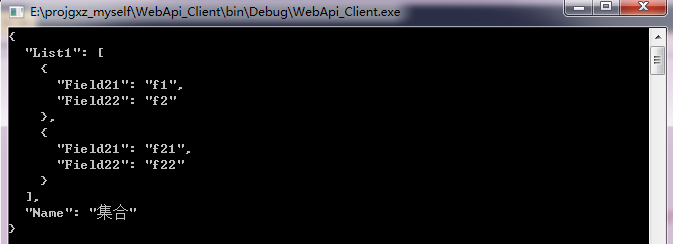
指定格式化器,下面例子指定了JSON格式化器,也可以指定BSON格式化器。
            string url = "http://localhost/webApi_test/api/testapi";

            List<Model2> model2List = new List<Model2> { new Model2 { Field21 = "f1", Field22 = "f2" }, new Model2 { Field21 = "f21", Field22 = "f22" } };

            Model1 model = new Model1 { Name = "集合", List1 = model2List };

            using (HttpClient client = new HttpClient())

            {

                Task<HttpResponseMessage> taskResult = client.PostAsync(url, model, new JsonMediaTypeFormatter());

                HttpResponseMessage responseMessage = taskResult.Result;

                Task<Model1> models = responseMessage.Content.ReadAsAsync<Model1>();

                models.Wait();

                Console.WriteLine(JsonConvert.SerializeObject(models.Result, Formatting.Indented));

            }

            Console.ReadLine();
指定BSON格式化器,并且解析响应时也要指定为BOSN格式化器,同时需要注意的是,Web API默认配置没有包含BSON格式化器,所以要在服务端添加BSON格式化器。
            string url = "http://localhost/webApi_test/api/testapi";

            List<Model2> model2List = new List<Model2> { new Model2 { Field21 = "f1", Field22 = "f2" }, new Model2 { Field21 = "f21", Field22 = "f22" } };

            Model1 model = new Model1 { Name = "集合", List1 = model2List };

            using (HttpClient client = new HttpClient())

            {

                Task<HttpResponseMessage> taskResult = client.PostAsync(url, model, new BsonMediaTypeFormatter());

                HttpResponseMessage responseMessage = taskResult.Result;

                Task<Model1> models = responseMessage.Content.ReadAsAsync<Model1>(new List<BsonMediaTypeFormatter> { new BsonMediaTypeFormatter() });

                models.Wait();

                Console.WriteLine(JsonConvert.SerializeObject(models.Result, Formatting.Indented));

            }

            Console.ReadLine();
---------------------------------------------------------------------
转载与引用请注明出处。
时间仓促,水平有限,如有不当之处,欢迎指正。
ASP.NET Web API编程——客户端调用的更多相关文章
- ASP.NET Web API编程——路由
路由过程大致分为三个阶段: 1)请求URI匹配已存在路由模板 2)选择控制器 3)选择操作 1匹配已存在的路由模板 路由模板 在WebApiConfig.Register方法中定义路由,例如模板默认生 ...
- ASP.NET Web API编程——序列化与内容协商
1 多媒体格式化器 多媒体类型又叫MIME类型,指示了数据的格式.在HTTP协议中多媒体类型描述了消息体的格式.一个多媒体类型包括两个字符串:类型和子类型. 例如: text/html.image/p ...
- asp.net web api 向客户端返回错误信息
1使用Http状态码 ASP.NET Web Api框架提供了Http状态码的值,如下图所示. 虽然有这些预定义的状态码,但在实际项目中使用自定状态码结合预定义状态码更有优势. 通过在适当的位置抛出异 ...
- ASP.NET Web API编程——构建api帮助文档
1 概要 创建ASP.NET Web Api 时模板自带Help Pages框架. 2 问题 1)使用VS创建Web Api项目时,模板将Help Pages框架自动集成到其中,使得Web Api项目 ...
- ASP.NET Web API编程——模型验证与绑定
1.模型验证 使用特性约束模型属性 可以使用System.ComponentModel.DataAnnotations提供的特性来限制模型. 例如,Required特性表示字段值不能为空,Range特 ...
- ASP.NET Web API编程——文件上传
首先分别介绍正确的做法和错误的做法,然后分析他们的不同和错误之处,以便读者在实现此功能时可避开误区 1正确的做法 public class AvaterController : BaseApiCont ...
- ASP.NET Web API编程——异常捕获
1 向客户端发送错误消息 使用throw new HttpResponseException()向客户端抛出错误信息. HttpResponseException包含两个重载的构造函数,其中一个是构造 ...
- ASP.NET Web API编程——文件下载
断点续传基本原理 HTTP协议中与断点续传相关的HTTP头为:Range和Content-Range标头,断点续传实现流程: 1)客户端请求下载一个文件,文件的总长度为n:已经下载了一部分文件,长度为 ...
- ASP.NET Web API 实现客户端Basic(基本)认证 之简单实现
优点是逻辑简单明了.设置简单. 缺点显而易见,即使是BASE64后也是可见的明文,很容易被破解.非法利用,使用HTTPS是一个解决方案. 还有就是HTTP是无状态的,同一客户端每次都需要验证. 实现: ...
随机推荐
- WPF中使用ObjectDataProvider绑定方法
ObjectDataProvider提供了绑定任意.net类型的功能,具体功能如下: 1.ObjectDataProvider提供了绑定任意CLR类型的公嫩那个. 2.它可以再XAML中利用生命史的语 ...
- RabbitMQ - exchange
总结一下几种ExchangeTypes. 之前写发布/订阅模式时第一次提到了exchange type.即producer不是将消息直接放到队列中,而是先到exchange中,exchange主要用于 ...
- git的问题(error: object file .git/objects/* is empty...)的解决方案及对git版本库文件的了解
由于操作不当,导致git版本库出了大问题,如下所示: error: object file .git/objects/8b/61d0135d3195966b443f6c73fb68466264c68e ...
- Java并发编程:volatile关键字解析(学习总结-海子)
博文地址:Java并发编程:volatile关键字解析
- String.replace使用技巧
relace replace() 方法返回一个由替换值替换一些或所有匹配的模式后的新字符串.模式可以是一个字符串或者一个正则表达式, 替换值可以是一个字符串或者一个每次匹配都要调用的函数. 使用字符串 ...
- Hibernate Annotation (Hibernate 注解)
简介: 传统上,Hibernate的配置依赖于外部 XML 文件:数据库映射被定义为一组 XML 映射文件,并且在启动时进行加载. 然而现在借助新的 Hibernate Annotation 库, ...
- CRLF与LF解析
window和mac的同学合作开发项目,会出现git提交/拉取时换行符不一致导致,提示 "the text is identical, but the files do not match, ...
- js if语句只写一个参数是什么意思?
如 var a=0:if(!a){...}; avascript中以下值会被转换为false false undefined null 0 -0 NaN ""
- element ui下拉框如何实现默认选择?
<template> <el-select v-model="value4" clearable placeholder="请选择"> ...
- Netty入门4之----如何实现长连接
前面三章介绍了Netty的一些基本用法,这一章介绍怎么使用Netty来实现一个简单的长连接demo. 关于长连接的背景知识,可以参考<如何使用Socket实现长连接> 一个简单的长 ...