
VS2010中使用 SpecFlow + Selenium.WebDriver
安装(VS扩展、程序包)
【工具】->【扩展管理器】,安装SpecFlow
【工具】->【库程序包管理】->【程序包管理器控制台】
PM> Install-Package SpecFlow -Version 1.9.

PM> Install-Package NUnit
PM> Install-Package Selenium.WebDriver
PM> Install-Package Should
使用中文
# language: zh-CN
| and | * ,而且,并且,同时 |
| background | 背景 |
| but | * ,但是 |
| examples | 例子 |
| feature | 功能 |
| given | * ,假如,假设,假定 |
| scenario | 场景,剧本 |
| scenarioOutline | 场景大纲,剧本大纲 |
| then | * ,那么 |
| when | * ,当 |
我想开始新游戏
作为破译者/我想开始新游戏.feature
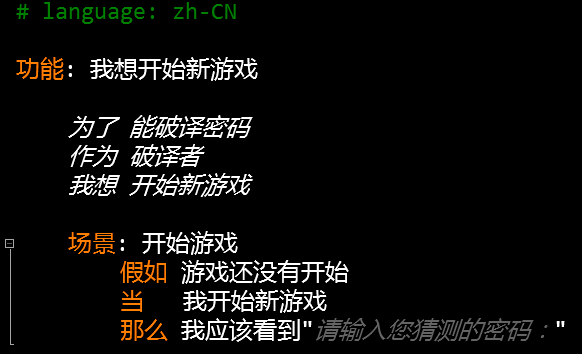
作为破译者/我想开始新游戏Steps.cs
 using OpenQA.Selenium;

 using OpenQA.Selenium.Firefox;

 using Should;

 using TechTalk.SpecFlow;

 namespace CodeBreakerGame.Specs.作为破译者

 {

     [Binding]

     public class 我想开始新游戏Steps

     {

         private IWebDriver driver = new FirefoxDriver();

         [Given(@"游戏还没有开始")]

         public void 假如游戏还没有开始()

         {

             driver.Navigate().GoToUrl("http://localhost:1387/Game/Index");

         }

         [When(@"我开始新游戏")]

         public void 当我开始新游戏()

         {

             driver.FindElement(By.TagName("button")).Click();

         }

         [Then(@"我应该看到""(.*)""")]

         public void 那么我应该看到(string message)

         {

             driver.FindElement(By.TagName("div")).Text.ShouldContain(message);

         }

         [AfterScenario]

         public void AfterScenario()

         {

             driver.Quit();

         }

     }

 }
我想提交猜测的密码
作为破译者/我想提交猜测的密码.feature
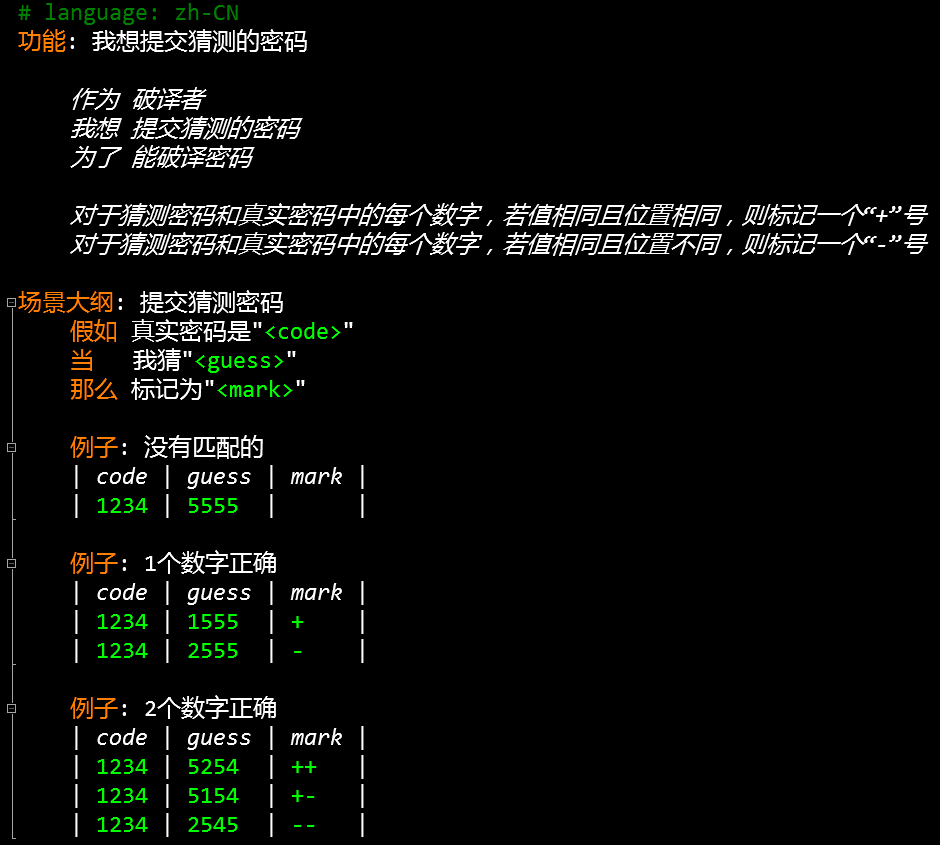
作为破译者/我想提交猜测的密码Steps.feature
 using System;

 using OpenQA.Selenium;

 using OpenQA.Selenium.Firefox;

 using Should;

 using TechTalk.SpecFlow;

 namespace CodeBreakerGame.Specs.作为破译者

 {

     [Binding]

     public class 我想提交猜测的密码Steps

     {

         private IWebDriver driver = new FirefoxDriver();

         [Given(@"真实密码是""(.*)""")]

         public void 假如真实密码是(int code)

         {

             driver.Navigate().GoToUrl("http://localhost:1387/Game/Guess/" + code.ToString());

         }

         [When(@"我猜""(.*)""")]

         public void 当我猜(int guess)

         {

             driver.FindElement(By.Id("Guess")).SendKeys(guess.ToString());

             driver.FindElement(By.TagName("button")).Click();

         }

         [Then(@"标记为""(.*)""")]

         public void 那么标记为(string mark)

         {

             driver.FindElement(By.TagName("strong")).Text.ShouldEqual(mark);

         }

         [AfterScenario]

         public void AfterScenario()

         {

             driver.Quit();

         }

     }

 }
Action
 [HttpPost]

 public ActionResult Guess(string code, FormCollection collection)

 {

     var guess = collection["Guess"];

     var mark = "";

     for (int i = ; i < code.Length; i++)

     {

         if (code[i] == guess[i])

             mark += "+";

     }

     for (int i = ; i < code.Length; i++)

     {

         for (int j = ; j < code.Length; j++)

         {

             if (i != j && code[i] == guess[j])

                 mark += "-";

         }

     }

     return View(new[] { guess, mark });

 }
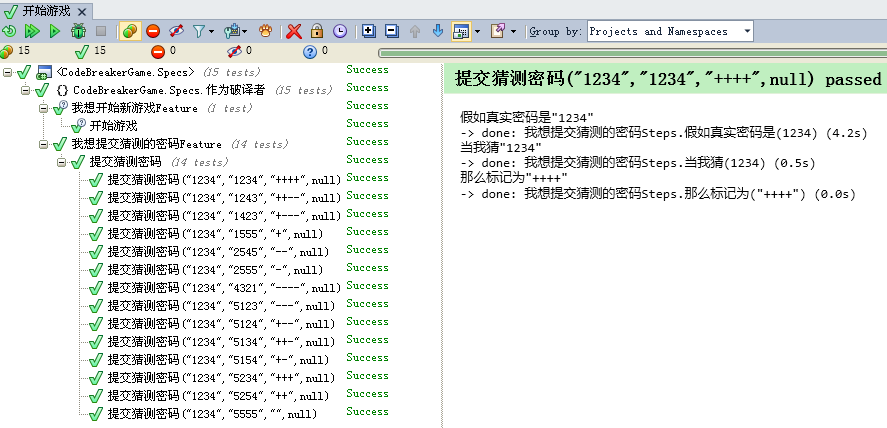
测试结果
源代码
说明:由于受文件大小的限制,压缩包里删除了文章开头提到的4个库程序包
Selenium和Firefox版本兼容性对照表
| Selenium | Firefox |
| 2.53.1 | 47.0.1 |
说明:需要注意Selenium.WebDriver和Firefox的版本,如果不兼容可能导致测试运行不了
参考文献
[2] https://github.com/cucumber/gherkin/blob/master/gherkin-languages.json
[3] https://github.com/SeleniumHQ/selenium
[4] http://seleniumhq.github.io/selenium/docs/api/dotnet/
[5] http://www.specflow.org/documentation/
VS2010中使用 SpecFlow + Selenium.WebDriver的更多相关文章
- Selenium_用selenium webdriver实现selenium RC中的类似的方法
最近想总结一下学习selenium webdriver的情况,于是就想用selenium webdriver里面的方法来实现selenium RC中操作的一些方法.目前封装了一个ActionDrive ...
- Selenium WebDriver中一些鼠标和键盘事件的使用
转自:http://www.ithov.com/linux/133271.shtml 在使用 Selenium WebDriver 做自动化测试的时候,会经常模拟鼠标和键盘的一些行为.比如使用鼠标单击 ...
- Java中通过Selenium WebDriver定位iframe中的元素
转载请注明出自天外归云的博客园:http://www.cnblogs.com/LanTianYou/ 问题:有一些元素,无论是通过id或是xpath等等,怎么都定位不到. 分析:这很可能是因为你要定位 ...
- Selenium WebDriver 中鼠标和键盘事件分析及扩展(转)
本文将总结 Selenium WebDriver 中的一些鼠标和键盘事件的使用,以及组合键的使用,并且将介绍 WebDriver 中没有实现的键盘事件(Keys 枚举中没有列举的按键)的扩展.举例说明 ...
- 转:总结Selenium WebDriver中一些鼠标和键盘事件的使用
在使用 Selenium WebDriver 做自动化测试的时候,会经常模拟鼠标和键盘的一些行为.比如使用鼠标单击.双击.右击.拖拽等动作:或者键盘输入.快捷键使用.组合键使用等模拟键盘的操作.在 W ...
- Selenium WebDriver 中鼠标和键盘事件分析及扩展[转载]
原文:http://www.ibm.com/developerworks/cn/java/j-lo-keyboard/ 概念 在使用 Selenium WebDriver 做自动化测试的时候,会经常模 ...
- 总结Selenium WebDriver中一些鼠标和键盘事件的使用
在使用 Selenium WebDriver 做自动化测试的时候,会经常模拟鼠标和键盘的一些行为.比如使用鼠标单击.双击.右击.拖拽等动作:或者键盘输入.快捷键使用.组合键使用等模拟键盘的操作.在 W ...
- selenium.webdriver.common.keys 模块中常用的变量
表11-5 selenium.webdriver.common.keys 模块中常用的变量属性 含义Keys.DOWN, Keys.UP, Keys.LEFT,Keys.RIGHT 键盘箭头键Keys ...
- Selenium WebDriver 中鼠标和键盘事件分析及扩展
[From] http://www.51testing.com/html/18/631118-861557.html 在使用 Selenium WebDriver 做自动化测试的时候,会经常模拟鼠标和 ...
随机推荐
- Java遍历List集合的三种方法
Java遍历List集合的三种方法 List<String> list = new ArrayList<String>(); list.add("aaa") ...
- ASP.NET MVC 4.0 中使用NPOI 2.2.0 按模板生成Excel报表
使用 NPOI 你就可以在没有安装 Office 或者相应环境的机器上对 WORD/EXCEL 文档进行读写.NPOI是构建在POI 3.x版本之上的,它可以在没有安装Office的情况下对Word/ ...
- 介绍Web项目中用到的几款JQuery消息提示插件
第一款 noty 官方网站:https://github.com/needim/noty 第二款 artDialog artDialog是一个精巧的web对话框组件,压缩后只有十多KB,并且不依赖其他 ...
- ES6 完全使用手册
前言 这里的 "ES6" 泛指 ES5 之后的新语法 这里的 "完全" 是指本文会不断更新 这里的 "使用" 是指本文会展示很多 ES6 的 ...
- COS-5资源分配与调度
操作系统是用户和计算机的接口,同时也是计算机硬件和其他软件的接口.操作系统的功能包括管理计算机系统的硬件.软件及数据资源,控制程序运行,改善人机界面,为其它应用软件提供支持,让计算机系统所有资源最大限 ...
- Spring_自动装配
Beans-autowire.xml <?xml version="1.0" encoding="UTF-8"?><beans xmlns=& ...
- Android中获取并设置屏幕亮度
最近在做一个Demo的时候用到了调节屏幕亮度的功能,于是上网搜索了一下,并且写了一个小Demo测试了一下,发现代码还是比较简单的.Android中的亮度调节,主要有三个方向,一个是针对于系统的亮度调节 ...
- RabbitMQ 简单了解以及使用
RabbitMQ 开发语言:Erlang – 面向并发的编程语言. AMQP:是消息队列的一个协议. mysql 是 java 写的吗?不是 那么 java 能不能访问?可以,则通过(驱动)协议;那么 ...
- 关于分析web.xml的一篇博客,写的很详细
http://blog.csdn.net/believejava/article/details/43229361
- C++ 学习使用
1.C++已经不太建议用#define const用法 定义小函数,不改变内部成员的可以用inline 2.namespace使用 3.C语言预处理 #define这些的使用 #pragma once ...