
VS2010中使用 SpecFlow + Selenium.WebDriver
安装(VS扩展、程序包)
【工具】->【扩展管理器】,安装SpecFlow
【工具】->【库程序包管理】->【程序包管理器控制台】
PM> Install-Package SpecFlow -Version 1.9.

PM> Install-Package NUnit
PM> Install-Package Selenium.WebDriver
PM> Install-Package Should
使用中文
# language: zh-CN
| and | * ,而且,并且,同时 |
| background | 背景 |
| but | * ,但是 |
| examples | 例子 |
| feature | 功能 |
| given | * ,假如,假设,假定 |
| scenario | 场景,剧本 |
| scenarioOutline | 场景大纲,剧本大纲 |
| then | * ,那么 |
| when | * ,当 |
我想开始新游戏
作为破译者/我想开始新游戏.feature
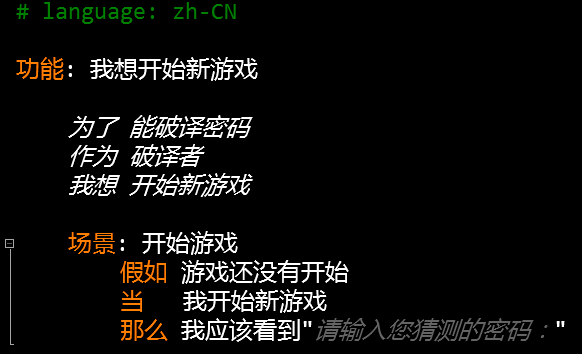
作为破译者/我想开始新游戏Steps.cs
 using OpenQA.Selenium;

 using OpenQA.Selenium.Firefox;

 using Should;

 using TechTalk.SpecFlow;

 namespace CodeBreakerGame.Specs.作为破译者

 {

     [Binding]

     public class 我想开始新游戏Steps

     {

         private IWebDriver driver = new FirefoxDriver();

         [Given(@"游戏还没有开始")]

         public void 假如游戏还没有开始()

         {

             driver.Navigate().GoToUrl("http://localhost:1387/Game/Index");

         }

         [When(@"我开始新游戏")]

         public void 当我开始新游戏()

         {

             driver.FindElement(By.TagName("button")).Click();

         }

         [Then(@"我应该看到""(.*)""")]

         public void 那么我应该看到(string message)

         {

             driver.FindElement(By.TagName("div")).Text.ShouldContain(message);

         }

         [AfterScenario]

         public void AfterScenario()

         {

             driver.Quit();

         }

     }

 }
我想提交猜测的密码
作为破译者/我想提交猜测的密码.feature
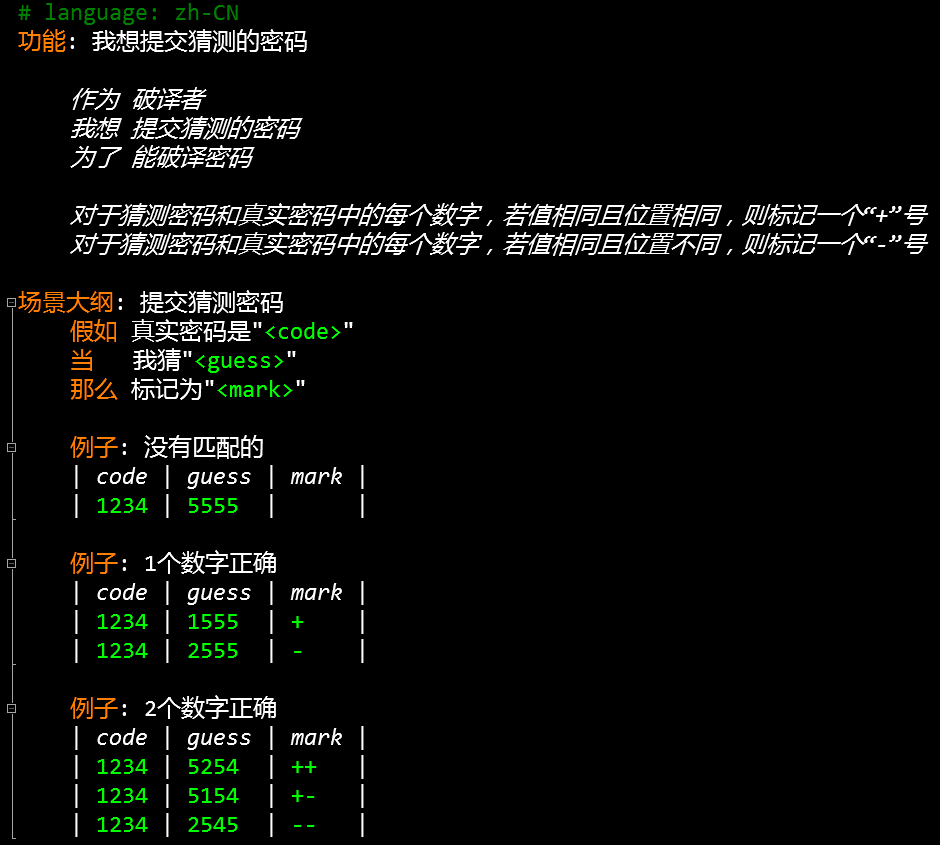
作为破译者/我想提交猜测的密码Steps.feature
 using System;

 using OpenQA.Selenium;

 using OpenQA.Selenium.Firefox;

 using Should;

 using TechTalk.SpecFlow;

 namespace CodeBreakerGame.Specs.作为破译者

 {

     [Binding]

     public class 我想提交猜测的密码Steps

     {

         private IWebDriver driver = new FirefoxDriver();

         [Given(@"真实密码是""(.*)""")]

         public void 假如真实密码是(int code)

         {

             driver.Navigate().GoToUrl("http://localhost:1387/Game/Guess/" + code.ToString());

         }

         [When(@"我猜""(.*)""")]

         public void 当我猜(int guess)

         {

             driver.FindElement(By.Id("Guess")).SendKeys(guess.ToString());

             driver.FindElement(By.TagName("button")).Click();

         }

         [Then(@"标记为""(.*)""")]

         public void 那么标记为(string mark)

         {

             driver.FindElement(By.TagName("strong")).Text.ShouldEqual(mark);

         }

         [AfterScenario]

         public void AfterScenario()

         {

             driver.Quit();

         }

     }

 }
Action
 [HttpPost]

 public ActionResult Guess(string code, FormCollection collection)

 {

     var guess = collection["Guess"];

     var mark = "";

     for (int i = ; i < code.Length; i++)

     {

         if (code[i] == guess[i])

             mark += "+";

     }

     for (int i = ; i < code.Length; i++)

     {

         for (int j = ; j < code.Length; j++)

         {

             if (i != j && code[i] == guess[j])

                 mark += "-";

         }

     }

     return View(new[] { guess, mark });

 }
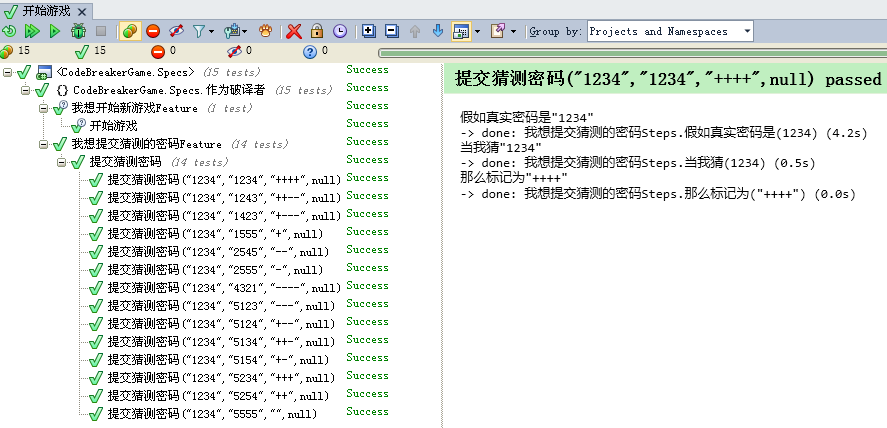
测试结果
源代码
说明:由于受文件大小的限制,压缩包里删除了文章开头提到的4个库程序包
Selenium和Firefox版本兼容性对照表
| Selenium | Firefox |
| 2.53.1 | 47.0.1 |
说明:需要注意Selenium.WebDriver和Firefox的版本,如果不兼容可能导致测试运行不了
参考文献
[2] https://github.com/cucumber/gherkin/blob/master/gherkin-languages.json
[3] https://github.com/SeleniumHQ/selenium
[4] http://seleniumhq.github.io/selenium/docs/api/dotnet/
[5] http://www.specflow.org/documentation/
VS2010中使用 SpecFlow + Selenium.WebDriver的更多相关文章
- Selenium_用selenium webdriver实现selenium RC中的类似的方法
最近想总结一下学习selenium webdriver的情况,于是就想用selenium webdriver里面的方法来实现selenium RC中操作的一些方法.目前封装了一个ActionDrive ...
- Selenium WebDriver中一些鼠标和键盘事件的使用
转自:http://www.ithov.com/linux/133271.shtml 在使用 Selenium WebDriver 做自动化测试的时候,会经常模拟鼠标和键盘的一些行为.比如使用鼠标单击 ...
- Java中通过Selenium WebDriver定位iframe中的元素
转载请注明出自天外归云的博客园:http://www.cnblogs.com/LanTianYou/ 问题:有一些元素,无论是通过id或是xpath等等,怎么都定位不到. 分析:这很可能是因为你要定位 ...
- Selenium WebDriver 中鼠标和键盘事件分析及扩展(转)
本文将总结 Selenium WebDriver 中的一些鼠标和键盘事件的使用,以及组合键的使用,并且将介绍 WebDriver 中没有实现的键盘事件(Keys 枚举中没有列举的按键)的扩展.举例说明 ...
- 转:总结Selenium WebDriver中一些鼠标和键盘事件的使用
在使用 Selenium WebDriver 做自动化测试的时候,会经常模拟鼠标和键盘的一些行为.比如使用鼠标单击.双击.右击.拖拽等动作:或者键盘输入.快捷键使用.组合键使用等模拟键盘的操作.在 W ...
- Selenium WebDriver 中鼠标和键盘事件分析及扩展[转载]
原文:http://www.ibm.com/developerworks/cn/java/j-lo-keyboard/ 概念 在使用 Selenium WebDriver 做自动化测试的时候,会经常模 ...
- 总结Selenium WebDriver中一些鼠标和键盘事件的使用
在使用 Selenium WebDriver 做自动化测试的时候,会经常模拟鼠标和键盘的一些行为.比如使用鼠标单击.双击.右击.拖拽等动作:或者键盘输入.快捷键使用.组合键使用等模拟键盘的操作.在 W ...
- selenium.webdriver.common.keys 模块中常用的变量
表11-5 selenium.webdriver.common.keys 模块中常用的变量属性 含义Keys.DOWN, Keys.UP, Keys.LEFT,Keys.RIGHT 键盘箭头键Keys ...
- Selenium WebDriver 中鼠标和键盘事件分析及扩展
[From] http://www.51testing.com/html/18/631118-861557.html 在使用 Selenium WebDriver 做自动化测试的时候,会经常模拟鼠标和 ...
随机推荐
- HDU - 4407 Sum (容斥)
题意:初始序列[1..N](1<=N<=4e5),支持两种操作:1.求区间[x,y]内与p互素的数之和: 2.将x位置的数变为c. 分析:很容易把人骗到线段树的思维中,而实际上操作2单点的 ...
- iOS 和服务端交互 数据加密策略
总体逻辑: 客户端:对称加密数据,上传...回执对称解密 同理服务端:获取上传数据 对称解密 ...下发:对称加密 当且仅当登录接口和 拉新(更新nonce 和 key的接口)是对称加密上传 非对称解 ...
- canvas 事件绑定
Canvas事件绑定 canvas事件绑定 众所周知canvas是位图,在位图里我们可以在里面画各种东西,可以是图片,可以是线条等等.那我们想给canvas里的某一张图片添加一个点击事件该怎么做到 ...
- CSS 一个完整的例子
My first web page What this is A simple page put together using HTML. I said a simple page put toget ...
- 判断一个对象是否有new
C++语言中,对象没有空和不空的概念,只有对象指针才有空和不空的概念 判断对象指针是否为空只需要和NULL常量进行比较即可 如果相等,则为空,否则不为空 另外对象虽然没有空和不空的概念,但是有有效和无 ...
- Flume-NG源码阅读之SinkGroups和SinkRunner
在AbstractConfigurationProvider类中loadSinks方法会调用loadSinkGroups方法将所有的sink和sinkgroup放到了Map<String, Si ...
- NumPy统计函数
NumPy - 统计函数 NumPy 有很多有用的统计函数,用于从数组中给定的元素中查找最小,最大,百分标准差和方差等. 函数说明如下: numpy.amin() 和 numpy.amax() 这些函 ...
- RedHat设置Yum源
Linux:RedHat AS 6.2的版本 1.删除原有的yum: rpm -aq | grep yum | xargs rpm -e –nodeps 2.安装新的yum <1>rpm ...
- 绝对布局absoluteLayout
绝对布局absoluteLayout 一.简介 二.实例 绝对布局我们是指定的横纵坐标,所以可以这样直接拖 绝对布局实际中用的少
- python中的mysql操作
一. 数据库在自动化测试中的应用 存测试数据 有的时候大批量的数据,我们需要存到数据库中,在测试的时候才能用到,测试的时候就从数据库中读取出来.这点是非常重要的! 存测试结果 二. python中的数 ...