
Ansible实现主备模式的高可用(Keepalived)
前言
Ansible是一款极其简单的IT自动化运维工具,基于Python开发,集合了众多运维工具(puppet、cfengine、chef、func、fabric)的优点,实现了批量系统配置、批量程序部署、批量运行命令等功能。Ansible是基于模块工作的,本身没有批量部署的能力,真正具有批量部署的是Ansible所运行的模块,Ansible只是提供一种框架。Ansible主要承担的工作包括:配置管理、服务即时开通、应用部署、流程编排、监控告警、日志记录等。
Ansible的基本架构:
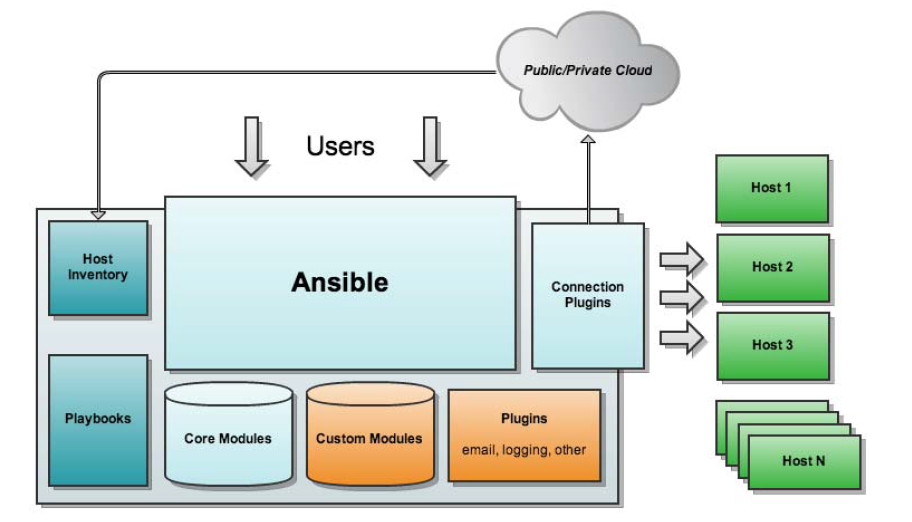
- 核心模块(Core Module):在模块库(Module Library)中分为两块,一个是核心模块,另外一个就是自定义模块(Custom Modules)。核心模块中都是Ansible自带的模块,模块资源分发到远程节点使其执行特定任务或匹配一个特定的状态;
- 自定义模块(Custom Modules):如果Ansible满足不了你所需求的模块,则在此处添加自定义化的模块;
- 插件(Plugins):协助模块来完成某个功能;
- 剧本(Playbooks):定义需要给远程主机执行的一系列任务;
- 连接插件(Connectior Plugins):Ansible默认基于SSH连接到目标机器上执行操作的,但也支持不同的连接方法,此时需要连接插件来帮助我们完成连接;
- 主机清单(Host Inventory):定义需要管理的主机,小型环境中我们只需要在host文件中写入主机的IP地址即可,但到了中大型环境我们有可能需要使用静态inventory或者动态主机清单来生成我们所需要执行的目标主机。
实验拓扑图
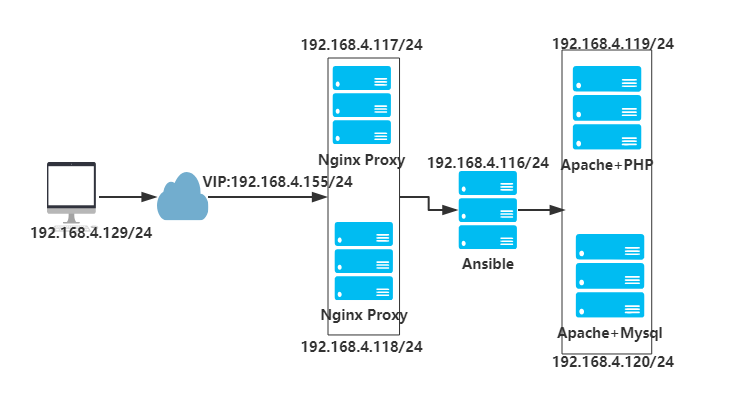
两台Nginx作为Web Proxy,配置实现KeepAlived做主备;后端两台Apache,一台部署Apache+PHP,一台部署Apache+MySQL。
搭建Ansible
[root@ansible ~]# systemctl stop firewalld.service

[root@ansible ~]# systemctl disable firewalld.serive

[root@ansible ~]# vim /etc/selinux/config

    ...

    SELINUX=disabled

    ...

[root@ansible ~]# init 6

[root@ansible ~]# ntpdate ntp1.aliyun.com

[root@ansible ~]# yum -y install ansible

[root@ansible ~]# vim /etc/ansible/hosts

    ...

    [hasrvs]

    192.168.4.117

    192.168.4.118

    [websrvs]

    192.168.4.119

    192.168.4.120
  [php]
  192.168.4.119
  [mysql]
  192.168.4.120

[root@ansible ~]# vim /etc/hosts

    ...

    192.168.4.117 nginx1

    192.168.4.118 nginx2

    192.168.4.119 apache1

    192.168.4.120 apache2

[root@ansible ~]# ssh-keygen -t rsa -N ''  #生成密钥对,实现ssh免密码登录

    Generating public/private rsa key pair.

    Enter file in which to save the key (/root/.ssh/id_rsa):

    Created directory '/root/.ssh'.

    Your identification has been saved in /root/.ssh/id_rsa.

    Your public key has been saved in /root/.ssh/id_rsa.pub

[root@ansible ~]# ssh-copy-id -i .ssh/id_rsa.pub root@192.168.4.117  #复制公钥到各远程主机

[root@ansible ~]# ssh-copy-id -i .ssh/id_rsa.pub root@192.168.4.118

[root@ansible ~]# ssh-copy-id -i .ssh/id_rsa.pub root@192.168.4.119

[root@ansible ~]# ssh-copy-id -i .ssh/id_rsa.pub root@192.168.4.120
测试连通性
[root@ansible ~]# ansible all -m ping

    192.168.4.117 | SUCCESS => {

        "changed": false,

        "ping": "pong"

    }

    192.168.4.118 | SUCCESS => {

        "changed": false,

        "ping": "pong"

    }

    192.168.4.120 | SUCCESS => {

        "changed": false,

        "ping": "pong"

    }

    192.168.4.119 | SUCCESS => {

        "changed": false,

        "ping": "pong"

    }
同步时间,关闭firewalld及selinux
[root@ansible ~]# ansible all -m shell -a 'echo "TZ='Asia/Shanghai'; export TZ" >> /etc/profile'

[root@ansible ~]# ansible all -m cron -a 'minute=*/5 job="/usr/sbin/ntpdate ntp1.aliyun.com &> /dev/null" name=UpdateTime'  #每隔3分钟同步一次时间

[root@ansible ~]# ansible all -m shell -a 'systemctl stop firewalld.service; systemctl disable firewalld.service; setenfore 0'
配置Apache服务的roles
[root@ansible ~]# mkdir -pv /etc/ansible/roles/apache/{files,templates,tasks,handlers,vars,meta,default}  #创建相关目录

[root@ansible ~]# vim /etc/ansible/roles/apache/templates/vhost.conf.j2  #Apache主机模板

    <virtualhost *:80>

        ServerName www.test.org

        DirectoryIndex index.html index.php

        DocumentRoot /var/www/html

        ProxyRequests off

        ProxyPassMatch ^/(.*\.php)$ fcgi://192.168.4.119:9000/var/www/html/$1

        ProxyPassMatch ^/(ping|status)$ fcgi://192.168.4.119:9000/$1

        <Directory />

        options FollowSymlinks

        Allowoverride None

        Require all granted

        </Directory>

    </virtualhost>

[root@ansible ~]# vim /etc/ansible/roles/apache/templates/index.html  #Apache主页

    <h1> This is {{ ansible_hostname }} </h1>

[root@ansible ~]# vim /etc/ansible/roles/apache/files/index.php

    <?php

        phpinfo();

    ?>

[root@ansible ~]# vim /etc/ansible/roles/apache/tasks/main.yml  #定义实现Apache的task

    - name: install apache

      yum: name=httpd state=latest

    - name: copy conf

      template: src=vhost.conf.j2 dest=/etc/httpd/conf.d/vhost.conf

    - name: copy index.html

      template: src=index.html dest=/var/www/html/index.html

    - name: copy index.php

      copy: src=index.php dest=/var/www/html/index.php

    - name: start httpd

      service: name=httpd state=started
配置php-fpm服务的roles
[root@ansible ~]# mkdir -pv /etc/ansible/roles/php-fpm/{files,templates,tasks,handlers,vars,meta,default}  #创建相关目录

[root@ansible ~]# cp /etc/php-fpm.d/www.conf /etc/ansible/roles/php-fpm/templates/www.conf.j2  #直接复制事先准备的配置模板

[root@ansible ~]# vim /etc/ansible/roles/php-fpm/templates/www.conf.j2

    #修改如下配置

    listem = 0.0.0.0:9000

    ;listen.allowed_clients = 127.0.0.1

    pm.status_path = /status

    ping.path = /ping

    ping.response = pong

[root@ansible ~]# vim /etc/ansible/roles/php-fpm/tasks/main.yml  #定义实现php-fpm的task

    - name: install php

      yum: name={{ item }} state=latest

      with_items:

      - php-fpm

      - php-mysql

      - php-mbstring

      - php-mcrypt

    - name: copy config

      template: src=www.conf.j2 dest=/etc/php-fpm.d/www.conf

    - name: create directory

      file: path=/var/lib/php/session group=apache owner=apache state=directory

    - name: start php-fpm

      service: name=php-fpm state=started
配置MySQL服务的roles
[root@ansible ~]# mkdir -pv /etc/ansible/roles/mysql/{files,templates,tasks,handlers,vars,meta,default}  #创建相关目录

[root@ansible ~]# cp /etc/my.cnf /etc/ansible/roles/mysql/templates/my.cnf.j2  #复制事先准备的模板

[root@ansible ~]# vim /etc/ansible/roles/mysql/templates/my.cnf.j2

    #添加如下配置

    skip-name-resolve=ON

    innodb-file-per-table=ON

[root@ansible ~]# vim /etc/ansible/roles/mysql/tasks/main.yml  #定义实现MySQL的task

    - name: install mysql

      yum: name=mariadb-server state=latest

    - name: copy config

      template: src=my.cnf.j2 dest=/etc/my.cnf

    - name: start mysql

      service: name=mariadb state=started
配置Nginx服务的roles
[root@ansible ~]# mkdir -pv /etc/ansible/roles/nginx/{files,templates,tasks,handlers,vars,meta,default}  #创建相关目录

[root@ansible ~]# cp /etc/nginx/nginx.conf /etc/ansible/roles/nginx/templates/nginx.conf.j2  #复制事先准备的模板

[root@ansible ~]# vim /etc/ansible/roles/nginx/templates/nginx.conf.j2
  #修改配置

    http {

        ...

        upstream websrvs {

            server 192.168.4.119:80;

            server 192.168.4.120:80;

            server 127.0.0.1:80 backup;

        }

        server {

            listen 80;

            include /etc/nginx/default.d/*.conf;

            location / {

                proxy_pass http://websrvs;

                proxy_set_header host $http_host;

                proxy_set_header X-Forward-For $remote_addr;

            }

            ...

        }

        ...

    }

[root@ansible ~]# vim /etc/ansible/roles/nginx/templates/localhost.conf.j2  #定义本地的Nginx服务

    server {

        listen 127.0.0.1:80;

        root /usr/share/nginx/html;

        index index.html;

    }

[root@ansible ~]# vim /etc/ansible/roles/nginx/templates/index.html

    <h1> Balance Server {{ ansible_hostname }} </h1>

[root@ansible ~]# vim /etc/ansible/roles/nginx/tasks/main.yml  #定义实现Nginx的task

    - name: install nginx

      yum: name=nginx state=latest

    - name: copy nginx conf

      template: src=nginx.conf.j2 dest=/etc/nginx/nginx.conf

    - name: copy local conf

      template: src=localhost.conf.j2 dest=/etc/nginx/conf.d/localhost.conf

    - name: copy index

      template: src=index.html dest=/usr/share/nginx/html/index.html

    - name: start nginx

      service: name=nginx state=started
配置KeepAlived服务的roles
[root@ansible keepalived]# mkdir -pv /etc/ansible/roles/keepalived/{files,templates,tasks,handlers,vars,meta,default}  #创建相关目录

[root@ansible keepalived]# vim /etc/ansible/roles/keepalived/templates/keepalived.conf.j2  #KeepAlived配置文件

    global_defs {

           notification_email {

             root@localhost

           }

           notification_email_from keepalived@localhost

           smtp_server 127.0.0.1

           smtp_connect_timeout 30

           router_id {{ ansible_nodename }}

           vrrp_skip_check_adv_addr

           vrrp_mcast_group4 224.0.0.10

    }

    vrrp_instance VIP_1 {

        state {{ keepalived_role }}

        interface eno16777736

        virtual_router_id 1

        priority {{ keepalived_pri }}

        advert_int 1

        authentication {

            auth_type PASS

            auth_pass %&hhjj99

        }

        virtual_ipaddress {

          192.168.4.155/24 dev eno16777736 label eno16777736:0

        }

    }

[root@ansible keepalived]# vim /etc/ansible/hosts  #添加变量

        ...

    [hasrvs]

    192.168.4.117 keepalived_role=MASTER keepalived_pri=100

    192.168.4.118 keepalived_role=BACKUP keepalived_pri=99

    ...

[root@ansible keepalived]# vim /etc/ansible/roles/keepalived/tasks/main.yml  #定义实现Keepalived的task

    - name: install keepalived

      yum: name=keepalived state=latest

    - name: copy config

      template: src=keepalived.conf.j2 dest=/etc/keepalived/keepalived.conf

    - name: start keepalived

      service: name=keepalived state=started
配置Apache+PHP服务的playbook
[root@ansible keepalived]# mkdir /etc/ansible/playbooks  #创建playbook存放目录

[root@ansible roles]# vim /etc/ansible/playbooks/ap1.yml  定义实现Apache+php-fpm的playbook

    - hosts: php

      remote_user: root

      roles:

      - apache

      - php-fpm

[root@ansible roles]# ansible-playbook --syntax-check /etc/ansible/playbooks/ap1.yml  #检查是否有语法错误

[root@ansible roles]# ansible-playbook /etc/ansible/playbooks/ap1.yml  #执行
配置Apache+MySQL服务的playbook
[root@ansible ~]# vim /etc/ansible/playbooks/ap2.yml

    - hosts: mysql

      remote_user: root

      roles:

      - apache

      - mysql

[root@ansible ~]# ansible-playbook --syntax-check /etc/ansibleplaybooks/ap2.yml

[root@ansible ~]# ansible-playbook /etc/ansibleplaybooks/ap2.yml
配置Nginx+Keepalived服务的playbook
[root@ansible ~]# vim /etc/ansible/playbooks/ha.yml

    - hosts: hasrvs

      remote_user: root

      roles:

      - nginx

      - keepalived

[root@ansible ~]# ansible-playbook --syntax-check /etc/ansible/playbooks/ha.yml

[root@ansible ~]# ansible-playbook /etc/ansible/playbooks/ha.yml
客户端测试访问
[root@client ~]# vim /etc/hosts

    ...

    192.168.4.155 www.test.org

    ...

[root@client ~]# for i in {1..10};do curl http://www.test.org;done

    <h1> This is apache2 </h1>

    <h1> This is apache1 </h1>

    <h1> This is apache2 </h1>

    <h1> This is apache1 </h1>

    <h1> This is apache2 </h1>

    <h1> This is apache1 </h1>

    <h1> This is apache2 </h1>

    <h1> This is apache1 </h1>

    <h1> This is apache2 </h1>

    <h1> This is apache1 </h1>
小插曲:
[root@ansible ~]# ansible all -m ping --list-hosts
ERROR! Unexpected Exception, this is probably a bug: (cryptography 0.8.2 (/usr/lib64/python2.7/site-packages), Requirement.parse('cryptography>=1.1'))
运行ansible命令时报错,python的cryptography版本必须>=1.1。
解决办法:
[root@ansible ~]# yum -y install python-pip
[root@ansible ~]# pip install --upgrade cryptography
Ansible实现主备模式的高可用(Keepalived)的更多相关文章
- Nginx+keepalived(高可用主备模式)
Nginx+keepalived(高可用主备模式) 环境:centos6.7 准备:两台服务器(虚拟机).两台应用(Tomcat).Nginx.keepalived server1:192.168.2 ...
- Centos7.6部署k8s v1.16.4高可用集群(主备模式)
一.部署环境 主机列表: 主机名 Centos版本 ip docker version flannel version Keepalived version 主机配置 备注 master01 7.6. ...
- [转帖]【MySQL+keepalived】用keepalived实现MySQL主主模式的高可用
[MySQL+keepalived]用keepalived实现MySQL主主模式的高可用 https://www.jianshu.com/p/8694d07595bc 一.实验说明 MySQL主主模式 ...
- centos7 搭建双网卡bond1(主备模式)实例
前景须知: 在redhat6 中网卡叫bond,在redhat7及centos7中改名team,此处只记录centos7中双网卡主备搭建过程. 应用情景:实现网络的高可用,防止一条网线或交换机故障影响 ...
- springboot整合ActiveMQ 2(主备模式,负载均衡)
基本使用,https://www.tapme.top/blog/detail/2018-09-05-10-38 主备模式,https://www.tapme.top/blog/detail/2018- ...
- 【 Keepalived 】Nginx or Http 主-备模式
一.主-备模式: 操作系统:centos 6.4 x64 ka1: 192.168.2.10 ka2: 192.168.2.11 vip: 192.168.2.200 ka1-master服务器配置 ...
- 实现高可用-Keepalived
简介 Keepalived是HA Cluster(High Availability Cluster,高可用集群)的一个服务软件,用来防止单点故障. Keepalived采用VRRP(virtual ...
- Centos7部署k8s[v1.16]高可用[keepalived]集群
实验目的 一般情况下,k8s集群中只有一台master和多台node,当master故障时,引发的事故后果可想而知. 故本文目的在于体现集群的高可用,即当集群中的一台master宕机后,k8s集群通过 ...
- linux 高可用----keepalived+lvs
什么是高可用? HA(high availability)即高可用性:就是在高可用集群中发生单点故障时,能够自动转移资源并切换服务,以保证服务一直在线的机制. LVS LVS:(linux virtu ...
随机推荐
- 项目经验:GIS<MapWinGIS>建模第四天
实现了查询,与定位功能
- ArcSDE 常用命令
一.sdeservice命令: 1. 创建sde服务:sdeservice –o create ArcSDE常用操作命令(转): 启动cmd 1. 创建和删除ArcSDE服务操作命令(sdeservi ...
- 基础JavaScript练习(一)
任务目的 学习与实践JavaScript的基本语法.语言特性 初步了解JavaScript的事件是什么 初步了解JavaScript中的DOM是什么 任务描述 如图,模拟一个队列,队列的每个元素是一个 ...
- javascript面向对象的写法02
面向对象特性的初步实现 1.封装 利用作用域封装变量 作用域的概念是一样的,for语句,if语句等这些作用域内定义的变量只能作用域内访问,函数内定义的变量只能函数内访问. function Class ...
- 关于实现XX系统设计时所实现的质量属性战术
可用性: 1)使用Try-catch对抛出的异常进行处理 2)使用Spring事务管理 易用性: 1)在类似删除相关选项时,弹出提示框,防止误操作 2)在不编辑基本信息时,对其进行折叠或者隐藏 3)提 ...
- angularJS directive中的controller和link function辨析
在angularJS中,你有一系列的view,负责将数据渲染给用户:你有一些controller,负责管理$scope(view model)并且暴露相关behavior(通过$scope定义)给到v ...
- js判断客户浏览器类型,版本
在JS中判断浏览器的 类型,估计是每个编辑过页面的开发人员都遇到过的问题.在众多的浏览器产品中,IE.Firefox.Opera.Safari........众多品牌 却标准不一,因此时常需要根据不同 ...
- VS2015配置Entity Framework Power Tools Bate4,还有一些使用与注意的地方
今天使用vs2015重新安装了这个名为Entity Framework Power Tools的插件,由于它只支持到2013,因此需要进行一些操作方能使用 下面是一些参考文档 http://www.c ...
- Linux Mint 18.2安装后需要进行的设置
自己的笔记本电脑升级到win10后各种不好用,运行速度慢,开关机时间很长,系统也是经常性的更新,外加发热严重.更改设置和更换驱动都没能解决问题.另外感觉在Linux下能够更加专注,所以索性将主系统更换 ...
- NFS-heartbeat-drbd模拟NFS高可用
NFS介绍: NFS(Network File System)即网络文件系统,是FreeBSD支持的文件系统中的一种,它允许网络中的计算机之间通过TCP/IP网络共享资源.在NFS的应用中,本地NFS ...