
[android] 天气app布局练习
主要练习一下RelativeLayout和LinearLayout
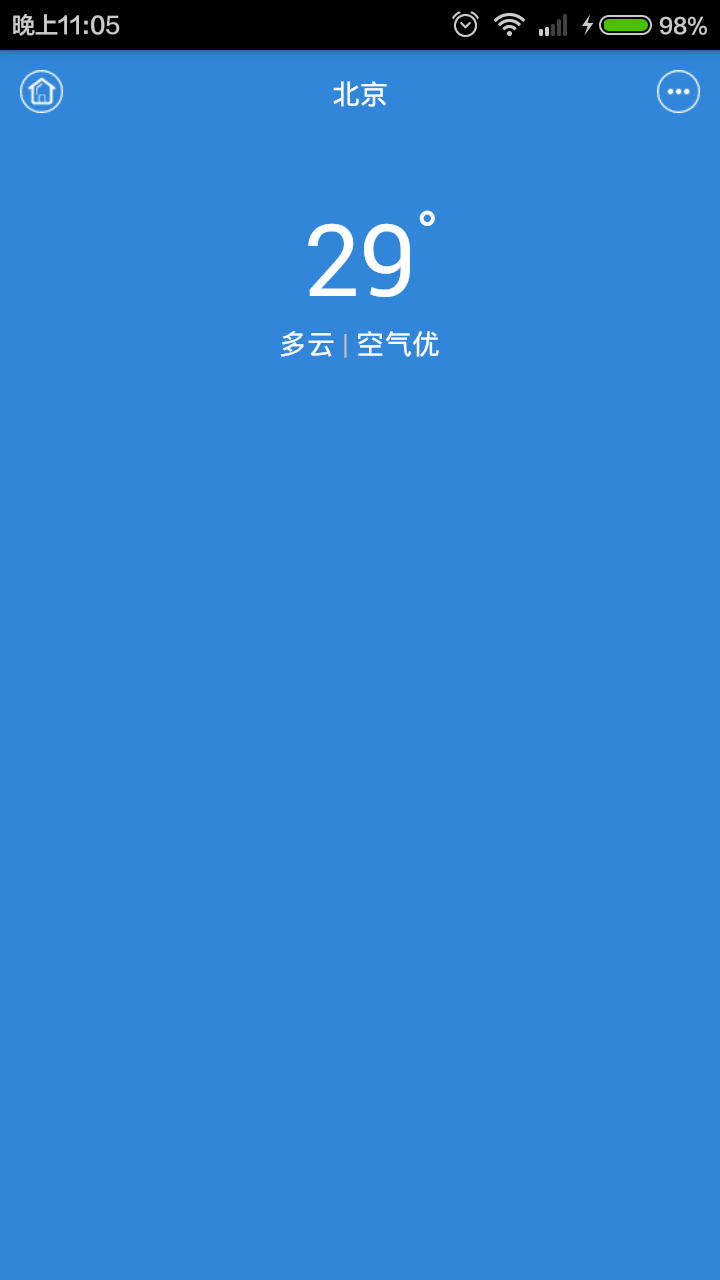
<RelativeLayout xmlns:android="http://schemas.android.com/apk/res/android"

    xmlns:tools="http://schemas.android.com/tools"

    android:layout_width="match_parent"

    android:layout_height="match_parent"

    android:background="#3186D9"

    tools:context="${relativePackage}.${activityClass}" >

    <ImageView

        android:layout_width="wrap_content"

        android:layout_height="wrap_content"

        android:layout_marginLeft="10dp"

        android:layout_marginTop="10dp"

        android:src="@drawable/icon_home" />

    <TextView

        android:layout_width="wrap_content"

        android:layout_height="wrap_content"

        android:layout_centerHorizontal="true"

        android:layout_marginTop="12dp"

        android:text="北京"

        android:textColor="#FDFDFD" />

    <ImageView

        android:layout_width="wrap_content"

        android:layout_height="wrap_content"

        android:layout_alignParentRight="true"

        android:layout_marginRight="10dp"

        android:layout_marginTop="10dp"

        android:src="@drawable/icon_more" />

    <TextView

        android:id="@+id/tv_number"

        android:layout_width="wrap_content"

        android:layout_height="wrap_content"

        android:layout_centerHorizontal="true"

        android:layout_marginTop="70dp"

        android:text="29"

        android:textColor="#fff"

        android:textSize="50sp" />

    <TextView

        android:layout_width="wrap_content"

        android:layout_height="wrap_content"

        android:layout_alignTop="@id/tv_number"

        android:layout_toRightOf="@id/tv_number"

        android:text="°"

        android:textColor="#FDFDFD"

        android:textSize="30sp" />

    <LinearLayout

        android:layout_width="wrap_content"

        android:layout_height="wrap_content"

        android:layout_below="@id/tv_number"

        android:layout_centerHorizontal="true"

        android:orientation="horizontal" >

        <TextView

            android:layout_width="wrap_content"

            android:layout_height="wrap_content"

            android:layout_centerHorizontal="true"

            android:text="多云"

            android:textColor="#FDFDFD" />

        <TextView

            android:layout_width="wrap_content"

            android:layout_height="wrap_content"

            android:layout_centerHorizontal="true"

            android:text=" | "

            android:textColor="#bbb" />

        <TextView

            android:layout_width="wrap_content"

            android:layout_height="wrap_content"

            android:layout_centerHorizontal="true"

            android:text="空气优"

            android:textColor="#FDFDFD" />

    </LinearLayout>

</RelativeLayout>
[android] 天气app布局练习的更多相关文章
- [android] 天气app布局练习(四)
主要练习一下获取网络数据和解析xml MainActivity.java package com.example.weatherreport; import java.io.UnsupportedEn ...
- [android] 天气app布局练习(二)
主要练习一下GridView MainActivity.java package com.example.weatherreport; import java.util.ArrayList; impo ...
- [android] 天气app布局练习(三)
主要练习LinearLayout和layout_weight属性 <RelativeLayout xmlns:android="http://schemas.android.com/a ...
- 制作一个功能丰富的Android天气App
简易天气是一个基于和风天气数据采用MD设计的Android天气App.目前的版本采用传统的MVC模式构建.通过丰富多彩的页面为用户提供日常所需的天气资讯. 项目说明 项目放在github上面 地址是: ...
- [Android]天气App 2 项目搭建
对于天气App,为了简化一些功能,暂时模仿MUUI系统提供的那个App. 本项目需要引入本人经常使用的一个工具库DroidTool,这个是本人根据工作中,收集到一些工具类,下载地址. ...
- [Android]天气App 3 网络数据的请求和Json解析
Android客户端开发,不仅仅是在Android端开发,还需要有相应的后台服务支持,否则的话,客户端的数据就只能放到本地自己做处理.我认为的原生态的App就是对应服务端的Client.他能像浏览 ...
- [Android]天气App 1
闲赋在家,无事可做就想着做点东西,于是乎把玩手机,我最常用的就是看天气,基本上我每天起来第一件事就是看天气,哈哈,用别人的这么爽,为什么不自己整一个关于天气的应用呢,墨迹天气.小米系统自带的天气.ya ...
- Android学习系列(5)--App布局初探之简单模型
人类科技的进步源自探索,探索来自于发现本原,当然App布局没这么先进,本文也只是一个归类总结.这篇文章是Android开发人员的必备知识,是我特别为大家整理和总结的,不求完美,但是有用. Androi ...
- Android经典项目开发之天气APP实例分享
原文:Android经典项目开发之天气APP实例分享 版权声明:本文为博主原创文章,未经博主允许不得转载. https://blog.csdn.net/mzc186/article/details/5 ...
随机推荐
- HTML5中本地储存概念是什么,什么优点 ,与cookie有什么区别?
html5中的Web Storage 包括了两种存储方式: sessionStorage 和 localStorage. seessionStorage 用于本地存储一个会话(session)中的 ...
- [Swift]字符串(String类、NSString类)常用操作
NS是Cocoa类对象类型的前缀,来源于乔布斯建立的另一家公司--NeXTNSString的使用方法,和Swift语言中的String有很多相似之处. 1.字符串的定义String类 var str1 ...
- 解决wordcloud的一个error:Microsoft Visual C++ 9.0 is required. Get it from http://aka.ms/vcpython27
环境: 操作系统:Windows 7 64位 语言:Python 2.7.13 |Anaconda 4.4.0 (64-bit)| (default, May 11 2017, 13:17:26) w ...
- Python处理json数据--世界国家维度数据
1.准备国家的json数据 将准备好的json数据放在指定的目录下,此处可以重这里下载 2.测试编写python脚本处理json提取字段值 #coding:utf8 import time, re, ...
- scrapy连接MySQL
Scrapy中连接MySQL所需要做的工作如下: 1.settings中需要设置的部分 # 启动管道组件 ITEM_PIPELINES = { 'QianChengWuYu.mongoDBPiplel ...
- 三种简单的html网页自动跳转方法
三种简单的html网页自动跳转方法,可以让你在打开一个html网页时自动跳转到其它的页面. 方法/步骤 <html> <head> <title>正在跳转< ...
- RPC与本地调用的区别
RPC远程调用:一般可以跨平台通讯,采用http协议.因为http协议底层使用socket技术,只要你的语言支持socket技术,就可以相互进行通讯.比如:java语言开发的接口,http协议,然后让 ...
- PIE SDK 距离分类和最大似然分类
1.算法功能简介 监督分类,也叫训练场地法.训练分类法,是遥感图像分类的一种,用被确认类别的样本像元去识别其他未知类别像元的过程.监督分类算法有平行算法.平行六面体法.最小距离法.最大似然法.马 ...
- iview2.0 bug之+8 区的 DatePicker
请看以上细节图:工作案例小Demo 用心去做,不留遗憾!
- 前端cookie、localStorage、sessionStorage缓存技术总结
转载自:https://www.cnblogs.com/belove8013/p/8134067.html 1.Cookie JavaScript是运行在客户端的脚本,因此一般是不能够设置Sessio ...