
letsencrypt证书-使用certbot申请wildcard证书
1. certbot安装
cd /usr/local/src

wget https://dl.eff.org/certbot-auto

chmod a+x certbot-auto
2. 认证方式
客户在申请 Let’s Encrypt 证书的时候,需要校验域名的所有权,证明操作者有权利为该域名申请证书,目前支持三种验证方式:
dns-01:给域名添加一个 DNS TXT 记录。

http-01:在域名对应的 Web 服务器下放置一个 HTTP well-known URL 资源文件。

tls-sni-01:在域名对应的 Web 服务器下放置一个 HTTPS well-known URL 资源文件。
3. 运行命令
./certbot-auto certonly -d *.archerwong.cn -d archerwong.cn --manual --preferred-challenges dns --server https://acme-v02.api.letsencrypt.org/directory
注意这里 -d archerwong.cn 最好写上,否则archerwong.cn将无法被信任,只有xxx.archerwong.cn这样的二级 域名才被信任
介绍下相关参数:
certonly,表示安装模式,Certbot 有安装模式和验证模式两种类型的插件。

--manual  表示手动安装插件,Certbot 有很多插件,不同的插件都可以申请证书,用户可以根据需要自行选择

-d 为那些主机申请证书,如果是通配符,输入 *.newyingyong.cn(可以替换为你自己的域名)

--preferred-challenges dns,使用 DNS 方式校验域名所有权

--server,Let's Encrypt ACME v2 版本使用的服务器不同于 v1 版本,需要显示指定。
交互界面如下
[root@host src]# sudo  ./certbot-auto certonly  -d *.archerwong.cn -d archerwong.cn --manual --preferred-challenges dns --server https://acme-v02.api.letsencrypt.org/directory

Saving debug log to /var/log/letsencrypt/letsencrypt.log

Plugins selected: Authenticator manual, Installer None

Enter email address (used for urgent renewal and security notices) (Enter 'c' to

cancel): xxx@163.com

- - - - - - - - - - - - - - - - - - - - - - - - - - - - - - - - - - - - - - - -

Please read the Terms of Service at

https://letsencrypt.org/documents/LE-SA-v1.2-November-15-2017.pdf. You must

agree in order to register with the ACME server at

https://acme-v02.api.letsencrypt.org/directory

- - - - - - - - - - - - - - - - - - - - - - - - - - - - - - - - - - - - - - - -

(A)gree/(C)ancel: A

- - - - - - - - - - - - - - - - - - - - - - - - - - - - - - - - - - - - - - - -

Would you be willing to share your email address with the Electronic Frontier

Foundation, a founding partner of the Let's Encrypt project and the non-profit

organization that develops Certbot? We'd like to send you email about our work

encrypting the web, EFF news, campaigns, and ways to support digital freedom.

- - - - - - - - - - - - - - - - - - - - - - - - - - - - - - - - - - - - - - - -

(Y)es/(N)o: Y

Obtaining a new certificate

Performing the following challenges:

dns-01 challenge for archerwong.cn

- - - - - - - - - - - - - - - - - - - - - - - - - - - - - - - - - - - - - - - -

NOTE: The IP of this machine will be publicly logged as having requested this

certificate. If you're running certbot in manual mode on a machine that is not

your server, please ensure you're okay with that.

Are you OK with your IP being logged?

- - - - - - - - - - - - - - - - - - - - - - - - - - - - - - - - - - - - - - - -

(Y)es/(N)o: (Y)es/(N)o: Y

- - - - - - - - - - - - - - - - - - - - - - - - - - - - - - - - - - - - - - - -

Please deploy a DNS TXT record under the name

_acme-challenge.archerwong.cn with the following value:

apQPzp-NYZ0md_D_2_fKr465Il3dDbdR_BlOSOJTYAo

Before continuing, verify the record is deployed.

- - - - - - - - - - - - - - - - - - - - - - - - - - - - - - - - - - - - - - - -

Press Enter to Continue
注意这里我把交互页面截断,很重要,先不要回车,将上面的txt值,填到你的域名解析里面,等确认生效后再回车,我填写如下
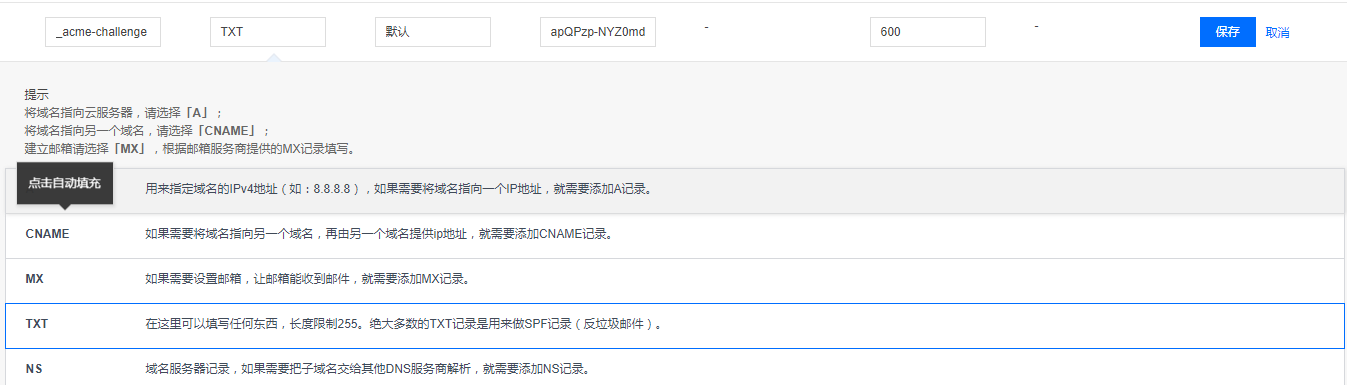
然后测试是否生效
$ dig  -t txt  _acme-challenge.archerwong.cn @8.8.8.8

; <<>> DiG 9.9.4-RedHat-9.9.4-51.el7_4.1 <<>> -t txt _acme-challenge.archerwong.cn @8.8.8.8

;; global options: +cmd

;; Got answer:

;; ->>HEADER<<- opcode: QUERY, status: NOERROR, id: 25704

;; flags: qr rd ra; QUERY: 1, ANSWER: 1, AUTHORITY: 0, ADDITIONAL: 1

;; OPT PSEUDOSECTION:

; EDNS: version: 0, flags:; udp: 512

;; QUESTION SECTION:

;_acme-challenge.archerwong.cn.	IN	TXT

;; ANSWER SECTION:

_acme-challenge.archerwong.cn. 599 IN	TXT	"apQPzp-NYZ0md_D_2_fKZ465Il3dDbdR_BlOSOJTYbo"

;; Query time: 306 msec

;; SERVER: 8.8.8.8#53(8.8.8.8)

;; WHEN: Mon Dec 17 21:34:43 CST 2018

;; MSG SIZE  rcvd: 114
确认生效后,按回车键,交互界面继续
Waiting for verification...

Cleaning up challenges

IMPORTANT NOTES:

 - Congratulations! Your certificate and chain have been saved at:

   /etc/letsencrypt/live/archerwong.cn/fullchain.pem

   Your key file has been saved at:

   /etc/letsencrypt/live/archerwong.cn/privkey.pem

   Your cert will expire on 2019-03-17. To obtain a new or tweaked

   version of this certificate in the future, simply run certbot-auto

   again. To non-interactively renew *all* of your certificates, run

   "certbot-auto renew"

 - If you like Certbot, please consider supporting our work by:

   Donating to ISRG / Let's Encrypt:   https://letsencrypt.org/donate

   Donating to EFF:                    https://eff.org/donate-le
至此已经成功生成了wildcard证书,查看下证书
tree  /etc/letsencrypt/live/archerwong.cn

/etc/letsencrypt/live/archerwong.cn

├── cert.pem -> ../../archive/archerwong.cn/cert1.pem

├── chain.pem -> ../../archive/archerwong.cn/chain1.pem

├── fullchain.pem -> ../../archive/archerwong.cn/fullchain1.pem

├── privkey.pem -> ../../archive/archerwong.cn/privkey1.pem

└── README
生成证书后,配置 Nginx
打开 nginx server 配置文件加入如下设置:
server {

    listen 443

    ssl on;

    ssl_certificate /etc/letsencrypt/live/网站域名/fullchain.pem;

    ssl_certificate_key /etc/letsencrypt/live/网站域名/privkey.pem;

     ## 其他配置

}
强制跳转 https
https 默认是监听 443 端口的,没开启 https 访问的话一般默认是 80 端口。如果你确定网站 80 端口上的站点都支持 https 的话加入下面的配件可以自动重定向到 https
server {

    listen 80;

    server_name your.domain.com;

    return 301 https://$server_name$request_uri;

}
4. 更新
使用的库:letsencrypt通配符证书,其实这个库就是写了一个钩子,通过钩子来自动填写txt dns记录。当然这个库也可以方便的申请通配符证书,感谢作者的付出。
1:下载
$ git clone https://github.com/ywdblog/certbot-letencrypt-wildcardcertificates-alydns-au

$ cd certbot-letencrypt-wildcardcertificates-alydns-au

$ chmod 0777 au.sh autxy.sh python-version/au.sh

// 我是移动到了/etc/letsencrypt目录下,然后重命名manual-auth-hook
2:配置
目前该工具支持三种运行环境:
- au.sh:操作阿里云 DNS hook shell(PHP 环境)。
- autxy.sh:操作腾讯云 DNS hook shell(PHP 环境)。
- python-version/au.py:操作阿里云 DNS hook shell(Python 2.7/3.6),感谢 @Duke-Wu 的 PR。
这三种运行环境什么意思呢?就是可根据自己服务器环境和域名服务商选择任意一个 hook shell(操作的时候任选其一即可)。
DNS API 密钥:
- alydns.php,修改 accessKeyId、accessSecrec 变量,阿里云 API key 和 Secrec 官方申请文档。
- txydns.php,修改 txyaccessKeyId、txyaccessSecrec 变量,腾讯云 API 密钥官方申请文档。
- python-version/alydns27.py,修改 ACCESS_KEY_ID、ACCESS_KEY_SECRET,阿里云 API key 和 Secrec 官方申请文档。
这个 API 密钥什么意思呢?由于需要通过 API 操作阿里云 DNS 或腾讯云 DNS 的记录,所以需要去域名服务商哪儿获取 API 密钥。
3:申请证书
特别说明: --manual-auth-hook 指定的 hook 文件三个任选其一(au.sh、autxy.sh、python-version/au.sh),其他操作完全相同。
测试是否有错误
$ ./certbot-auto certonly  -d *.example.com --manual --preferred-challenges dns  --manual-auth-hook /脚本目录/au.sh(autxy.sh 或 python-version/27.py,下面统一以 au.sh 介绍)  --dry-run

# 实际申请

$ ./certbot-auto certonly  -d *.example.com --manual --preferred-challenges dns  --manual-auth-hook /脚本目录/au.sh
这里我实际运行了测试
[root@host src]# ./certbot-auto certonly  -d *.archerwong.cn --manual --preferred-challenges dns  --manual-auth-hook /etc/letsencrypt/manual-auth-hook/autxy.sh --dry-run

Saving debug log to /var/log/letsencrypt/letsencrypt.log

Plugins selected: Authenticator manual, Installer None

Obtaining a new certificate

Performing the following challenges:

dns-01 challenge for archerwong.cn

- - - - - - - - - - - - - - - - - - - - - - - - - - - - - - - - - - - - - - - -

NOTE: The IP of this machine will be publicly logged as having requested this

certificate. If you're running certbot in manual mode on a machine that is not

your server, please ensure you're okay with that.

Are you OK with your IP being logged?

- - - - - - - - - - - - - - - - - - - - - - - - - - - - - - - - - - - - - - - -

(Y)es/(N)o: y

Output from autxy.sh:

/etc/letsencrypt/manual-auth-hook/alydns.php

archerwong.cn_acme-challengevnc1ol1jxXcQnX8ggc40-HFXPdca7xTzhDZRDKzHla8

END

Waiting for verification...

Cleaning up challenges

IMPORTANT NOTES:

 - The dry run was successful.
4:续期证书
1、对机器上所有证书 renew
$ ./certbot-auto renew --manual --preferred-challenges dns --manual-auth-hook /脚本目录/au.sh
实际更新下,结果如下
[root@host src]# ./certbot-auto renew --manual --preferred-challenges dns  --manual-auth-hook /etc/letsencrypt/manual-auth-hook/autxy.sh

Saving debug log to /var/log/letsencrypt/letsencrypt.log

- - - - - - - - - - - - - - - - - - - - - - - - - - - - - - - - - - - - - - - -

Processing /etc/letsencrypt/renewal/archerwong.cn.conf

- - - - - - - - - - - - - - - - - - - - - - - - - - - - - - - - - - - - - - - -

Cert not yet due for renewal

- - - - - - - - - - - - - - - - - - - - - - - - - - - - - - - - - - - - - - - -

The following certs are not due for renewal yet:

  /etc/letsencrypt/live/archerwong.cn/fullchain.pem expires on 2019-03-18 (skipped)

No renewals were attempted.

- - - - - - - - - - - - - - - - - - - - - - - - - - - - - - - - - - - - - - - -

[root@host src]# ./certbot-auto renew --manual --preferred-challenges dns  --manual-auth-hook /etc/letsencrypt/manual-auth-hook/autxy.sh --force-renewal

Saving debug log to /var/log/letsencrypt/letsencrypt.log

- - - - - - - - - - - - - - - - - - - - - - - - - - - - - - - - - - - - - - - -

Processing /etc/letsencrypt/renewal/archerwong.cn.conf

- - - - - - - - - - - - - - - - - - - - - - - - - - - - - - - - - - - - - - - -

Plugins selected: Authenticator manual, Installer None

Renewing an existing certificate

Performing the following challenges:

dns-01 challenge for archerwong.cn

dns-01 challenge for archerwong.cn

Output from autxy.sh:

/etc/letsencrypt/manual-auth-hook/alydns.php

archerwong.cn_acme-challengeapQPzp-NYaZfafamd_D_2_fKr46fafafaR_BlOSOJTYAo

END

Output from autxy.sh:

/etc/letsencrypt/manual-auth-hook/alydns.php

archerwong.cn_acme-challengeNnS-4PfafavlFuvgm1vjzfafafaD5Ux_JfQoohs

END

Waiting for verification...

Cleaning up challenges

- - - - - - - - - - - - - - - - - - - - - - - - - - - - - - - - - - - - - - - -

new certificate deployed without reload, fullchain is

/etc/letsencrypt/live/archerwong.cn/fullchain.pem

- - - - - - - - - - - - - - - - - - - - - - - - - - - - - - - - - - - - - - - -

- - - - - - - - - - - - - - - - - - - - - - - - - - - - - - - - - - - - - - - -

Congratulations, all renewals succeeded. The following certs have been renewed:

  /etc/letsencrypt/live/archerwong.cn/fullchain.pem (success)

- - - - - - - - - - - - - - - - - - - - - - - - - - - - - - - - - - - - - - - -
2、对某一张证书进行续期
先看看机器上有多少证书:
$ ./certbot-auto certificates

Saving debug log to /var/log/letsencrypt/letsencrypt.log

- - - - - - - - - - - - - - - - - - - - - - - - - - - - - - - - - - - - - - - -

Found the following certs:

  Certificate Name: archerwong.cn-0001

    Domains: *.archerwong.cn archerwong.cn

    Expiry Date: 2019-03-17 13:24:57+00:00 (VALID: 89 days)

    Certificate Path: /etc/letsencrypt/live/archerwong.cn-0001/fullchain.pem

    Private Key Path: /etc/letsencrypt/live/archerwong.cn-0001/privkey.pem

  Certificate Name: test.archerwong.cn-0001

    Domains: test.archerwong.cn

    Expiry Date: 2019-03-18 05:36:23+00:00 (INVALID: TEST_CERT)

    Certificate Path: /etc/letsencrypt/live/test.archerwong.cn-0001/fullchain.pem

    Private Key Path: /etc/letsencrypt/live/test.archerwong.cn-0001/privkey.pem

  Certificate Name: archerwong.cn

    Domains: *.archerwong.cn

    Expiry Date: 2019-03-17 12:34:52+00:00 (VALID: 89 days)

    Certificate Path: /etc/letsencrypt/live/archerwong.cn/fullchain.pem

    Private Key Path: /etc/letsencrypt/live/archerwong.cn/privkey.pem
记住证书名,比如 archerwong.cn,然后运行下列命令 renew:
$ ./certbot-auto renew --cert-name archerwong.cn --manual-auth-hook /脚本目录/au.sh
3、加入 crontab
编辑文件 /etc/crontab :
1 1 */1 * * root certbot-auto renew --manual --preferred-challenges dns --manual-auth-hook /脚本目录/au.sh
上面的意思是,每隔一天的一点一分运行一次脚本
crontab的文件格式
分 时 日 月 星期 要运行的命令
- 第1列分钟0~59
- 第2列小时0~23(0表示子夜)
- 第3列日1~31
- 第4列月1~12
- 第5列星期0~7(0和7表示星期天)
- 第6列要运行的命令
参考:
https://www.jianshu.com/p/c5c9d071e395
https://github.com/ywdblog/certbot-letencrypt-wildcardcertificates-alydns-au
letsencrypt证书-使用certbot申请wildcard证书的更多相关文章
- 【linux】centos6/7 + nginx 利用certbot 申请https证书
没错我又踩坑了.昨晚上搞到十二点半才成功申请.鬼知道OJ服务器是个什么渣渣. 早上才算正式弄好,中间也学了不少东西,记录一下.这次是http转https,所以默认的还是只有80端口. 请务必确保自己的 ...
- certbot申请SSL证书及中间证书问题
首先是到https://certbot.eff.org/上申请证书,由于我们使用的web服务器是基于erlang的cowboy的,在主页上没有选项可以支持,因此在Software下拉项中选择" ...
- certbot 获取数字证书失效问题
title: certbot 获取数字证书失效问题 author: Narule date: 2021-02-18 10:45:00 +0800 categories: [Technology^技术, ...
- 免费申请 HTTPS 证书,开启全站 HTTPS
作者:HelloGitHub-追梦人物 文中涉及的示例代码,已同步更新到 HelloGitHub-Team 仓库 HTTP 报文以明文形式传输,如果你的网站只支持 HTTP 协议,那么就有可能遭受到安 ...
- 使用 certbot 申请泛域名https证书
使用 certbot 申请泛域名https证书 Intro Certbot 是一个基于 Let's Encrypt 的自动化申请证书的工具,支持的系统和web server也很多,详见 Certbot ...
- 申请ssl证书报提示caa提示
申请ssl证书报下面提示caa提示,这和dns有关,换一组dns重新申请 send challenge err[acme error 'urn:acme:error:connection': DNS ...
- 阿里云-域名免费申请ssl证书过程
1.运行证书服务docker docker run --entrypoint="/bin/sh" -it --name certbotsh certbot/certbot:late ...
- 【转】iOS开发者申请发布证书及真机调试图文详解
原文网址:http://www.tqcto.com/article/mobile/57822.html 打开iOS Dev Center,选择Sign in,登陆(至少99美元账号),登陆之后在网页右 ...
- ssl证书之certbot
一.安装 1.下载压缩包:#wget https://github.com/certbot/certbot/archive/master.zip 2.解压包 3.官方文档https://github. ...
随机推荐
- how to design Programs 学习笔记
how to design Programs 学习笔记 */--> how to design Programs 学习笔记 目录 1. 前言 1.1. 系统化程序设计 1.2. 输入和输出 2. ...
- 【xampp】windows下XAMPP集成环境中,MySQL数据库的使用
在已经安装了XAMPP之后,会在你安装的目录下面出现”XAMPP“文件夹,这个文件夹就是整个XAMPP集成环境的目录. 我们先进入这个目录,然后会看到带有XAMPP标志的xampp-control.e ...
- 视图 b
- 为什么机器能够学习——PAC Learnability
机器学习中,我们根据训练集训练一个模型,来对测试数据进行预测.通常我们并不关心模型在训练集上的好坏(即训练误差,in sample error),举个简单例子,我们想要根据前六个月股市行情训练一个模型 ...
- js获取浏览器上一访问页面URL地址,document.referrer方法
如题,可用document.referrer方法获取上一页面的url 但是也有不可使用的情况 直接在浏览器地址栏中输入地址: 使用location.reload()刷新(location.href或者 ...
- 大数据框架-Zookeeper
Hadoop的分布式协同服务,让分布式系统碰到失败时候,能够正确处理此类问题.基础功能:master选举,数据同步.Zooleeper集群有Client和Server(leader和follower) ...
- Layered Architecture 分层架构
分层的价值在于每一层都只代表程序中的某一特定方面.这种限制使每个方面的设计都更具有内聚性,更容易解释. 大多数成功的架构使用的都是包括下面这四个概念层的某个版本
- free -g 说明
free -g 说明: free -g -/+ buffers/cache 说明: buffer 写缓存,表示脏数据写入磁盘之前缓存一段时间,可以释放.sync命令可以把buffer强制写入硬盘 ca ...
- DBUtils 学习使用
DBUtils 学习使用 commons-dbutils简介 commons-dbutils是Apache组织提供的一个开源JDBC工具类库,它是对JDBC的简单封装,学习成本极低,并且使用dbuti ...
- Java 序列化与反序列化(Serialization)
一.什么是?为什么需要? 序列化(Serialization)是将对象的状态信息转化为可以存储或者传输的形式的过程,反序列化则为其逆过程. 内存的易失性:传输需要:一些应用场景中需要将对象持久化下来, ...