
CentOS6.6+Puppet3.7.4分布式部署Nagios监控系统
测试框架
|
1
2
3
4
5
6
7
8
9
10
11
12
13
14
15
16
17
18
19
20
21
|
CentOS-6.6-x86_64(minimal)puppet-3.7.4nagios-4.0.8.tar.gznagios-plugins-2.0.3.tar.gznrpe-2.15.tar.gz192.168.188.10 mirrors.redking.com192.168.188.20 master.redking.com192.168.188.20 nagios.redking.com192.168.188.31 agent1.redking.com192.168.188.32 agent2.redking.com192.168.188.33 agent3.redking.com |
Puppet 要求所有机器有完整的域名(FQDN),如果没有 DNS 服务器提供域名的话,可以在两台机器上设置主机名(注意要先设置主机名再安装 Puppet,因为安装 Puppet 时会把主机名写入证书,客户端和服务端通信需要这个证书),因为我配置了DNS,所以就不用改hosts了,如果没有就需要改hosts文件指定。
1.关闭selinux,iptables,并设置ntp 采用CentOS-6.6-x86_64.iso进行minimal最小化安装
关闭selinux
|
1
2
3
4
5
6
7
8
9
10
11
12
13
14
15
16
17
18
19
20
21
22
23
24
25
26
27
28
29
30
31
32
33
34
35
36
37
38
39
40
41
42
43
44
45
46
47
|
[root@master ~]# cat /etc/selinux/config # This file controls the state of SELinux on the system. # SELINUX= can take one of these three values: # enforcing - SELinux security policy is enforced. # permissive - SELinux prints warnings instead of enforcing. # disabled - No SELinux policy is loaded. SELINUX=enforcing # SELINUXTYPE= can take one of these two values: # targeted - Targeted processes are protected, # mls - Multi Level Security protection. SELINUXTYPE=targeted [root@master ~]# sed -i '/SELINUX/ s/enforcing/disabled/g' /etc/selinux/config [root@master ~]# cat /etc/selinux/config # This file controls the state of SELinux on the system. # SELINUX= can take one of these three values: # enforcing - SELinux security policy is enforced. # permissive - SELinux prints warnings instead of enforcing. # disabled - No SELinux policy is loaded. SELINUX=disabled # SELINUXTYPE= can take one of these two values: # targeted - Targeted processes are protected, # mls - Multi Level Security protection. SELINUXTYPE=targeted [root@master ~]# setenforce 0 |
停止iptables
|
1
2
3
4
5
6
7
8
9
10
11
12
13
14
15
16
17
18
19
20
21
22
23
24
25
26
27
|
[root@node1 ~]# chkconfig --list |grep tables ip6tables 0:off 1:off 2:on 3:on 4:on 5:on 6:off iptables 0:off 1:off 2:on 3:on 4:on 5:on 6:off [root@node1 ~]# chkconfig ip6tables off [root@node1 ~]# chkconfig iptables off [root@node1 ~]# service ip6tables stop ip6tables: Setting chains to policy ACCEPT: filter [ OK ] ip6tables: Flushing firewall rules: [ OK ] ip6tables: Unloading modules: [ OK ] [root@node1 ~]# service iptables stop iptables: Setting chains to policy ACCEPT: filter [ OK ] iptables: Flushing firewall rules: [ OK ] iptables: Unloading modules: [ OK ] [root@node1 ~]# |
设置ntp
|
1
2
3
4
5
6
7
8
9
10
11
12
13
14
15
|
[root@master ~]# ntpdate pool.ntp.org[root@master ~]# chkconfig --list|grep ntp ntpd 0:off 1:off 2:off 3:off 4:off 5:off 6:off ntpdate 0:off 1:off 2:off 3:off 4:off 5:off 6:off [root@master ~]# chkconfig ntpd on [root@master ~]# service ntpd start Starting ntpd: [ OK ] [root@master ~]# |
2.安装puppet服务 puppet不在CentOS的基本源中,需要加入 PuppetLabs 提供的官方源:
|
1
2
3
4
5
|
[root@master ~]# wget http://yum.puppetlabs.com/el/6/products/x86_64/puppetlabs-release-6-7.noarch.rpm [root@master ~]# rpm -ivh puppetlabs-release-6-7.noarch.rpm [root@master ~]# yum update -y |
在 master上安装和启用 puppet 服务:
|
1
2
3
4
5
6
7
8
9
10
11
12
13
14
15
|
[root@master ~]# yum install -y puppet-server[root@master ~]# chkconfig puppet on [root@master ~]# chkconfig puppetmaster on[root@master ~]# service puppet startStarting puppet agent: [ OK ][root@master ~]# service puppetmaster startStarting puppetmaster: [ OK ][root@master ~]# |
在clients上安装puppet客户端
|
1
2
3
4
5
|
[root@agent1 ~]# yum install -y puppet [root@agent1 ~]# chkconfig puppet on [root@agent1 ~]# service puppet start |
3.配置puppet
对于puppet 客户端,修改/etc/puppet/puppet.conf,指定master服务器
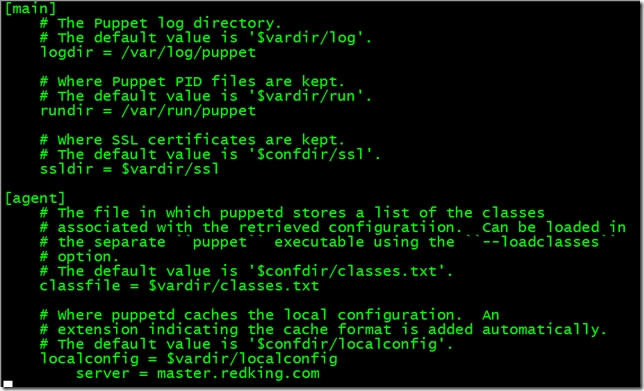
并重启puppet服务
|
1
|
[root@agent1 ~]# service puppet restart |
4.Client申请证书 服务端自动签发证书设置 设置master自动签发所有的证书,我们只需要在/etc/puppet目录下创建 autosign.conf文件。(不需要修改 /etc/puppet/puppet.conf文件,因为我默认的autosign.conf 文件的位置没有修改)
|
1
2
3
4
5
6
7
8
9
10
11
12
13
|
[root@master ~]# cat > /etc/puppet/autosign.conf <<EOF > *.redking.com> EOF[root@master ~]# service puppetmaster restart Stopping puppetmaster: [ OK ]Starting puppetmaster: [ OK ][root@master ~]# |
这样就会对所有来自fisteam2.com的机器的请求,都自动签名。 client需要向服务器端发出请求, 让服务器对客户端进行管理. 这其实是一个证书签发的过程. 第一次运行 puppet 客户端的时候会生成一个 SSL 证书并指定发给 Puppet 服务端, 服务器端如果同意管理客户端,就会对这个证书进行签发,可以用这个命令来签发证书,由于我们已经在客户端设置了server地址,因此不需要跟服务端地址
|
1
|
[root@agent1 ~]# puppet agent --test |
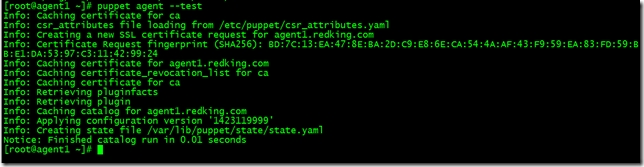
就可以申请证书了,由于我配置的自动签发证书,所以直接就签发了,在服务端执行
|
1
|
[root@master ~]# puppet cert list --all |

Nagios服务器安装
1.安装Nagios相关依赖包
|
1
|
[root@master ~]# yum install -y httpd php gcc glibc glibc-common gd gd-devel openssl-devel |
2.创建Nagios用户与组
|
1
2
3
|
[root@master ~]# useradd -m nagios[root@master ~]# passwd nagios |
创建nagcmd用户组以执行来自Web接口命令,并添加nagios和apache用户到此用户组
|
1
2
3
4
5
|
[root@master ~]# groupadd nagcmd[root@master ~]# usermod -a -G nagcmd nagios[root@master ~]# usermod -a -G nagcmd apache |
3.下载Nagios和Plugins软件包
http://www.nagios.org/download/下载Nagios Core和Nagios Plugins

4.编译安装Nagios
|
1
2
3
|
[root@master tmp]# tar zxf nagios-4.0.8.tar.gz [root@master tmp]# cd nagios-4.0.8 |
#运行Nagios配置脚本,并把nagcmd更改为之前所创建的组
|
1
|
[root@master nagios-4.0.8]# ./configure --with-command-group=nagcmd |
#编译Nagios源码
|
1
|
[root@master nagios-4.0.8]# make all |
#安装二进制文件、init脚本文件、sample配置文件,设置外部命令目录权限
|
1
2
3
4
5
6
7
|
[root@master nagios-4.0.8]# make install[root@master nagios-4.0.8]# make install-init[root@master nagios-4.0.8]# make install-config[root@master nagios-4.0.8]# make install-commandmode |
5.修改配置文件
样式配置文件位于/usr/local/nagios/etc目录,可以更改email地址
|
1
|
[root@master nagios-4.0.8]# vim /usr/local/nagios/etc/objects/contacts.cfg |
6.配置Web界面
在Apache的conf.d目录中安装Nagios Web配置文件
|
1
|
[root@master nagios-4.0.8]# make install-webconf |
创建nagiosadmin帐号登录Nagios Web接口
|
1
2
3
4
5
6
7
|
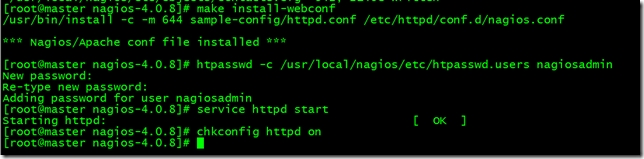
[root@master nagios-4.0.8]# htpasswd -c /usr/local/nagios/etc/htpasswd.users nagiosadmin[root@master nagios-4.0.8]# service httpd startStarting httpd: [ OK ][root@master nagios-4.0.8]# chkconfig httpd on |
开启httpd服务使配置生效并设置开机自启
7.编译安装Nagios Plugins
|
1
2
3
4
5
6
7
|
[root@master tmp]# tar zxvf nagios-plugins-2.0.3.tar.gz [root@master tmp]# cd nagios-plugins-2.0.3[root@master nagios-plugins-2.0.3]# ./configure --with-nagios-user=nagios --with-nagios-group=nagios[root@master nagios-plugins-2.0.3]# make && make install |
8.编译安装Nrpe
|
1
2
3
4
5
6
7
8
9
10
11
|
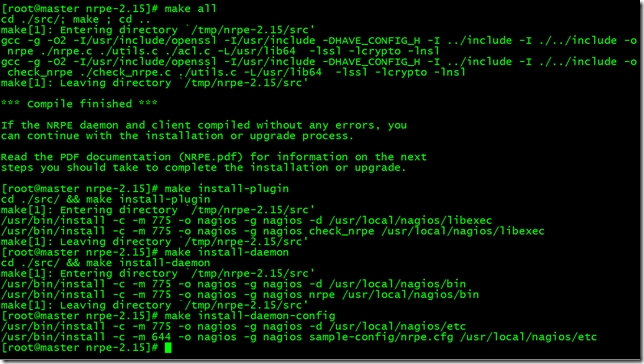
[root@master tmp]# tar zxvf nrpe-2.15.tar.gz[root@master nrpe-2.15]# ./configure[root@master nrpe-2.15]# make all[root@master nrpe-2.15]# make install-plugin[root@master nrpe-2.15]# make install-daemon[root@master nrpe-2.15]# make install-daemon-config |
9.启动Nagios
本机监控HTTP SSH的Notifications显示警告错误,解决方法
|
1
2
3
4
5
6
7
8
9
10
11
12
13
14
15
16
17
18
19
20
21
22
23
24
25
26
27
28
29
30
31
32
33
34
35
36
37
38
39
|
[root@master ~]# vim /usr/local/nagios/etc/objects/localhost.cfg# Define a service to check SSH on the local machine.# Disable notifications for this service by default, as not all users may have SSH enabled.define service{use local-service ; Name of service template to usehost_name localhostservice_description SSHcheck_command check_sshnotifications_enabled 1 #改为1,即可}# Define a service to check HTTP on the local machine.# Disable notifications for this service by default, as not all users may have HTTP enabled.define service{use local-service ; Name of service template to usehost_name localhostservice_description HTTPcheck_command check_httpnotifications_enabled 1 #改为1,即可}[root@master ~]# touch /var/www/html/index.html |
启动Nagios之前测试配置文件
|
1
|
[root@master ~]# /usr/local/nagios/bin/nagios -v /usr/local/nagios/etc/nagios.cfg |
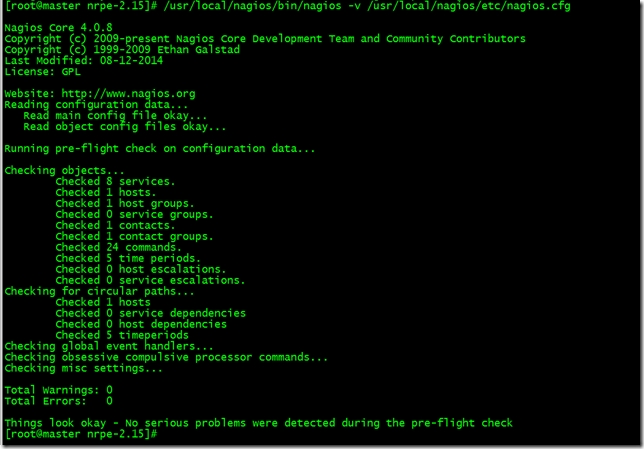
启动Nagios、nrpe并设置开机自启
|
1
2
3
4
5
6
7
8
9
10
11
12
13
14
15
16
17
18
19
20
21
22
23
|
[root@master ~]# chkconfig nagios --add[root@master ~]# chkconfig --list |grep nagios nagios 0:off 1:off 2:off 3:on 4:on 5:on 6:off[root@master ~]# chkconfig nagios on[root@master ~]# service nagios startStarting nagios: done.[root@master ~]# echo "/usr/local/nagios/bin/nrpe -c /usr/local/nagios/etc/nrpe.cfg -d" >> /etc/rc.d/rc.local[root@master nrpe-2.15]# /usr/local/nagios/bin/nrpe -c /usr/local/nagios/etc/nrpe.cfg -d [root@master nrpe-2.15]# netstat -tunpl |grep nrpe tcp 0 0 0.0.0.0:5666 0.0.0.0:* LISTEN 70100/nrpetcp 0 0 :::5666 :::* LISTEN 70100/nrpe[root@master nrpe-2.15]# |
执行/usr/local/nagios/libexec/check_nrpe -H 127.0.0.1检查连接是否正常

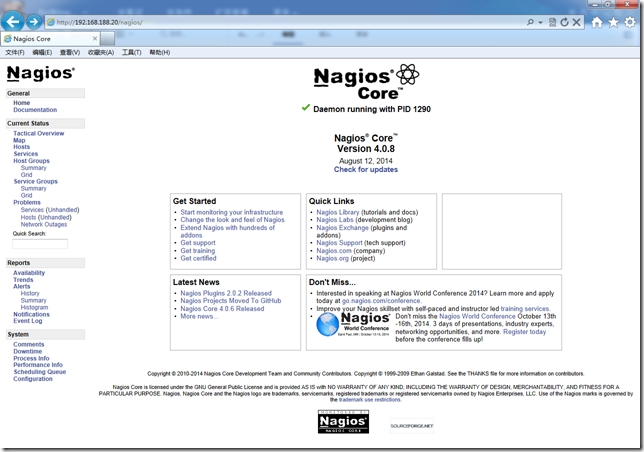
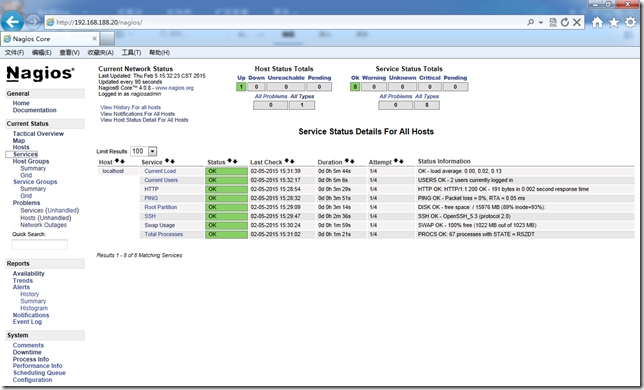
使用之前定义的nagiosadmin帐号与密码登录Nagios,地址:http://192.168.188.20/nagios/
创建Nagios客户端监控
1.Puppet Master安装相应模块
Nagios没有目前没有提供官方软件源,在批量部署时可以使用第三方epel源,采用Example42所提供的puppet-nrpe来实现Linux服务器批量部署。部署客户端使用官方3个模块:epel、nrpe、puppi。
epel模块用于安装nrpe软件,nrpe模块用于收集主机信息,puppi属于Example42模块组件,使用Example42模块时都需要加载此模块。
Puppi是一个Puppet模块和CLI命令,他可以标准化和自动化快速部署应用程序,并提供快速和标准查询命令,检查系统资源。
|
1
2
3
4
5
6
7
8
9
10
11
12
13
|
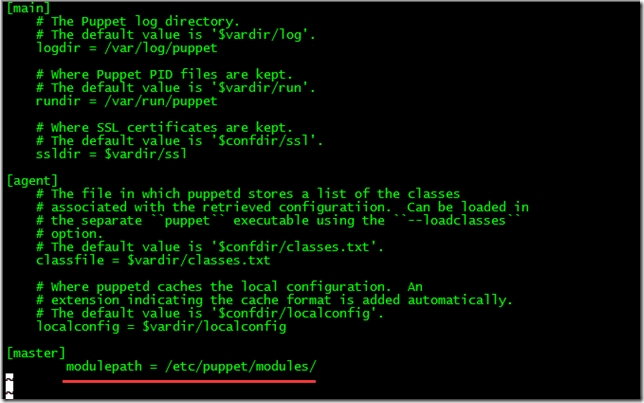
[root@master ~]# git clone https://github.com/puppetlabs/puppetlabs-stdlib /etc/puppet/modules/stdlib[root@master ~]# git clone https://github.com/example42/puppi /etc/puppet/modules/puppi[root@master ~]# git clone https://github.com/example42/puppet-nrpe /etc/puppet/modules/nrpe[root@master ~]# puppet module install stahnma/epel[root@master ~]# vim /etc/puppet/puppet.conf [master]modulepath = /etc/puppet/modules/ |
2.创建agent节点组配置文件
|
1
2
3
4
5
6
7
8
9
10
11
12
13
14
15
16
17
18
19
20
21
22
23
24
25
26
27
|
[root@master ~]# mkdir /etc/puppet/manifests/nodes[root@master ~]# vim /etc/puppet/manifests/nodes/agentgroup.ppnode /^agent\d+\.redking\.com$/ {include stdlibinclude epelclass { 'puppi': }class { 'nrpe': require => Class['epel'],allowed_hosts => ['127.0.0.1',$::ipaddress,'192.168.188.20'],template => 'nrpe/nrpe.cfg.erb',}}[root@master ~]# vim /etc/puppet/manifests/site.ppimport "nodes/agentgroup.pp" |
3.配置Nagios添加agent.redking.com主机监控
修改/usr/local/nagios/etc/objects/commands.cfg
command_name check_nrpe ——定义命令名称为check_nrpe,services.cfg必须使用
command_line $USER1$/check_nrpe -H $HOSTADDRESS$ -c $ARG1$ ——用$USER1$代替/usr/local/nagios/libexec
这是定义实际运行的插件程序.这个命令行的书写要完全按照check_nrpe这个命令的用法.不知道用法的就用check_nrpe –h查看; -c后面带的$ARG1$参数是传给nrpe daemon执行的检测命令,它必须是nrpe.cfg中所定义的5条命令中的其中一条。
|
1
2
3
4
5
6
7
8
9
10
11
|
[root@master ~]# vim /usr/local/nagios/etc/objects/commands.cfg # 'check_nrpe' command definitiondefine command{command_name check_nrpecommand_line $USER1$/check_nrpe -H $HOSTADDRESS$ -c $ARG1$} |
修改/usr/local/nagios/etc/nagios.cfg
|
1
2
3
4
5
6
7
|
[root@master ~]# vim /usr/local/nagios/etc/nagios.cfg cfg_file=/usr/local/nagios/etc/objects/agent1.redking.com.cfgcfg_file=/usr/local/nagios/etc/objects/agnet2.redking.com.cfgcfg_file=/usr/local/nagios/etc/objects/agent3.redking.com.cfg |
增加agent1~3.redking.com.cfg配置文件
|
1
2
3
4
5
6
7
8
9
10
11
12
13
14
15
16
17
18
19
20
21
22
23
24
25
26
27
28
29
30
31
32
33
34
35
36
37
38
39
40
41
42
43
44
45
46
47
48
49
50
51
52
53
54
55
56
57
58
59
60
61
|
# vim /usr/local/nagios/etc/objects/agent1.redking.com.cfgdefine host{use linux-serverhost_name agent1.redking.comalias agent1.redking.comaddress 192.168.188.31}define service{use generic-servicehost_name agent1.redking.comservice_description PINGcheck_command check_ping!100.0,20%!500.0,60%}define service{use generic-servicehost_name agent1.redking.comservice_description Current Userscheck_command check_nrpe!check_users!10!5}define service{use generic-servicehost_name agent1.redking.comservice_description Current Loadcheck_command check_nrpe!check_load!15,10,5!30,25,20}define service{use generic-servicehost_name agent1.redking.comservice_description Swap Usagecheck_command check_nrpe!check_swap!20!40} |
检测Nagios服务并重启使配置生效
|
1
2
3
4
5
|
[root@master ~]# /usr/local/nagios/bin/nagios -v /usr/local/nagios/etc/nagios.cfg [root@master ~]# service nagios restart[root@master ~]# service puppetmaster restart |
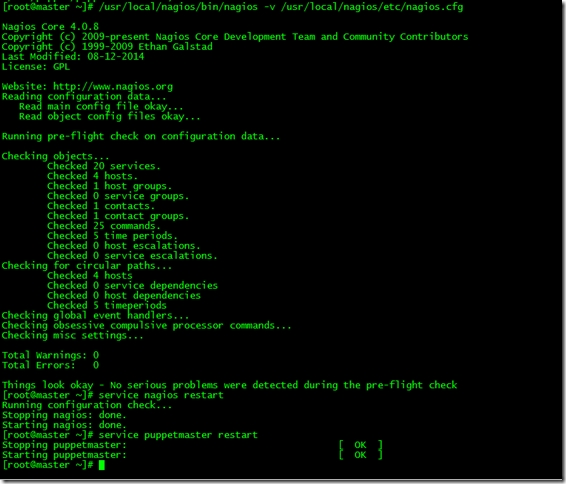
客户端测试
|
1
|
[root@agent1 ~]# puppet agent --test |
客户端自动部署nrpe
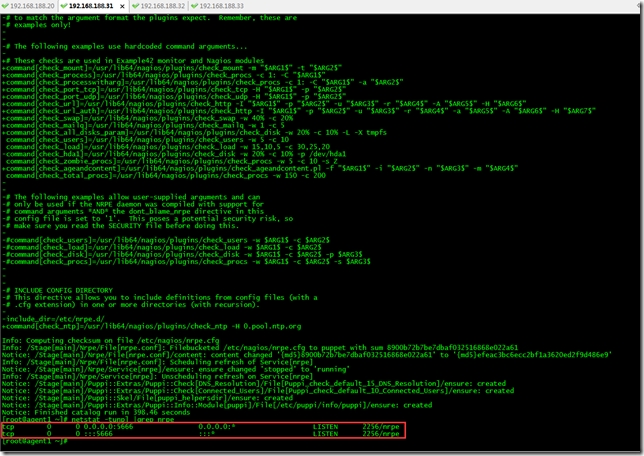
下面我们来看下客户端自动化部署nrpe后采集信息的nagios监控界面
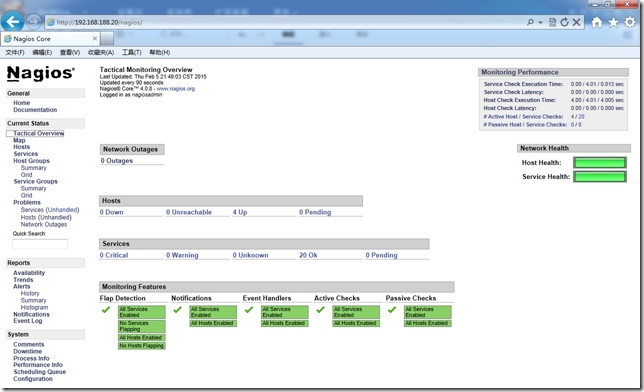
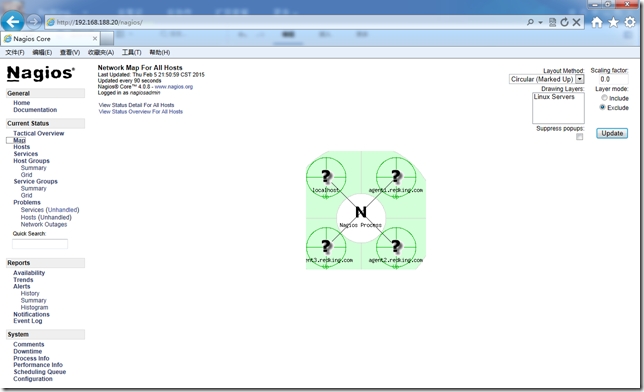
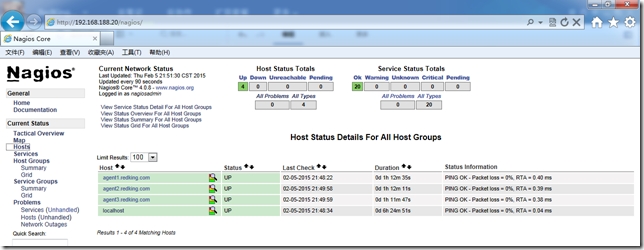
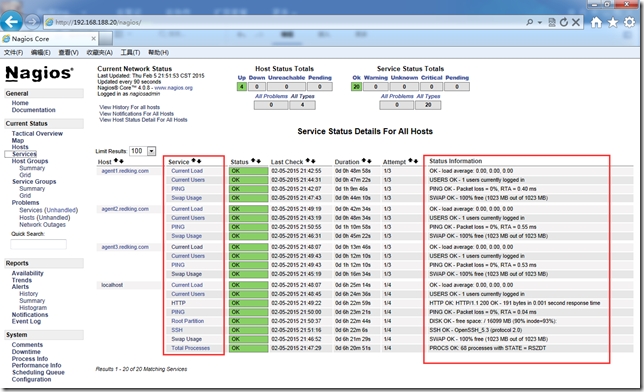
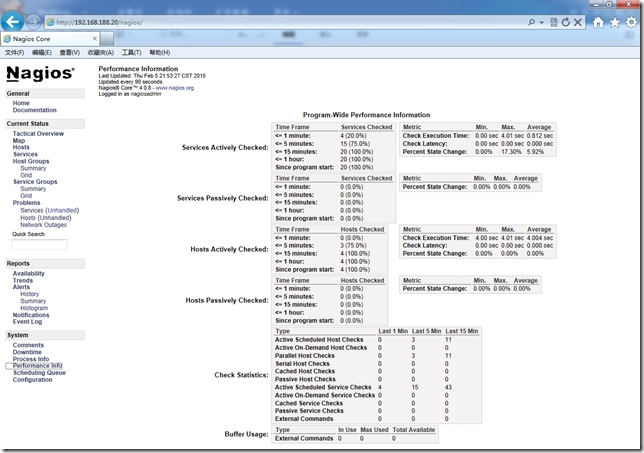
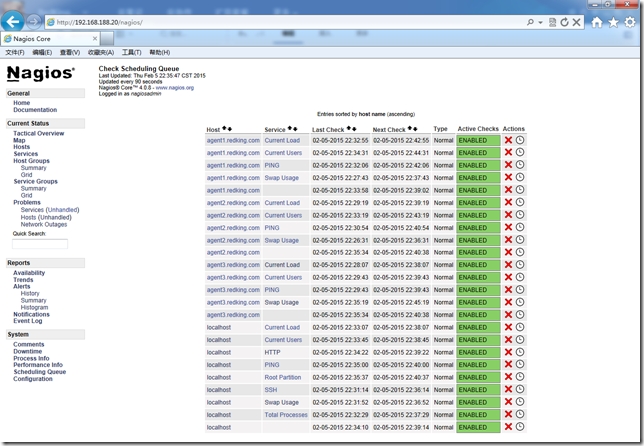
NRPE模块中定义的nrpe.cfg包含大量脚本,我们可以直接拿来使用当然也可以自己修改nrpe.cfg.erb模板内容。在批量部署时可以分别采用自己编写的模块或者现有模块来实现,利用现有模块几乎能实现系统管理日常工作中90%任务,剩余的10%我们可以根据生产业务来自己定制。
========================END=================================
http://redking.blog.51cto.com/27212/1612136
CentOS6.6+Puppet3.7.4分布式部署Nagios监控系统的更多相关文章
- CentOS 7.4 下安装部署Nagios监控系统详细攻略(三)
Nagios是一个流行的电脑系统和网络监控程序,它检测主机和服务,当异常发生和解除时能提醒用户.它是基于GPLv2开发的开源软件,可免费获得及使用. nagios工作原理 nagios的功能是监控服务 ...
- Nagios监控系统部署(源码)
1. 概述2. 部署Nagios2.1 创建Nagios用户组2.2 下载Nagios和Nagios-plugin源码2.3 编译安装3. 部署Nagios-plugin3.1 编译安装nagios- ...
- Nagios监控系统部署(源码)(四)
Nagios监控系统部署(源码) 1. 概述2. 部署Nagios2.1 创建Nagios用户组2.2 下载Nagios和Nagios-plugin源码2.3 编译安装3. 部署Nagios-pl ...
- Nagios 监控系统架设全攻略
Nagios 全名为(Nagios Ain’t Goona Insist on Saintood),最初项目名字是 NetSaint.它是一款免费的开源 IT 基础设施监控系统,其功能强大,灵活性强, ...
- CentOS 6.5安装部署Zabbix监控系统
CentOS 6.5安装部署Zabbix监控系统 先说一点废话,我没有用centos7做实验,讲真,centos 7我也不常用,喜欢新版本的同学其实可以尝试下,注意一点的就是centos 6.5只支持 ...
- Nagios 监控系统架构
Nagios 监控系统架设全攻略 简介: Nagios 全名为(Nagios Ain’t Goona Insist on Saintood),最初项目名字是 NetSaint.它是一款免费的开源 IT ...
- Ganglia+Nagios监控系统
第1章 简介 ganglia是一款为HPC(高性能计算) 集群设计的可扩展性 的分布式监控系统,它可以监视和显示集群中节点的各种状态信息,他由运行在各个节点上的gmond守护进程来采集 CPU.内存. ...
- Nagios监控系统的安装
环境:centOS 6.5 X86 64位 nagios-4.08 步骤: 1. 最小化安装系统 2. 修改安全特性 关闭SELINUX SELINUX=disabled 清除iptabl ...
- Hawkeye部署Github监控系统
2019独角兽企业重金招聘Python工程师标准>>> step1:python环境安装 #pwd /usr/local/soft #wget https://www.python. ...
随机推荐
- MATLAB/Octave中implicit conversion from real matrix to real scalar错误原因与解决
写程序时提示 implicit conversion from real matrix to real scalar的一个warning,主要问题在于将一个矩阵当成一个标量在使用.我的程序出现这个wa ...
- MYSQL复习笔记1-物理文件和系统架构
date:20140101auth:Jin 一.物理组成(一) 日志文件参考:http://dev.mysql.com/doc/refman/5.1/en/server-logs.html1.错误日志 ...
- 新浪微博宋琦:PHP在微博优化中的“大显身手”
摘要:2013中国软件开发者大会编程语言与工具专题论坛中,新浪微博架构师宋琦介绍了PHP在新浪微博中的应用,并且分享了很多微博主站所做的性能优化的工作. [CSDN报道] 2013中国软件开发者大会( ...
- countdownlatch用法
public void await() throws InterruptedException { }; //调用await()方法的线程会被挂起,它会等待直到count值为0才继续执行 publ ...
- 【Thumbnailator】java 使用Thumbnailator实现等比例缩放图片,旋转图片等【转载】
Thumbnailator概述: Thumbnailator是与Java界面流畅的缩略图生成库.它简化了通过提供一个API允许精细的缩略图生成调整生产从现有的图像文件的缩略图和图像对象的过程, ...
- 表单对象属性disabled和readOnly
简而言之: disabled 和 readonly 区别: disabled 被禁用后的元素,不会随表单提交 readonly 不可修改, 会随表单提交
- java性能监控器VisualVM
1.mac系统启动文件位置:/Library/Java/JavaVirtualMachines/jdk1.8.0_101.jdk/Contents/Home/bin/jvisualvm 2.linux ...
- iOS:多线程的详细介绍
多线程: 一.概念 1.什么是进程? 程序的一次性执行就是进程.进程占独立的内存空间. 2.什么是线程? 进程中的代码的执行路径. 3.进程与线程之间的关系? 每个进 ...
- Linux下inotify的基本使用及注意事项
最近在写一个云备份的项目,其中有一个模块是要监控计算机本地的文件,于是我翻了翻linux/unix系统编程手册发现了inotify这个用于文件监控的框架 1.概述 1)inotify机制可用于监控文件 ...
- unity shader 编译时间过长
去掉opengles2.0能省一半时间 换ssd Compiled shader 'Shader Forge/Scenes_Ground_Standard_M' in 315.51s gles ...